


NanoGUI is a minimalistic cross-platform widget library for OpenGL 3+, GLES 2/3, and Metal. It supports automatic layout generation, stateful C++ lambdas callbacks, a variety of useful widget types and Retina-capable rendering on Apple devices thanks to NanoVG by Mikko Mononen. Python bindings of all functionality are provided using nanobind. Binary wheels of NanoGUI are available on PyPI.
Note: This repository contains an improved port of the original NanoGUI. The most visible change to developers is that it no longer relies on Eigen or Enoki and ships with its own (absolutely minimal) vector library. Additionally, the repository here incorporates the following changes:
A different set of naming conventions is used for function and variable names that feels more natural in a mixed C++ & Python environment. (specifically, underscore_case for methods and variables rather than camelCase).
GUI Rendering now provides backends for OpenGL 3+, GLES 2/3, and Metal. GLES 2 support allows NanoGUI to run on ARM devices including the Raspberry Pi and in browsers via WebGL. The Metal backend supports modern Macs, iPhones, etc.
NanoGUI includes generic wrappers around shaders and textures that work for all of these frameworks.
Cross-platform (macOS, Wayland, Windows) support for HDR displays and extended color spaces. See example_hdr
The event loop is much more conservative by default and only issues redraw calls when explicitly requested by an event callback.
Python integration: the library comes with a pip-compatible setup.py installation script.
WebAssembly code generation works out of the box (requires Emscripten), enabling powerful UI development for the web. See Tekari for an example of such an application.
Significantly revamped tab widget (supports right-click context menus, draggable, and closeable tabs) and image view widget.
The Entypo icon font has been replaced by FontAwesome (v5.10.1).
Example screenshot
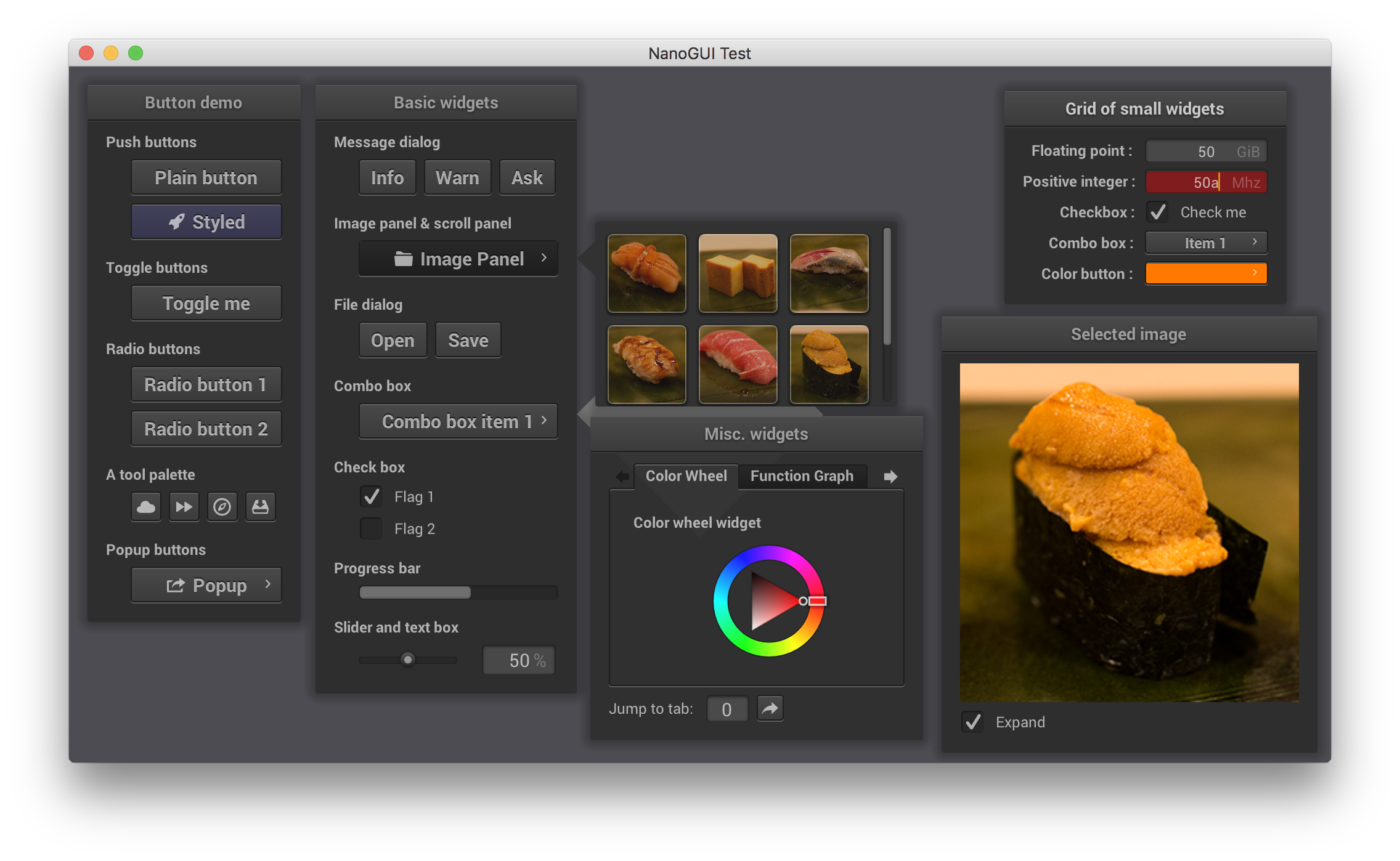
Description
NanoGUI builds on GLFW for cross-platform context creation and event handling, GLAD to access OpenGL functionality on Windows, and NanoVG/MetalNanoVG to draw 2D primitives.
Note that the dependency library NanoVG already includes some basic example code to draw good-looking static widgets; what NanoGUI does is to flesh it out into a complete GUI toolkit with event handling, layout generation, etc.
NanoGUI currently works on Mac OS X (Clang), Linux (GCC or Clang), FreeBSD (Clang), and Windows (Visual Studio ≥ 2017); it requires a recent C++17 capable compiler. All dependencies are jointly built using a CMake-based build system.
Creating widgets
NanoGUI makes it easy to instantiate widgets, set layout constraints, and register event callbacks using high-level C++17 code. For instance, the following two lines from the included example application add a new button to an existing window window and register an event callback.
Button *b = new Button(window, "Plain button");
b->set_callback([] { cout << "pushed!" << endl; });
The following lines from the example application create the coupled slider and text box on the bottom of the second window (see the screenshot).
/* Create an empty panel with a horizontal layout */
Widget *panel = new Widget(window);
panel->set_layout(new BoxLayout(BoxLayout::Horizontal, BoxLayout::Middle, 0, 20));

/* Add a slider and set defaults */
Slider *slider = new Slider(panel);
slider->set_value(0.5f);
slider->set_fixed_width(80);

/* Add a textbox and set defaults */
TextBox *tb = new TextBox(panel);
tb->set_fixed_size(Vector2i(60, 25));
tb->set_value("50");
tb->set_units("%");

/* Propagate slider changes to the text box */
slider->set_callback([tb](float value) {
    tb->set_value(std::to_string((int) (value * 100)));
});
The Python version of this same piece of code looks like this:
# Create an empty panel with a horizontal layout
panel = Widget(window)
panel.set_layout(BoxLayout(BoxLayout.Horizontal, BoxLayout.Middle, 0, 20))

# Add a slider and set defaults
slider = Slider(panel)
slider.set_value(0.5)
slider.set_fixed_width(80)

# Add a textbox and set defaults
tb = TextBox(panel)
tb.set_fixed_size(Vector2i(60, 25))
tb.set_value("50")
tb.set_units("%")

# Propagate slider changes to the text box
def cb(value):
    tb.set_value("%i" % int(value * 100))
slider.set_callback(cb)
“Simple mode”
Christian Schüller contributed a convenience class that makes it possible to create AntTweakBar-style variable manipulators using just a few lines of code. For instance, the source code below was used to create the following example application.
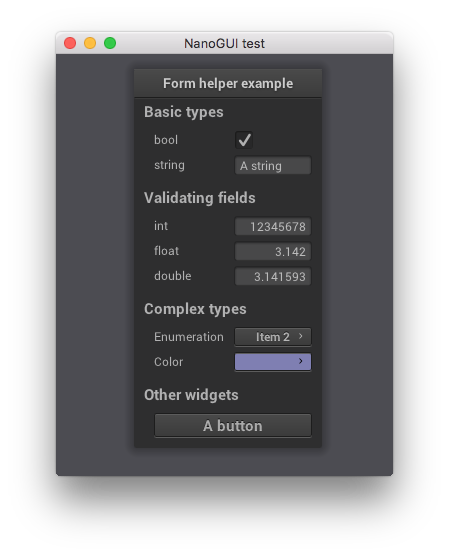
/// dvar, bvar, strvar, etc. are double/bool/string/.. variables

FormHelper *gui = new FormHelper(screen);
ref<Window> window = gui->add_window(Vector2i(10, 10), "Form helper example");
gui->add_group("Basic types");
gui->add_variable("bool", bvar);
gui->add_variable("string", strvar);

gui->add_group("Validating fields");
gui->add_variable("int", ivar);
gui->add_variable("float", fvar);
gui->add_variable("double", dvar);

gui->add_group("Complex types");
gui->add_variable("Enumeration", enumval, enabled)
   ->setItems({"Item 1", "Item 2", "Item 3"});
gui->add_variable("Color", colval);

gui->add_group("Other widgets");
gui->add_button("A button", [](){ std::cout << "Button pressed." << std::endl; });

screen->set_visible(true);
screen->perform_layout();
window->center();
Compiling
Clone the repository and all dependencies (with git clone --recursive), run CMake to generate Makefiles or CMake/Visual Studio project files, and the rest should just work automatically.
On Debian/Ubuntu, make sure that you have installed the following packages
$ apt-get install cmake xorg-dev libglu1-mesa-devTo also get the Python bindings, you’ll need to run
$ apt-get install python-devOn RedHat/Fedora, make sure that you have installed the following packages
$ sudo dnf install cmake mesa-libGLU-devel libXi-devel libXcursor-devel libXinerama-devel libXrandr-devel xorg-x11-server-develTo also get the Python bindings, you’ll need to run
$ sudo dnf install python3-develLicense
NanoGUI is provided under a BSD-style license that can be found in the LICENSE file. By using, distributing, or contributing to this project, you agree to the terms and conditions of this license.
Note that NanoGUI ships with several fonts that use different (though similarly unencumbered) licenses, in particular Roboto, Inconsolata, and the free version of the Font Awesome icon font (v5.10.1). The latter two are distributed under the SIL Open Font License Version 1.1, while Roboto is distributed under the Apache 2.0 license.
1 maintainer

Download files
Download the file for your platform. If you're not sure which to choose, learn more about installing packages.
Source Distributions
Built Distributions
Filter files by name, interpreter, ABI, and platform.
If you're not sure about the file name format, learn more about wheel file names.
Copy a direct link to the current filters
File details
Details for the file nanogui-0.5.0-cp310-abi3-win_arm64.whl.
File metadata
- Download URL: nanogui-0.5.0-cp310-abi3-win_arm64.whl
- Upload date:
- Size: 1.7 MB
- Tags: CPython 3.10+, Windows ARM64
- Uploaded using Trusted Publishing? No
- Uploaded via:
twine/7.0.0 CPython/3.13.14
File hashes
| Algorithm | Hash digest | |
|---|---|---|
| SHA256 |
a80ecde3755135646f80841b1f25501124be4770c448d2cb3824c73f9f8b112b
|
|
| MD5 |
ea3f1e3ca0082dc64bb70fdb92f69991
|
|
| BLAKE2b-256 |
877f6cd85a73a62f00984c4b75d56cd6014ffade3651cdf4a39d8acd931e78a1
|
File details
Details for the file nanogui-0.5.0-cp310-abi3-win_amd64.whl.
File metadata
- Download URL: nanogui-0.5.0-cp310-abi3-win_amd64.whl
- Upload date:
- Size: 1.6 MB
- Tags: CPython 3.10+, Windows x86-64
- Uploaded using Trusted Publishing? No
- Uploaded via:
twine/7.0.0 CPython/3.13.14
File hashes
| Algorithm | Hash digest | |
|---|---|---|
| SHA256 |
e939cfb24117437485e8fb8fa6ddaef5a15f14daf8905258c8f39d902e67c750
|
|
| MD5 |
e807bc478b8c6f929b0257b03154fad4
|
|
| BLAKE2b-256 |
ffb4d3718624f272050c252488da055e3532f5bd577d87375092ccb6194543cf
|
File details
Details for the file nanogui-0.5.0-cp310-abi3-manylinux_2_28_x86_64.whl.
File metadata
- Download URL: nanogui-0.5.0-cp310-abi3-manylinux_2_28_x86_64.whl
- Upload date:
- Size: 3.7 MB
- Tags: CPython 3.10+, manylinux: glibc 2.28+ x86-64
- Uploaded using Trusted Publishing? No
- Uploaded via:
twine/7.0.0 CPython/3.13.14
File hashes
| Algorithm | Hash digest | |
|---|---|---|
| SHA256 |
f23387d2262814fd58d37d74321635ca3d6b09b91bdf7be67ecabbf83f4cfdc8
|
|
| MD5 |
b2ba7323dcd55f054aec0f54d1fc086b
|
|
| BLAKE2b-256 |
26f5e5eef875c358aeff3b45716181eb14339517260fc095fa883d1efaa69318
|
File details
Details for the file nanogui-0.5.0-cp310-abi3-manylinux_2_28_aarch64.whl.
File metadata
- Download URL: nanogui-0.5.0-cp310-abi3-manylinux_2_28_aarch64.whl
- Upload date:
- Size: 3.5 MB
- Tags: CPython 3.10+, manylinux: glibc 2.28+ ARM64
- Uploaded using Trusted Publishing? No
- Uploaded via:
twine/7.0.0 CPython/3.13.14
File hashes
| Algorithm | Hash digest | |
|---|---|---|
| SHA256 |
f18a019e2dd34a7b228442c54c88e6ca537ad9adc6eb792b42a419197626449c
|
|
| MD5 |
b60bd1da2e7e13fc1d465b3c6014f94a
|
|
| BLAKE2b-256 |
ee0b7ea1c194975d9399b65b55edc7b7bab6196b3b4af6d07ec2457e1c2610b0
|
File details
Details for the file nanogui-0.5.0-cp310-abi3-macosx_11_0_x86_64.whl.
File metadata
- Download URL: nanogui-0.5.0-cp310-abi3-macosx_11_0_x86_64.whl
- Upload date:
- Size: 1.4 MB
- Tags: CPython 3.10+, macOS 11.0+ x86-64
- Uploaded using Trusted Publishing? No
- Uploaded via:
twine/7.0.0 CPython/3.13.14
File hashes
| Algorithm | Hash digest | |
|---|---|---|
| SHA256 |
7a78d88591d5127781a63620345fc0a36097dc523d6baac772a3ba423f5174fe
|
|
| MD5 |
e26245df54d37eeb0e375f50b6e8f952
|
|
| BLAKE2b-256 |
356ffb9f3d9c26efa66e2ddf17ce3da3f1cafed7d7d2f463fbd6ab8d929fe215
|
File details
Details for the file nanogui-0.5.0-cp310-abi3-macosx_11_0_arm64.whl.
File metadata
- Download URL: nanogui-0.5.0-cp310-abi3-macosx_11_0_arm64.whl
- Upload date:
- Size: 1.3 MB
- Tags: CPython 3.10+, macOS 11.0+ ARM64
- Uploaded using Trusted Publishing? No
- Uploaded via:
twine/7.0.0 CPython/3.13.14
File hashes
| Algorithm | Hash digest | |
|---|---|---|
| SHA256 |
399a8c0f69fe05cd6f16c34f593677a00ca971a43eaad6b881ed47816cbc6071
|
|
| MD5 |
ef0ff098ab8135ba5cd47c4a09cecd7a
|
|
| BLAKE2b-256 |
7feae011602b76e78a7a24d08d98891d276c429dfa99920ffba116c631b647c4
|














