
A simple plugin for counting objects in 3D images
Verified details
These details have been verified by PyPIProject links
GitHub Statistics
Maintainers

Project description
napari-3d-counter






A simple plugin for counting objects in 3D images
This napari plugin was generated with Cookiecutter using @napari's cookiecutter-napari-plugin template.
Installation
You can install napari-3d-counter via pip:
pip install napari-3d-counter
To install latest development version :
pip install git+https://github.com/pnewstein/napari-3d-counter.git
Count3D Usage
Count3D can be launched from the plugin menu
Adding a cell
You can add a cell of the currently selected cell type by clicking on the viewer.
- Ensure that
Point adderlayer is selected - Ensure that
Add pointstool is selected - Click on the viewer where you would like the point to be added
The counter on the current cell type's button will be incremented
https://github.com/pnewstein/napari-3d-counter/assets/30813691/745d495e-1d18-43dd-aa5e-e9ecd835cdae
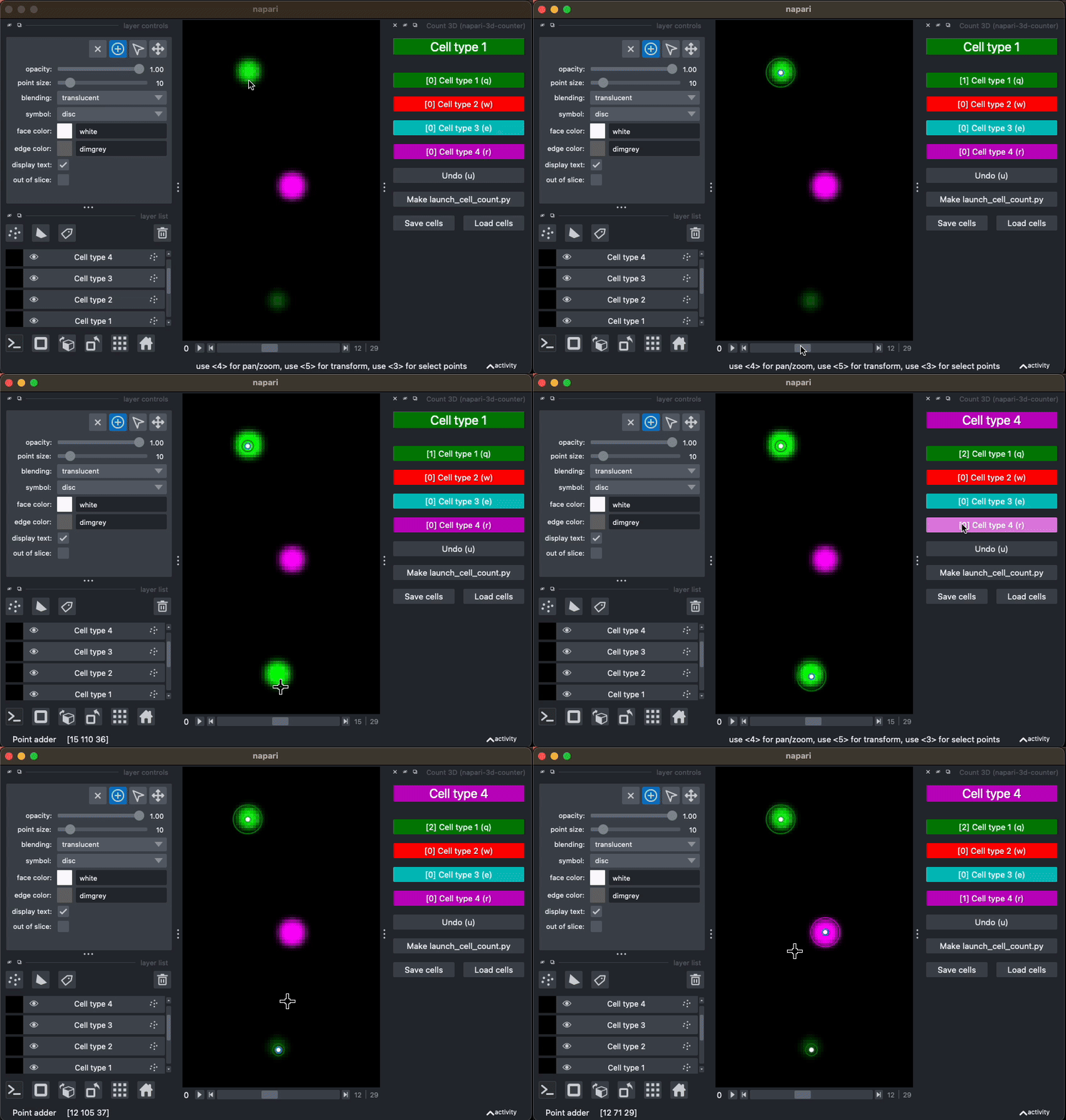
Changing cell type
You can change the currently selected cell type by clicking on that cell type's button. This change will be reflected in the GUI. Additionally, the keyboard shortcut for that cell type can be used. Keyboard shortcuts are listed on the button, and are "q", "w", "e", "r", "t", "y" by default
https://github.com/pnewstein/napari-3d-counter/assets/30813691/844d04ce-2795-4226-a98b-d5fe5a0b131e
Undo last added cell
The undo button (shortcut u) will remove last added cell, regardless of cell type
https://github.com/pnewstein/napari-3d-counter/assets/30813691/c04ca5e3-9f48-4dd5-89e5-a9866b353e03
Remove a particular cell
To remove a particular cell. Change to the layer containing the cell you would
like to remove. Then select the select points tool to select the points to
delete, then use Delete selected points to delete those points
This change will be reflected in the counts.
https://github.com/pnewstein/napari-3d-counter/assets/30813691/d0787cba-9b23-46d5-9cd3-21a4ad73460a
Change appearance of a cell type
Changes to the name or edge color of a points layer will be reflected in the previously added points, as well as the GUI. Features that are editable in this way include: - face color - edge color - symbol - size
https://github.com/pnewstein/napari-3d-counter/assets/30813691/6c495270-d4c4-473e-9091-8d2e0f8e2764
Save configuration
Use the Make launch_cell_count.py button to create a python script that will
launch napari with 3DCounter added to the dock and current cell type appearances
already loaded
https://github.com/pnewstein/napari-3d-counter/assets/30813691/3448652d-3064-4900-8bbe-e88d75667108
Save cells
Use the "Save cells" button to save the cell coordinates for all layers into a csv file
https://github.com/pnewstein/napari-3d-counter/assets/30813691/38b30f2a-cc83-46c2-8b19-4d44715c07c5
Load cells
Use the "Load cells" button to load the cells from a csv file into new layers
https://github.com/pnewstein/napari-3d-counter/assets/30813691/7df74688-85b1-4b61-aa51-dab179763832
Launch with saved configuration
To run Count3D with custom configuration, paste the following code into your napari ipython console
from napari_3d_counter import Count3D, CellTypeConfig

cell_type_config = [
    # The first celltype is called "cq+eve+" and should be green
    CellTypeConfig(
        name="cq+eve+",
        color="g"
    ),
    # The first celltype is called "cq+eve-" and should be cyan
    CellTypeConfig(
        name="cq+eve-",
        color="c"
    ),
    # The first celltype is called "cq-eve+" and should be red
    CellTypeConfig(
        name="cq-eve+",
        color="r"
    ),
]
# Launch the plugin with configuration
viewer.window.add_dock_widget(Count3D(viewer, cell_type_config=cell_type_config))
Contributing
Contributions are very welcome. Tests can be run with tox, please ensure the coverage at least stays the same before you submit a pull request.
License
Distributed under the terms of the GNU GPL v3.0 license, "napari-3d-counter" is free and open source software
Issues
If you encounter any problems, please file an issue along with a detailed description.
Project details
Verified details
These details have been verified by PyPIProject links
GitHub Statistics
Maintainers
Release history Release notifications | RSS feed


Download files
Download the file for your platform. If you're not sure which to choose, learn more about installing packages.
Source Distribution
Built Distribution
Filter files by name, interpreter, ABI, and platform.
If you're not sure about the file name format, learn more about wheel file names.
Copy a direct link to the current filters
File details
Details for the file napari_3d_counter-0.4.1.tar.gz.
File metadata
- Download URL: napari_3d_counter-0.4.1.tar.gz
- Upload date:
- Size: 34.3 kB
- Tags: Source
- Uploaded using Trusted Publishing? Yes
- Uploaded via: twine/6.1.0 CPython/3.12.9
File hashes
| Algorithm | Hash digest | |
|---|---|---|
| SHA256 |
894ee7caaf8896cf76da15fd44b6512cab9ad3a6b79e5b9f61ad80471b920468
|
|
| MD5 |
4c479dff052e3cae9af84d6823a80fb5
|
|
| BLAKE2b-256 |
63fd42b37e8f226834c10a75c9ad62d3dc7d2c20fe4620767832d7500a339d97
|
Provenance
The following attestation bundles were made for napari_3d_counter-0.4.1.tar.gz:
Publisher:
test_and_deploy.yml on pnewstein/napari-3d-counter
-
Statement:
-
Statement type:
https://in-toto.io/Statement/v1 -
Predicate type:
https://docs.pypi.org/attestations/publish/v1 -
Subject name:
napari_3d_counter-0.4.1.tar.gz -
Subject digest:
894ee7caaf8896cf76da15fd44b6512cab9ad3a6b79e5b9f61ad80471b920468 - Sigstore transparency entry: 173341429
- Sigstore integration time:
-
Permalink:
pnewstein/napari-3d-counter@a2aecceca052455419a46a593937265eee90e487 -
Branch / Tag:
refs/tags/v0.4.1 - Owner: https://github.com/pnewstein
-
Access:
public
-
Token Issuer:
https://token.actions.githubusercontent.com -
Runner Environment:
github-hosted -
Publication workflow:
test_and_deploy.yml@a2aecceca052455419a46a593937265eee90e487 -
Trigger Event:
push
-
Statement type:
File details
Details for the file napari_3d_counter-0.4.1-py3-none-any.whl.
File metadata
- Download URL: napari_3d_counter-0.4.1-py3-none-any.whl
- Upload date:
- Size: 30.6 kB
- Tags: Python 3
- Uploaded using Trusted Publishing? Yes
- Uploaded via: twine/6.1.0 CPython/3.12.9
File hashes
| Algorithm | Hash digest | |
|---|---|---|
| SHA256 |
b4465f1fef3deb5f2ef98c921ed5f00e073616aab804f8b89a933efa97bb92db
|
|
| MD5 |
e76b61784d014c908aff1c27ecc23e8a
|
|
| BLAKE2b-256 |
c23171332688a87af81373cb2bfc192f0d3e5b40b50afd9b8d6fca57f0e17e1e
|
Provenance
The following attestation bundles were made for napari_3d_counter-0.4.1-py3-none-any.whl:
Publisher:
test_and_deploy.yml on pnewstein/napari-3d-counter
-
Statement:
-
Statement type:
https://in-toto.io/Statement/v1 -
Predicate type:
https://docs.pypi.org/attestations/publish/v1 -
Subject name:
napari_3d_counter-0.4.1-py3-none-any.whl -
Subject digest:
b4465f1fef3deb5f2ef98c921ed5f00e073616aab804f8b89a933efa97bb92db - Sigstore transparency entry: 173341430
- Sigstore integration time:
-
Permalink:
pnewstein/napari-3d-counter@a2aecceca052455419a46a593937265eee90e487 -
Branch / Tag:
refs/tags/v0.4.1 - Owner: https://github.com/pnewstein
-
Access:
public
-
Token Issuer:
https://token.actions.githubusercontent.com -
Runner Environment:
github-hosted -
Publication workflow:
test_and_deploy.yml@a2aecceca052455419a46a593937265eee90e487 -
Trigger Event:
push
-
Statement type:






