
A plugin to classify aphids by stage of development.

Project description
napari-aphid






A plugin to classify aphids by stage of development.
This napari plugin was generated with Cookiecutter using @napari's cookiecutter-napari-plugin template.
Installation
You can install napari-aphid via pip:
pip install napari-aphid
To install latest development version :
pip install git+https://github.com/hereariim/napari-aphid.git
Several commands are used in the script. These commands are exclusively executable on windows, for the moment. So, this plugin works only on windows.
Description
This plugin is a tool to count the number of aphids from two models developed on ilastik. Implemented in napari, this tool allows the correction of pixels and labels that are not well predicted.
In this plugin we find our two main parts of the aphid counting model presented in two widgets. A third widget allows to save the updates applied on the segmentation mask.
This plugin is an use cas, dedicated to private use of french laboratory.
Plugin input
Segmentation
The user must give two objects as input:
- Compressed file in .zip format
- Ilastik pixel classification model in .ilp format
In particular, compressed file must be organized as follows:
.
└── Country.zip
    └── Country
        ├── Area1
        │   ├── Area1.im_1.tif
        │   ├── Area1.im_1.h5
        │   ├── Area1.im_2.tif
        │   ├── Area1.im_2.h5
        │   ├── Area1.im_3.tif
        │   ├── Area1.im_3.h5
        │   ...
        │   ├── Area1.im_n.tif
        │   └── Area1.im_n.h5
        │
        ├── Area2
        │   ├── Area2.im_1.tif
        │   ├── Area2.im_1.h5
        │   ├── Area2.im_2.tif
        │   ├── Area2.im_2.h5
        │   ├── Area2.im_3.tif
        │   ├── Area2.im_3.h5
        │   ...
        │   ├── Area2.im_n.tif
        │   └── Area2.im_n.h5
        │
        ...
        │
        └── Arean
            ├── Arean.im_1.tif
            ├── Arean.im_1.h5
            ├── Arean.im_2.tif
            ├── Arean.im_2.h5
            ├── Arean.im_3.tif
            ├── Arean.im_3.h5
            ...
            ├── Arean.im_n.tif
            └── Arean.im_n.h5
In each folder Area1, Area2, ..., Arean, we notice that each tif image is accompanied by its h5 version. The images in h5 format were generated by the Export h5 widget of the Ilastik plugin in the ImageJ software.
Classification
The user must give the Ilastik object classification model in .ilp format.
Widget: Image segmentation
This widget is a tool to segment a set of images. It takes as input a compressed file of images and an ilastik segmentation model. A Run button is used to start the image segmentation process. In the background, the console presents the progress status. This widget returns a menu which is a list of processed images. This list allows an RGB image and its segmentation mask to be displayed in the napari window.
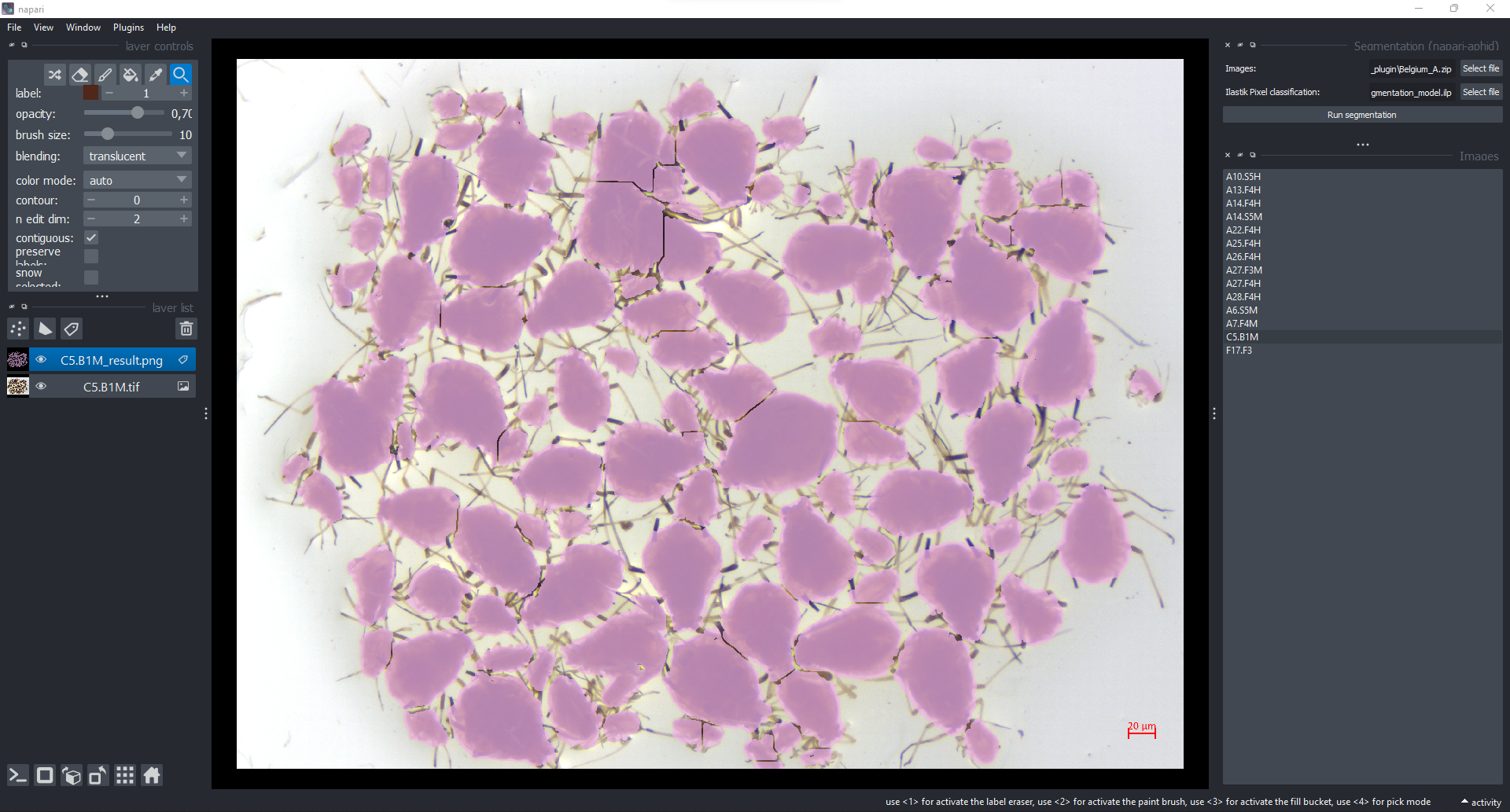
User conduct : In this widget, the user corrects the image with the annotation tools (brush and eraser only). With the brush, he/she has to add the same colour presented in the image. To obtain this colour, the user can take the color with the color picker tool. With the eraser, he/she erase colour not well predicted. Tous les annotations appliquées dans l'image doit être sauvegarder avec le bouton Save du widget Save modification
Widget: Save modification
This is the backup of the segmentation mask. It saves updates applied to the mask.
Widget: Object classification
This widget is a tool to classify segmented images. It takes as input an ilastik object classification model. A Run button is used to start the classification process. In the background, the console shows the progress of the image processing. This widget returns a menu that lists the processed images. This list provides two elements. The first is the display of the selected image in the window. The second is the display of a table that shows the predicted classes for each object.
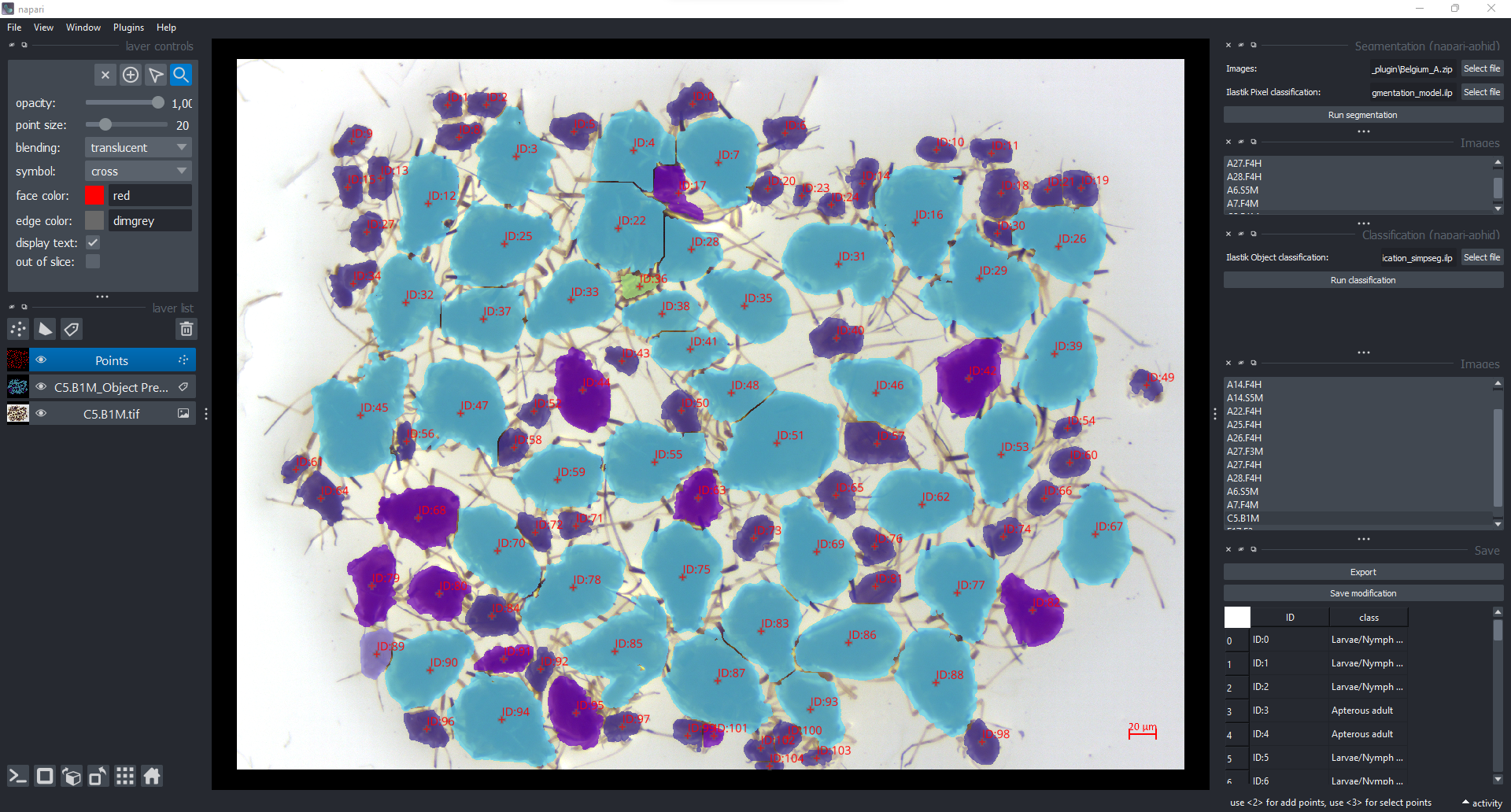
User conduct : In this widget, the user corrects labels not well predicted in the table at the bottom right. He must not forget to save his correction with the Save button. When the user has finished with all his images, he uses the Export button to import a quantitative table. This table contains for each image, the name of the aphid type and its size in pixels.
Contributing
Contributions are very welcome. Tests can be run with tox, please ensure the coverage at least stays the same before you submit a pull request.
License
Distributed under the terms of the BSD-3 license, "napari-aphid" is free and open source software
Issues
If you encounter any problems, please file an issue along with a detailed description.
Release history Release notifications | RSS feed


Download files
Download the file for your platform. If you're not sure which to choose, learn more about installing packages.
Source Distribution
Built Distribution
Filter files by name, interpreter, ABI, and platform.
If you're not sure about the file name format, learn more about wheel file names.
Copy a direct link to the current filters
File details
Details for the file napari-aphid-1.1.3.tar.gz.
File metadata
- Download URL: napari-aphid-1.1.3.tar.gz
- Upload date:
- Size: 20.6 kB
- Tags: Source
- Uploaded using Trusted Publishing? No
- Uploaded via: twine/4.0.2 CPython/3.9.5
File hashes
| Algorithm | Hash digest | |
|---|---|---|
| SHA256 |
fcdb8596a5799c3a8cefaf1563d36957b29d90f114eaca2a707d51f3c3f1511c
|
|
| MD5 |
c7df5133e2b9f1f29915fe4cf9e69f45
|
|
| BLAKE2b-256 |
f39afef8d5b44fc9b593d77ef0364eb5365c05233f5b1f3de0455e7ea55e8308
|
File details
Details for the file napari_aphid-1.1.3-py3-none-any.whl.
File metadata
- Download URL: napari_aphid-1.1.3-py3-none-any.whl
- Upload date:
- Size: 15.5 kB
- Tags: Python 3
- Uploaded using Trusted Publishing? No
- Uploaded via: twine/4.0.2 CPython/3.9.5
File hashes
| Algorithm | Hash digest | |
|---|---|---|
| SHA256 |
c59678e0521c18e130548171feda68438c9bb13fcf16cfcceff0e458005416d0
|
|
| MD5 |
bd178c8e039e33d6e5d0a4e157f931b6
|
|
| BLAKE2b-256 |
d2c10e22ce040c82bcb8c1cafcea67fdbb7b0421c3a141d19c9b8fb1fbeabb8a
|






