
napari-bbox






A new layer for bounding boxes in 2+ dimensions
Note: This plugin was originally part of Annotation Toolbox, and was separated to allow other plugins to utilize it.
Features
- A bounding box layer for napari (
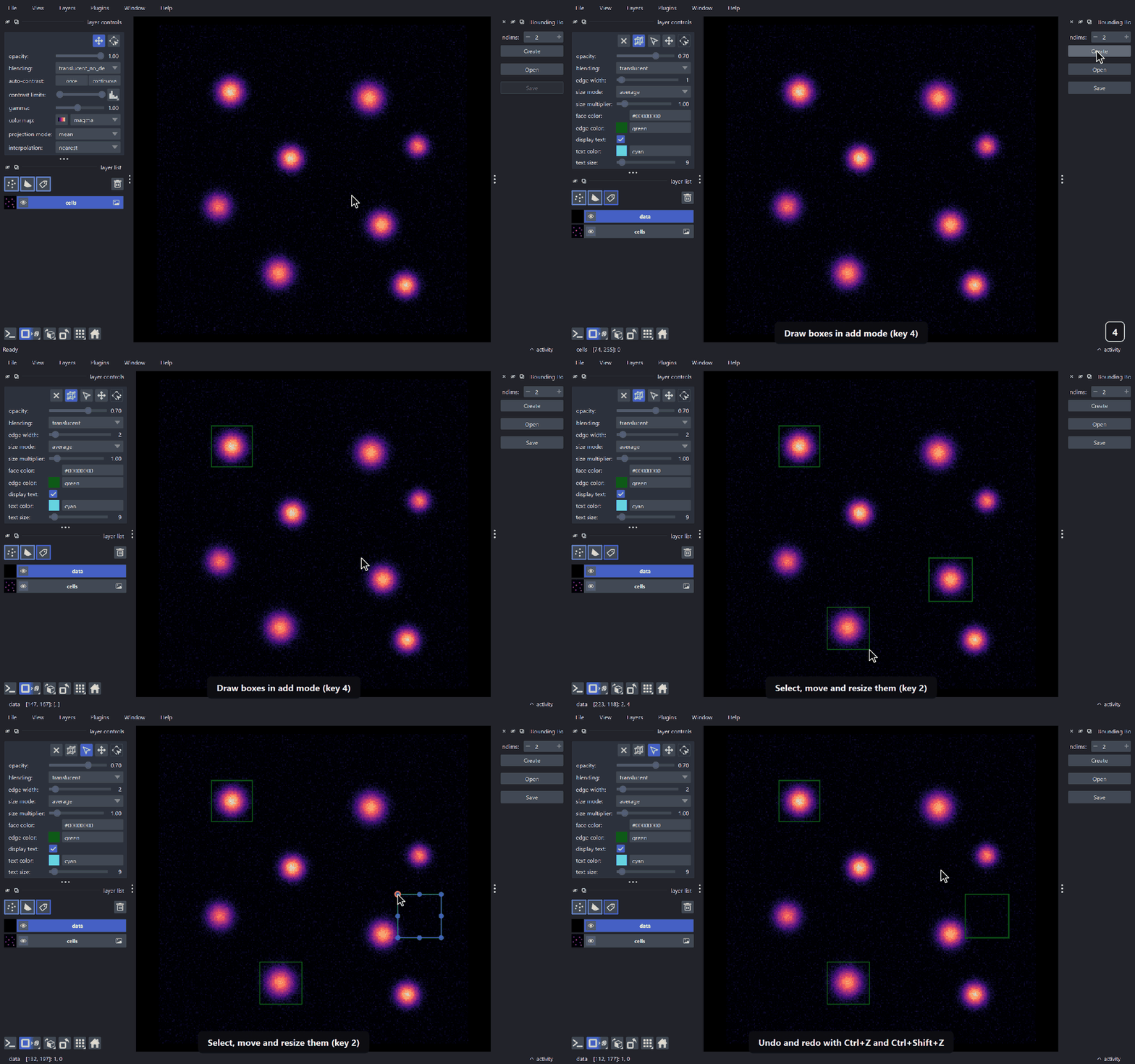
BoundingBoxLayer) for axis-aligned boxes in 2D, 3D and higher dimensional data. - Interactive editing in 2D: draw, select, move and resize boxes.
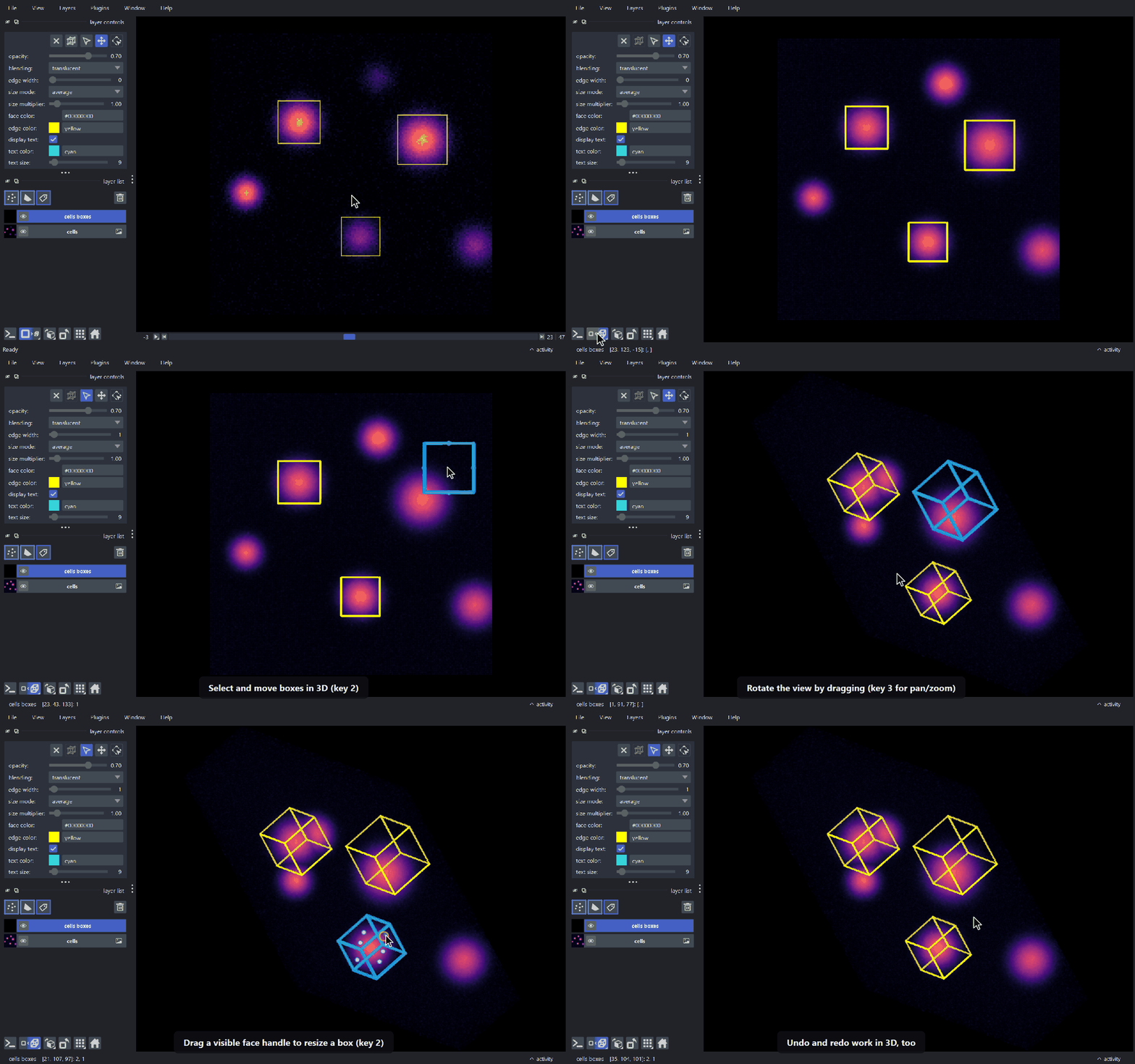
- Interactive editing in 3D views: select, move and resize existing boxes while the viewer is in 3D mode, see Editing in 3D.
- Undo and redo of box edits, in 2D and in 3D, see Undo and redo.
- Features and text labels: attach a features table to the boxes and display it as text, like in the napari points and shapes layers.
- Appearance: edge color, edge width, face color, opacity and blending, set from the layer controls, plus a z-index per box to control which box is drawn on top.
- CSV import and export, and a Bounding Box Creator widget to create, open and save layers, see Reading and saving.
- Works with the standard layer actions of napari, such as Duplicate Layer.
- Supports napari 0.4.15 up to 0.10 and is tested against them on every change, see Compatibility.
Demo
Drawing and editing boxes in 2D
Editing boxes in 3D
This napari plugin was generated with Cookiecutter using @napari's cookiecutter-napari-plugin template.
Usage
Create a layer from code with viewer.add_bounding_boxes, or with the Bounding
Box Creator widget from the Plugins menu:
import napari
import numpy as np
import napari_bbox  # adds viewer.add_bounding_boxes

viewer = napari.Viewer()
viewer.add_image(np.random.rand(60, 200, 200))

# every box is given by two opposite corners
boxes = [
    np.array([[10, 20, 20], [40, 90, 100]]),
    np.array([[20, 100, 90], [55, 180, 170]]),
]
layer = viewer.add_bounding_boxes(
    boxes,
    edge_color="yellow",
    features={"label": [1, 2]},
    text="{label}",
)
viewer.add_bounding_boxes(ndim=3) creates an empty layer to draw boxes into, and
from napari_bbox import BoundingBoxLayer gives direct access to the layer class.
layer.data holds all 2 ** ndim corners of every box.
Interacting with the boxes
The layer controls have one button per mode. A mode can also be activated with the keyboard while the bounding box layer is active.
| Mode | Key | What it does |
|---|---|---|
| Select | 2 | Select, move and resize boxes. Hold Shift while resizing to keep the aspect ratio. |
| Pan/zoom | 3 | Move the camera as usual. |
| Add bounding boxes | 4 | Draw new boxes (2D views only). |
Hold Space to temporarily switch to pan/zoom in any mode (rotate and pan in 3D), and release it to go back to the previous mode. Selected boxes are deleted with the delete button of the layer controls or with the Delete key.
Editing in 3D
Existing boxes can be edited while the viewer is in 3D mode (add mode is only available in 2D). In select mode:
- Click a box to select it. Shift-click or Ctrl-click adds the box to the selection or removes it from there.
- Drag a selected box to move all selected boxes in the plane parallel to the screen.
- Drag a face handle of a single selected box to move that face along its axis, which resizes the box. The handle stays under the cursor, also in oblique views. Handles facing the camera are hidden.
- Drag on empty space to draw a selection box. Boxes whose center is inside it get selected.
- Pressing Space during a drag hands the rest of the drag over to the camera, so the view can be rotated in the middle of an edit.
Undo and redo
Edits of the bounding boxes in the active bounding box layer can be undone with Ctrl+Z and redone with Ctrl+Shift+Z (or Ctrl+Y), in 2D and in 3D. Adding, moving, resizing, deleting and pasting boxes are one undo step each, a mouse drag is one step. Selecting boxes is not.
From code, use layer.undo(), layer.redo(), layer.can_undo, layer.can_redo
and layer.clear_history(). Undo and redo restore the corners, features, colors,
edge widths and z-indices of all the boxes and emit the same layer.events.data
events as the edit they are equal to. The last 50 edits are kept.
Setting layer.data or layer.features from code is not an edit, it is not
recorded. If it changes the layer the history is cleared, so undo cannot bring
back boxes from before the change. Adding boxes with layer.add and deleting
them with layer.remove_selected are edits.
Reading and saving
Bounding boxes are stored in CSV files with one box per row: the minimum
corner followed by the maximum corner, i.e. min_0, ..., min_n, max_0, ..., max_n
for boxes in n dimensions.
napari-bboxregisters a reader for.csvfiles, so they can be opened withFile > Open.- The Bounding Box Creator widget has buttons to create, open and save layers.
- From code,
napari_bbox.write_single_bbox(path, layer.data, {})saves a layer.
Installation
You can install napari-bbox via pip:
pip install napari-bbox
To install latest development version :
pip install git+https://github.com/bauerdavid/napari-bbox.git
Compatibility
napari-bbox supports Python 3.9 and newer and napari 0.4.15 and newer.
Supported napari versions
| napari | Python | Undo/redo and 3D editing | Tested in CI |
|---|---|---|---|
| 0.4.15 – 0.4.17 | 3.9+ | no | 0.4.15, 0.4.17 |
| 0.4.18 – 0.4.19 | 3.9+ | yes | 0.4.18, 0.4.19 |
| 0.5.x | 3.9+ | yes | 0.5.0, 0.5.6 |
| 0.6.x – 0.7.x | 3.10+ | yes | 0.6.0, 0.6.6, 0.7.1 |
| 0.8.x – 0.10.x | 3.11+ | yes | 0.10.0 |
The Python versions are the ones napari itself requires. napari 0.10 also requires Qt6.
Testing
- The test suite runs in CI on every push and pull request, against the napari
versions in the last column.
napari-bboxhas a separate implementation for each range of napari versions, and these are the oldest and newest releases of each of them. - The tests run on Linux. Windows and macOS are not covered by CI.
- Other releases within the ranges above, such as 0.4.16, 0.5.3 or 0.9.2, are not tested separately.
Changelog
0.2.0
Added
- Editing of existing bounding boxes in 3D views: select, move and resize boxes with face handles, and box selection.
- Undo and redo of box edits.
- Support for napari 0.10.
- A CI test suite that runs against napari 0.4.15 up to 0.10.
Changed
- In a layer with a scale, the thickness of the edges (
edge_width) and the size of new boxes along the dimensions that are not displayed (average mode and the size constant) are in world units, so they do not depend on the scale. Layers without a scale are not affected.
Fixed
- Duplicate Layer raised an error on napari 0.5 and newer.
- Removing the last bounding box left it displayed.
- Clearing a layer raised an error on napari 0.4.15 with vispy 0.12 or newer.
- The opacity and blending rows of the layer controls were shown twice on napari 0.6 and newer, and a new layer had an opacity of 0 on napari 0.6.0.
- Boxes drawn in a layer with a scale were stretched along the scaled axes in the dimensions that are not displayed.
- The edges of the boxes were stretched along the scaled axes in layers with a scale, e.g. the 3D tubes became flat ribbons.
Contributing
Contributions are very welcome. Tests can be run with tox or with pytest,
please ensure the coverage at least stays the same before you submit a pull request.
The demo GIFs of this page are generated with
napari-demo-recorder from the
files in docs/demos. After changing the user interface, render them again with
pip install git+https://github.com/bauerdavid/napari-demo-recorder.git
napari-demo-recorder render docs/demos/*.demo.yaml
License
Distributed under the terms of the BSD-3 license, "napari-bbox" is free and open source software
Issues
If you encounter any problems, please file an issue along with a detailed description.
1 maintainer

Metadata
1 maintainer
Release files for napari-bbox 0.2.0
For a detailed explanation of source distributions (sdists) and built distributions (wheels), please see the package formats documentation.
Source distribution (sdist)
| File | Size | Uploaded | Provenance | Actions |
|---|---|---|---|---|
| napari_bbox-0.2.0.tar.gz | 109.8 kB | Without provenance | Details for napari_bbox-0.2.0.tar.gz |
Release files / napari_bbox-0.2.0.tar.gz
| Download URL | napari_bbox-0.2.0.tar.gz |
|---|---|
| Size | 109.8 kB |
| Tags | Source |
|
SHA-256 checksum How to use checksums |
86a634477528b5027a9f7b37e4d24621df3884f1723cc711451721c8c86eeda1
|
|
BLAKE2b-256 checksum How to use checksums |
2b0c5927797a1f7bbb385e45993c82c0bf080ee49a29e9937cc73b1276c27b6c
|
| Upload date | |
|
Uploaded using Trusted Publishing? What is trusted publishing? |
No |
| Uploaded via |
twine/6.2.0 CPython/3.9.25
|
Security for napari-bbox 0.2.0
Provenance
Provenance describes where a file came from. On PyPI, provenance is shared via attestations, which provide a verifiable record of the build or publishing details. View details, limitations and caveats.
No provenance found
None of the files in this release were uploaded with provenance metadata.
A note on package security
PyPI is a repository for distributing packages, not a service for auditing them. While third-party security researchers and our staff do their best to detect and remove malicious packages, PyPI cannot guarantee the quality, security or suitability of any given package.
To learn more about protecting yourself from malicious actors, visit our package security documentation.














