
napari-bootstrapper





A napari plugin to generate dense 3D segmentations from sparse 2D labels. The plugin uses the 2D-to-3D method in Sparse Annotation is Sufficient for Bootstrapping Dense Segmentation.
For larger volumes, dedicated 3D models, and block-wise processing, see the Bootstrapper CLI.

| Dataset | Data type | Video |
|---|---|---|
| CREMI C | 3D volumetric stack | 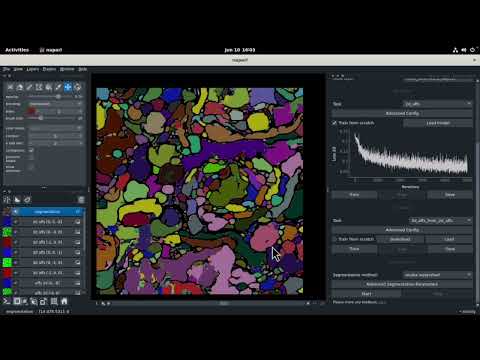 |
| Fluo-C2DL-Huh7 | 2D + time series | 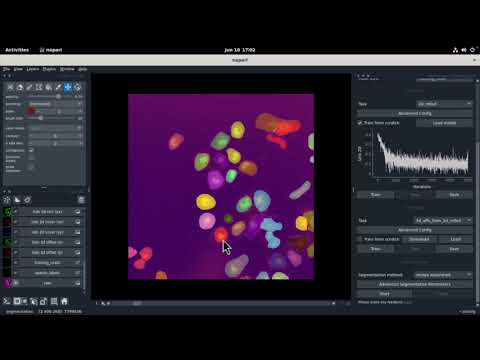 |
Install
Use Python 3.12 or later and scikit-image 0.26 or later.
The plugin requires Zarr format 2 (zarr<3). Create a separate environment:
conda create -n napari-bootstrapper python=3.12
conda activate napari-bootstrapper
python -m pip install "napari-bootstrapper==1.0.0" pyqt5
To install the development version instead:
python -m pip install "napari-bootstrapper @ git+https://github.com/ucsdmanorlab/napari-bootstrapper.git" pyqt5
Launch
conda activate napari-bootstrapper
napari -w napari-bootstrapper Bootstrapper
You can also open the Bootstrapper widget from napari's Plugins menu.
The File > Open Sample menu includes CREMI C (cremi_c) and Fluo-C2DL-Huh7 (fluo_c2dl_huh7) data, which ship with the plugin and need no download.
Segmentation
1. Data
Load a 3D image, or a 4D image with one channel dimension, and select its image layer. Label objects on one or more sections, then click Make mask to select the labelled voxels for training. You can make labels with napari's drawing tools or micro-sam.
2. 2D model
Choose a task and click Train, or load a checkpoint from an earlier run.
| Task | Output |
|---|---|
2d_affs |
Affinities |
2d_lsd |
Local shape descriptors (LSDs) |
2d_mtlsd |
Both LSDs and affinities |
The Device control selects CPU, CUDA, or MPS when available.
For CPU training without data-loader processes, set Num Workers to 0 in Advanced Config.
3. 3D model
Click Download to get the pretrained 3D model for the selected 2D task.
The 3D model converts 2D predictions into 3D affinities.
Downloads and training checkpoints go into ~/.napari_bootstrapper.
4. Segmentation
Choose mutex watershed or connected components, then click Start to predict and segment the volume. The widget adds the predictions and segmentation as napari layers.
Proofreading
Open the Proofreading widget from the Plugins menu, or run:
napari -w napari-bootstrapper Proofreading
Select objects with points or label IDs, then apply an operation to one section or the full volume. The widget can merge, split, delete, dilate, erode, open, close, and fill holes. Filters remove objects by size, section count, or distance from the object-size distribution. The widget uses fastmorph, fastremap, and cc3d.
Changes in 1.0
lsd-litereplaces the oldlsdspackage. The 2D targets match Bootstrapper 1.0, including background masking and odd-sized crops.- The default LSD sigma stays at 10 pixels. New training excludes background from the LSD loss and rejects empty supervised batches.
- The three pretrained 3D checkpoints match Bootstrapper 1.0. They remain the files published in its
v0.3.2release. - Downloads verify SHA-256 hashes before extraction. The widget also verifies cached checkpoints and replaces damaged files.
- CPU training accepts zero data-loader workers. Synthetic-label generation supports slices smaller than its dilation footprints.
- Connected components reads affinities at the trained negative offsets. Mutex watershed applies the fragment filter, so segmentations can change.
- Snapshots still use Zarr format 2. Zarr format 3 is not supported.
Tests
From a source checkout, install the test dependencies and run the headless suite:
python -m pip install ".[testing]"
QT_QPA_PLATFORM=offscreen CUDA_VISIBLE_DEVICES="" python -m pytest
The tests build the widget, load bundled samples, train small CPU models, and run both segmentation methods.
They also download, verify, and run all three published checkpoints.
OpenGL capability queries are stubbed; the tests do not check rendered pixels.
To run without checkpoint downloads, use python -m pytest -m "not network".
Citation
Please cite the preprint when you use the plugin in research:
@article {Thiyagarajan2024.06.14.599135,
	author = {Thiyagarajan, Vijay Venu and Sheridan, Arlo and Harris, Kristen M. and Manor, Uri},
	title = {Sparse Annotation is Sufficient for Bootstrapping Dense Segmentation},
	year = {2024},
	doi = {10.1101/2024.06.14.599135},
	URL = {https://www.biorxiv.org/content/10.1101/2024.06.14.599135v2},
}
Issues
File an issue with the error message, plugin version, and steps to reproduce the problem.
Acknowledgements
- micro-sam provides SAM annotation tools.
- empanada-napari inspired the proofreading widget.
- napari-cellulus provides the original plugin structure.
Funding
Chan-Zuckerberg Imaging Scientist Award: https://doi.org/10.37921/694870itnyzk. The award comes from the Chan Zuckerberg Initiative DAF, an advised fund of Silicon Valley Community Foundation. Funder DOI: 10.13039/100014989.
NSF NeuroNex Technology Hub Award (1707356), NSF NeuroNex2 Award (2014862).

1 maintainer

Metadata
1 maintainer
Release files for napari-bootstrapper 1.0.0
For a detailed explanation of source distributions (sdists) and built distributions (wheels), please see the package formats documentation.
Source distribution (sdist)
| File | Size | Uploaded | Provenance | |
|---|---|---|---|---|
| napari_bootstrapper-1.0.0.tar.gz | 11.5 MB | Without provenance | Details |
Built distribution (wheel)
| File | Interpreter | ABI | Platform | Reset |
|---|---|---|---|---|
| napari_bootstrapper-1.0.0-py3-none-any.whl | Python 3 | none | any | Details |
Total release size: 23.1 MB
Release files / napari_bootstrapper-1.0.0.tar.gz
| Download URL | napari_bootstrapper-1.0.0.tar.gz |
|---|---|
| Size | 11.5 MB |
| Tags | Source |
|
SHA-256 checksum How to use checksums |
b80527fed41ec99963b8c208d0ad7e0bfcb260f6cb8b49f71123ae8f826dd519
|
|
BLAKE2b-256 checksum How to use checksums |
5006853cb8155066f791894a9da385d3f1b50eb705b1a129564447dd41ff324a
|
| Upload date | |
|
Uploaded using Trusted Publishing? What is trusted publishing? |
No |
| Uploaded via |
twine/7.0.0 CPython/3.14.8
|
Release files / napari_bootstrapper-1.0.0-py3-none-any.whl
| Download URL | napari_bootstrapper-1.0.0-py3-none-any.whl |
|---|---|
| Size | 11.6 MB |
| Tags | Python 3 |
|
SHA-256 checksum How to use checksums |
f70cd94cb3a42c7084cc3b59a2a95f6c3ffc3c3b3bade92b50e5d890ecfb5dcb
|
|
BLAKE2b-256 checksum How to use checksums |
44d51d295550c542cc80b10d6fe61a6ad92896b494362a2d8f6db34d68c3a350
|
| Upload date | |
|
Uploaded using Trusted Publishing? What is trusted publishing? |
No |
| Uploaded via |
twine/7.0.0 CPython/3.14.8
|
Security for napari-bootstrapper 1.0.0
Provenance
Provenance describes where a file came from. On PyPI, provenance is shared via attestations, which provide a verifiable record of the build or publishing details. View details, limitations and caveats.
No provenance found
None of the files in this release were uploaded with provenance metadata.
A note on package security
PyPI is a repository for distributing packages, not a service for auditing them. While third-party security researchers and our staff do their best to detect and remove malicious packages, PyPI cannot guarantee the quality, security or suitability of any given package.














