
Visualize and Diagnose brainbow dataset in color space.

Project description
napari-brainbow-diagnose






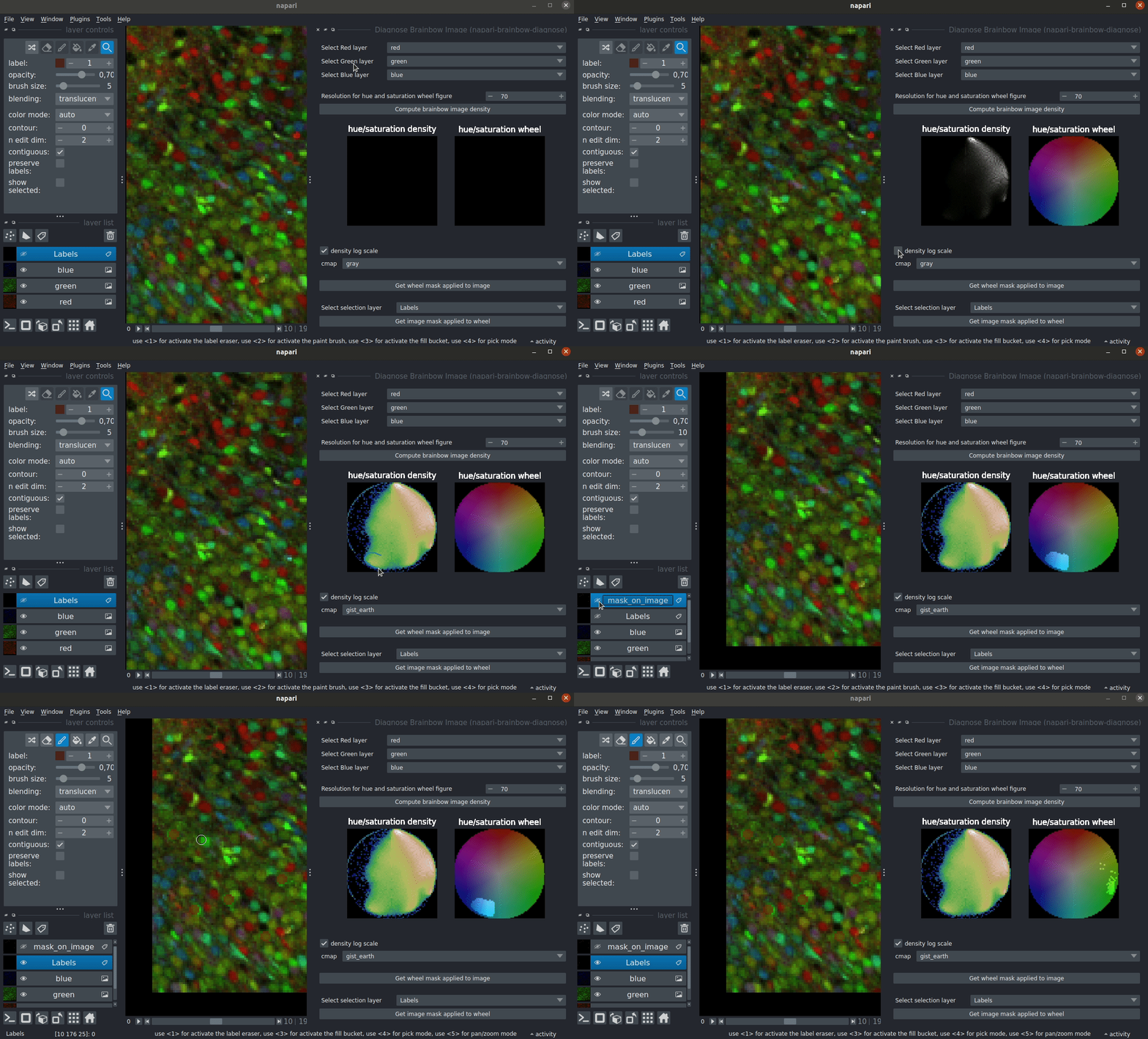
Explore image in channel coordinate spaces.
Original motivation: Brainbow dataset have unique features that need to be addressed by specialized tools. This plugin allows you to visualize the distribution of the channel ratio interactively in the image space and channel spaces.
You can also use this plugin along with the napari-cluster-plotter plugin to interact with individual objects.
Available Channel space transformation
The following channel spaces are available:
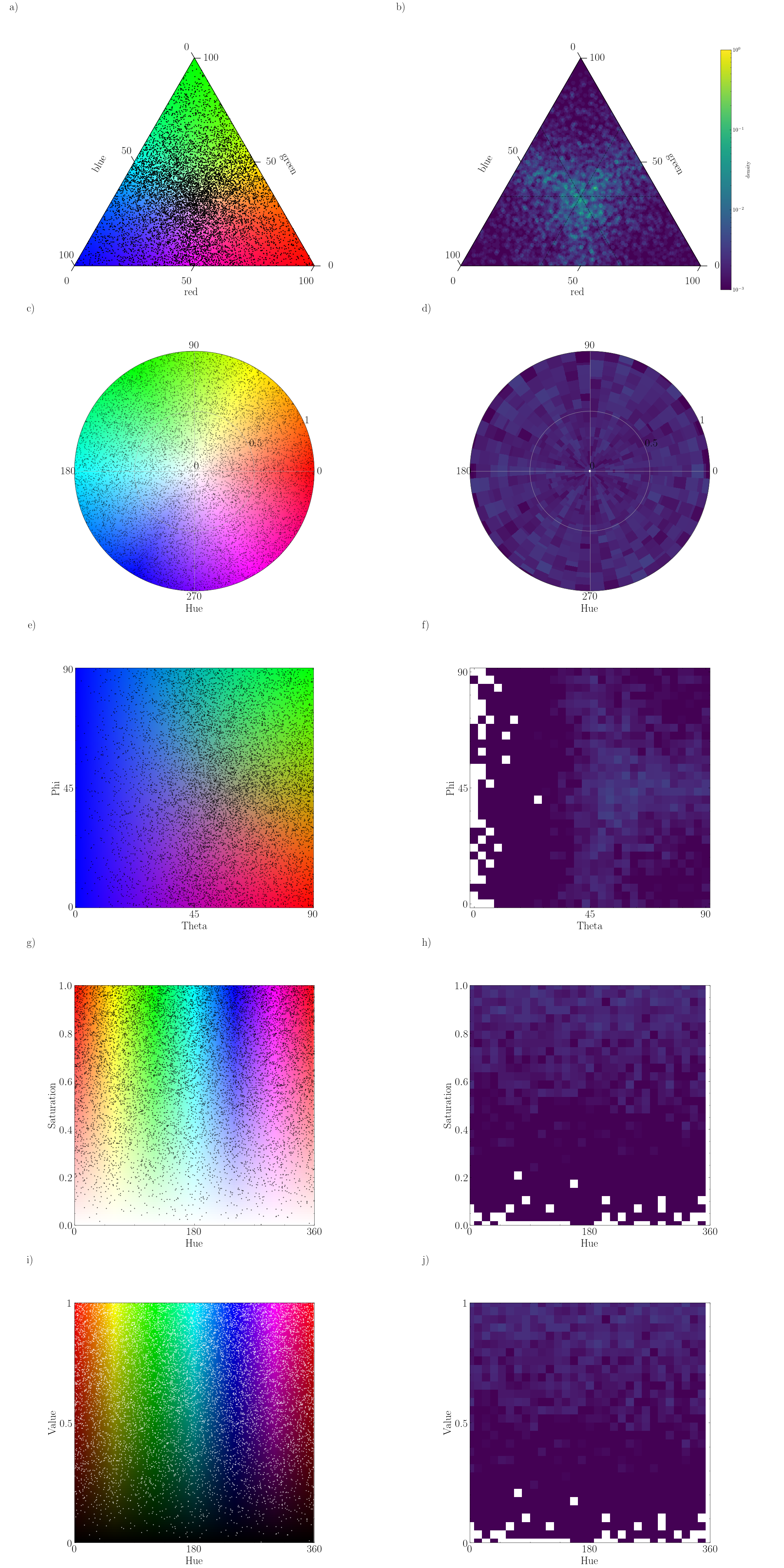
From Cartesian RGB:
- (a) Maxwell triangle (ternary plot) illustration
- (c) Hue-Saturation wheel illustration (g)
- (e) Spherical coordinates (Theta, Phi and Radius) illustration
- (g,i) Hue-Saturation-Value planes illustration (b)(f)
Example Notebooks
You can use this plugin to visualize channel space of:
- interactively every voxel in the image (see demo notebook)
- interactively every object (aka center point) in the image (see demo notebook). To use this notebook you need to install
napari-cluster-plotterplugin. - Not interactive in matplotlib to export figures: (see demo notebook)
Example Datasets
If you want to use your dataset, you have to format it such as each channel is in one distinct napari.Layers
You can open test dataset to try this plugin in File > Open Sample > napari-brainbow-diagnose.
- The RGB Cube is an array with shape (3x256x256x256) cube : Great to check how the plugin work when all color are represented
- ChroMS Cortex Sample is an array with shape (3x256x256x256) #Hugo : Real life brainbow image (Cortex E18 Emx1Cre) !
Once you have your layers you can use the dropdown and select the corresponding layer. It is advised to match the red, green, blue order so the ratio you see on the napari viewer corresponds to the Hue-Saturation Wheel of the plugin.
Installation
You can install napari-brainbow-diagnose via pip:
pip install napari-brainbow-diagnose
If you want to use napari-cluster-plotter plugin you also need to install it manually
To install latest development version :
pip install git+https://github.com/LaboratoryOpticsBiosciences/napari-brainbow-diagnose.git
Contributing
Contributions are very welcome. Tests can be run with tox, please ensure the coverage at least stays the same before you submit a pull request.
License
Distributed under the terms of the BSD-3 license, "napari-brainbow-diagnose" is free and open source software
Issues
If you encounter any problems, please file an issue along with a detailed description.
This napari plugin was generated with Cookiecutter using @napari's cookiecutter-napari-plugin template.


Download files
Download the file for your platform. If you're not sure which to choose, learn more about installing packages.
Source Distribution
Built Distribution
Filter files by name, interpreter, ABI, and platform.
If you're not sure about the file name format, learn more about wheel file names.
Copy a direct link to the current filters
File details
Details for the file napari_brainbow_diagnose-0.2.0.tar.gz.
File metadata
- Download URL: napari_brainbow_diagnose-0.2.0.tar.gz
- Upload date:
- Size: 23.1 MB
- Tags: Source
- Uploaded using Trusted Publishing? No
- Uploaded via: twine/6.1.0 CPython/3.13.1
File hashes
| Algorithm | Hash digest | |
|---|---|---|
| SHA256 |
ecbf057ee6594f2999e566cb3b219b322102268ba7f42b0293b12253d847fbf8
|
|
| MD5 |
4622cb8ae3a16e5fef28e93b4871d3d0
|
|
| BLAKE2b-256 |
6fee6758aabcffe087120e5ca72e8bb219a5d863c852889d5433dda35730d6a4
|
File details
Details for the file napari_brainbow_diagnose-0.2.0-py3-none-any.whl.
File metadata
- Download URL: napari_brainbow_diagnose-0.2.0-py3-none-any.whl
- Upload date:
- Size: 31.2 kB
- Tags: Python 3
- Uploaded using Trusted Publishing? No
- Uploaded via: twine/6.1.0 CPython/3.13.1
File hashes
| Algorithm | Hash digest | |
|---|---|---|
| SHA256 |
0755ea4e5e876bc88802da127d25ce608476e511a38f44aaae006c45babea876
|
|
| MD5 |
e2bd07b4ce57ff3fce5436cd0db7e3ee
|
|
| BLAKE2b-256 |
eea76553481cf472173355ed3fb46197d5f946c6bb99ce6e2a677684c858ca55
|







