
Colocalization analysis of multi-channel images

Project description

napari-colocalization







⚠️ Under construction — pre-alpha. APIs, UI, and outputs may change without notice. Not recommended for production analysis yet; use at your own risk and please report rough edges via the issue tracker.
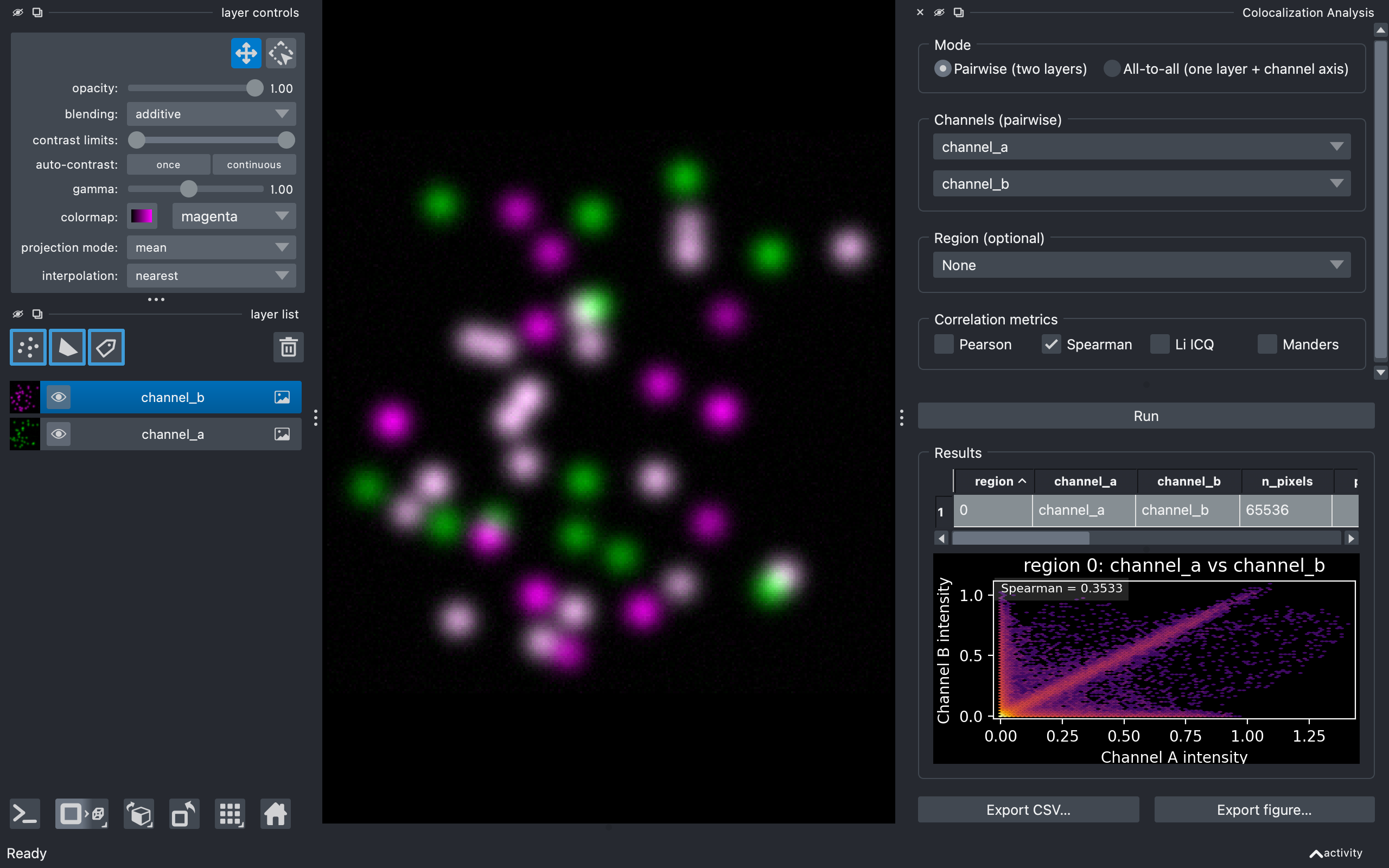
Interactive intensity-colocalization analysis for napari. Pick two channels (or one multi-channel image), optionally restrict the analysis to a region drawn as shapes or labels, choose your metric, and get a results table plus an intensity-vs-intensity density plot.
Features
- Four correlation metrics: Pearson (PCC), Spearman rank (SRCC), Li Intensity Correlation Quotient (ICQ), and Manders' coefficients M1/M2 (MCC).
- Pairwise or all-to-all mode: analyse two grayscale layers, or every channel pair within a single multi-channel layer.
- 2D and 3D support natively (no time-series for now).
- Region-restricted analysis via a Shapes or Labels layer — each non-zero region is reported on its own row.
- Manders thresholds: choose Costes auto (iterative regression-based) or Manual.
- Interactive results: in-widget table, density plot of the selected row, multi-row selection that highlights all matching shapes/labels in the viewer.
- CSV export of the current table, plus figure export of the density plot (PNG / PDF / SVG / TIFF, configurable size and DPI).
Installation
pip install napari-colocalization
If napari isn't already installed, install both at once:
pip install "napari-colocalization[all]"
For the latest development version:
pip install git+https://github.com/DBI-INFRA/napari-colocalization.git
Quick start
-
Launch napari.
-
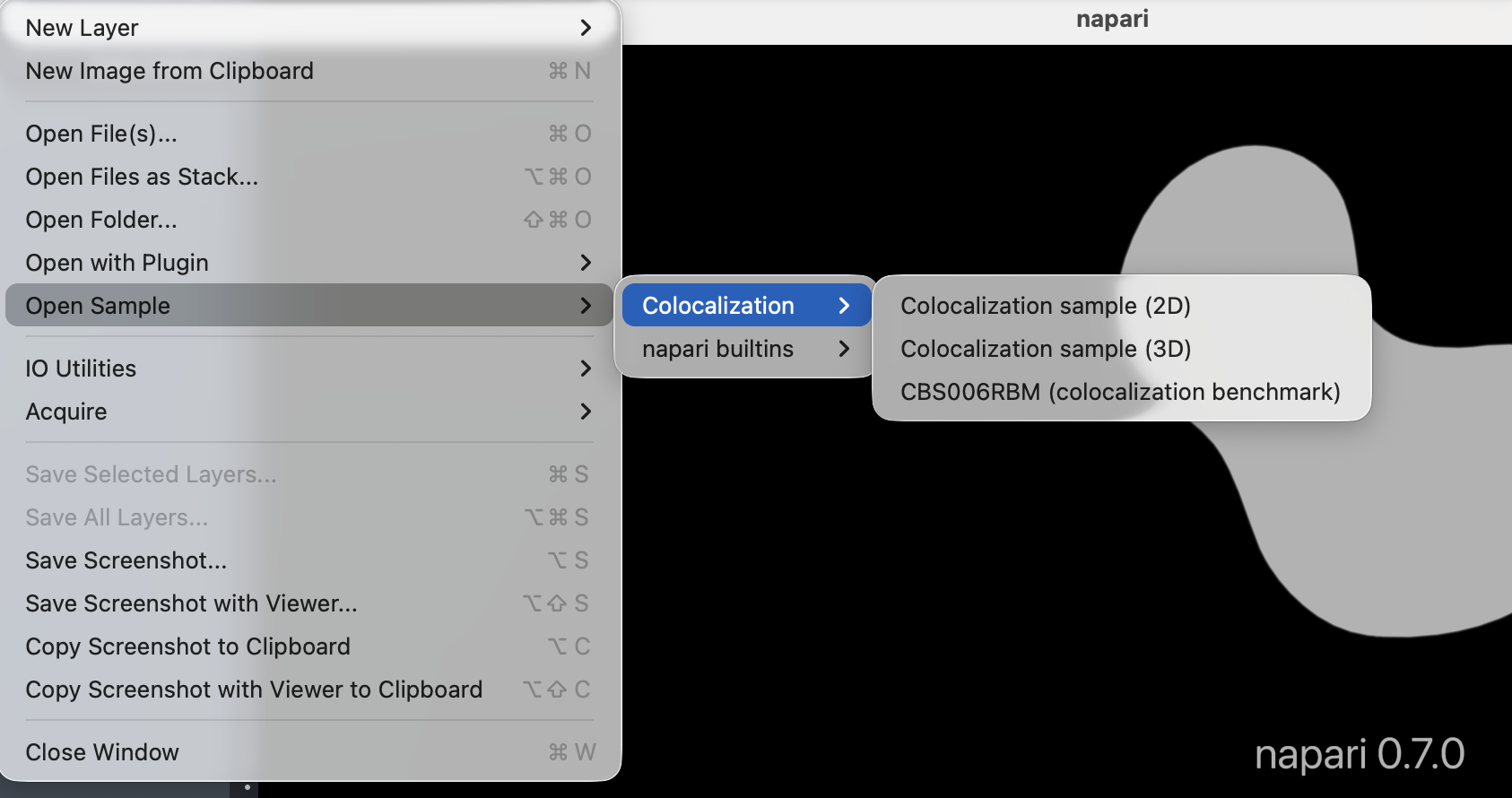
Load sample data: File → Open Sample → napari-colocalization → Colocalization sample (2D). A 3D synthetic sample and CBS006RBM — a real two-channel benchmark image from the Colocalization Benchmark Source — are also provided.
-
Open the widget: Plugins → Colocalization Analysis. Two image layers
channel_aandchannel_bare auto-selected for pairwise mode. -
Click Run. The results table populates with a single row (the whole image), and the density plot below shows the intensity pairs with the metric values overlaid.
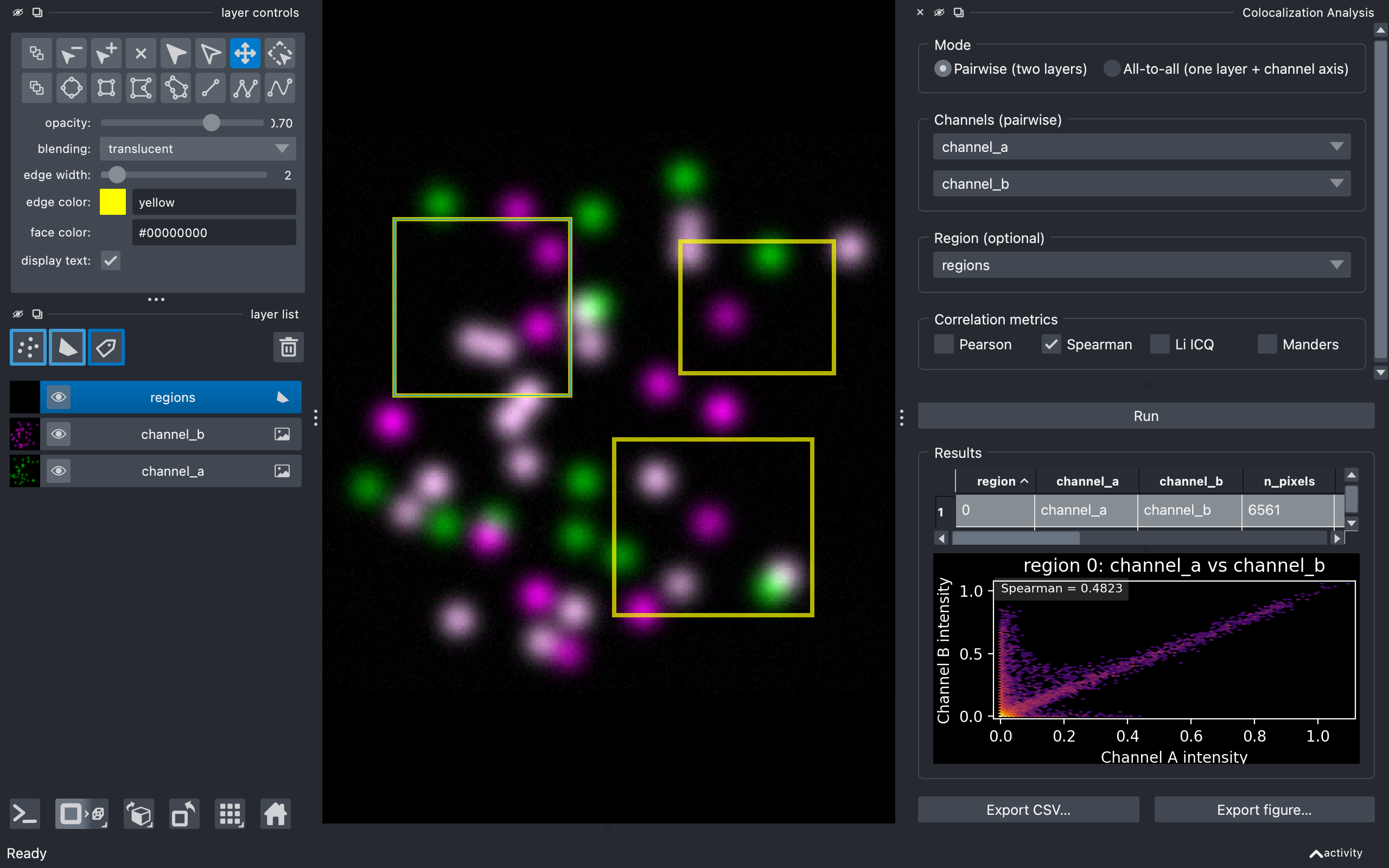
- (Optional) Add a Shapes layer, draw a few rectangles or polygons, set Region to Shapes and pick the layer. Re-run — the table now has one row per shape, and clicking a row highlights the matching shape in the viewer.
See docs/usage.md for the full walkthrough.
Documentation
- Usage guide — every control in the widget, in order.
- Metrics — what PCC, SRCC, ICQ and MCC mean, when to use which, and how the Costes auto-threshold works.
- Python API — calling the pure-compute layer
(
pearson,spearman,li_icq,manders,costes_threshold,analyse_pairwise,analyse_all_to_all) from scripts or notebooks.
Related projects
- Coloc 2 — the reference ImageJ colocalization plugin; this plugin follows it in spirit.
- scikit-image colocalization metrics — the underlying implementations of PCC and Manders.
Contributing
Contributions are welcome. Run the test suite with:
pip install -e . --group dev
python -m pytest tests/ -v
Pre-commit hooks (ruff lint + format, napari-plugin-checks) ship with the repo:
pre-commit install
pre-commit run --all-files
Please keep test coverage at or above the current level when submitting a PR.
License
Distributed under the terms of the MIT
licence; napari-colocalization is free and open-source software.
Issues
Found a bug or have a feature request? Please open an issue.
Release history Release notifications | RSS feed


Download files
Download the file for your platform. If you're not sure which to choose, learn more about installing packages.
Source Distribution
Built Distribution
Filter files by name, interpreter, ABI, and platform.
If you're not sure about the file name format, learn more about wheel file names.
Copy a direct link to the current filters
File details
Details for the file napari_colocalization-0.1.4.tar.gz.
File metadata
- Download URL: napari_colocalization-0.1.4.tar.gz
- Upload date:
- Size: 2.5 MB
- Tags: Source
- Uploaded using Trusted Publishing? Yes
- Uploaded via: twine/6.1.0 CPython/3.13.12
File hashes
| Algorithm | Hash digest | |
|---|---|---|
| SHA256 |
1648afc958b5a41018ce2ad284fe3bb160775a4a7a53415bad9b7dd86cf94cc8
|
|
| MD5 |
f800a5ce54b06ac1656ada337ee2e091
|
|
| BLAKE2b-256 |
387d0de39fd19c0e30989bd0243546c02107bca2de9038ff6950aade2a0fbb58
|
Provenance
The following attestation bundles were made for napari_colocalization-0.1.4.tar.gz:
Publisher:
test_and_deploy.yml on DBI-INFRA/napari-colocalization
-
Statement:
-
Statement type:
https://in-toto.io/Statement/v1 -
Predicate type:
https://docs.pypi.org/attestations/publish/v1 -
Subject name:
napari_colocalization-0.1.4.tar.gz -
Subject digest:
1648afc958b5a41018ce2ad284fe3bb160775a4a7a53415bad9b7dd86cf94cc8 - Sigstore transparency entry: 1439624935
- Sigstore integration time:
-
Permalink:
DBI-INFRA/napari-colocalization@063aab0452c4ee1be3776215f6d31f1daac04e1d -
Branch / Tag:
refs/tags/v0.1.4 - Owner: https://github.com/DBI-INFRA
-
Access:
public
-
Token Issuer:
https://token.actions.githubusercontent.com -
Runner Environment:
github-hosted -
Publication workflow:
test_and_deploy.yml@063aab0452c4ee1be3776215f6d31f1daac04e1d -
Trigger Event:
push
-
Statement type:
File details
Details for the file napari_colocalization-0.1.4-py3-none-any.whl.
File metadata
- Download URL: napari_colocalization-0.1.4-py3-none-any.whl
- Upload date:
- Size: 25.6 kB
- Tags: Python 3
- Uploaded using Trusted Publishing? Yes
- Uploaded via: twine/6.1.0 CPython/3.13.12
File hashes
| Algorithm | Hash digest | |
|---|---|---|
| SHA256 |
9da076252020ad88767d316efd80b1fe3fd460ef2897f2aee9f97b3eceb3c0f6
|
|
| MD5 |
4c5116cde8ca2aad01cd412c71712e52
|
|
| BLAKE2b-256 |
4f3c47d236bd3521e3fdb63af3549551b7294f0aa195b52263b0472bc0a08c1b
|
Provenance
The following attestation bundles were made for napari_colocalization-0.1.4-py3-none-any.whl:
Publisher:
test_and_deploy.yml on DBI-INFRA/napari-colocalization
-
Statement:
-
Statement type:
https://in-toto.io/Statement/v1 -
Predicate type:
https://docs.pypi.org/attestations/publish/v1 -
Subject name:
napari_colocalization-0.1.4-py3-none-any.whl -
Subject digest:
9da076252020ad88767d316efd80b1fe3fd460ef2897f2aee9f97b3eceb3c0f6 - Sigstore transparency entry: 1439624942
- Sigstore integration time:
-
Permalink:
DBI-INFRA/napari-colocalization@063aab0452c4ee1be3776215f6d31f1daac04e1d -
Branch / Tag:
refs/tags/v0.1.4 - Owner: https://github.com/DBI-INFRA
-
Access:
public
-
Token Issuer:
https://token.actions.githubusercontent.com -
Runner Environment:
github-hosted -
Publication workflow:
test_and_deploy.yml@063aab0452c4ee1be3776215f6d31f1daac04e1d -
Trigger Event:
push
-
Statement type:






