
This release is a pre-release and may not be stable for production use.







 napari-FlowReg-Formats
This repository contains the file format support for the Flow-Registration toolbox in napari. It reads and writes the microscopy formats used across the FlowRegSuite through the pyflowreg and flowreg3d I/O layers, so a recording that opens here opens identically in the motion correction pipeline.
Everything works out of the box. Drag a recording into napari and it opens: TIFF (including ScanImage, OME-TIFF, ImageJ hyperstacks and BigTIFF), HDF5, MATLAB MAT in both the classic and the v7.3 container, and Sutter MDF. MAT and HDF5 videos work in both 2D and 3D, including multi-channel recordings, volumetric time series, and the MATLAB axis order that older Flow-Registration data is written in. The structure is detected from the file itself, so no configuration is needed for the common cases.
Recordings load lazily, so a volumetric stack larger than memory can be inspected frame by frame. An import dialog covers what automatic detection cannot settle on its own: 2D against 3D interpretation, axis order, which datasets are channels, and folding a flat ScanImage page sequence into (T, Z, Y, X) volumes.
The publication for the underlying toolbox can be found here and the project website with video results here.
Related projects
- PyFlowReg: https://github.com/FlowRegSuite/pyflowreg
- flowreg3D: https://github.com/FlowRegSuite/flowreg3d
- napari motion correction plugin: https://github.com/FlowRegSuite/napari-flowreg
- Original Flow-Registration repo: https://github.com/FlowRegSuite/flow_registration
- ImageJ/Fiji plugin: https://github.com/FlowRegSuite/flow_registration_IJ
Installation via pip and conda
To install the plugin via conda, you can create a new environment and install napari along with the plugin:
conda create -n flowreg -c conda-forge python=3.11
conda activate flowreg
You can then install napari-flowreg-formats via [pip]:
pip install napari[all] napari-flowreg-formats
or directly from the GitHub repository:
pip install git+https://github.com/FlowRegSuite/napari-flowreg-formats.git
napari is not a runtime dependency of this package, following napari plugin practice, so install it alongside as shown above.
The plugin depends on pyflowreg and flowreg3d, which are currently published as pre-releases. The dependency specifiers name those pre-releases explicitly, so a plain pip install resolves them and no --pre flag is needed.
Supported formats
| Family | Extensions | 2D | 3D | Lazy | Auto-detected |
|---|---|---|---|---|---|
| TIFF | .tif .tiff |
yes | yes | yes | series axes, ImageJ hyperstack structure |
| BigTIFF | .btf .tf8 .tf2 |
yes | yes | yes | as above, without the 4 GB limit |
| OME-TIFF | .ome.tif .ome.tiff |
yes | yes | yes | OME axes, physical pixel size |
| ScanImage TIFF | .tif |
yes | yes | yes | slices per volume, frames per slice, channels, z step, frame rate |
| HDF5 | .h5 .hdf5 .hdf |
yes | yes | yes | dataset discovery, writer provenance, stored axis order |
| MATLAB MAT | .mat (v5/v7 and v7.3) |
yes | yes | v7.3 only | variable discovery, MATLAB axis order and dimension reversal |
| Sutter MDF | .mdf |
yes | — | no | acquisition metadata; Windows only |
Extension matching is case-insensitive, so .TIF, .H5 and .MAT work as written. See the supported formats reference for the full matrix, including the formats this plugin deliberately leaves to others.
Usage
Drag a recording into napari. For extensions that napari's built-in reader also claims, such as .tif and .h5, napari shows a reader chooser; select FlowReg Formats and tick the box to remember that choice for the extension.
For explicit control over dimensions, channels and TIFF reshaping, open File > FlowReg Import or Plugins > FlowReg Formats > FlowReg Import. The dialog reports the detected structure, lets you override every field, and loads off the Qt event loop so the viewer stays responsive.
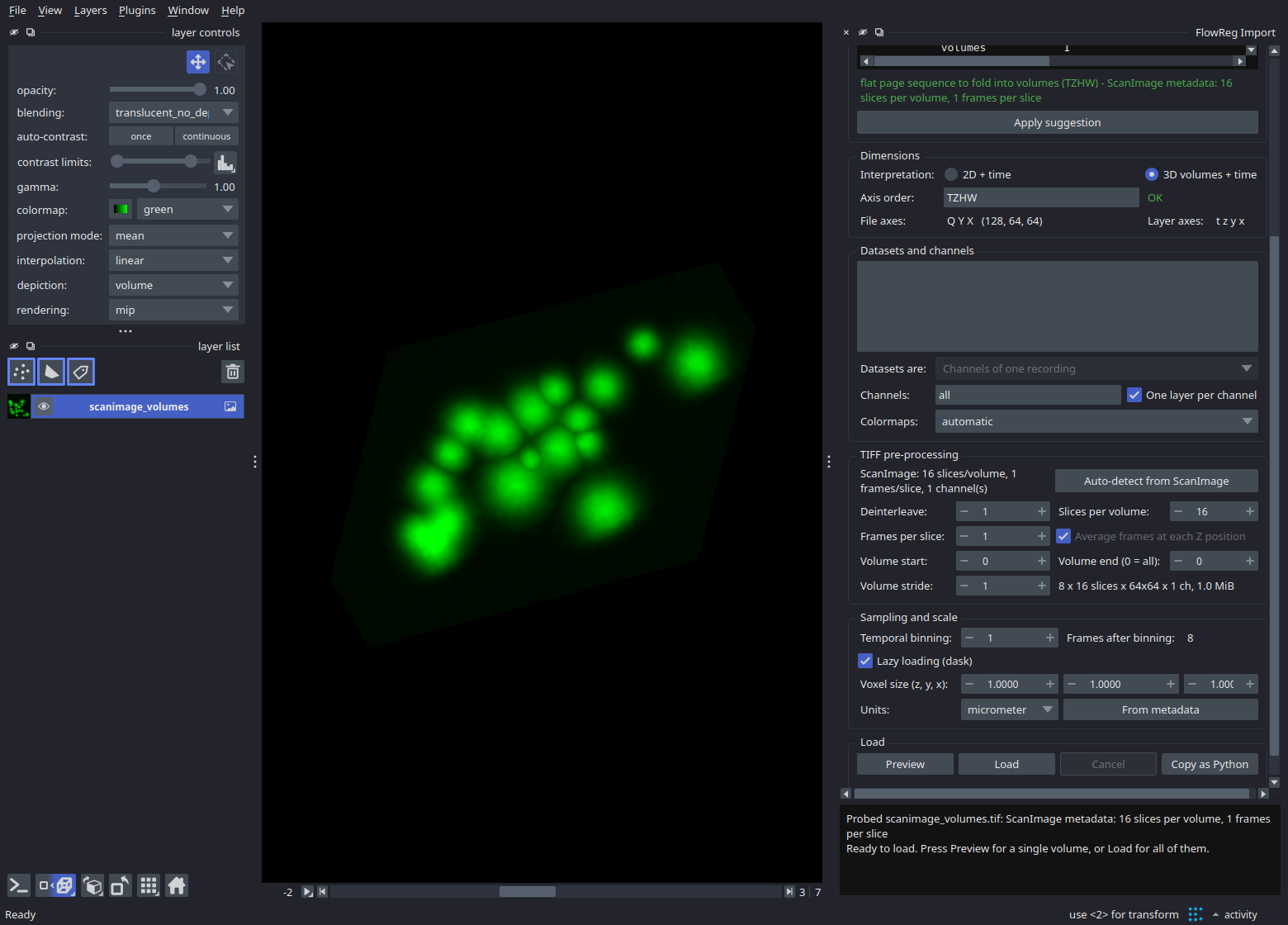
Above, a flat ScanImage page sequence has been probed: the volume structure was read from the acquisition metadata, the recording was identified as a volumetric time series, and the 16 slices per volume were filled in automatically. Load applies it; Copy as Python emits the equivalent script.
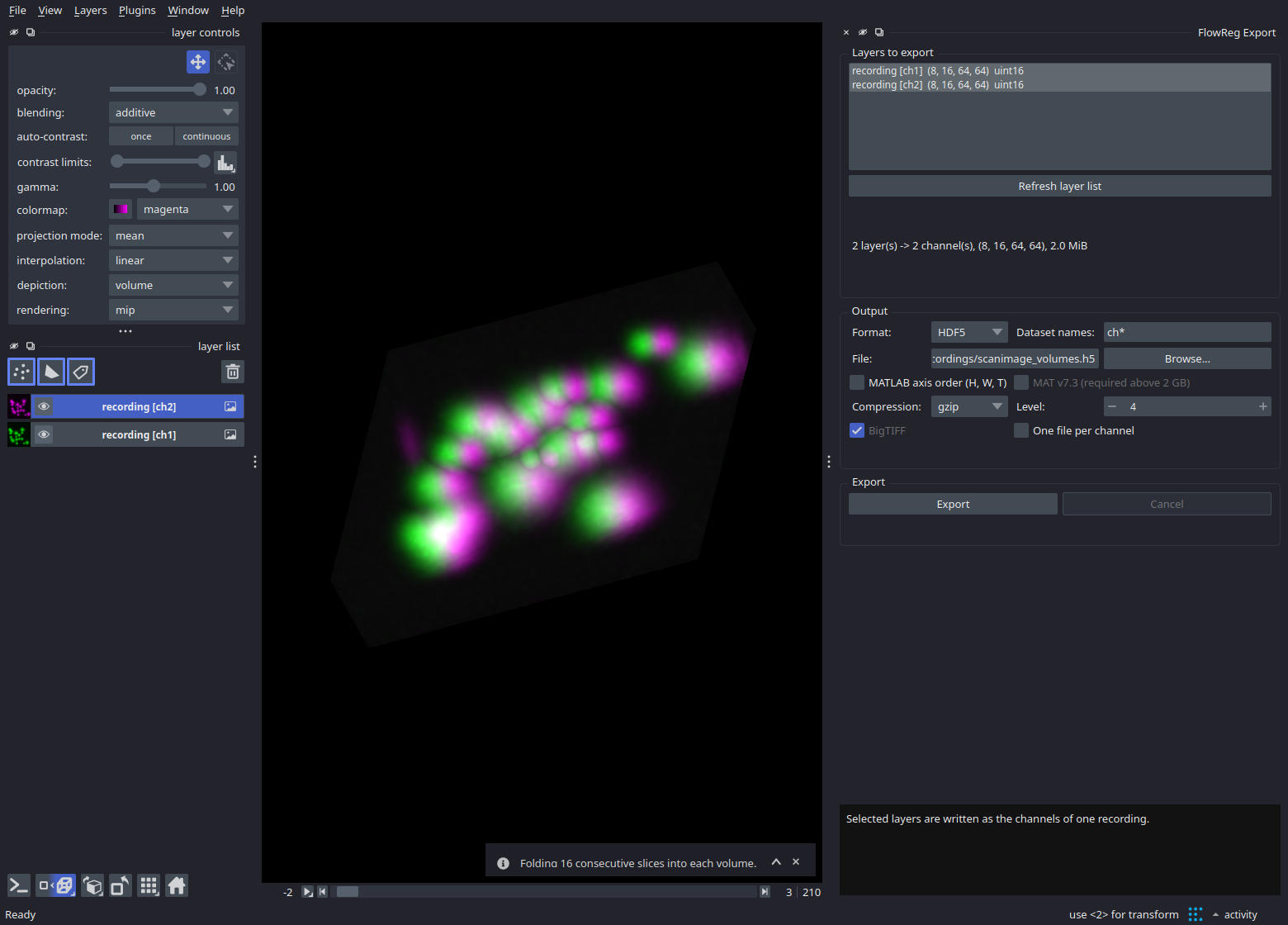
Layers are written back with File > Save Selected Layers, or through File > FlowReg Export for control over the dataset naming pattern, MATLAB axis order, the MAT container version and compression. Selected layers become the channels of one recording.
The same import is available from a script, with no GUI:
import napari
from napari_flowreg_formats import ImportSpec, load

viewer = napari.Viewer()

# automatic: the structure is detected from the file
viewer.open("recording.tif", plugin="napari-flowreg-formats")

# explicit: fold a flat ScanImage page sequence into volumes
for data, meta, layer_type in load(
    "scanimage_volumes.tif",
    ImportSpec(is_3d=True, slices_per_volume=30, frames_per_slice=1, lazy="always"),
):
    viewer._add_layer_from_data(data, meta, layer_type)

napari.run()
The Copy as Python button in the import dialog emits exactly this call for the settings currently on screen, so an interactive import is always reproducible.
Two synthetic sample recordings are available under File > Open Sample > FlowReg Formats, so the plugin can be tried without any data on disk.
Citation
Details on the original method and video results can be found here.
If you use parts of this code or the plugin for your work, please cite
"Pyflowreg," (in preparation), 2025.
and
P. Flotho, S. Nomura, B. Kuhn and D. J. Strauss, "Software for Non-Parametric Image Registration of 2-Photon Imaging Data," J Biophotonics, 2022. doi:https://doi.org/10.1002/jbio.202100330
BibTeX entry
@article{flotea2022a,
    author = {Flotho, P. and Nomura, S. and Kuhn, B. and Strauss, D. J.},
    title = {Software for Non-Parametric Image Registration of 2-Photon Imaging Data},
    year = {2022},
  journal = {J Biophotonics},
  doi = {https://doi.org/10.1002/jbio.202100330}
}
License
Distributed under the MIT License. See LICENSE.txt.
1 maintainer

Metadata
1 maintainer
Release files for napari-flowreg-formats 0.1.0a1
For a detailed explanation of source distributions (sdists) and built distributions (wheels), please see the package formats documentation.
Source distribution (sdist)
| File | Size | Uploaded | Provenance | |
|---|---|---|---|---|
| napari_flowreg_formats-0.1.0a1.tar.gz | 2.1 MB | With provenance | Details |
Built distribution (wheel)
| File | Interpreter | ABI | Platform | Reset |
|---|---|---|---|---|
| napari_flowreg_formats-0.1.0a1-py3-none-any.whl | Python 3 | none | any | Details |
Total release size: 2.2 MB
Release files / napari_flowreg_formats-0.1.0a1.tar.gz
| Download URL | napari_flowreg_formats-0.1.0a1.tar.gz |
|---|---|
| Size | 2.1 MB |
| Tags | Source |
|
SHA-256 checksum How to use checksums |
95b1fc514e88fc84d92dc661a43dfb105f7fb847a7729f02eb9721b046d89a5b
|
|
BLAKE2b-256 checksum How to use checksums |
6d41d245da5541155bc84a8ca4b23c13f0722e13e11e9d8f6e1bccb09c0c27f0
|
| Upload date | |
|
Uploaded using Trusted Publishing? What is trusted publishing? |
Yes |
| Uploaded via |
twine/7.0.0 CPython/3.13.14
|
Provenance
Provenance describes where a file came from. On PyPI, provenance is shared via attestations, which provide a verifiable record of the build or publishing details. View details, limitations and caveats.


PyPI Publish Attestation
PyPI verified that this artifact, at this checksum, originated from the publisher listed below.
Signed by GitHub Actions, verified by PyPI on Aug 8, 2026.
Transparency logRelease files / napari_flowreg_formats-0.1.0a1-py3-none-any.whl
| Download URL | napari_flowreg_formats-0.1.0a1-py3-none-any.whl |
|---|---|
| Size | 85.8 kB |
| Tags | Python 3 |
|
SHA-256 checksum How to use checksums |
fb09496a552615831dc602508b487560de1aec7a4c75355779209ea938ddcb45
|
|
BLAKE2b-256 checksum How to use checksums |
33852227c601ccf437d2152cafbfa8059e49e2ce01ff98a62626d88c3c637bcf
|
| Upload date | |
|
Uploaded using Trusted Publishing? What is trusted publishing? |
Yes |
| Uploaded via |
twine/7.0.0 CPython/3.13.14
|
Provenance
Provenance describes where a file came from. On PyPI, provenance is shared via attestations, which provide a verifiable record of the build or publishing details. View details, limitations and caveats.
PyPI Publish Attestation
PyPI verified that this artifact, at this checksum, originated from the publisher listed below.
Signed by GitHub Actions, verified by PyPI on Aug 8, 2026.
Transparency logSecurity for napari-flowreg-formats 0.1.0a1
Provenance
Provenance describes where a file came from. On PyPI, provenance is shared via attestations, which provide a verifiable record of the build or publishing details. View details, limitations and caveats.
Full provenance
All 2 files in this release have been uploaded with provenance metadata.
Attestation for napari_flowreg_formats-0.1.0a1.tar.gz
PyPI Publish Attestation
PyPI verified that this artifact, at this checksum, originated from the publisher listed below.
Signed by GitHub Actions, verified by PyPI on Aug 8, 2026.
Transparency logA note on package security
PyPI is a repository for distributing packages, not a service for auditing them. While third-party security researchers and our staff do their best to detect and remove malicious packages, PyPI cannot guarantee the quality, security or suitability of any given package.













