napari-meshio






This napari plugin uses meshio to read and write mesh files to surfaces in napari.

Image caption: screenshot of the Stanford bunny example surface mesh open in napari.
Installation
You can install napari-meshio via pip:
pip install napari-meshio
To install latest development version :
pip install git+https://github.com/GenevieveBuckley/napari-meshio.git
How to use napari-meshio
Open example surface data
Launch the napari viewer, then open one of the sample datasets (eg: the Stanford bunny) from the file menu:
File > Open Sample > napari-meshio > bunny
Or, open sample data from python with:
import napari

viewer = napari.Viewer(ndisplay=3)
viewer.open_sample('napari-meshio', 'bunny')
Read surface data from file
Drag and drop the file onto the napari viewer.
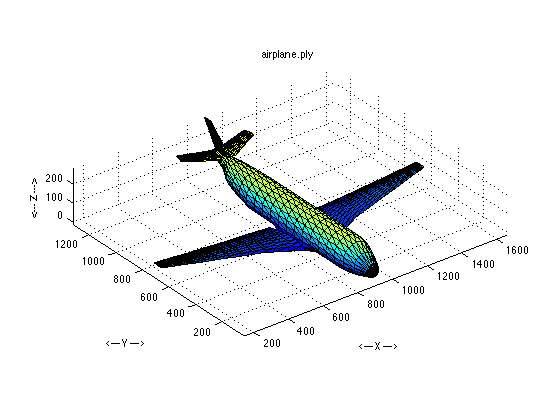
Note: Here are a number of .ply example files you can download to try, like this airplane (see image).
Or, open surface mesh files from python with:
import napari

viewer = napari.Viewer(ndisplay=3)
viewer.open("path/to/surface/mesh/file.stl")  # change this to your mesh filename
Save surface data
To save a surface layer, click the layer name to select it, and then choose save from the file menu:
File > Save selected layer(s)
You can also use keyboard shortcuts to save the selected surface layer:
- Windows/Linux:
Control+S - Mac:
⌘+S
Or, save surface layers from python with:
filename = "bunny.stl"
viewer.layers['bunny'].save(filename)
Note: this code example assumes you have the Stanford bunny example dataset loaded.
A wide variety of surface mesh file formats are supported by
meshio.
If no file extension is provided when saving a surface layer,
the default is the .ply polygon file format.
Supported mesh file formats
Note: Only triangular mesh faces are supported by napari.
The meshio library documentation describes the supported file formats:
There are various mesh formats available for representing unstructured meshes. meshio can read and write all of the following and smoothly converts between them:
Abaqus (
.inp), ANSYS msh (.msh), AVS-UCD (.avs), CGNS (.cgns), DOLFIN XML (.xml), Exodus (.e,.exo), FLAC3D (.f3grid), H5M (.h5m), Kratos/MDPA (.mdpa), Medit (.mesh,.meshb), MED/Salome (.med), Nastran (bulk data,.bdf,.fem,.nas), Netgen (.vol,.vol.gz), Neuroglancer precomputed format, Gmsh (format versions 2.2, 4.0, and 4.1,.msh), OBJ (.obj), OFF (.off), PERMAS (.post,.post.gz,.dato,.dato.gz), PLY (.ply), STL (.stl), Tecplot .dat, TetGen .node/.ele, SVG (2D output only) (.svg), SU2 (.su2), UGRID (.ugrid), VTK (.vtk), VTU (.vtu), WKT (TIN) (.wkt), XDMF (.xdmf,.xmf).
Contributing
Contributions are very welcome. Tests can be run with tox, please ensure the coverage at least stays the same before you submit a pull request.
License
Distributed under the terms of the MIT license, "napari-meshio" is free and open source software
Issues
If you encounter any problems, please file an issue along with a detailed description.
This napari plugin was generated with Cookiecutter using @napari's cookiecutter-napari-plugin template.
1 maintainer

Metadata
1 maintainer
Release files for napari-meshio 0.0.2
For a detailed explanation of source distributions (sdists) and built distributions (wheels), please see the package formats documentation.
Source distribution (sdist)
| File | Size | Uploaded | Provenance | |
|---|---|---|---|---|
| napari_meshio-0.0.2.tar.gz | 138.1 kB | Without provenance | Details |
Built distribution (wheel)
| File | Interpreter | ABI | Platform | Reset |
|---|---|---|---|---|
| napari_meshio-0.0.2-py3-none-any.whl | Python 3 | none | any | Details |
Total release size: 153.5 kB
Release files / napari_meshio-0.0.2.tar.gz
| Download URL | napari_meshio-0.0.2.tar.gz |
|---|---|
| Size | 138.1 kB |
| Tags | Source |
|
SHA-256 checksum How to use checksums |
489bdfba46fe12b82e404f6bbcc8056f508fec034b84ac64767817afcd9b0e09
|
|
BLAKE2b-256 checksum How to use checksums |
1995860296565d3a02b8acd37bee4832e95dd6c5a83980bd9f22a2ac26720480
|
| Upload date | |
|
Uploaded using Trusted Publishing? What is trusted publishing? |
No |
| Uploaded via |
twine/6.2.0 CPython/3.14.0
|
Release files / napari_meshio-0.0.2-py3-none-any.whl
| Download URL | napari_meshio-0.0.2-py3-none-any.whl |
|---|---|
| Size | 15.4 kB |
| Tags | Python 3 |
|
SHA-256 checksum How to use checksums |
2b17510a4716ea8a3f1d9d53f41f34e280834081ed84b0e69fe99cd0a9801257
|
|
BLAKE2b-256 checksum How to use checksums |
648e887203038abcfa5182f39017c3b05d42f301abcf4af2e21e7ce168f7e8db
|
| Upload date | |
|
Uploaded using Trusted Publishing? What is trusted publishing? |
No |
| Uploaded via |
twine/6.2.0 CPython/3.14.0
|
Security for napari-meshio 0.0.2
Provenance
Provenance describes where a file came from. On PyPI, provenance is shared via attestations, which provide a verifiable record of the build or publishing details. View details, limitations and caveats.
No provenance found
None of the files in this release were uploaded with provenance metadata.
A note on package security
PyPI is a repository for distributing packages, not a service for auditing them. While third-party security researchers and our staff do their best to detect and remove malicious packages, PyPI cannot guarantee the quality, security or suitability of any given package.
To learn more about protecting yourself from malicious actors, visit our package security documentation.