
A napari plugin for dynamically displaying orthogonal views and syncing events between the different viewers.

Project description
napari-orthogonal-views








A napari plugin for dynamically displaying orthogonal views and syncing events between the different viewers.
This napari plugin was generated with copier using the napari-plugin-template.
This plugin is based on this example, with extra display and synchronization functionalities. The crosshair overlay is based on this and this example.
Installation
You can install the latest development version of napari-orthogonal-views via pip:
pip install git+https://github.com/AnniekStok/napari-orthogonal-views.git
Usage
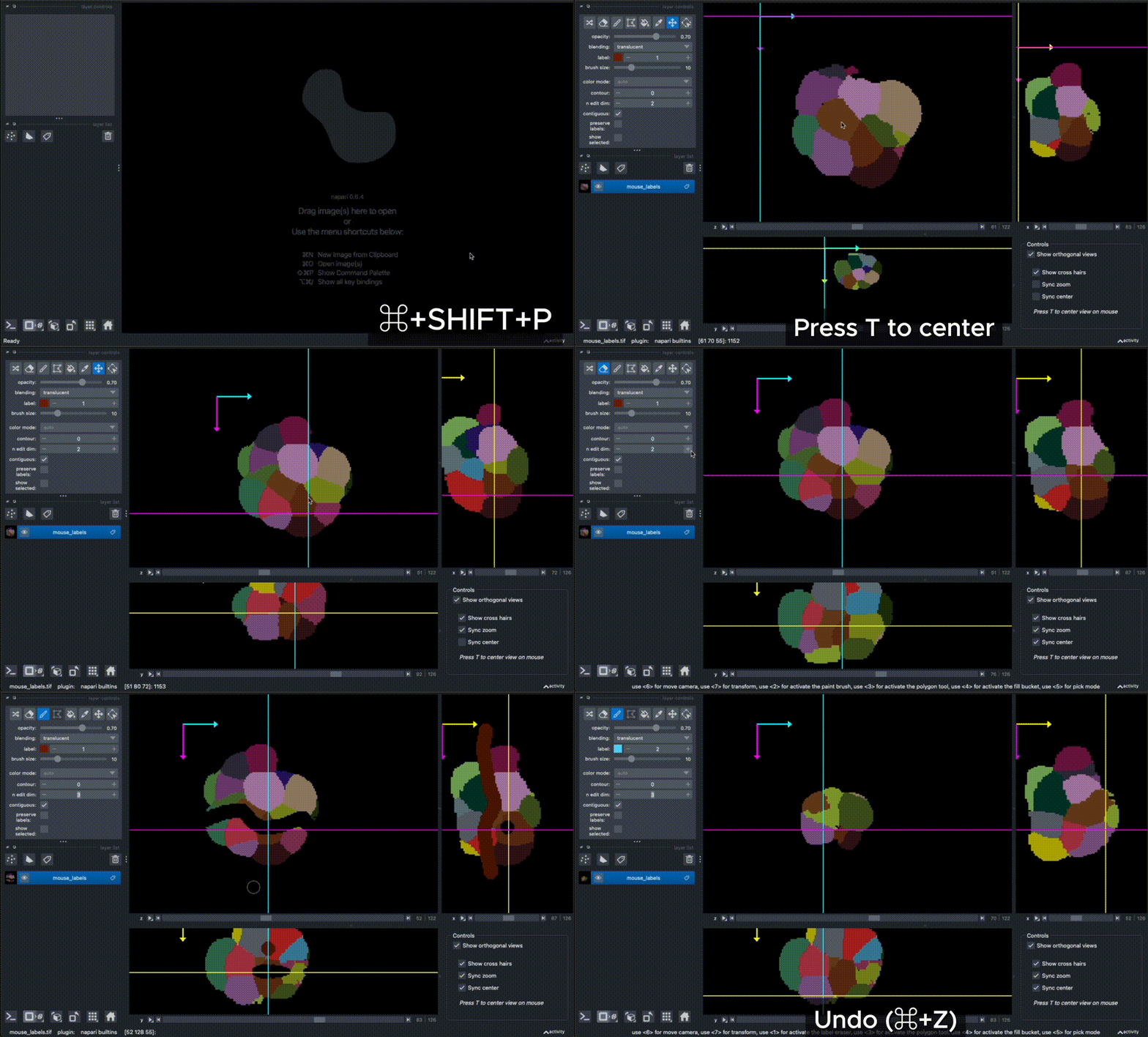
This plugin is not discoverable as a widget, but commands are available in Views>Commands Palette (CMD+SHIFT+P):
- Show Orthogonal Views
- Hide Orthogonal Views
- Toggle Orthogonal Views
- Remove Orthogonal Views
Once shown, it can also be popped up or collapsed using the checkbox in the bottom right corner 'Show orthogonal views'. Alternatively, you can show the orthogonal views via the console:
from napari_orthogonal_views.ortho_view_manager import show_orthogonal_views
show_orthogonal_views(viewer)
And access the OrthoViewManager via _get_manager:
from napari_orthogonal_views.ortho_view_manager import _get_manager
m = _get_manager(viewer)
m.is_shown()
Out[6]: True
The size of the orthogonal view windows can be adjusted by clicking and dragging the small dot in between the views, optionally one or two views can be hidden entirely. The checkboxes in the bottom right corner can be used to show the crosshair overlay or for more control over camera zoom and axis center syncing.
Pressing T on the keyboard will center all views to the current mouse location.
By default, all events (including label editing such as painting) are synced across all views. The different views share the same underlying data array and undo/redo history.
Syncing properties
By default, all layer properties should be synced between the layer on the main viewer and the orthoviews. However, it is possible to have more finegrained control over the synced properties via the set_sync_filters function, as long as it is specified before the orthogonal views are activated.
For example, to disable syncing of all properties on Tracks layers and specifically the contour property on Labels layers:
from napari_orthogonal_views.ortho_view_manager import _get_manager
from napari.layers import Tracks, Labels
m = _get_manager(viewer)
sync_filters = {
    Tracks: {
        "forward_exclude": "*",  # disable all forward sync
        "reverse_exclude": "*",  # disable all reverse sync
    },
    Labels: {
        "forward_exclude": "contour" # exclude contour from forward syncing
    },
}
m.set_sync_filters(sync_filters)
Then add 3D data (e.g. File > Open Sample > napari builtins > Balls (3D)). Activate the labels layer and change the contour value. You should see that the contour property is not synced from main viewer to orthoviews now.
Known issues and ongoing work
- Deprecation warnings on
Window._qt_window,LayerList._get_step_size,LayerList._get_extent_world(suppressed for now). - After removing the OrthoViewManager with
delete_and_cleanup(Remove Orthogonal Views command), the canvas may become temporarily unresponsive. Clicking outside of Napari and then back on the Napari window usually fixes this.
Contributing
Contributions are very welcome. Tests can be run with tox, please ensure the coverage at least stays the same before you submit a pull request.
License
Distributed under the terms of the BSD-3 license, "napari-orthogonal-views" is free and open source software
Issues
If you encounter any problems, please file an issue along with a detailed description.
Release history Release notifications | RSS feed


Download files
Download the file for your platform. If you're not sure which to choose, learn more about installing packages.
Source Distribution
Built Distribution
Filter files by name, interpreter, ABI, and platform.
If you're not sure about the file name format, learn more about wheel file names.
Copy a direct link to the current filters
File details
Details for the file napari_orthogonal_views-0.0.9.tar.gz.
File metadata
- Download URL: napari_orthogonal_views-0.0.9.tar.gz
- Upload date:
- Size: 28.9 kB
- Tags: Source
- Uploaded using Trusted Publishing? No
- Uploaded via: twine/6.2.0 CPython/3.14.2
File hashes
| Algorithm | Hash digest | |
|---|---|---|
| SHA256 |
9a7c11ba38e6c7a2bfa9923b31a9a0c1cc4c9955660511a1514d7daa9af032ac
|
|
| MD5 |
702f1d75fc18755e45df434a5bd274f5
|
|
| BLAKE2b-256 |
8e2c6ffbaf8bcf97a12ae58c567d47ba7c431ea72c89ce536f46a58c0b8b0c3a
|
File details
Details for the file napari_orthogonal_views-0.0.9-py3-none-any.whl.
File metadata
- Download URL: napari_orthogonal_views-0.0.9-py3-none-any.whl
- Upload date:
- Size: 23.9 kB
- Tags: Python 3
- Uploaded using Trusted Publishing? No
- Uploaded via: twine/6.2.0 CPython/3.14.2
File hashes
| Algorithm | Hash digest | |
|---|---|---|
| SHA256 |
14a92ef8a556836dfdc9f2a5515c9d6e41d425455819a1ec62a51278b3eacb44
|
|
| MD5 |
a2c9edb8f62f7ca8a090eea982f87470
|
|
| BLAKE2b-256 |
a678c9ffaa7bb9f98a34322064d7b4042804f1c6c0345f75984ad47a9c1f5da3
|






