
napari-roi-registration






A Napari plugin for the registration of regions of interests (ROI) in a time lapse acquistion and processing of the intensity of the registered data.
The ROI are defined using a Labels layer. Registration of multiple ROIs is supported.
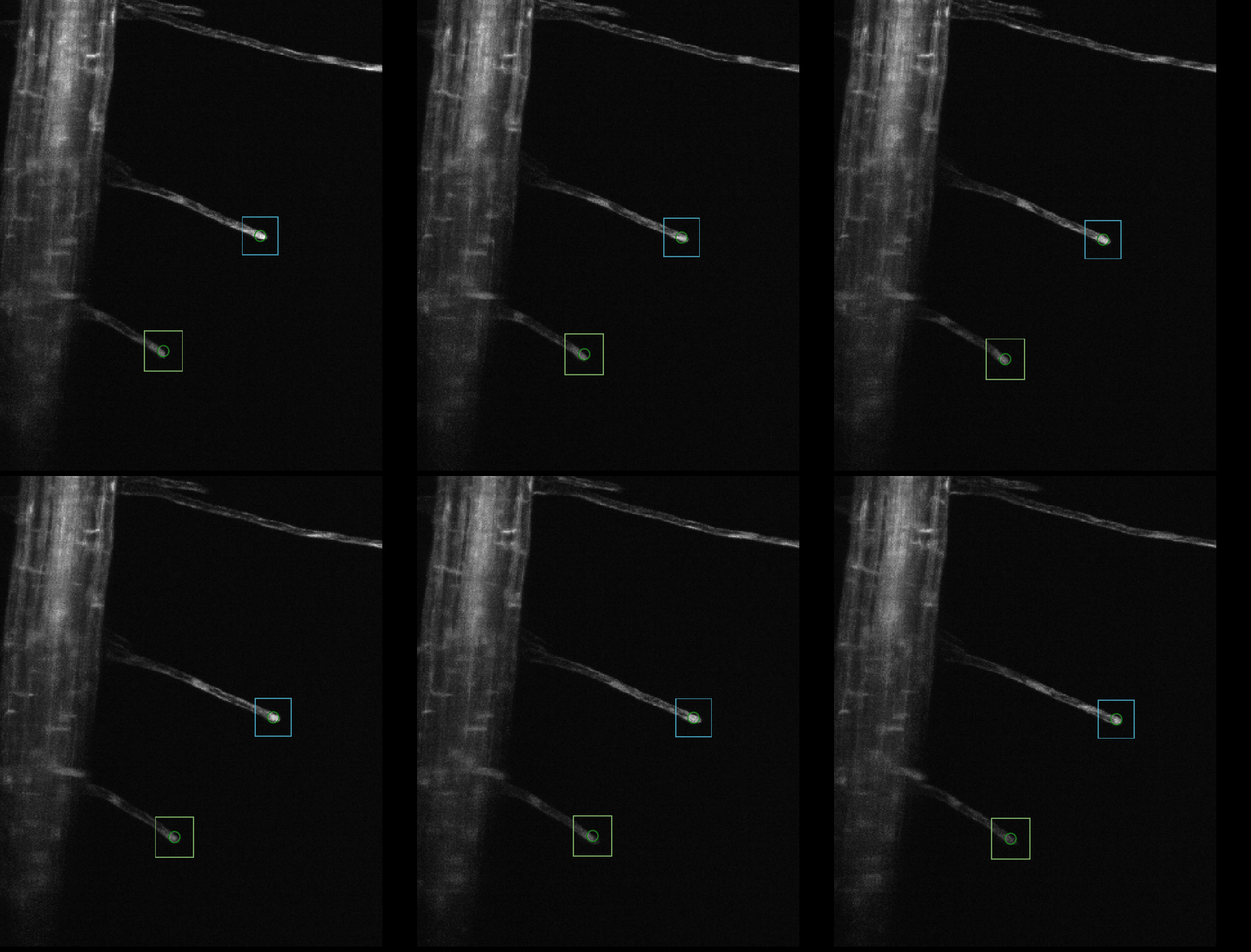
The Registration widget uses the user-defined labels, constructs a rectangular ROI around each of them and registers the ROIs in each time frame.
The Processing widget measures the ROI displacements and extracts the average intensity of the ROI, calculated on the area of the labels.
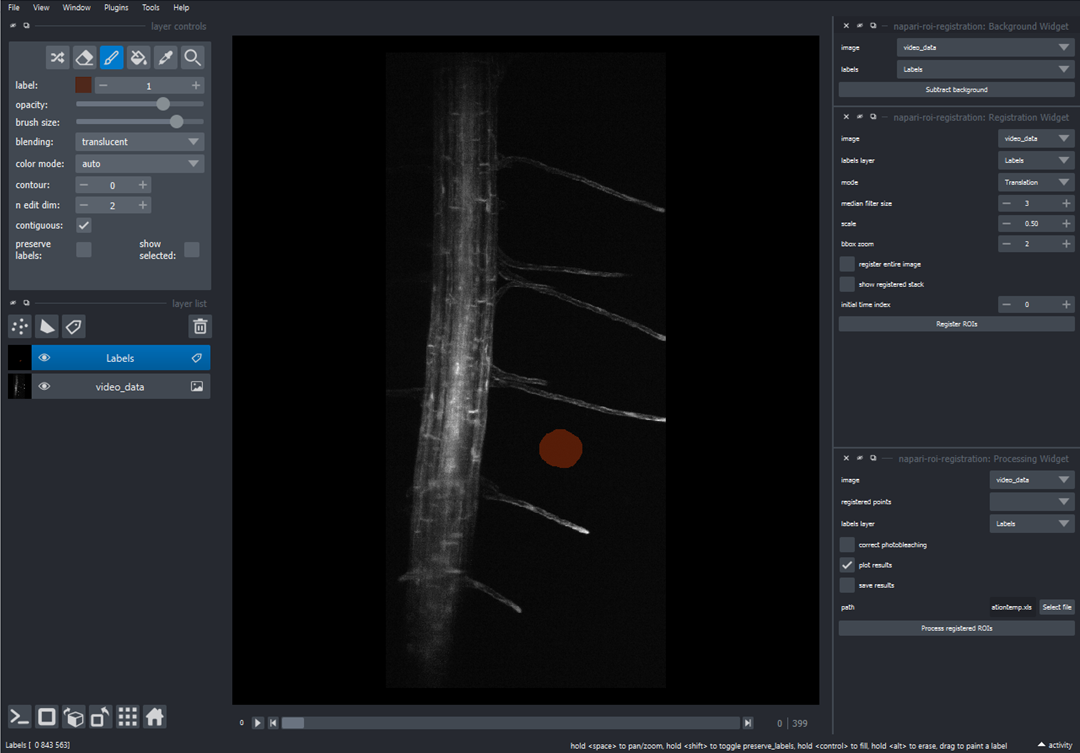
The Subtract background widget subtracts a background on each frame, calculated as the mean intensity on a Labels layer.
Tipically useful when ambient light affects the measurement.
This napari plugin was generated with Cookiecutter using @napari's cookiecutter-napari-plugin template.
Installation
You can install napari-roi-registration via pip:
pip install napari-roi-registration
To install latest development version :
pip install git+https://github.com/GiorgiaTortora/napari-roi-registration.git
Usage
A detailed guide which shows how to use the widgets of the napari-roi-registration plugin and how to properly choose the parameters can be found here. A demo video is available at this link. Sample datasets are available.
Registration Widget
- Create a new Labels layer and draw one or more labels where you want to select a ROI (Region Of Interest). Each color in the same Labels layer represents a different label which will correspond to a different ROI.
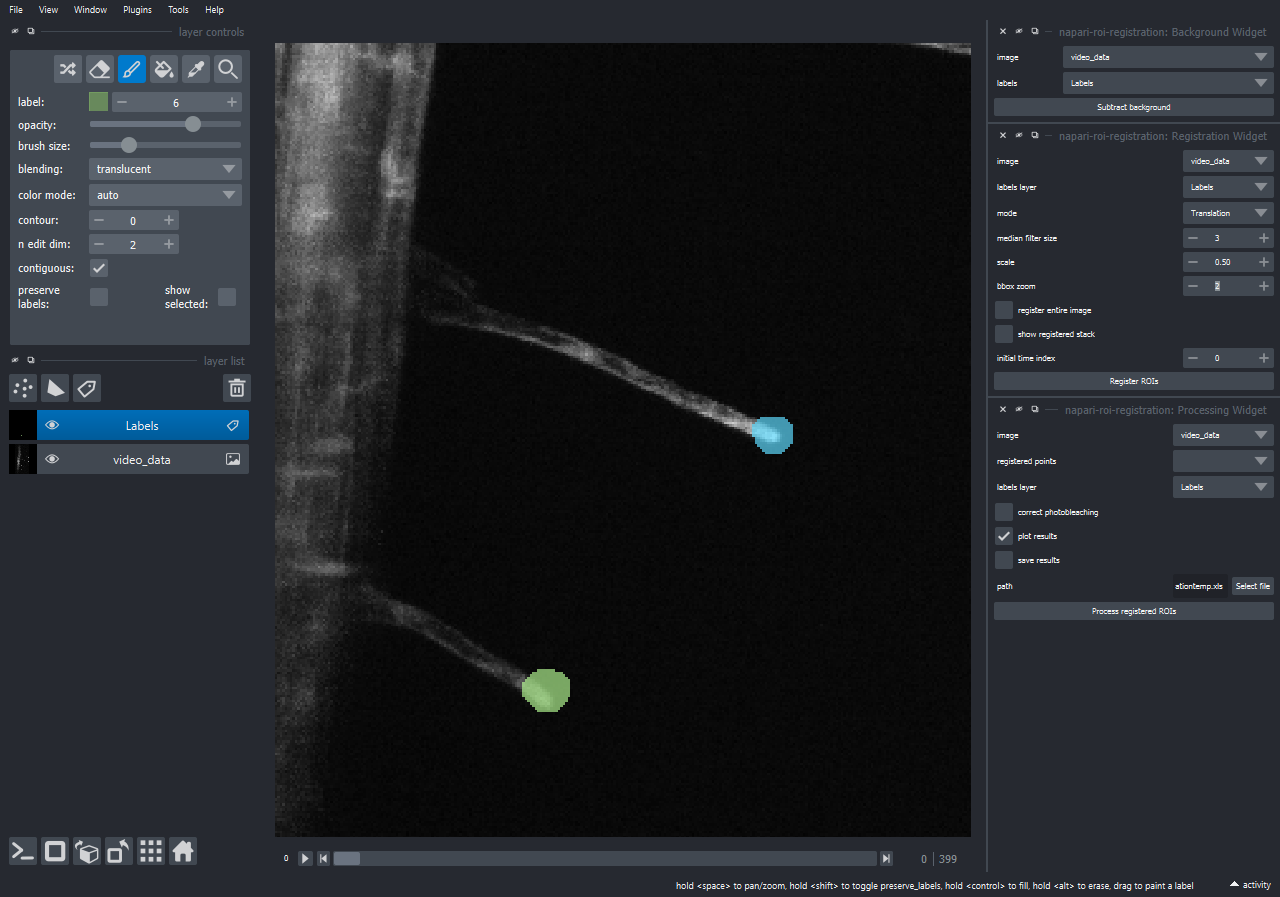
- Push the
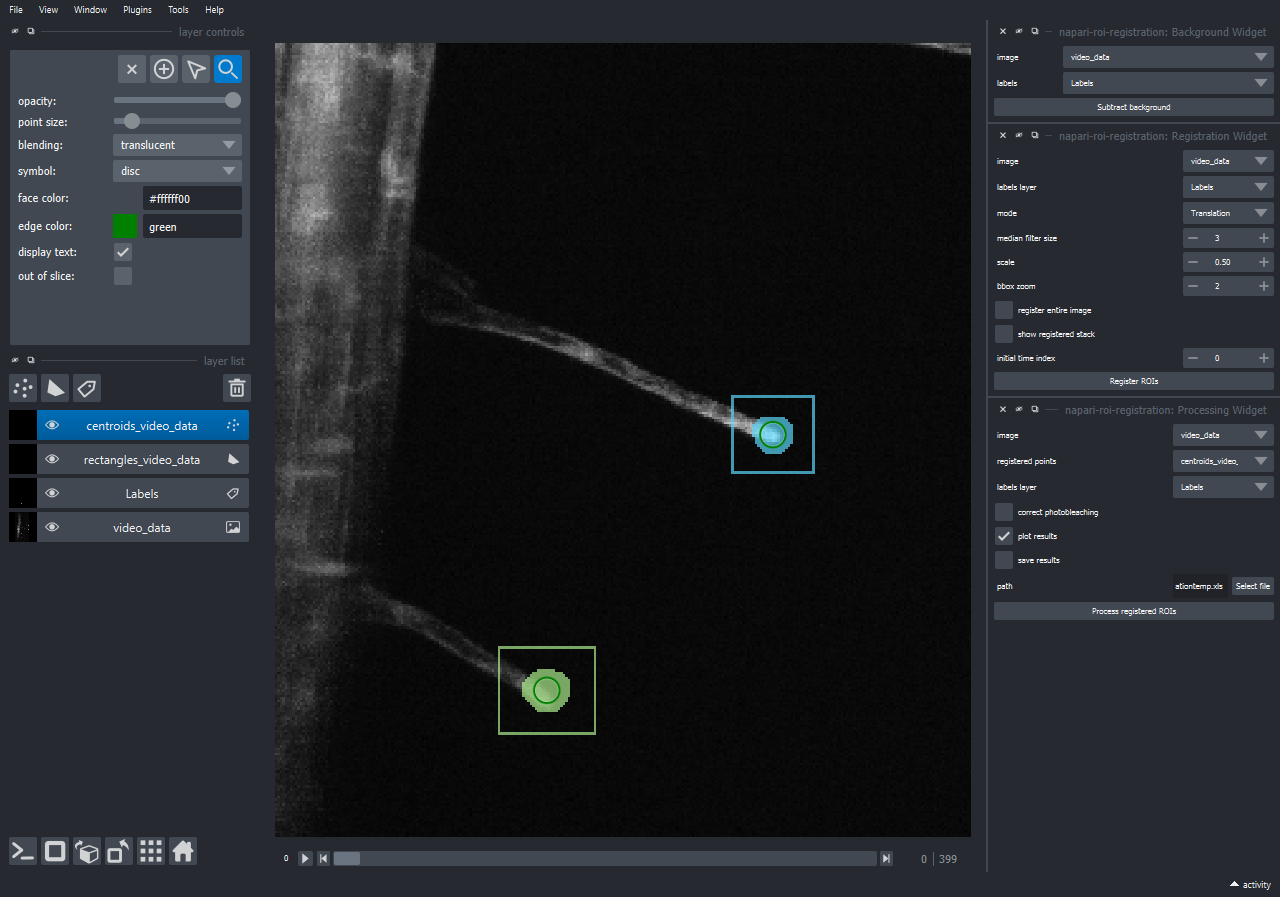
Register ROIsbutton: registration of the entire stack will be performed. When the registration is finished two new layers will appear in the viewer. One layer contains the centroids of the drawn labels while the other contains the bounding boxes enclosing the ROIs. The registration starts from the currently selected frame. Ifregister entire stackis selected, the registration will create a new layer for each label, with the registered ROI stacks.
Processing Widget
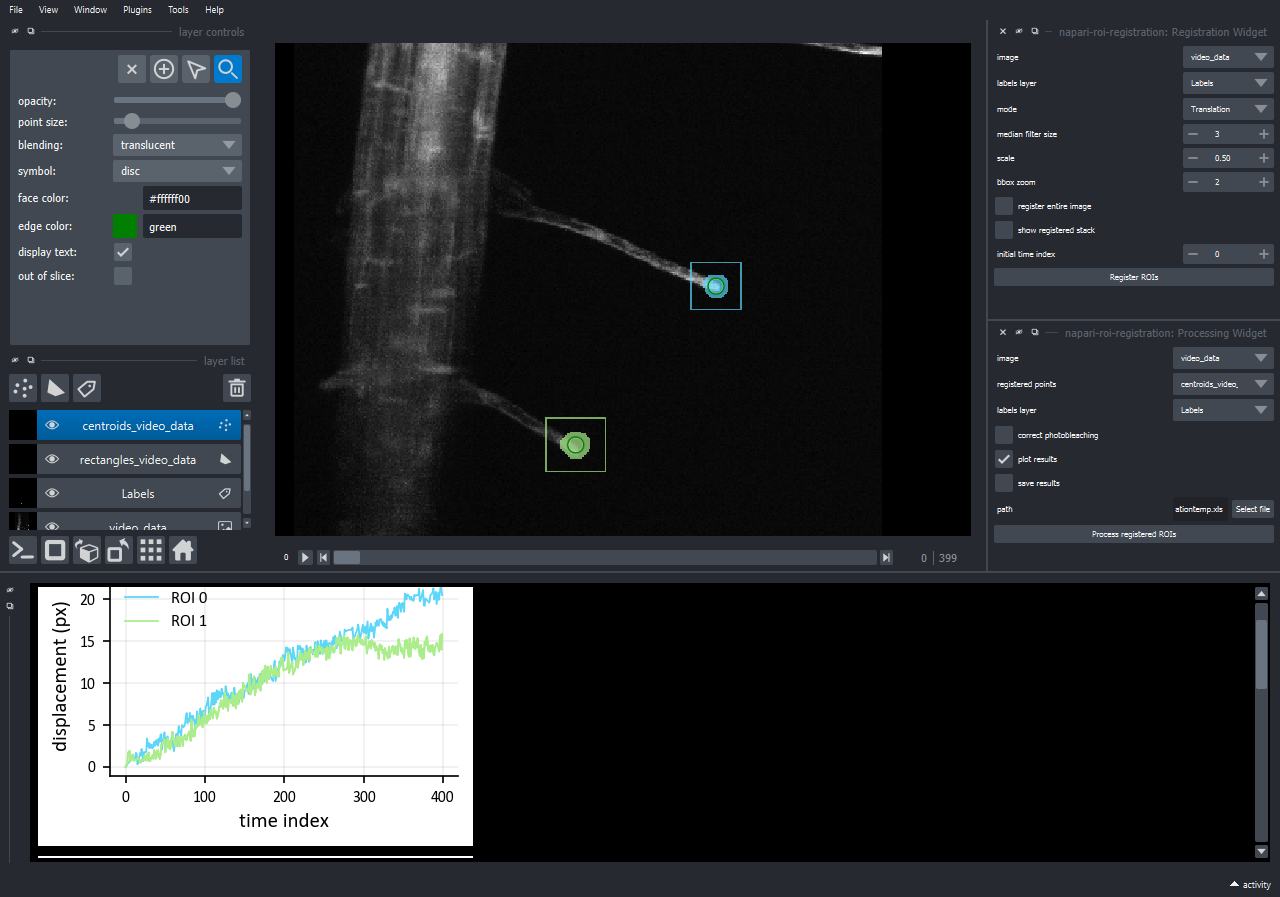
Pushing the Process registered ROIs button, the registered ROIs will be analyzed. The intensity of the registered ROIs (measured on the area of the selected label) and the displacement of the ROIs will be calculated.
If plot results is selected the plot of displacement vs time index and mean intensity vs time index will appear in the Console.
Choosing the save results option, an excel file containing ROIs positions, displacements and intensities, will be saved.
Background Widget
- Create a new Labels layer and draw a label on the area where you want to calculate the background.
- Push the
Subtract backgroundbutton. A new image layer will appear in the viewer. This layer contains the image to which the background was subtracted.
Contributing
Contributions are very welcome. Tests can be run with tox, please ensure the coverage at least stays the same before you submit a pull request.
License
Distributed under the terms of the BSD-3 license, "napari-roi-registration" is free and open source software
Issues
If you encounter any problems, please file an issue along with a detailed description.
1 maintainer

Metadata
1 maintainer
Release files for napari-roi-registration 0.1.4
For a detailed explanation of source distributions (sdists) and built distributions (wheels), please see the package formats documentation.
Source distribution (sdist)
| File | Size | Uploaded | Provenance | Actions |
|---|---|---|---|---|
| napari-roi-registration-0.1.4.tar.gz | 11.6 MB | Without provenance | Details for napari-roi-registration-0.1.4.tar.gz |
Built distribution (wheel)
| File | Interpreter | ABI | Platform | Actions Reset |
|---|---|---|---|---|
| napari_roi_registration-0.1.4-py3-none-any.whl | Python 3 | none | any | Details for napari_roi_registration-0.1.4-py3-none-any.whl |
Total release size: 11.6 MB
Release files / napari-roi-registration-0.1.4.tar.gz
| Download URL | napari-roi-registration-0.1.4.tar.gz |
|---|---|
| Size | 11.6 MB |
| Tags | Source |
|
SHA-256 checksum How to use checksums |
166263cae897874806152acebdfceb51daef8cad6d02f0ddfc4d70958e539f46
|
|
BLAKE2b-256 checksum How to use checksums |
d16cef7eea445a81994632738dcbc2daaca321771e2a710ae65f957085d15f24
|
| Upload date | |
|
Uploaded using Trusted Publishing? What is trusted publishing? |
No |
| Uploaded via |
twine/4.0.2 CPython/3.12.1
|
Release files / napari_roi_registration-0.1.4-py3-none-any.whl
| Download URL | napari_roi_registration-0.1.4-py3-none-any.whl |
|---|---|
| Size | 20.1 kB |
| Tags | Python 3 |
|
SHA-256 checksum How to use checksums |
e3e3bd85d446707c15a5f027a138190fe459351d2c1381436985901bf7f1e7a3
|
|
BLAKE2b-256 checksum How to use checksums |
76add093f707e1a1a92e7aec744819abd9984c3c094a53387495e8263a895133
|
| Upload date | |
|
Uploaded using Trusted Publishing? What is trusted publishing? |
No |
| Uploaded via |
twine/4.0.2 CPython/3.12.1
|
Security for napari-roi-registration 0.1.4
Provenance
Provenance describes where a file came from. On PyPI, provenance is shared via attestations, which provide a verifiable record of the build or publishing details. View details, limitations and caveats.
No provenance found
None of the files in this release were uploaded with provenance metadata.
A note on package security
PyPI is a repository for distributing packages, not a service for auditing them. While third-party security researchers and our staff do their best to detect and remove malicious packages, PyPI cannot guarantee the quality, security or suitability of any given package.
To learn more about protecting yourself from malicious actors, visit our package security documentation.














