
napari plugin for ROI tracking and FRAP analysis in time-lapse images

Project description
Napari_Simple_Tracker



Napari_Simple_Tracker is a lightweight, easy-to-use napari plugin for ROI tracking and FRAP analysis in time-lapse imaging data.
It is intentionally simple while still providing the core tools needed for routine quantitative analysis.
- Simple: point-based interaction with minimal configuration
- Practical: tracking, intensity plotting, CSV export, and session save/load are included
- Readable: ROI masks and track IDs are displayed directly in the napari viewer
Capabilities
Simple_Tracker
- Multi ROI tracking
- Linear interpolation across frames
- Mean intensity measurement within circular ROIs
- Plot generation
- CSV export
- Session save/load
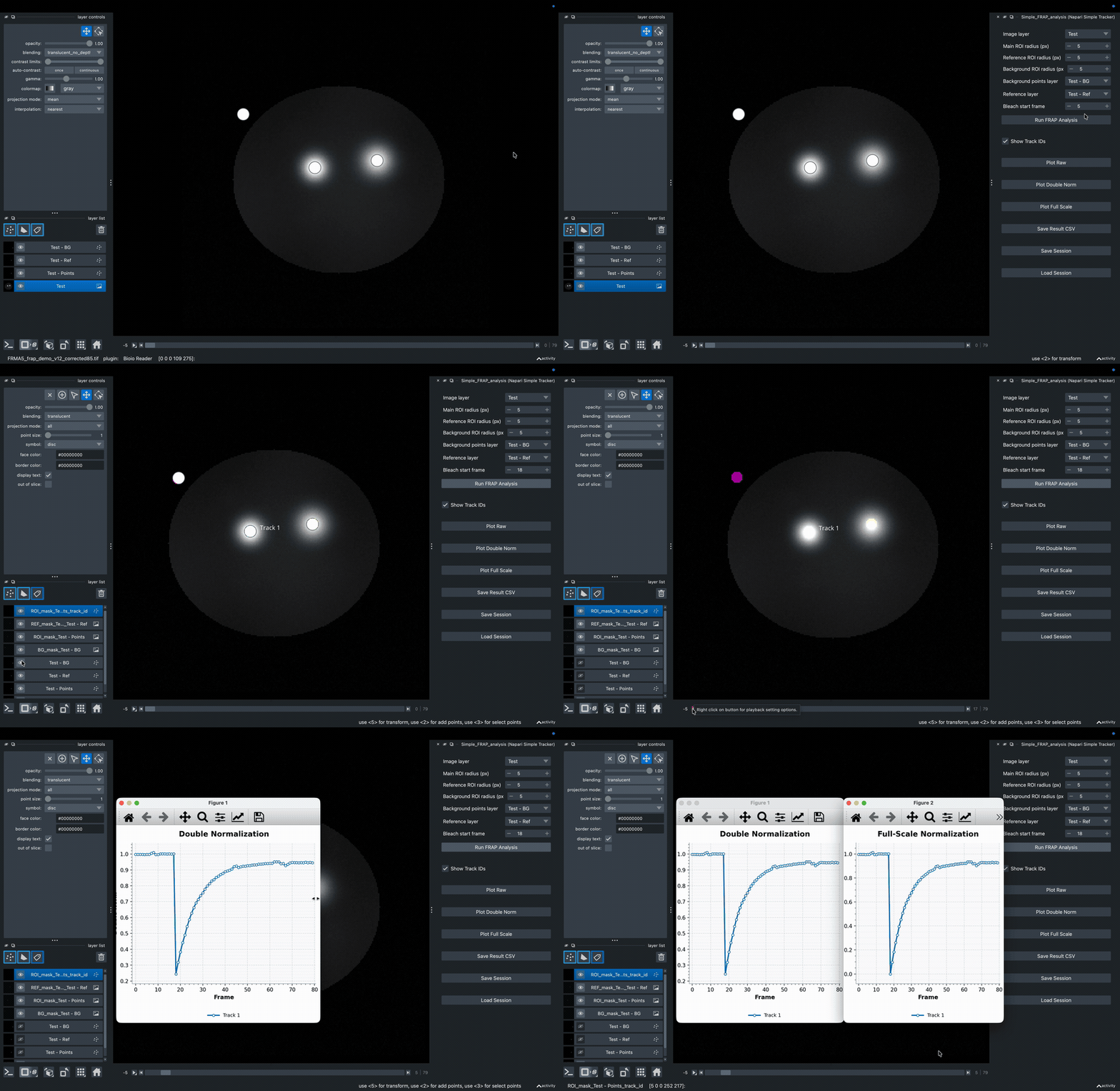
Simple_FRAP_analysis
- FRAP analysis using a main ROI, with optional reference and background ROIs
- Background correction
- Double normalization
- Full-scale normalization
- Plot generation
- CSV export
- Session save/load
Examples
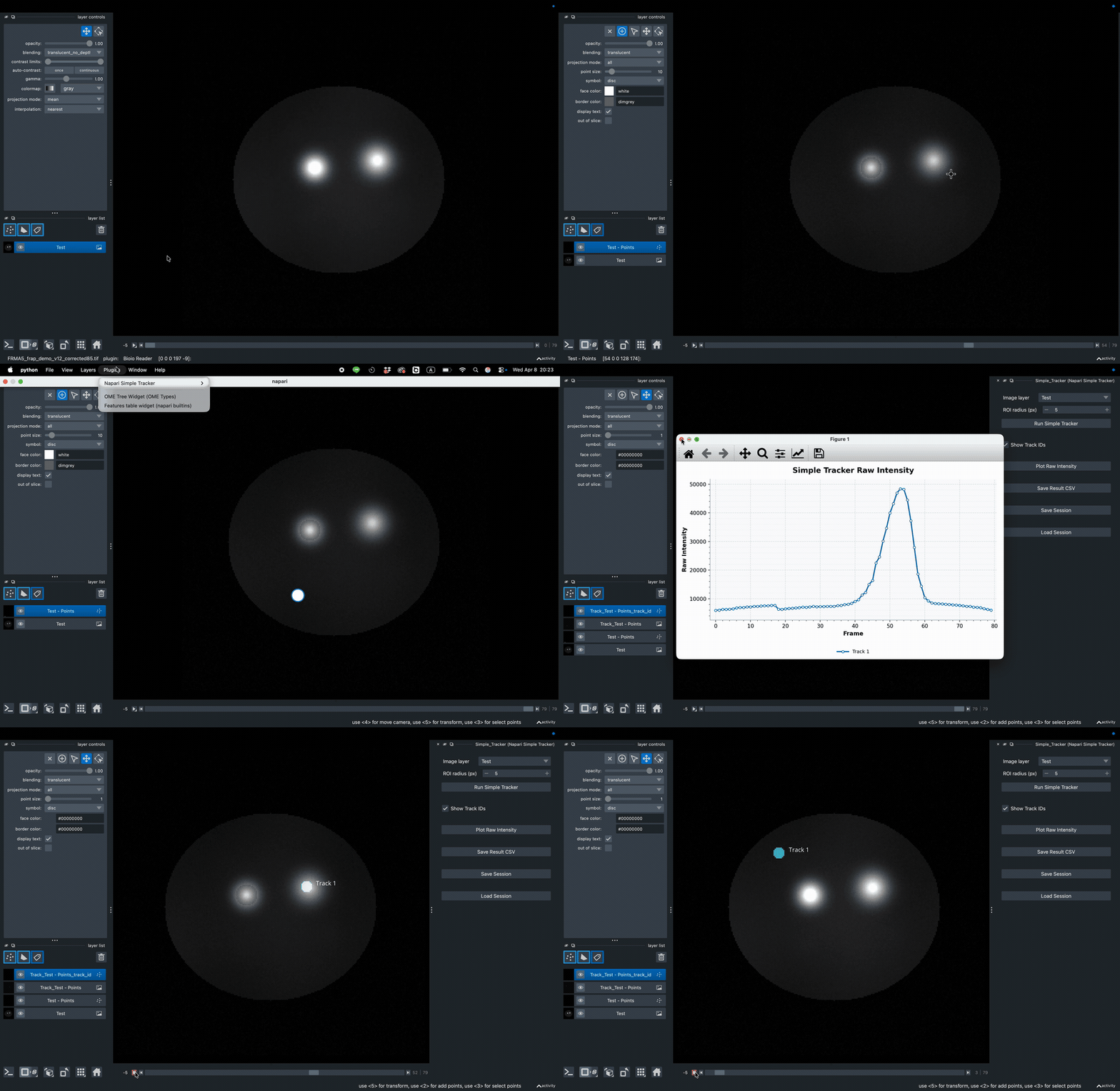
Simple_Tracker
Simple_FRAP_analysis
Installation
This package is published on PyPI as napari-simple-tracker.
Install with pip
Install the plugin in an environment where napari is already installed:
python -m pip install napari-simple-tracker
Install from napari
- Launch napari.
- Open
Plugins -> Install/Uninstall Plugins.... - Use
Install by name/URL. - Enter the package name
napari-simple-trackerand install it.
Install from source
To install the latest local version from this repository:
git clone https://github.com/Aohirovet/Napari_Simple_Tracker.git
cd Napari_Simple_Tracker
python -m pip install .
If you use a dedicated environment for napari, activate it before running the install command.
Usage
After installation, open napari and launch either widget from:
Plugins -> Napari Simple Tracker -> Simple_Tracker
or
Plugins -> Napari Simple Tracker -> Simple_FRAP_analysis
Quick Start
Open image
  -> place Points
  -> open plugin
  -> run analysis
  -> inspect masks, plots, and CSV output
Simple_Tracker
- Load a time-series image in napari.
- Create one
Pointslayer for each object to be tracked. - Mark the object center across multiple frames.
- Open
Plugins -> Napari Simple Tracker -> Simple_Tracker. - Press
Run Simple Tracker.
Simple_FRAP_analysis
- Load a time-series image in napari.
- Create
Pointslayers for the main ROI. - Create one
Pointslayer for the reference ROI. - Optionally create one
Pointslayer for the background ROI. - Open
Plugins -> Napari Simple Tracker -> Simple_FRAP_analysis. - Select the relevant layers and ROI radii, then press
Run FRAP Analysis.
Documentation
Detailed usage notes, supported image dimensions, output columns, session behavior, and common errors are documented here:
Release Note
For every new public release, increment the version in pyproject.toml before publishing to PyPI or expecting changes to appear on napari-hub.
License
MIT License
Release history Release notifications | RSS feed


Download files
Download the file for your platform. If you're not sure which to choose, learn more about installing packages.
Source Distribution
Built Distribution
Filter files by name, interpreter, ABI, and platform.
If you're not sure about the file name format, learn more about wheel file names.
Copy a direct link to the current filters
File details
Details for the file napari_simple_tracker-1.1.6.tar.gz.
File metadata
- Download URL: napari_simple_tracker-1.1.6.tar.gz
- Upload date:
- Size: 17.7 kB
- Tags: Source
- Uploaded using Trusted Publishing? No
- Uploaded via: twine/6.2.0 CPython/3.10.13
File hashes
| Algorithm | Hash digest | |
|---|---|---|
| SHA256 |
b302a0ba615956e910990ce1d1dbb4566d9f24e450de9b01769af421ead0f3d8
|
|
| MD5 |
39dab18f8e75430621fa3a70daf4b42b
|
|
| BLAKE2b-256 |
799113670b2d4f5af68f6340831adfda215abc548e58fdcd04f07ac2c2219901
|
File details
Details for the file napari_simple_tracker-1.1.6-py3-none-any.whl.
File metadata
- Download URL: napari_simple_tracker-1.1.6-py3-none-any.whl
- Upload date:
- Size: 17.6 kB
- Tags: Python 3
- Uploaded using Trusted Publishing? No
- Uploaded via: twine/6.2.0 CPython/3.10.13
File hashes
| Algorithm | Hash digest | |
|---|---|---|
| SHA256 |
3b3ddfceead76505d277a2be3f4ab57ce391b058938f0fe61ae9586210f528f2
|
|
| MD5 |
19a20b6da5120a1382019b6a4b113281
|
|
| BLAKE2b-256 |
82b59e22de9cb7a0b6ed884357839c96f835b9ecd77fd2cf28ecee88c33c0bf6
|






