
This release is a pre-release and may not be stable for production use.
Napari Track Edit


An application for interactive tracking with motile. The full documentation of the plugin can be found here.
Motile is a library that makes it easy to solve tracking problems using optimization by framing the task as an Integer Linear Program (ILP). See the motile documentation for more details on the concepts and method.
Installation
Users can download and install an executable application from the github release, or
install from pypi in the environment of their choice (e.g. venv, conda) with the command
pip install napari-track-edit.
Currently, napari-track-edit requires python >=3.11.
Recommended extras
For better performance, you can install optional extras:
-
numba: Speeds up candidate graph construction significantly.
pip install napari-track-edit[numba]
-
gurobi: Uses the Gurobi solver instead of the default open-source solver. Gurobi is much faster but requires a license (free for academics).
pip install napari-track-edit[gurobi]
You can install multiple extras at once: pip install napari-track-edit[numba,gurobi]
Gurobi license version mismatch
If you have a Gurobi license and encounter an error about license version mismatch,
you may need to install a specific version of gurobipy that matches your license.
Use one of the version-specific extras:
pip install napari-track-edit[gurobi12]  # For Gurobi 12.x licenses
pip install napari-track-edit[gurobi13]  # For Gurobi 13.x licenses
Developers can clone the GitHub repository and then use uv to install and run the code.
See the developer guide in DEVELOPER.md for more information.
Usage
Start napari and call the main widget via Plugins > Napari Track Edit > Open all widgets. 2D+time and 3D+time sample data can be loaded via File > Open Sample > Napari Track Edit. You can track objects in napari Labels or Points layers. For details, please read the documentation.
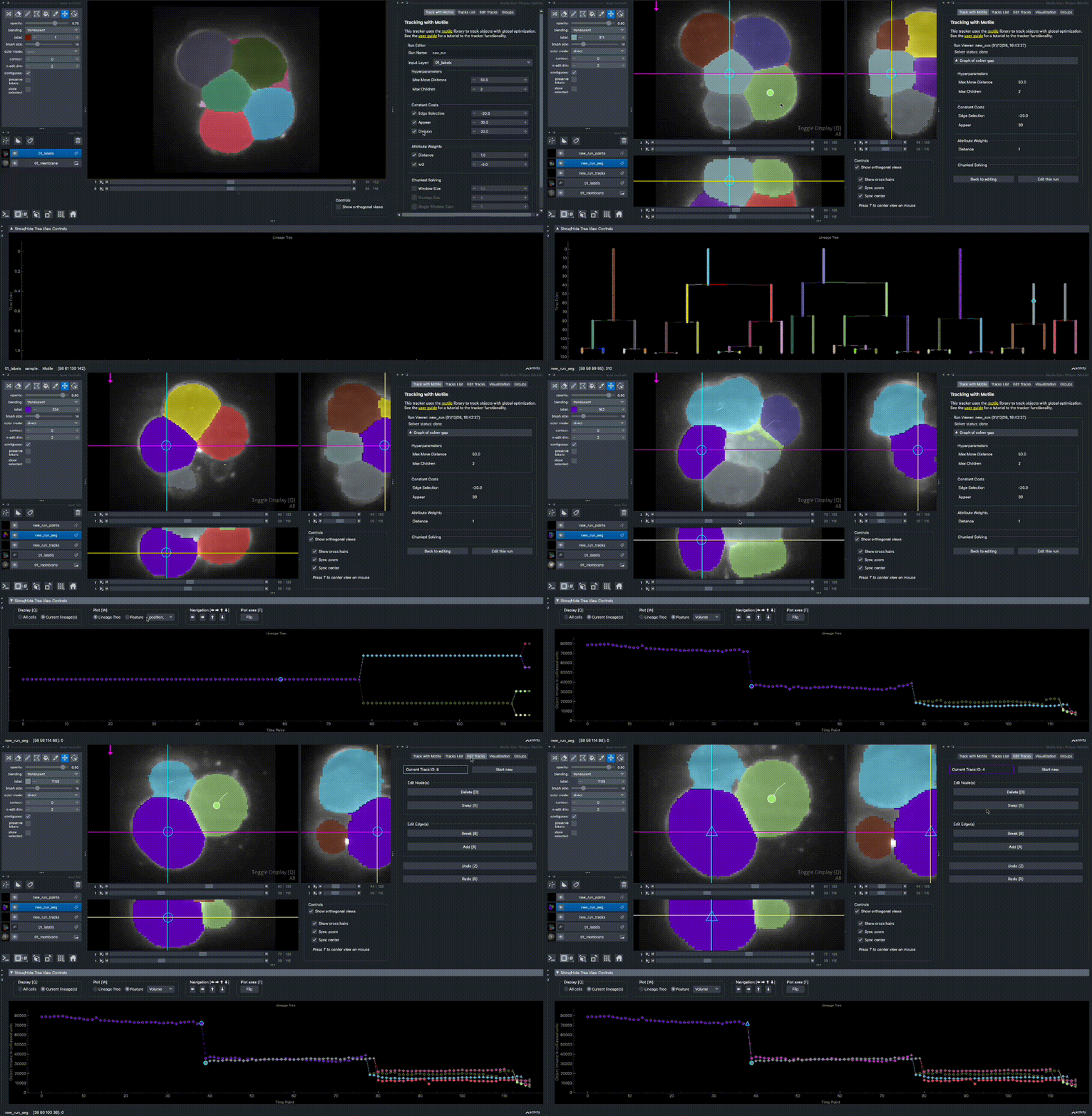
If you are new to using napari-track-edit, you can follow this tutorial to learn the basics.
Package the application into an executable and create the installer
Tagging any branch will automatically trigger the deploy.yml workflow,
which pushes the tagged version to PyPi and creates a github release; draft release if the tag contains "-dev", pre-release if the tag contains "-rc' or a full release otherwise. In case of a draft or pre release, when the user updates the release notes and promotes it to a published release, github will trigger make_bundle_app.yml workflow which will create the Linux, Mac and Windows installer and will upload them as release artifacts to github.
Issues
If you encounter any problems, please file an issue along with a detailed description.
Metadata
Release files for napari-track-edit 1.0.0a2
For a detailed explanation of source distributions (sdists) and built distributions (wheels), please see the package formats documentation.
Source distribution (sdist)
| File | Size | Uploaded | |
|---|---|---|---|
| napari_track_edit-1.0.0a2.tar.gz | 15.6 MB | Details |
Built distribution (wheel)
| File | Interpreter | ABI | Platform | Reset |
|---|---|---|---|---|
| napari_track_edit-1.0.0a2-py3-none-any.whl | Python 3 | none | any | Details |
Total release size: 15.8 MB
Release files / napari_track_edit-1.0.0a2.tar.gz
| Download URL | napari_track_edit-1.0.0a2.tar.gz |
|---|---|
| Size | 15.6 MB |
| Tags | Source |
|
SHA-256 checksum How to use checksums |
1b046c43acf50a466c37da557c08c878474e1b8ec6f0a3ba9f89bf3f25233bc2
|
|
BLAKE2b-256 checksum How to use checksums |
dd06ae70b173effe82c0ecc205f0b549ef2a4cb476c9c9a85de993df2bd409ae
|
| Upload date | |
|
Uploaded using Trusted Publishing? What is trusted publishing? |
Yes |
| Uploaded via |
twine/7.0.0 CPython/3.13.14
|
Provenance
Provenance describes where a file came from. On PyPI, provenance is shared via attestations, which provide a verifiable record of the build or publishing details. View details, limitations and caveats.


PyPI Publish Attestation
PyPI verified that this artifact, at this checksum, originated from the publisher listed below.
Signed by GitHub Actions, verified by PyPI on Sep 26, 2026.
Transparency logRelease files / napari_track_edit-1.0.0a2-py3-none-any.whl
| Download URL | napari_track_edit-1.0.0a2-py3-none-any.whl |
|---|---|
| Size | 212.4 kB |
| Tags | Python 3 |
|
SHA-256 checksum How to use checksums |
d1a815bb09f3e041843c52124942d7bb891bfffebabd2b27967dc00cd635f1d0
|
|
BLAKE2b-256 checksum How to use checksums |
ee79dc38feef0446a2e7a00bb75cb67d4b97e44b0ad0c45e79e407cab128620c
|
| Upload date | |
|
Uploaded using Trusted Publishing? What is trusted publishing? |
Yes |
| Uploaded via |
twine/7.0.0 CPython/3.13.14
|
Provenance
Provenance describes where a file came from. On PyPI, provenance is shared via attestations, which provide a verifiable record of the build or publishing details. View details, limitations and caveats.
PyPI Publish Attestation
PyPI verified that this artifact, at this checksum, originated from the publisher listed below.
Signed by GitHub Actions, verified by PyPI on Sep 26, 2026.
Transparency log













