
This release is a pre-release and may not be stable for production use.

VIPP — Visual Image Processing Platform
Visual image processing made approachable.
VIPP's scientific purpose is to support visual workflows for reproducible bioimage analysis: workflows that can be inspected, saved, rerun, and reported with their important context intact.




napari-vipp is the napari-native implementation of VIPP. Build typed visual
workflows, inspect intermediate images and tables, tune parameters, save and
batch-run graphs, and retain the metadata and provenance needed to understand
how results were produced.
Alpha software: expect breaking workflow and parameter changes. Validate outputs on representative data before scientific interpretation or publication.
VIPP includes physical-grid checks, exact unsampled diagnostics, detached viewer layers, atomic artifacts, source reverification, and publication only after successful batch validation. See the scientific integrity boundaries and scientific behavior requirements.
Quick Start
Windows Installer (Recommended Path)
The 0.13.0a8 links below become valid only when the official
v0.13.0a8 GitHub prerelease and checksum sidecars are public. Until then, use
the published 0.13.0a7 release or an explicitly marked development checkout;
do not download a file from a guessed asset URL.
The normal experience is one Windows .exe: download
VIPP-Setup-0.13.0a8-Windows-x86_64-UNSIGNED.exe
from the official v0.13.0a8 release, double-click it, and keep the recommended
managed VIPP environment. Review CPU or qualified NVIDIA GPU setup, then launch
VIPP from the shortcuts it creates. A supported 64-bit Python is a separate prerequisite;
if it is missing, setup links to the official Python 3.12.10 installer and lets
the user check again afterward.
Before Install is enabled, setup shows the exact managed location, the resolved CPU or NVIDIA CUDA 13 route, and whether shortcuts will be added to the Start Menu only or to both the Start Menu and Desktop. GPU setup currently needs at least 15 GiB free on the installation drive while it runs. This is disk storage, not GPU memory (VRAM). It also needs at least 5 GiB free on each drive used for Windows temporary files and VIPP installer records; CPU setup needs at least 1 GiB there. Setup names the exact location if that check fails. The standard GPU installation includes every current GPU implementation.
For 0.13.0a8, one-click managed installation uses only two fixed per-track
roots. Windows supplies the canonical Local App Data directory through
SHGetKnownFolderPath(FOLDERID_LocalAppData); setup appends
VIPP\environments\cpu or VIPP\environments\cuda13. Custom managed roots are
not accepted. The CUDA path must contain ASCII characters only because the
pinned CuPy 14.1.1 runtime cannot reliably compile CUDA kernels from a Windows
environment path containing characters such as Å or é. Spaces are
supported. If canonical Local App Data contains a non-ASCII character, the
one-click CUDA route is unavailable and setup offers CPU instead. The fixed CPU
root remains supported with Unicode paths.
Expert-selected existing environments remain a separate, non-mutating route; setup does not move, edit, or turn them into managed installations. If an older installer-owned CUDA copy is already in an incompatible path, setup will not update or repair it in place. After any separately recorded recovery from an earlier interrupted transaction, the newly blocked selection performs no new mutation of that copy. It can be removed through its ownership-bound Windows Apps uninstaller, but this account cannot use one-click CUDA until its canonical Local App Data path is ASCII-compatible.
Unsigned alpha: this release is intentionally not Authenticode-signed, so Windows will show Unknown publisher and may show Windows protected your PC. Download only the explicitly named
-UNSIGNED.exefrom the officialv0.13.0a8GitHub release, verify its SHA-256 against the attachedSHA256SUMSfile, then select More info > Run anyway. Stop if the hash differs or antivirus identifies a threat; never disable Windows security. The Quick Start gives the exact verification steps and a manual fallback.
The VIPP Quick Start explains the installer-first flow, current manual commands, CPU/GPU choices, prerequisites, the advanced existing-napari route, update/repair/uninstall behavior, and a first workflow.
Manual Installation (Advanced And Non-Windows)
VIPP 0.13.0a8 supports CPython 3.12 and 3.13. Create and activate a dedicated
virtual environment, then install:
python -m pip install "napari[pyqt6]>=0.6" "napari-vipp==0.13.0a8"
vipp
An exact alpha version does not need pip's --pre option. The optional public
GPU route currently requires native Windows, CPython 3.12, a compatible NVIDIA
driver/GPU, and the pinned CUDA 13 stack. Follow the
Quick Start rather than adding
GPU packages to a general napari environment by hand.
Inside an existing napari session, open:
Plugins > VIPP Workflow (napari-vipp)
First Workflow
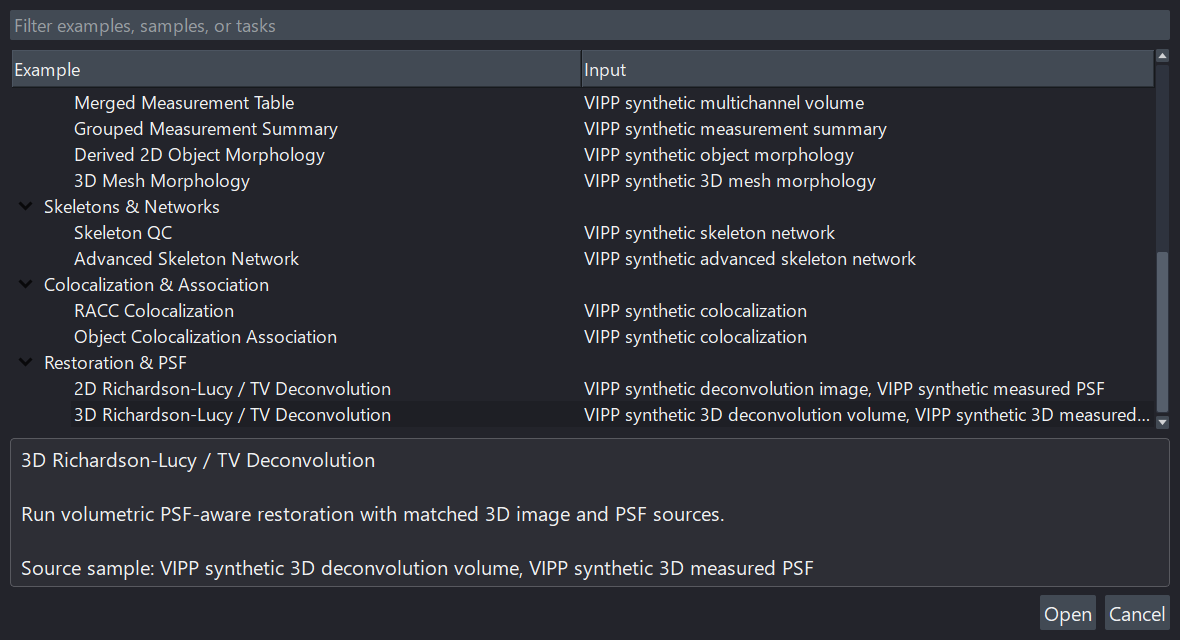
Choose Open example... and start with Red-Channel Label Cleanup. Select nodes from left to right to inspect parameters, previews, metadata, and outputs. Deterministic Batch & Provenance is a self-contained introduction to collection processing.
What VIPP Supports
| Area | Current alpha capabilities |
|---|---|
| Graph authoring | Searchable node palette and canvas, typed ports, multi-node selection and movement, copy/paste and exact-operation value transfer, dynamic outputs, cycle prevention, undo/redo, graph notes, named tunnels, insert-on-wire or before-tunnel editing, saved positions, and auto-layout. |
| Images and metadata | Semantic T/C/Z/Y/X axes, scale, units, origin, channel/acquisition metadata, source identity, and operation history. |
| Processing | Intensity transforms, filters, background correction, thresholding, watershed, binary/label morphology, channels, axes, masks, and composites. |
| Measurements | Object and intensity tables, calibrated/mesh morphology, skeleton/network analysis, colocalization, object association, and table composition. |
| Restoration | Born-Wolf PSF generation, measured-PSF preparation, Richardson-Lucy, and RL-TV deconvolution in 2D/3D. |
| Reuse and automation | Independent workflow tabs, workflow JSON, generated Python, explicit batch outputs, plan review, progress/cancellation, manifests, and provenance artifacts. |
| I/O | OME-TIFF, ImageJ TIFF, TIFF, local OME-Zarr 0.4/0.5, NPY/NPZ, common 2D raster formats, and optional microscope readers. |
Most graph operations are still eager. Large z-stacks and OME-Zarr datasets need deliberate cache, preview, and output choices; see Cache and memory.
GPU Acceleration (Optional)
VIPP remains fully usable on CPU on Windows, Linux, and macOS. The current public GPU route is native Windows, CPython 3.12, CUDA 13, and a compatible NVIDIA GPU with compute capability 7.5 or newer. GPU model names are recorded for reproducibility rather than used as an allowlist.
Auto is recommended and may correctly choose CPU. Prefer GPU requests every scientifically eligible GPU implementation, while Custom adds per-node choices and Find fastest pipeline…. Unsupported operations, data, parameters, environments, or memory conditions visibly use CPU.
See the GPU Guide for qualification, supported operation families, setup, benchmarking, fallback, and cross-device reproducibility. Durable batch/generated-Python behavior is documented in Durable GPU execution; exact scientific and benchmark evidence remains in the linked phase records rather than this landing page.
Workflow Basics
- Add an Image Source for a napari layer, file, or bundled sample.
- Add nodes from the palette and connect compatible ports.
- Select a node to tune parameters and inspect output metadata.
- Click Calculate for manual/cached analysis or deconvolution nodes.
- Pin important image outputs into napari for full-resolution comparison.
- Save the graph with Save workflow....
- Add explicit Batch Output nodes before running a collection when exact saved outputs matter.
The User Guide covers graph controls, workflow schema, batch configuration, source-axis declarations, export, and scientific review.
Optional Microscope Readers
Reader packages should be installed with the Python interpreter from the exact environment that launches VIPP, never a global/base Python. Keep the VIPP version pinned and restart napari afterward. For example:
python -m pip install "napari-vipp[nd2]==0.13.0a8"
Available extras include nd2, czi, microscope, and bioformats. See
Image import and export for formats, limitations, and
the matching commands.
Windows Installer And Startup
VIPP 0.13.0a8 provides a novice-facing Windows setup window, automatic CPU/GPU
recommendation, exact dependency review, transactional install/update/repair,
owned shortcuts, independent CPU/GPU Apps & Features entries, ownership-safe
uninstall, and acceptance checks. It installs into a private managed location
and never overwrites an unrelated folder or manually managed napari environment.
It also provides branded Automatic/CPU/Prefer-GPU
launchers, lightweight in-napari loading host, read-only planning CLI, and the
same reviewed CuPy/CuPyX implementation set in every CUDA installation.
See the Desktop startup and installer plan and Windows installation planner.
Documentation
- Quick Start
- User Guide
- GPU Guide
- Image import and export
- Example workflow index
- Measurement workflows
- Durable GPU execution
- Architecture
- Planning and roadmap
- Published versioned manual
Development
python -m venv .venv
.venv\Scripts\Activate.ps1
python -m pip install -e ".[dev]"
python -m npe2 validate src/napari_vipp/napari.yaml
python -m ruff check .
python -m pytest
Read CONTRIBUTING.md before opening a pull request. Use SUPPORT.md for help, report vulnerabilities privately through SECURITY.md, and follow the Code of Conduct.
Current Alpha
0.13.0a8 adds Fiji-style binary outlier cleanup, explicit QYX-to-ZYX source
interpretation and Z rescaling, drop-on-wire graph insertion, shared intensity
histograms, dtype-aware numeric controls, and more reliable optimizer results.
Interactive GPU tuning avoids parameter-specific compilation pauses, thumbnail
work is more responsive and truthful, and basic object measurements now use
the normal CuPy-only CUDA installation instead of a separate provider add-on. CPU
remains the portable reference, and unsupported inputs or parameters continue
to use it visibly.
See the categorized 0.13.0a8 release notes and roadmap for details and remaining milestones.
Citation, Acknowledgement, And License
If VIPP contributes to your work, acknowledge napari-vipp and link to the
project repository. Citation
metadata is available in CITATION.cff; a DOI or manuscript
citation can be added when available.
napari-vipp is distributed under the BSD 3-Clause License. See LICENSE for the full terms.
1 maintainer

Download files
Download the file for your platform. If you're not sure which to choose, learn more about installing packages.
Source Distribution
Built Distribution
Filter files by name, interpreter, ABI, and platform.
If you're not sure about the file name format, learn more about wheel file names.
Copy a direct link to the current filters
File details
Details for the file napari_vipp-0.13.0a8.tar.gz.
File metadata
- Download URL: napari_vipp-0.13.0a8.tar.gz
- Upload date:
- Size: 2.7 MB
- Tags: Source
- Uploaded using Trusted Publishing? No
- Uploaded via:
twine/7.0.0 CPython/3.13.14
File hashes
| Algorithm | Hash digest | |
|---|---|---|
| SHA256 |
4e1a7b40669832ad8e19e7e0297bae0c3d19fc175f7a99ba3d5284425dbbb433
|
|
| MD5 |
e6ba1b40d1668a911a404f4f4cf57edc
|
|
| BLAKE2b-256 |
183a6515304492ba4bfadc8d56980c23334de5f0cd490e630a74467fb71c2a8a
|
File details
Details for the file napari_vipp-0.13.0a8-py3-none-any.whl.
File metadata
- Download URL: napari_vipp-0.13.0a8-py3-none-any.whl
- Upload date:
- Size: 1.3 MB
- Tags: Python 3
- Uploaded using Trusted Publishing? No
- Uploaded via:
twine/7.0.0 CPython/3.13.14
File hashes
| Algorithm | Hash digest | |
|---|---|---|
| SHA256 |
77f18e4f34541847c93aa0a54b230a586b9967cc9a66d97370ea0f15ff593ec5
|
|
| MD5 |
d0da46c7b2470fce7e65d03f141f451e
|
|
| BLAKE2b-256 |
ccee3687ab6c55fe4b092ac9bb6bce604fbcc4942ecf9dfc9c4a35d9ab532f33
|














