
napari-virtual-reader
A napari plugin for lazy, reference-backed OME-Zarr images using refkv.
Remarks
Experimental software - Beta status. APIs and behavior may change without notice. Validate results independently before relying on them for analysis.
Open images without first converting them, writing a pixel copy, or creating an intermediate archive. Requested regions are still decoded and composed in memory for display; "virtual" does not mean zero memory use.
The plugin uses refkv directly. It does not depend on czitools, pylibCZIrw, or the napari-czitools plugin.
This README describes the source checkout. Published releases may not yet include all features below; see the changelog for unreleased changes.
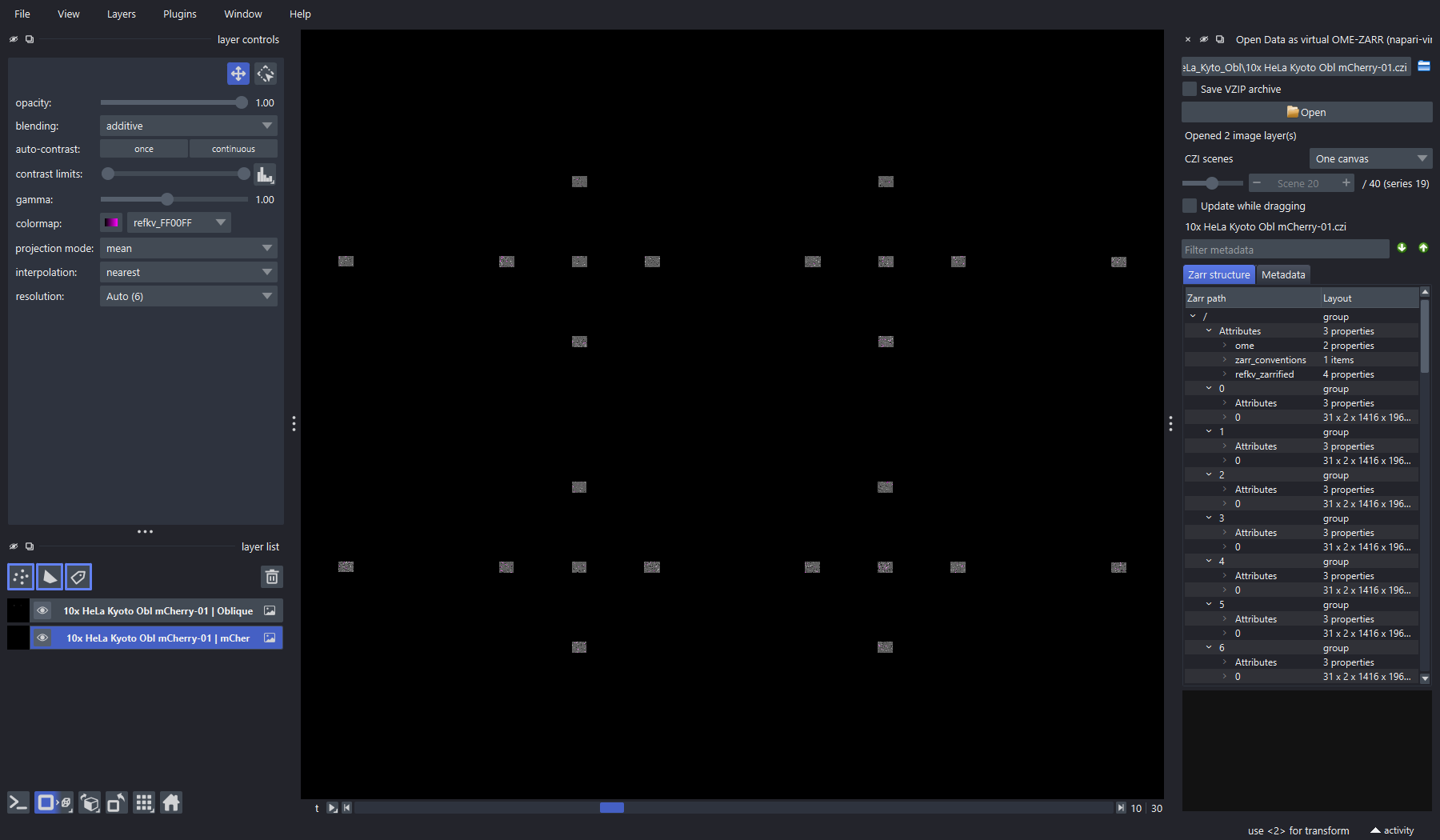
The current UI combines loading controls, scene navigation and the metadata inspector in one dock. The canvas below retains one layer per channel and a time slider; Update while dragging is off by default.
Visual guides
- How the plugin works: lazy loading, the combined dock, release-only slider dragging, scene controls, multidimensional canvases, metadata and VZIP archives.
- How CZI tile assembly works: tile placement, chunk reads, coordinate mapping, stored tile pyramids, lazy scene-canvas overviews, bounded overview caching and limitations.
These links open rendered HTML on GitHub Pages, not GitHub's HTML source viewer. The editable sources and standalone pages are in _docs; see the documentation publishing notes for regeneration and deployment.
Install
Python 3.12 or newer is required. Install into the environment running napari:
python -m pip install napari-virtual-reader
A working Qt backend is required. For a fresh environment:
python -m pip install "napari[pyqt6]" napari-virtual-reader
napari
Restart napari after installation. The package registers an npe2 reader and
widget through its napari.manifest entry point; no manual registration is
required. Check Plugins > Plugin Manager for napari-virtual-reader.
The plugin is also listed on napari hub.
Format-specific features
CZI image files
- RGB images: brightfield colour images open as one RGB/RGBA layer per acquisition channel, not separate red, green, and blue layers. Fluorescence channels remain separate.
- Large 2D images and pyramids: supported 2D mosaics are assembled on demand, including full resolution when native tiles are available. Napari switches between stored resolution levels as you zoom, without loading the whole image or writing a converted copy.
- Multiple scenes: choose One canvas or Scene slider in the dock. Matching scenes retain one layer per channel in both modes, including T/Z dimensions. Nonmatching scenes keep individual layers without forced padding or resampling. Use napari's native S slider or the dock's scene-number controls.
Why assembly helps: refkv can expose irregular or overlapping CZI tiles separately from its regular image levels. Reading only those levels can omit native resolution or show just an overview. The plugin places supported tiles using their CZI coordinates and groups them into the available resolution levels. Placement restores the missing view; lazy, chunk-by-chunk reads make it practical without building the whole slide in memory. Tile assembly does not invent missing source pixels or tile resolution levels. The separate scene-canvas path can add lazy display overviews from existing scene arrays.
This extra assembly is CZI-only. Other formats can display images and pyramids already exposed by refkv, but the plugin does not yet assemble their separate irregular tile arrays. General lazy loading is not a general tile-assembly solution.
Open the original CZI to use mosaic assembly; reopening a VZIP archive does not currently restore this assembly. Overlapping tiles use a fixed "later tile wins" rule, so overlap regions can look different from ZEN. If some tiles cannot be assembled, the plugin warns that the view may be incomplete. See Scope for technical details and limitations.
Open an image
In napari, choose Plugins > napari-virtual-reader > Open Data as virtual OME-ZARR, select the input, and click Open. This dock prepares the image in a background worker; napari provides its normal layer, contrast, time, and Z controls.
The plugin uses one dock: the file selector, Save VZIP archive, and Open controls stay at the top, with the metadata inspector below. The inspector receives the remaining vertical space as the dock is resized.
You can also use File > Open or drop a file on the napari canvas and choose the napari-virtual-reader reader. Drop a file on the plugin dock to select it without opening it yet.
import napari

viewer = napari.Viewer()
viewer.open("image.czi", plugin="napari-virtual-reader")
napari.run()
Raw images are virtualized in memory through refkv.zarrify.zarrify. Existing
.vzip archives are opened directly. Original image files must remain available
and unchanged for as long as their layers are used. Nothing is written beside
the source by default.
Save a VZIP Archive
In Plugins > napari-virtual-reader > Open Data as virtual OME-ZARR, select an image and enable
Save VZIP archive before clicking Open. Choose the destination in the
save dialog; the suggested filename is a sibling .vzip. Saving runs in the
background, and the resulting image still opens lazily with the metadata panel.
The status shows the saved filename, with its full path available on hover.
Saving stores refkv's reference layout, not converted pixel data. It retains the image series, pyramid levels and separate tile arrays exposed by refkv, not just the selected napari layer. It is not a self-contained image backup: the referenced source must remain available and unchanged. Existing destinations require explicit replacement confirmation; failed writes leave the old archive intact. Cancelling the save dialog cancels the open action. The save option is disabled for inputs that are already VZIP archives. File/Open and canvas drops remain in-memory operations without automatic saving.
The saved archive retains refkv's original reference layout, not the plugin's runtime mosaic composition. Refkv's live pyramid-factor summary is not saved in VZIP. If a CZI-derived archive contains separate tile arrays, reopening it still warns about unassembled tiles; open the original CZI to use mosaic assembly. Archive reads also depend on refkv's source-access policy; an archive can fail to open if that policy does not permit its referenced local files.
Metadata Inspector
The metadata inspector is embedded below the loading controls in the Open Data as virtual OME-ZARR dock, which opens on the right by default. Using the refkv reader through File/Open or canvas drag-and-drop automatically opens this same dock, without requiring the plugin menu first. Opening the plugin from the menu before or after a reader load reuses the dock rather than creating a second panel. A new reader load also reopens the dock if it was hidden. The inspector follows the selected image layer, independently of how it was loaded.
Dimension slider updates
With a composed CZI canvas selected, Update while dragging is off by default. Drag a dimension-slider thumb, such as T or Z, to preview its numeric index without changing the displayed image. Releasing the thumb requests only the final position, rather than calculating every intermediate frame.
Enable Update while dragging for continuous image updates. Keyboard steps, scrollbar step/page clicks, committed numeric entries and playback retain their normal immediate updates. Napari's numeric fields commit on Enter or focus loss; the dock's scene-number field also waits for committed entry rather than loading each digit.
Napari's dimension sliders are shared by all layers in a viewer, so this option affects that viewer while a composed CZI canvas is selected. Selecting another source, leaving composed canvas mode or closing the plugin widget restores the previous tracking behavior. The option is disabled outside a composed canvas. It does not enable background prefetch or change the overview-cache policy.
CZI scene display
Select a layer from a multi-scene CZI, then use CZI scenes in the dock:
- Scene slider (default for compatible scenes): use one image layer per acquisition channel with a real napari S dimension. Matching single-channel files with 28 scenes therefore open as one layer, not 28 layers. Move napari's S slider or use the dock's Scene number field and its up/down arrows.
- One canvas: matching scenes share one lazy Y/X spatial canvas per acquisition channel, at their recorded positions, retaining T and Z sliders when present. Switching a matching 28-scene, single-channel file therefore keeps one layer in both modes. Incompatible scenes retain individual layers at their physical positions; this is their default display mode.
- For nonmatching shapes, scales, dtypes or pyramid depths, Scene slider uses the dock slider and scene-number arrows instead. It shows the selected scene's channels and fits the camera to that scene. No padding or resampling is needed. Independent per-scene channel visibility also retains this mode.
The scene-number field is 1-based and supports typing a number and keyboard Up/Down; napari's native S indices are 0-based. The dock and native slider stay synchronized. Each scene retains its lazy pixels, dtype and pyramid levels. Combined canvases read only intersecting source regions in bounded output chunks. Gaps are zero and later numeric scenes win overlaps. Fractional scene positions use nearest-neighbour sampling on the canvas pixel grid. Lazy nearest-neighbour overview levels are added when needed for large, sparse canvases; switching back to S restores the original scene arrays and pyramids. Generated overview chunks are cached on demand in a shared 64 MiB in-memory LRU cache per canvas load, across channels and overview levels. Revisiting a cached timepoint or Z slice avoids rereading its source images; first visits still need source reads. Full-resolution and stored pyramid levels are not cached by this mechanism. Cache entries are evicted as the budget is reached; switching back to canvas mode creates a fresh cache. There is no background prefetch or disk cache. No full canvas or converted pixel copy is allocated or written during preparation. Combined canvases support S/T/C/Z/Y/X data: S is composed spatially in Y/X, C remains separate layers, and T/Z remain lazy dimensions, chunked one plane at a time. Scenes must match in shape, calibration and pyramid structure and share T/Z origins, without rotation, shear or extra affine transforms. Unsupported scenes retain separate layers.
Switch modes after loading without reopening the file. Display-mode changes apply to the selected layer's source load; other images and repeated loads of the same file are not converted. Native S stacks follow napari's shared dimension sliders; separate-layer dock sliders retain independent scene indices. Channel visibility settings are retained across scene switches and when returning to canvas. Selecting an unrelated layer disables the controls. CZI-derived VZIPs use the same scene controls, but retain their existing tile-assembly limitations.
A native S stack requires matching scenes on every acquisition channel, including the same scene membership. Otherwise the complete source retains separate layers for the dock slider. A single CZI scene containing multiple separated scan regions still counts as one scene; the reader does not invent scene boundaries. The controls require multiple OME image series exposed by refkv.
- Zarr structure shows expandable groups and arrays, including original shapes, dtypes, attributes, chunk grids and codec configuration.
- Metadata shows the selected layer's OME metadata, source and channel information, plus original scene transforms for stacked CZI images.
- A filter finds matching properties; selecting a row shows its complete, selectable value below the tree.
The older screenshot below illustrates metadata contents; it shows the historical separate-dock layout, not the current controls.
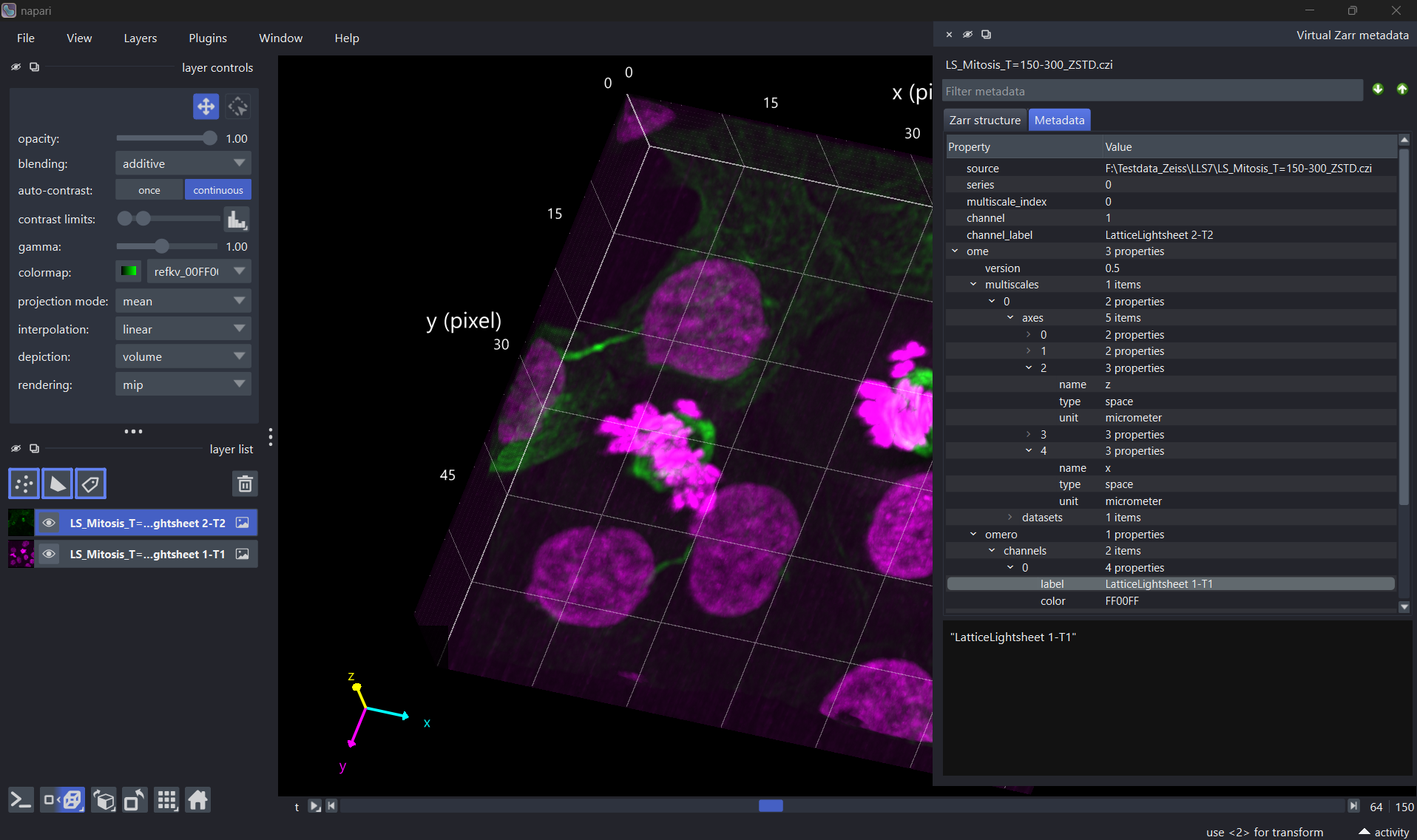
The inspector uses a metadata-only snapshot collected during reader preparation (in the background when using the plugin's Open button). It does not scan pixel data or reconstruct the source hierarchy from displayed layer shapes. Selecting an unrelated layer clears the inspector.
Scope
- Lazy CZI mosaic assembly: for 2D slide-scan series with an OME image and refkv's live pyramid-factor summary, the plugin assembles irregular and overlapping tiles alongside the existing image levels. Full resolution is included when native tiles are available. Each requested output chunk is at most 1024 x 1024 pixels per acquisition channel and reads only intersecting source regions. This bounds output tasks, not total memory: a compressed source chunk can require full decoding, and concurrent tasks use separate buffers. No full mosaic or converted image is written.
- Mosaic levels share the finest level's spatial extent. Coarse levels use
nearest-neighbour sampling to align differing origins and clipped/odd edges
with napari's shape-derived pyramid transforms. Native full-resolution
pixels are not resampled. Gaps are zero; overlaps use later numeric refkv
tile wins, with tiles drawn over any existing assembled level. This is
deterministic, not blending or image registration, and is not guaranteed to
match ZEN/libCZI overlap selection or codec rounding pixel-for-pixel.
metadata["czi_assembly"]records bounds, factors, full-resolution availability, tile count, and compositing policy. The inspector's Zarr tree still describes the original reference store, not the runtime mosaic. Missing resolution levels are not generated, and gaps at one level are not filled from another. Source read/decode errors propagate; they are not replaced with zero-filled pixels. - Remaining incomplete CZI views: time/Z tile stacks, scenes without an
OME image, unclassified tile scales, and VZIPs without the live calibration
summary are not assembled by this implementation. Unsupported tiles retain
the napari warning once per source load and
metadata["reader_warning"]. An input without any supported OME image still fails explicitly. Use napari-czitools for those cases; do not assume a displayed pyramid is complete when the warning is present. - CZI, TIFF/OME-TIFF, and other refkv-supported files that expose OME image series. Reader registration includes common microscopy and volumetric image extensions; actual support is determined by refkv's parser and the file's metadata/codecs. The extra tile assembler and incomplete-tile warning are CZI-specific; absence of that warning for another format does not establish that its view is complete.
- One layer per acquisition channel. Packed-colour CZI images (
Bgr24,Bgr48,Bgr96Float, andBgra32) open as RGB/RGBA layers rather than separate colour components. Detection uses refkv's CZI profile and component chunk layout, not channel count or names. Component order is corrected per pyramid level: raw/Zstd/LZW BGR(A) is reordered, while JPEG/JPEG-XR RGB(A) is retained. Complex-valued packed-colour CZI pixels are not supported. - GUI loads compact compatible CZI scenes into one layer per channel with a
leading S axis; matching scenes also use one lazy spatial canvas per
channel in canvas mode without reopening the source. Incompatible scenes retain the
separate-layer dock slider. Other formats retain separate series layers
without CZI scene controls. Scripted
read_images(path)calls also stack compatible CZI scenes lazily by default; passstack_scenes=Falseto request individual scene/channel layer descriptions. - RGB/RGBA keeps its component axis last, outside napari's dimension sliders; ordinary fluorescence channels remain separate additive layers. Loading and reordering stay lazy, preserve pixel dtype, and do not write converted images.
- CZI stacking requires matching axes, shapes, dtypes, physical scales and
pyramid levels. Incompatible scenes remain separate without cropping or
resampling. Axes with differing scene origins use zero translation on the
stacked layer; shared origins are retained. Original origins and metadata
remain available in the layer's
metadata["scenes"]list. These compatibility restrictions apply to native S stacks, not the dock's separate-layer slider. - Stored multiscale pyramids, OME axis ordering, physical scale/origin, channel names, colors, and display windows.
- Regular and rectilinear chunk grids, without scanning complete lazy arrays for contrast limits. Files without display windows use dtype bounds (0-1 for floating point); adjust contrast in napari as needed.
- OME-Zarr 0.4 and 0.5 image metadata, including nested image hierarchies.
This is deliberately not a replacement for every refkv dataset interface: non-image tables, audio, arbitrary tensors, remote inputs, and stores without OME image metadata are outside this first version. Time and Z use napari's dimension sliders; the dock adds CZI scene-display controls.
Development
git clone https://github.com/sebi06/napari-virtual-reader.git
cd napari-virtual-reader
python -m pip install -e ".[testing]"
python -m pytest
python -m ruff check .
Install a Qt backend as above if the development environment does not already provide one. Development installs register the same napari plugin as PyPI installs.
Source guide:
- _reader.py: reference stores, lazy layers, axes, colours, scenes, warnings and archive saving.
- _czi_mosaic.py: native tile placement, spatial indexing and on-demand pyramid composition.
- _widget.py: loading controls, preparation workers and Qt-thread delivery of layers.
- _metadata.py: shared dock access and a read-only inspector built from metadata snapshots.
Releases
Version 0.0.4 adds multidimensional scene canvases, native scene navigation, bounded overview caching and load-on-release slider dragging. It includes refreshed visual guides and a current-UI screenshot. The package remains experimental Beta software; review Scope before using it for analysis.
The package workflow tests pull requests and pushes to main against
refkv[zarr,images]==0.2.0 from PyPI on Linux, Windows, and macOS with
Python 3.12, 3.13, and 3.14. The runtime requirement remains refkv 0.2.0 or newer.
PyPI publishing
runs only after its test matrix passes on a pushed tag beginning with v;
use the release convention vX.Y.Z.
Set project.version in pyproject.toml and the runtime __version__ to the
intended release version before
tagging; tags do not change the package version. PyPI requires a new
version for every upload. Manual runs of the package workflow test and build
without publishing to PyPI. The separate documentation workflow publishes
GitHub Pages on relevant pushes to main or a manual run on main.
See the changelog for the change history and the release notes for release-specific features, validation, and limitations. Published tags and release details are available on GitHub Releases.
1 maintainer

Metadata
1 maintainer
Release files for napari-virtual-reader 0.0.4
For a detailed explanation of source distributions (sdists) and built distributions (wheels), please see the package formats documentation.
Source distribution (sdist)
| File | Size | Uploaded | Provenance | Actions |
|---|---|---|---|---|
| napari_virtual_reader-0.0.4.tar.gz | 1.6 MB | Without provenance | Details for napari_virtual_reader-0.0.4.tar.gz |
Built distribution (wheel)
| File | Interpreter | ABI | Platform | Actions Reset |
|---|---|---|---|---|
| napari_virtual_reader-0.0.4-py3-none-any.whl | Python 3 | none | any | Details for napari_virtual_reader-0.0.4-py3-none-any.whl |
Total release size: 1.7 MB
Release files / napari_virtual_reader-0.0.4.tar.gz
| Download URL | napari_virtual_reader-0.0.4.tar.gz |
|---|---|
| Size | 1.6 MB |
| Tags | Source |
|
SHA-256 checksum How to use checksums |
7d8dde5bac68353d7d9b7137b5a57c232b204dd065dd67dbec6b67fd72ff02ac
|
|
BLAKE2b-256 checksum How to use checksums |
e19ef327de7b8bed07715c5be72b4142be38eb2bf46475b3ca66e5f2e8f86b69
|
| Upload date | |
|
Uploaded using Trusted Publishing? What is trusted publishing? |
No |
| Uploaded via |
twine/7.0.0 CPython/3.12.16
|
Release files / napari_virtual_reader-0.0.4-py3-none-any.whl
| Download URL | napari_virtual_reader-0.0.4-py3-none-any.whl |
|---|---|
| Size | 42.3 kB |
| Tags | Python 3 |
|
SHA-256 checksum How to use checksums |
2f31857e3712ddbc72f425c07c33b3fa4e7497bab5891621aeaa393a937825d2
|
|
BLAKE2b-256 checksum How to use checksums |
9ca956996737da0e09e4a3ed53f57a0f1fa52f6135668e2ef42c6a58cd5d67e8
|
| Upload date | |
|
Uploaded using Trusted Publishing? What is trusted publishing? |
No |
| Uploaded via |
twine/7.0.0 CPython/3.12.16
|
Security for napari-virtual-reader 0.0.4
Provenance
Provenance describes where a file came from. On PyPI, provenance is shared via attestations, which provide a verifiable record of the build or publishing details. View details, limitations and caveats.
No provenance found
None of the files in this release were uploaded with provenance metadata.
A note on package security
PyPI is a repository for distributing packages, not a service for auditing them. While third-party security researchers and our staff do their best to detect and remove malicious packages, PyPI cannot guarantee the quality, security or suitability of any given package.
To learn more about protecting yourself from malicious actors, visit our package security documentation.














