
VPN APP

Project description
Nautobot VPN App




An App for Nautobot
Overview
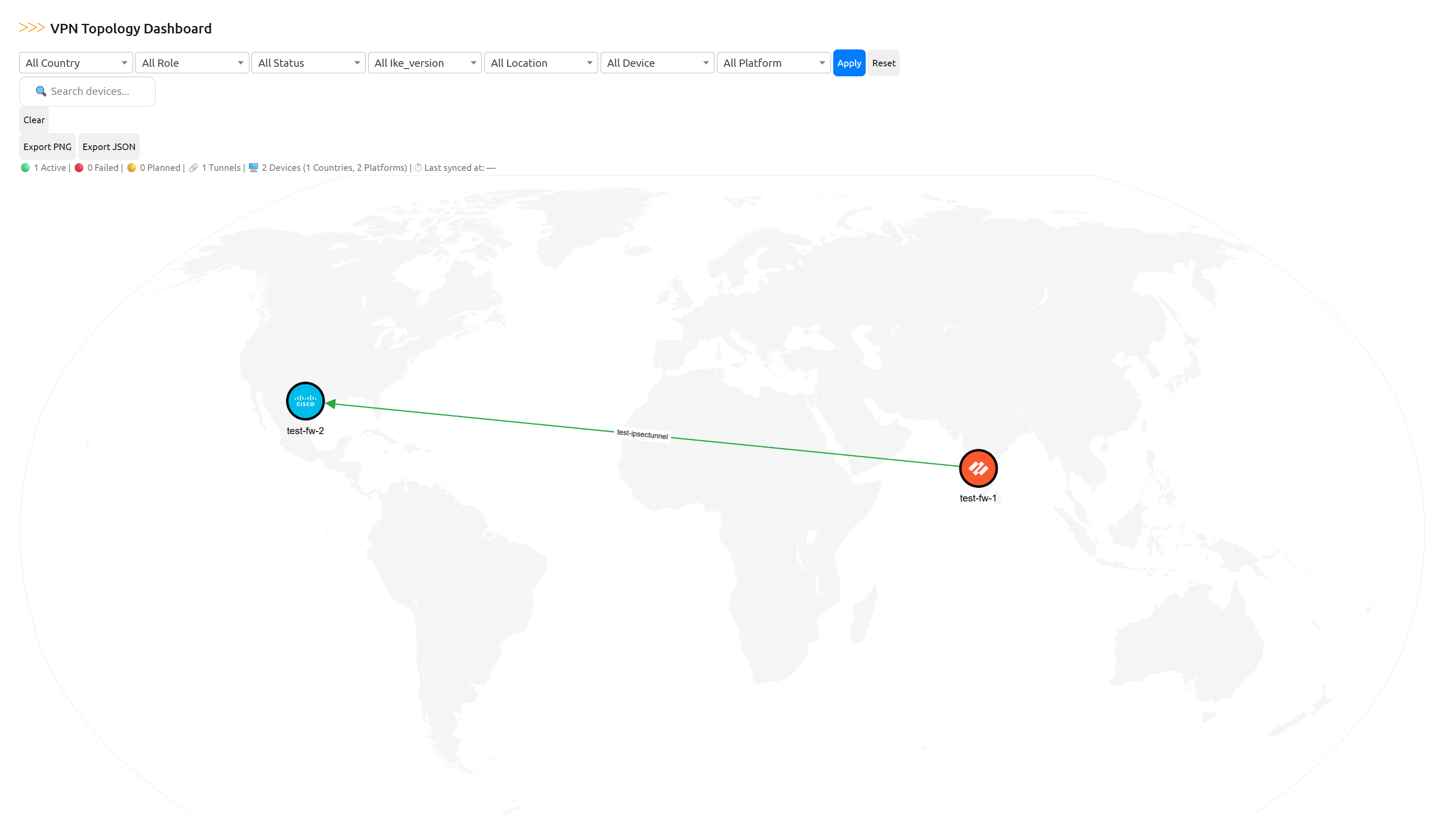
A Nautobot plugin designed to model, visualize, and manage VPN infrastructure, including IPSec tunnels, IKE gateways, crypto profiles, and dynamic topology diagrams sourced from Neo4j.
Key Features
- IKE Gateway and IPSec Tunnel modeling
- Inline or default crypto profile selection
- Dynamic tunnel provisioning form with interface auto-selection
- Topology visualization via Neo4j + Cytoscape
Requirements
- Nautobot >= 3.0.0 (validated on 3.0.1)
- Python >= 3.11
- Neo4j >= 5.0 (for topology view)
Installation
1. Install via pip
pip install nautobot-app-vpn
2. Enable the plugin
In your nautobot_config.py, add to PLUGINS and configure Neo4j settings:
NEO4J_URI = "bolt://neo4j:7687" NEO4J_USER = "neo4j" NEO4J_PASSWORD = os.getenv("NEO4J_PASSWORD", "testneo4j")
PLUGINS = [
    "nautobot_app_vpn",
    # ...
]

PLUGINS_CONFIG = {
    "nautobot_app_vpn": {
        "map": {
        "style_url": "https://basemaps.cartocdn.com/gl/positron-gl-style/style.json",
        "attribution": "© OpenStreetMap contributors © CARTO"
        }
    },
}
Docker/Compose Setup (Optional)
If you are using docker-compose, include this plugin in your plugin_requirements.txt:
nautobot_app_vpn
Then rebuild Nautobot:
docker-compose build nautobot
Usage
Topology View
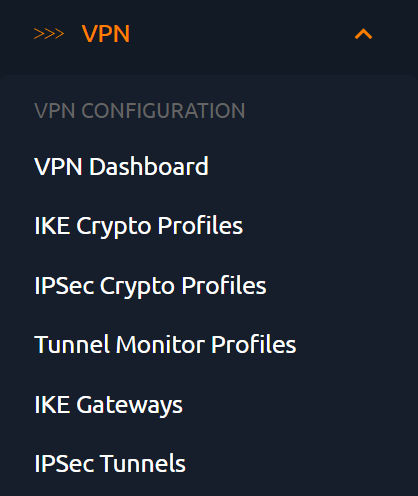
The plugin provides a Neo4j-powered dashboard under Plugins > VPN Dashboard, enabling visualization of active IPSec tunnels and their metadata using Open Street Map.
Forms for Provisioning
- Auto-select interfaces based on ISP zone tags
- Auto-populate IPs from synced device data
- Support dynamic IP tunnels
- Create or select IKE/IPsec crypto profiles
Screenshots





Development
Clone and install in editable mode:
git clone https://github.com/iss-world/nautobot-app-vpn.git
cd nautobot-app-vpn
poetry install
Run linters locally
ruff check .
yamllint .
Contributing
Pull requests are welcome! Please ensure code follows Nautobot plugin guidelines and passes all checks.
License
Apache License 2.0. See LICENSE for details.
Author
Maintained by @npolisetty26


Download files
Download the file for your platform. If you're not sure which to choose, learn more about installing packages.
Source Distribution
Built Distribution
Filter files by name, interpreter, ABI, and platform.
If you're not sure about the file name format, learn more about wheel file names.
Copy a direct link to the current filters
File details
Details for the file nautobot_app_vpn-2.0.0.tar.gz.
File metadata
- Download URL: nautobot_app_vpn-2.0.0.tar.gz
- Upload date:
- Size: 3.6 MB
- Tags: Source
- Uploaded using Trusted Publishing? No
- Uploaded via: twine/6.1.0 CPython/3.11.13
File hashes
| Algorithm | Hash digest | |
|---|---|---|
| SHA256 |
99d85bbb20731c98723715cd7bb009a9046fcc0c69b9cff5d032da88c7f6dddb
|
|
| MD5 |
259ce481c5092fb4e374bd475261e1a8
|
|
| BLAKE2b-256 |
5d359c84eef2689321ddd2b4d116c821195d1715a2a36321175ad46a4f19141d
|
File details
Details for the file nautobot_app_vpn-2.0.0-py3-none-any.whl.
File metadata
- Download URL: nautobot_app_vpn-2.0.0-py3-none-any.whl
- Upload date:
- Size: 3.7 MB
- Tags: Python 3
- Uploaded using Trusted Publishing? No
- Uploaded via: twine/6.1.0 CPython/3.11.13
File hashes
| Algorithm | Hash digest | |
|---|---|---|
| SHA256 |
e9f5361bf53b9f40cbca77d6188f3f4802a494443af760c2e87d822999115dd5
|
|
| MD5 |
e769e3030cba2545dfb01821c18e37ac
|
|
| BLAKE2b-256 |
7a7b63499fd59ff55c6f055fddc5e238d2bbbdb5c3c5948509996cd87a65c3cf
|






