
navcom
Super-fast search over your past AI coding sessions, from one command, across 30 harnesses.
navcom indexes the transcripts your coding agents already write to disk (SQLite FTS5, incremental) and answers "where did we talk about X?" in well under a second. It's built to be called by LLM agents from their shell tool, and by you.
| Harness | Where navcom reads it |
|---|---|
| Claude Code | $CLAUDE_CONFIG_DIR/projects (default ~/.claude/projects) |
| Codex CLI | $CODEX_HOME/sessions (default ~/.codex/sessions) |
| Gemini CLI | ~/.gemini/tmp/*/chats/*.json (≤0.38) and *.jsonl (≥0.39, edits replayed) |
| pi | $PI_CODING_AGENT_SESSION_DIR or ~/.pi/agent/sessions |
| omo (OmO) | $OMO_CODING_AGENT_SESSION_DIR or ~/.omo/agent/sessions |
| opencode | $XDG_DATA_HOME/opencode/opencode.db (and legacy storage/message) |
| goose | $XDG_DATA_HOME/goose/sessions/sessions.db (and legacy *.jsonl) |
DeepSeek Harness (dsh) |
$DSH_HOME/sessions/--<cwd>--/<id>/session.v4.jsonl.zstd (zstd: Python 3.14, zstandard, or the zstd CLI) |
Grok Build (xAI grok) |
$GROK_HOME/sessions/<url-encoded cwd>/<id>/updates.jsonl |
| Kilo Code CLI | $KILO_DB or $XDG_DATA_HOME/kilo/kilo.db (opencode's schema) |
| GitHub Copilot CLI | $COPILOT_HOME/session-state/<id>/events.jsonl |
| Cline (CLI 3.x + VS Code extension tasks) | ~/.cline/data/sessions/ and …/globalStorage/saoudrizwan.claude-dev/tasks/ |
Continue (cn + IDE) |
$CONTINUE_GLOBAL_DIR/sessions/*.json |
| Qwen Code | ~/.qwen/projects/<cwd>/chats/*.jsonl (+ subagents; rewinds followed) |
| Kimi Code (+ legacy Kimi CLI) | ~/.kimi-code/sessions/…/wire.jsonl, ~/.kimi/sessions/…/context.jsonl |
| Crush | <project>/.crush/crush.db (found via ~/.local/share/crush/projects.json) |
| Codewhale (DeepSeek-TUI) | ~/.codewhale/sessions/*.json (+ legacy ~/.deepseek/sessions) |
| DeepSeek Reasonix | ~/.reasonix/…/sessions-v4/*/events.frames and sessions/*.jsonl + .events.jsonl |
| Deep Code | ~/.deepcode/projects/<cwd>/*.jsonl |
| Hermes Agent | $HERMES_HOME/state.db (+ profiles/*/state.db) |
| OpenHands CLI | ~/.openhands/conversations/<id>/events/*.json |
| Mistral Vibe | ~/.vibe/logs/session/session_*/messages.jsonl |
| Aider | every .aider.chat.history.md under ~ (one session per "aider chat started" header; refs project@N) |
Antigravity CLI (agy) |
~/.gemini/antigravity-cli/brain/<id>/.system_generated/logs/transcript_full.jsonl |
| Factory Droid | ~/.factory/sessions/<cwd>/<id>.jsonl |
| grok-dev (community Grok CLI) | ~/.grok/grok.db |
| Cursor CLI ¹ | ~/.cursor/chats/<md5(cwd)>/<id>/store.db (+ projects/*/agent-transcripts/) |
| Kiro CLI ¹ | ~/.kiro/sessions/cli/*.jsonl (+ KAS sess_*, legacy conversations_v2) |
| Amp ¹ | $XDG_DATA_HOME/amp/threads/T-*.json |
| Augment Auggie ¹ | ~/.augment/sessions/*.json |
¹ These need a vendor account to run, so they were built from the vendor's shipped code and tested with format-faithful fixtures. Every other harness above was proven against sessions it actually wrote.
Run navcom --where to see what it found on your machine.
navcom --tui
A full-screen retro dashboard for humans. It shows your history (sessions, turns, tool output, and how many sessions were rescued after their harness deleted them) and retention (each harness's default deletion window, then the fix navcom applied). It also has live search with a session reader, every harness on the machine, and a LEARN screen. Each screen shows the CLI command it is running, so the commands are easy to pick up.
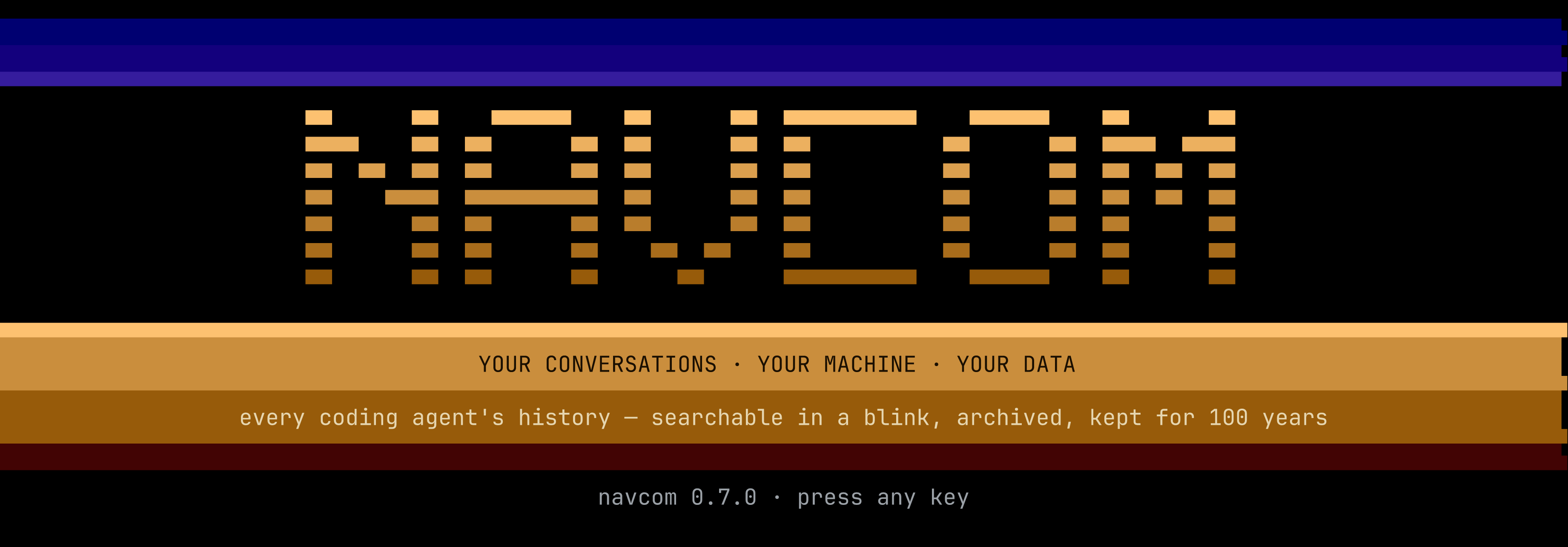
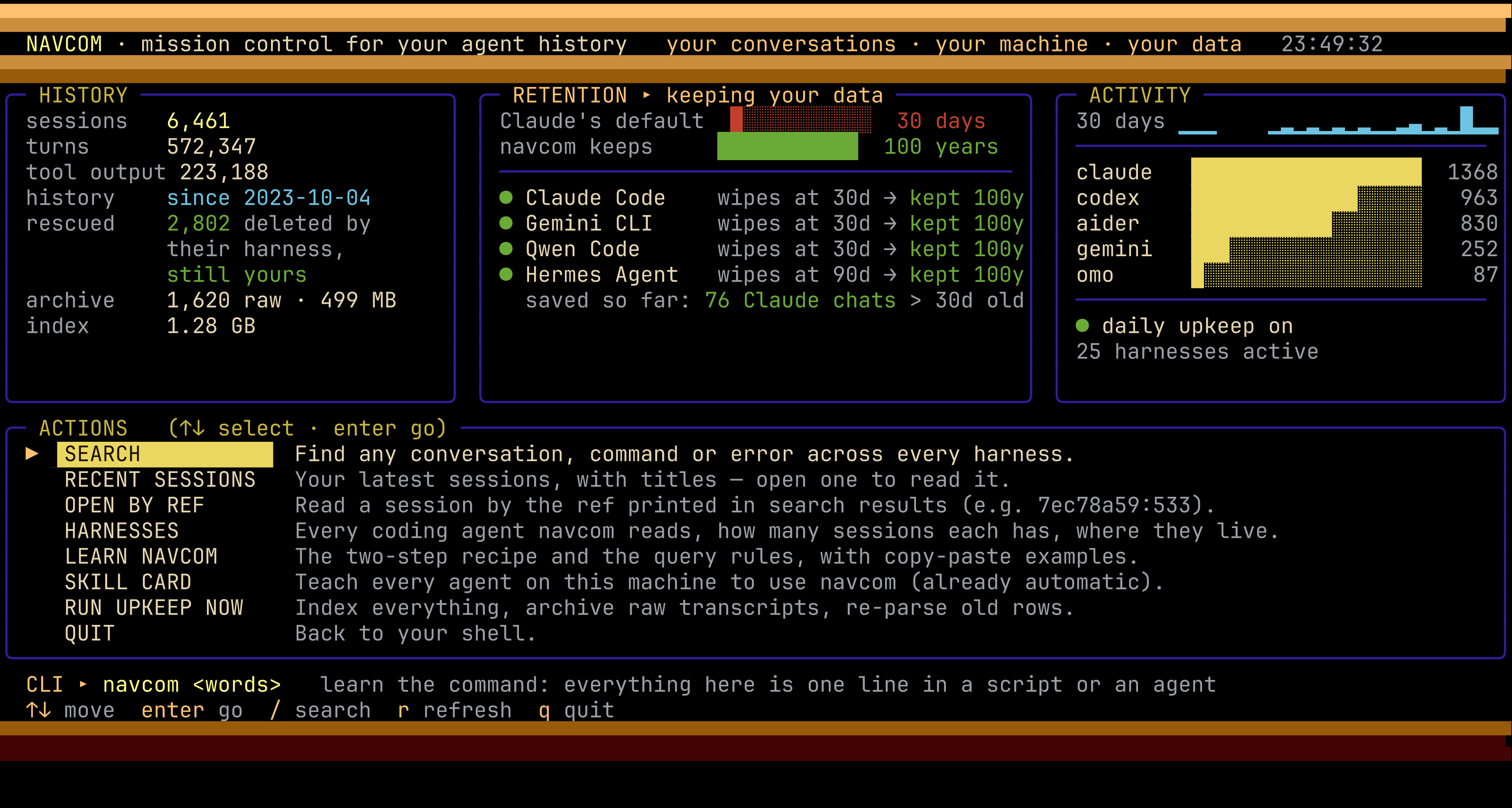
It needs only the standard library and a truecolor terminal (Atari raster-bar styling, with a
block-glyph wordmark that renders the same in any font). Bare navcom and navcom --help show the command overview.
Use navcom help all for the full option and Atlas subcommand reference, or
navcom help browse for web and terminal controls.
navcom --sessions lists your recent sessions.
Install
pipx install navcom        # or: uv tool install navcom
pipx upgrade navcom
No dependencies. Python 3.10+.
On every run, navcom silently installs or refreshes a small agent skill card
(navcom-session-recall/SKILL.md) into every skill folder a harness on this machine reads, one copy per
folder so no agent sees it twice:
| Folder | Read by |
|---|---|
$CLAUDE_CONFIG_DIR/skills (~/.claude/skills) |
Claude Code (opencode, Kilo, goose, Grok, Crush, Amp, Augment and Cursor read it too) |
~/.agents/skills |
the Agent Skills standard: Codex, Gemini CLI, Copilot CLI, pi, omo, opencode, Kilo, goose, Qwen, Kimi, Crush, DeepSeek dsh, Grok Build, Cline, Codewhale, Reasonix, Deep Code, OpenHands, Mistral Vibe, Factory Droid, Cursor, Amp, Augment, grok-dev |
~/.continue/skills |
Continue (cn and the IDE extension) |
$HERMES_HOME/skills (+ each profile) |
Hermes Agent |
$KIRO_HOME/skills |
Kiro CLI |
~/.gemini/config/skills |
Antigravity CLI |
Aider has no global skill mechanism; point it at the card with read: in ~/.aider.conf.yml if you want.
A folder is only written when its harness is installed. Older navcom versions also wrote
~/.codex/skills; Codex reads ~/.agents/skills too and listed the card twice, so navcom now removes
that copy (only if it is navcom's own, unedited). Your agents
know navcom exists before anyone mentions it. A card someone has edited is never overwritten.
NAVCOM_NO_SKILLS=1 turns it off.
navcom --skill                 # print the stock SKILL.md (hand it to any agent)
navcom --skill install         # (re)install it for every harness here, and show where
navcom --skill list            # Skillflag-compatible (github.com/osolmaz/skillflag) …
navcom --skill export | npx skillflag install --agent claude    # … so its installer works too
navcom --help is the command overview. Use navcom help all for the full manual,
navcom help space for galactic navigation, or a subcommand's --help for its
parameters. Help is available without indexing or starting a web server.
Use
navcom drizzle migration            # every harness; compact hits grouped by session
navcom --open 395e14b4:73           # read the turns around hit #73 of that session
navcom --resume 395e14b4            # get back into it: cd to its folder + reopen it in its harness
navcom --recap 395e14b4             # its whole story, sized for an LLM (picking old work back up)
navcom drizzle --context            # expand every hit with the turns around it
navcom --sessions                   # your most recent sessions, with titles
navcom --menu                       # the Galactic Bridge, Library and Conversation Atlas
navcom drizzle --solo               # one LLM summary of all the hits
Output is plain text when piped (no color codes), so agents can read it:
navcom: 7 hits in 3 sessions · query: drizzle* migration*
[1] 2026-09-28  claude   ~/clients/syra/syrab2bdev  ref 7ec78a59  (4 hits)
    #533 assistant: The «migration» runner looks correct — it reads `«drizzle»/*.sql` …
    #570 cmd: git add «drizzle».config.ts Dockerfile …
[2] 2026-09-27  codex    ~/dev/api  ref 0174f1b5255f  (3 hits)
    …
→ read around a hit: navcom --open 7ec78a59:533   · expand all: add --context
→ get back into [1] yourself: cd ~/clients/syra/syrab2bdev && claude --resume 7ec78a59-…   · any session: navcom --resume <ref> (--tab: new tab)
Get back into a conversation
Found the conversation? Every search ends with the exact command that reopens the top session: it
cds to the folder it ran in and resumes it in its own harness. navcom --open shows the same line
for the session it prints, and --json carries it as "resume".
navcom --resume 7ec78a59            # cd + reopen it right here, in this terminal
navcom --resume 7ec78a59 --tab      # in a new tab: cmux workspace, tmux window, iTerm2, WezTerm, kitty, Terminal.app
navcom --resume 7ec78a59 --print    # just print the command (pipes and agents always get this)
navcom --tui opens automatically with an animated startup bar showing the active stage and elapsed
time. Dashboard snapshots are cached for up to two minutes (invalidated when the index changes);
r forces a fresh snapshot. Search and Recents still discover current conversations.
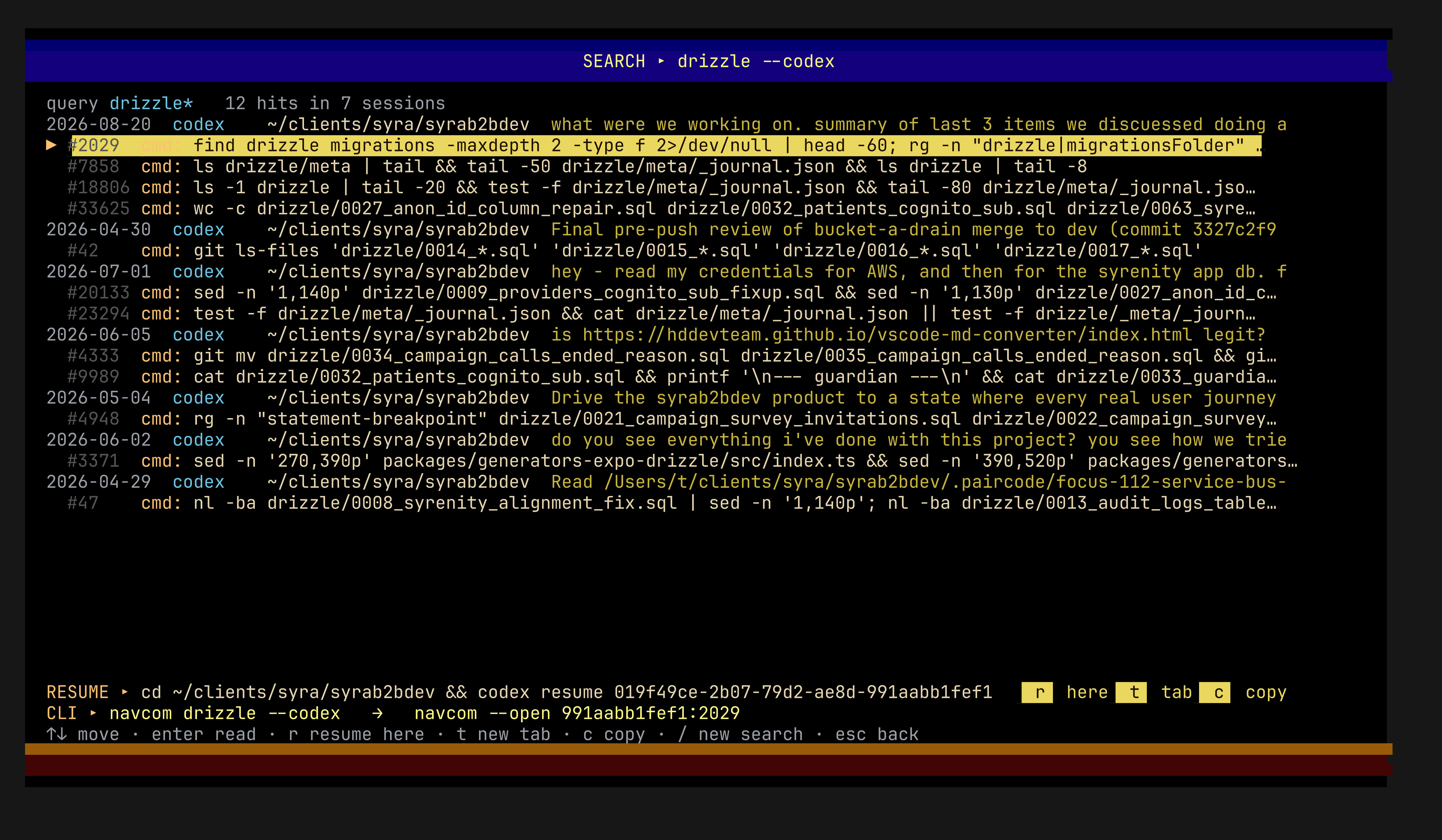
In navcom --tui, every search hit and open session shows a RESUME line with that command:
press r to resume here, t for a new tab, c to copy it. Global search labels child hits
and h hides/shows them. Escape returns to the dashboard; only q quits from there.
Recents groups complete conversation families, ordered by their latest activity. h expands or collapses the selected parent; children sit directly below it with an indented ↳ CHILD marker. Nested children retain their own level. Missing parents are explicitly labeled.
- ? shows every Recents shortcut, including in narrow terminals.
- / searches names, folders, notes and indexed conversation text within the recent families. Search keeps whole matching families, including children that do not match independently. Matching branches open initially; h still collapses and expands them. enter opens the matching passage. x clears search. On a leaf child, h toggles its parent branch.
- f stars a conversation; v shows favorites with their parent context. Starred families remain available even when older than the 80 most recent families.
- e gives a conversation a recognizable name; d adds a short “where we left off” note. Without a note, the detail panel shows an excerpt labeled Last reply.
- Filters, expanded families, selected conversation, list position and reading position persist locally in the index. Names and notes do not modify the original transcripts.
The selection preview names the launch action, harness and working folder. For Codex and Claude
children, r, t, and c target the root parent. n opens a fresh-harness picker with parent
and selected-child context; t in that picker starts it in a new tab. Opening Recents, searching,
reading long conversations and running upkeep show animated progress when they take time.
--sessions also marks child rows at the left edge.
Each harness gets its own command (claude --resume <uuid>, codex resume <uuid>, gemini --resume <sessionId>, opencode --session ses_…, kimi -S session_<uuid>, amp threads continue T-…,
goose session --resume --session-id …, and so on for all 30). Continue and Aider can't reopen a
session by id, so navcom gives their closest command (cn --fork <id>, aider --restore-chat-history)
and says what it does. If the harness already deleted the transcript, navcom restores it from its
archive first.
Too old to reopen? Revive it with its context
A session its harness deleted, one from a harness that can't resume, or one you'd rather continue in
another agent can still be picked back up. navcom starts a fresh agent of your choice in that
folder and primes it with one instruction: run navcom --recap <ref> first.
navcom --recap 7ec78a59                     # the context pack: every user message, where it stopped,
                                            # commands run, files changed, how to dig deeper (~30k chars)
navcom --resume 7ec78a59 --with claude      # fresh Claude in that folder, primed with the recap
navcom --resume 7ec78a59 --with codex --tab # …or Codex, Gemini, Copilot, opencode, pi, … in a new tab
Every one of the 30 harnesses works. The 17 that take an opening prompt on their command line start
already primed. The rest (Kimi, Crush, goose, Hermes, Aider, Amp, …) start plainly: navcom prints the start
command plus the prompt to paste, and when it launches them for you it puts the prompt on your clipboard.
Without --with, --resume on a session that can't be reopened asks which agent to use. In
navcom --tui, r on such a session (or n on any session) opens a REVIVE picker. A raw
--open of a long session can run to hundreds of KB; the recap is about 8k tokens. In a live test, a
fresh Claude given only the revive prompt rebuilt a five-month-old Codex review in three turns: what was
checked, the two leftovers it flagged, and what was next. Search results also point at it:
whole story: navcom --recap <ref>.
Queries never break
Type anything. navcom never throws an FTS5 syntax error.
- words: every word must appear in the same turn, prefix-matched (
authfindsauthentication). If no turn contains all of them, navcom falls back to any word and tells you so. "exact phrase"(curly quotes work too).a OR b,a or b,a | b: either one.a, b, c: a comma or semicolon list means any of the groups.NOT x: exclude.- Punctuation is fine:
don't,main(),v0.1.3,log-search,C++,~/dev/x,role:user. - Shell quoting awkward? Pipe the query in:
navcom - <<'EOF'
it's the "weird"; query, (really)
EOF
- A half-remembered
"exact phrase"that matches nothing is retried as loose words. --queryand bare words combine, and a leadingsearch/findis ignored.- Only the turn text is matched. Words that appear in project paths don't produce false hits.
Tool outputs
What commands printed, files that were read, errors and test runs are indexed too. Each output is labelled with the call that produced it, and long ones are capped to the first 3 KB plus the last 1 KB, where errors usually are. Tool outputs stay out of normal searches so file dumps don't drown your conversations:
navcom "TypeError: cannot read" --tool    # only tool outputs
navcom cognito --everything               # conversation and tool outputs together
Narrow it
navcom auth --claude              # or --codex --gemini --pi --omo --opencode --goose
navcom auth -p claude,pi          # several harnesses (aliases like omo-ai, pi-dev work)
navcom auth --here                # sessions whose working dir is the current directory
navcom auth --project syra        # sessions whose project path contains "syra"
navcom auth --days 7              # active in the last week (also --since 2026-09-01, --since 12h)
navcom auth --user                # only what you typed; --cmd for shell commands the agent ran
navcom auth -n 50                 # hits PER HARNESS (default 20) — every harness gets its own share
navcom auth --newest              # order sessions by date instead of relevance
navcom auth --json                # machine-readable
navcom -v                         # version (also -V, --version)
--compact is the default and still accepted, so old scripts keep working.
By default a search leaves out the conversation navcom runs inside when the harness exposes its id
(CLAUDE_CODE_SESSION_ID, CODEX_THREAD_ID, …). Your own session is noise when you want prior
work. --include-self brings it back. --this-session searches only the current conversation,
which is useful after a context compaction. navcom's own past invocations never show up as hits.
Read
navcom --open 7ec78a59            # whole session (turns truncated to 400 chars)
navcom --open 7ec78a59:533        # 3 turns either side of #533, full length
navcom --open 7ec78a59:520-560    # a range
navcom --latest                   # dump the most recent session
Summaries
--solo produces one consolidated summary and --summary produces one per session. Both use the
first LLM CLI that works (claude, gemini, codex, then local ollama). --ollama or --llmgemini
picks a specific one.
Your history stays yours
Claude Code deletes transcripts older than cleanupPeriodDays, which defaults to 30 days. The
deletion has been there since Claude Code's very first public release, v0.2.9 (2025-02-24). It
became a setting in v0.2.118 (2025-05-18), still defaulting to 30.
On every run, if you haven't chosen a value, navcom sets "cleanupPeriodDays": 36500 (100 years)
in ~/.claude/settings.json. It writes atomically and keeps a one-time backup in
settings.json.navcom-backup.
- An explicit value you set is respected.
- A settings file that isn't plain JSON is never touched.
- It never writes
0: Claude rejects it, and older versions read 0 as "save nothing". NAVCOM_NO_RETENTION_FIX=1opts out.
Other harnesses that delete history get the same treatment, but only when you haven't set the value yourself:
- Qwen Code: subagent transcripts after 30 days (
general.cleanupPeriodDays→ 36500). - Hermes Agent: ended sessions after 90 days, from v2026.9.7 (
sessions.auto_prune: false). This one is a single-line YAML edit with a backup kept.
navcom --where lists every harness's retention.
Gemini CLI deletes chats after 30 days by default too (general.sessionRetention). When that
setting is unset, navcom turns it off ({"enabled": false}) in ~/.gemini/settings.json, following
the same rules as for Claude.
navcom --whereshows the current retention.
Raw archive. Every Claude and Gemini transcript (the two harnesses that delete) is also kept whole and compressed under
~/.navcom/archive/, with every byte of every tool output. A growing session is archived
incrementally: only the new part is compressed and appended. If a transcript ever disappears,
navcom --restore <ref> (or --restore all) puts it back so claude --resume works again.
NAVCOM_ARCHIVE=all archives every harness, and =off stops archiving.
Daily upkeep. navcom installs a daily background job, a launchd agent on macOS or a systemd
user timer on Linux. The job runs navcom --maintain, which indexes everything, re-parses old rows
and archives, with no time limits. Your history is kept current even if nobody runs navcom.
navcom --daily status | off | on controls it, and off stays off.
navcom's index keeps every session it has seen, even after a harness deletes the file. It is
created owner-only (0600), matching the transcripts it copies text from.
Safe to call from agents
- Parallel calls are fine. If another navcom is writing, a call waits at most ~3s. It then searches the index as it stands and prints a one-line note on stderr.
- In a read-only sandbox navcom searches the index without refreshing it.
- Unknown flags print a hint on stdout as well, so a
2>/dev/nulldoesn't turn a typo into an empty result that looks like "nothing found". --soloand--summaryhave a hard time budget (NAVCOM_SUMMARY_TIMEOUT, default 150s). A summarizer that hangs is killed along with its child processes.
The index
The index lives at $NAVCOM_INDEX (default $CODEX_HOME/navcom-index.sqlite) and updates itself on every
call. Only new or changed sessions are read, and a growing JSONL is read from where it left off.
A session stays searchable after its harness deletes the transcript. Claude Code, for example,
prunes old sessions. navcom --where shows the counts, and navcom --reindex rebuilds.
Local browser mission control
Run navcom --menu to open the local Galactic Bridge, or navcom --tui for the terminal UI.
Keep its terminal running; Ctrl+C stops the web server. navcom --menu --no-browser prints the URL
without opening a browser. The server binds only to 127.0.0.1 and loads no external assets.
The browser offers conversation families, text search within recent families, reading/paging, favorites, names, notes, saved position, launch previews, fresh-harness selection, and upkeep with progress and retryable errors. Launch buttons open a terminal tab using the displayed command. An unavailable tab integration provides a copyable command instead.
Suggest with local model is optional and runs only when clicked. It checks CapCom's selected
local profile (CAPCOM_CONFIG, or its saved default profile), then resident Ollama models.
NAVCOM_CAPCOM_PROFILE selects another existing named profile. Bertha works through an existing
CapCom private endpoint or tunnel; no Bertha dependency is imposed on other installations.
NavCom never starts a server, pulls weights, unloads models, or uses cloud providers for suggestions.
Ollama choices are limited to already-resident models of at most 8 GiB, with a 2,048-token context,
6,000-character input cap, 180-token output cap, one request at a time, and a 15-second timeout.
Already-running OpenAI-compatible local services use the same excerpt/output bounds.
Suggestions are labeled and require Use this name and note before saving. Without a running
model, every other feature remains available.
TUI upkeep keeps lock failures inside its screen: r retries and Esc returns to the dashboard. Menus commit pending metadata writes before waiting for input, so idle updated windows do not hold the index writer. Older already-running NavCom windows need reopening to receive this fix.
Fly through your work
navcom --menu opens the Galactic Bridge. Select a system, product planet,
experiment moon, district, expertise candidate, starbase or recorded ship, then Fly to. Drag the
chart to pan, use + / − to zoom, and Back / Forward to recover your
viewpoint, selection and search. Narrow screens keep destination labels readable;
Fit provides an overview with full names at a readable size. On crowded small
screens, select an object to reveal its full name in the destination panel.
Searching does not rearrange the chart.
Conversation results keep recorded families together. A parent card shows its child count and an expandable list of matching tasks; each task opens at its matching turn. A child passage and its parent have separate read actions. NavCom does not infer parenthood from a task-like title when a provider did not record the relationship.
The Navigator accepts fly to Polaris, find matrix in exp32,
fly to exp32 then find matrix, home and back. Spoken-style punctuation such
as Fly to experiment 32, then find matrix. works too; quoted queries and code
syntax stay literal. Search only this place
controls the allowed area. Named places resolve inside that area before searching;
ambiguous names show choices, and an unknown place never falls back to a global
search. In the CLI, repeat the request with --choose <returned-place-id> to select
a validated candidate. Code, documents and conversations retain
their separate evidence and coverage. Typed input and local voice use the same Navigator. The microphone records up to
20 seconds through an existing whisper.cpp tiny/base model, with two CPU threads
and one transcription at a time across NavCom processes. Review the transcript
before searching. Stop, Cancel and Escape release recording; no audio is retained.
navcom voice status checks availability without loading the model, and
navcom voice transcribe clip.wav uses the same service (mono 16-bit PCM, 16 kHz).
Set NAVCOM_WHISPER_MODEL to an existing model under 200 MiB. NavCom downloads
nothing; when unavailable, type or use system dictation.
The same behavior is available from the CLI:
navcom atlas refresh --space --harvest
navcom atlas list systems
navcom atlas list planets --within <system-id>
navcom atlas explore <planet-id>
navcom atlas navigate "fly to Polaris" --json
navcom atlas navigate "find matrix" --within <moon-id> --json
navcom atlas navigate "find matrix in exp32" --json
navcom atlas navigate "fly to exp32 then find matrix" --choose <returned-place-id> --json
navcom atlas search matrix --within <district-id> --evidence
navcom atlas related <moon-id> --query matrix
navcom atlas files <planet-id> --query README
navcom atlas list ships
navcom atlas inspect <ship-id>
navcom atlas context <ship-id> --query login
navcom atlas list stars
navcom atlas inspect <star-candidate-id>
navcom atlas inspect <star-candidate-id> --observe
navcom help space
navcom atlas navigate --help
Opening the bridge starts a bounded background intake when its last completed
sweep is older than ten minutes. A fresh menu first indexes the native conversation
logs, so discovery does not depend on a previous CLI search. Pause survives
reload, keeps published evidence and saves the
current position; Continue chart resumes it. Each sweep pins the indexed
project inventory, so later index changes cannot shuffle a continuation. The web
pass stops after two minutes; the CLI's --seconds and --limit bound one pass,
with an exact continuation command in its output. --restart pins a fresh sweep.
Failures and unavailable projects are disclosed without starving later projects.
Select a destination, then Fly to; double-clicking flies directly. Drag the map or its small Overview to move around, and use + / − to zoom. Fit shows the whole current chart. Narrow windows retain the same geography and readable names. Back restores your camera, query, selection and open evidence panels. Same-named products show distinguishing path suffixes; the inspector keeps their full paths. Product descriptions prefer the harvested README at that product's own boundary over component package metadata; explicit owner descriptions win.
atlas files PLACE lists the code and documents retained for a product,
experiment or district. --query filters file paths; use each returned
sources read command to open its pinned snapshot. Follow the returned
continuation command for more files. Missing paths and scan limits are disclosed;
a budget-limited inventory requires a narrower district instead of unstable
later pages. This never scans the live repository or starts another harvest.
Connections & versions uses cached Starforge lineage and both source-search
paths. It shows suggested version families, retained files you can read, and exact
documented links you can fly along. atlas related PLACE --query TEXT exposes the
same evidence and continuation controls from the CLI. Folder versions are
suggestions, not proven ancestry; missing harvested files remain explicit. See the
native relationship contract.
Browsing reads the saved chart while existing Starforge harvest analyzes bounded
code and documents. Unchanged sources reuse cached artifacts. Existing explicit
scopes stay registered; updating one source retains other published snapshots even
when their original storage is offline. Native Git ignore rules and metadata
budgets apply; raw provider config is not added by document discovery.
sources discover --json reports its selected files, exclusions and pagination.
Use sources harvest ROOT --include src --include docs to register a larger code
scope, then refresh the chart; no catalog copying or manual synchronization is
needed. Starforge is optional for the map and required for source analysis.
Systems and product boundaries come from observed folders, Git identities and
declared application manifests; suggested relationships are labelled. Nested
runnable applications can become separate candidate planets even when their
repository has no workspace declaration. Bounded automatic intake retains their
manifests and code, and existing Starforge entry/build detection supplies the
evidence. New harvests group districts within each application scope. Districts
reuse cached Starforge token groups. Missing or stale metadata stays visible as
uncertainty. Machines and storage are physical locations, separate from conceptual
geography. Inspect code locations shows a product, experiment or district's
recorded paths, observed host, Git checkout, branch and commit. Native Git common
directories distinguish linked worktrees from independent repository copies.
atlas inspect <planet-id> --refresh repeats this bounded read-only observation;
ordinary inspection uses its dated cache. It does not pick a preferred copy or
infer working changes, runtime or availability after the observation date.
Inspect ship uses the installed Starship metadata observer and
automatically finds exact-location receipts in commission records. It shows the
mission, carried-history inventory and captain viewpoint with their separate dates
and source paths. Remote locations remain unobserved; a receipt is not a current
integrity, receiving or takeover check. Repeated inspections read the cache;
atlas inspect <ship-id> --refresh repeats the metadata observation.
atlas context SHIP lists carried sessions. Add --query WORDS to search them,
--session ID --turn N to read an exact original message, or --handover to read
the ship's handover document. Preserve the returned catalog SHA with --catalog
when paging or opening a result; a changed catalog requires a fresh read.
--offset, --limit and --max-chars bound the output. This uses the installed
Starship reader and the selected local ship's retained dialogue, without resuming
a captain or substituting current host history. Remote ships remain unavailable.
Refresh discovers separate local commission archives from Starship evidence and
caches their metadata. Stored ship copies at the galaxy and Ships & stored
context on linked ships/products open those copies. atlas list ships and
search include them too. Archives with a carried catalog can read context but cannot board a captain;
archive integrity stays unverified until separately checked.
Navigator searches and atlas search --space --evidence also check carried
conversations through that same native reader. Results identify their physical
ship, recorded title or verbatim matching excerpt, and original turn. Opening a
result preserves its catalog pin. Product searches include ships with a recorded
source association; district searches do not inherit the entire product's cargo.
An exact ship search stays on that copy. Cached results include zero-match reads;
repeat a partial search to check remaining ships within the next bounded pass.
These snapshots remain separate from current host conversations and are not
semantic rankings or evidence of captain readiness.
Expertise candidates are separate destinations across systems. Existing native
Hermes profiles and supported Compose/OCI metadata supply their identity,
description, charter references and provider interfaces. A declared description
and charter remain a candidate, with runtime availability unknown; automatic
descriptions stay unconfirmed. A generic repository or default charter alone does
not establish expertise. Discovery is paged and cached, with unvisited roots and
coverage gaps visible.
Inspect expert reads that recorded metadata. atlas inspect <star-id> --refresh
updates the selected dossier. --observe explicitly checks an existing provider
process; it does not ask the expert a question, start a gateway/model, or prove
answer quality. Observations retain their time and provider binding separately
from metadata. Ask expert prepares the exact question and provider command.
Open question in Hermes revalidates it and opens the native agent terminal.
Hermes uses its own configured model, tools and hooks, and may use remote services
or change files; this is an explicit action, separate from chart navigation.
navcom atlas ask STAR "question" prepares the same review. Repeat with
--launch --review TOKEN only to open that reviewed action.
Board ship discovers the exact host/workspace route in native captain metadata
and uses installed Starship tools to validate it. navcom atlas board SHIP previews;
--validate checks the native thread; --launch --review TOKEN revalidates and
opens it. Missing, ambiguous or remote routes remain unavailable. A terminal
dispatch does not prove an expert reply, restored context or captain takeover. See the
spatial vision and
implementation status.
A place through time
navcom history timeline <planet-id>
navcom history explore <planet-id> <commit-sha> --query login
navcom history timeline --repo ~/dev/project
navcom history explore HEAD --repo ~/dev/project --query login
navcom history system <system-id> --at 2026-04-01 --query login --json
navcom history system --cursor <next-cursor> --json
navcom history system --cursor <failed-cursor> --retry-larger --json
navcom history land <planet-id> --cursor <cursor> --result-key <result-key> --json
navcom history land <planet-id> --cursor <cursor> --result-key <result-key> --group <district-id> --query login
navcom help history
History selects one actual Git repository and reads the exact committed tree.
The current place supplies its address and file scope; historical manifests,
README clues, file inventory and Starforge code groups come from the chosen
commit. Both Starforge search paths operate on the historical snapshot. Dirty
working files and current conversations are excluded. Renamed paths are not
silently followed. For timeline and explore, a place spanning multiple
repositories requires an explicit physical copy through --repo.
Snapshots and analyses are cached by commit, selected paths and tool identity, outside the source repository. Nothing checks out or rewrites your current work. Large scopes fail with a bounded-budget error; unsupported files, hidden paths, submodules, symlinks, LFS pointers and shallow history are disclosed. Git dates are recorded metadata, not deployment dates or proof of a whole galaxy's state.
history system visits the current system or galaxy's repository-backed products
at a UTC cutoff. Current IDs, positions and containment remain navigation
addresses. Historical names, manifests, files and search results come from
committed trees; missing history stays unknown. The first request pins repository
HEADs, and next_cursor continues those same pins even if today's repositories
change. The default page visits four repositories within a 30-second budget;
coverage includes unvisited and unavailable places. This does not infer deleted
products, historical ownership or commit-to-conversation relationships.
After a snapshot-size failure, the printed --retry-larger command creates a
separate bounded local-cache journey, retaining the same pinned HEADs, cutoff
and scopes. It allows up to 10,000 files and 64 MiB per repository; the original
view remains available. It requires an existing failed cursor and does not raise
the per-file or execution-time limits. Omitted snapshot flags inherit the saved
cursor's limits on later pages; explicitly changed limits are rejected.
history land enters a product or experiment from a saved system view. Follow
its printed Land command; the cursor and result key select the exact saved
native evidence. The returned districts are Starforge's existing source groups,
with their file membership visible. A district query runs both native search
paths within those exact retained files. Landing never consults current product
ownership, resolves a new HEAD or harvests current files. Missing or changed
snapshot evidence is reported instead of silently returning to the present.
In the bridge, Explore time opens the UTC cutoff controls for a system or galaxy. Observed commit dates moves among dates actually returned by the service; Continue remaining repositories extends coverage. Return to present restores current evidence. Historical files open in the same source reader, with their pinned commit shown. Reload, Back and Copy journey link retain the dated session's repository pins. The link works against the same local NavCom history cache; an unavailable pin is reported instead of silently choosing newer evidence. The camera and current addresses stay steady while evidence changes. See the system-history contract.
Conversation Atlas
Alongside the Galactic bridge, navcom --menu offers the Library and
Conversation Atlas. Explore the full index by topic, project, planet district,
time, or recorded Starship family. Natural-language searches create a new map;
conversation nodes lead to related work, actual parents/children, the reader,
and the existing parent-safe launch controls. Zoom, drag, use the trail to go
back, or choose Browse as cards.
The map runs locally without a model. The Galactic Bridge’s optional voice input uses existing local Whisper tools; otherwise type or use system dictation. See Atlas behavior, provenance and Starship link contract.
Atlas from the command line
navcom --help
navcom atlas list research
navcom atlas explore research:exp29
navcom atlas search listener --within research:exp30
navcom atlas list districts --json
navcom atlas help research
navcom atlas search --help
Atlas is CLI-first: the web UI and commands use the same discovery service.
list supports topics, research, projects, districts, time, and
starships. Copy a collection ID into explore or search --within; result
blocks print the next command. show REF explains context and resume targets;
tree REF prints actual ancestry. Neither launches a harness. Use existing
--open, --recap, and --resume commands when ready.
Search within a collection covers all its pages. Child-only matches show their
parent and the matching child's evidence; --children expands tasks. Narrow
with --provider, --since, --until, or --favorites, page with --limit and
--offset, and use --json for versioned machine output (warnings on stderr).
Paths wrap without truncation. Collection IDs remain stable when labels change;
combined IDs joined by + represent intersecting collections.
navcom atlas refresh incrementally extracts suggested families and branches
from the existing index. It uses a private atomic sidecar (INDEX.atlas.json),
not a SQLite writer or an LLM. Normal discovery never scans raw logs or starts a
model. Upkeep also refreshes this cache. Suggestions are labeled; version
mentions are not implementation claims, and shared subjects are not ancestry.
Missing/stale caches are reported while ordinary indexed discovery stays usable.
The web search defaults to Search only this collection after entering a collection. Uncheck to search the archive; explicit filters remain. Changing Grouping preserves scope. Copy this view as CLI command reproduces the query, scope, filters and page. Cards offer full paths, copy actions, evidence, Search here, and parent/child navigation.
Help is layered: navcom help search, read, resume, atlas, maintenance,
or all; navcom atlas help districts explains a grouping; each subcommand has
--help. A leading atlas, sources, history or voice word is a command only
before one of its subcommands (or alone, or with --help); help only before a help
subject. Anything else is an ordinary search, so navcom history of the login fix
searches. No MCP server is required.
Cached local source search (Starforge)
NavCom can harvest local code and documentation through an installed Starforge, then search both its ranked concept/gem results and its broader code/document search. Conversation search remains dependency-free. No model is started or called.
navcom sources harvest ~/dev/my-project --include README.md --include src
navcom sources list
navcom sources search 'login' --within my-project
navcom sources search 'protocol goals' --mode text --ext md --json
navcom sources read <source-id> docs/architecture.md --line 40 --limit 80
navcom sources refresh
navcom help sources
navcom sources search --help
harvest adds or updates one source; repeating it replaces that source's include
scope and keeps other registered sources. With no --include, it scans the root.
refresh checks all registered sources and only reharvests changed content or a
changed Starforge/adapter implementation. Search uses the last complete snapshot;
it does not refresh automatically. Repeated queries are cached by snapshot,
query, scope and options. Source results print an Atlas conversation search command
when the source matches an indexed project.
--mode both (default) returns two separate result lists. concept uses Starforge's
concept ranking over harvested gems. text uses Starforge's existing code-search
callback over cached files, including Markdown and small files omitted by the gem
finder. Text matching is a literal phrase unless --regex is supplied; it is not
semantic document search. --ext affects only text results. --within selects an
exact source ID, unique directory name, or absolute root. --limit applies to each
path; reaching the limit is reported rather than implying exhaustive results.
sources read opens a numbered window from an exact published source snapshot,
never the live working file. The default is 80 lines; each response is limited to
200 lines and 64 KiB of displayed text. Returned snapshot and published values
can pin later reads with --snapshot and --published. An exact unchanged artifact
remains readable when other sources publish. Changed snapshots and unpinned stale
results fail explicitly; reads report the publication actually verified.
--history <receipt-id>
reads a prepared Git snapshot and verifies its file against the pinned receipt.
The bridge's Open source action uses this same service, shows the original
path and provenance, and provides previous/next windows and a copyable CLI command.
The private cache defaults to navcom-sources beside the conversation index.
Override it with NAVCOM_SOURCES_CACHE or --cache PATH on each subcommand.
The cache must be outside the harvested source root. Snapshots are local copies
of supported source/document files; hidden files/directories, symlinks and
Starforge's excluded directories are omitted. sources list --json reports exact
scope, supported extensions and exclusions. This is not a complete backup or a
secret scanner: only harvest directories you intend to make locally searchable.
Default limits are 10,000 files, 64 MiB total and 2 MiB per file; harvest --help
explains overrides. Exceeding a limit fails without replacing the previous cache.
Old generations are retained; this version has no automatic cache pruning.
NavCom uses the Python runtime of starforge on PATH. For a nonstandard install,
set NAVCOM_STARFORGE_PYTHON to the interpreter where Starforge is installed.
list and help work without Starforge. Harvest uses Starforge's local analysis
stage without Git pulls, modifying original repositories, or updating Starforge's
global catalog. Refresh holds a separate nonblocking writer lock; searches remain
available against the last complete publication. CLI and bridge searches/readers
consume the same published artifacts.
1 maintainer

Metadata
1 maintainer
Release files for navcom 0.12.0
For a detailed explanation of source distributions (sdists) and built distributions (wheels), please see the package formats documentation.
Source distribution (sdist)
| File | Size | Uploaded | Provenance | Actions |
|---|---|---|---|---|
| navcom-0.12.0.tar.gz | 2.7 MB | Without provenance | Details for navcom-0.12.0.tar.gz |
Built distribution (wheel)
| File | Interpreter | ABI | Platform | Actions Reset |
|---|---|---|---|---|
| navcom-0.12.0-py3-none-any.whl | Python 3 | none | any | Details for navcom-0.12.0-py3-none-any.whl |
Total release size: 5.1 MB
Security for navcom 0.12.0
Provenance
Provenance describes where a file came from. On PyPI, provenance is shared via attestations, which provide a verifiable record of the build or publishing details. View details, limitations and caveats.
No provenance found
None of the files in this release were uploaded with provenance metadata.
A note on package security
PyPI is a repository for distributing packages, not a service for auditing them. While third-party security researchers and our staff do their best to detect and remove malicious packages, PyPI cannot guarantee the quality, security or suitability of any given package.
To learn more about protecting yourself from malicious actors, visit our package security documentation.














