
A small graph package used to draw image for ndnsim metrics

Project description
ndnsim-graph
A small graph package used to draw image for ndnsim metrics
1. Install
pip install ndnsimgraph
2. Usage Example
2.1 Throughput
-
功能:
- 绘制节点特定Face的吞吐量;=>
plot - 绘制多个节点吞吐量之和;=>
plotSum - 绘制多个节点吞吐量的平均值; =>
plotAvg
- 绘制节点特定Face的吞吐量;=>
-
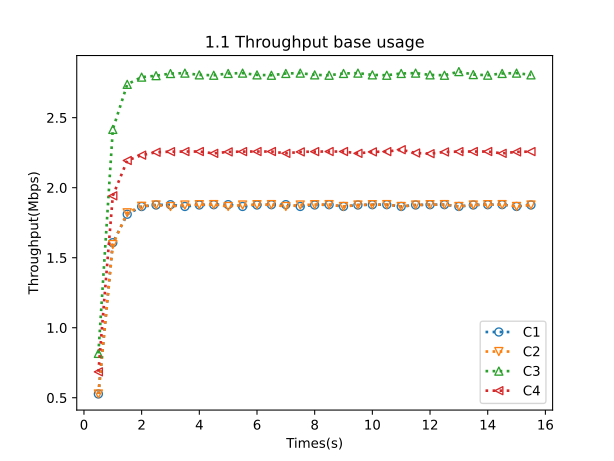
基本使用:
from ndnsimgraph.throughput import ThroughputGraph, ThroughputType, ThroughputTarget

ThroughputGraph.parse("throughput.txt"). \
    setThroughputType(ThroughputType.OutData). \
    setThroughputTarget(ThroughputTarget.Kilobytes_Mbps). \
    setSamplingInterval(0.5). \
    plot("C1", 258). \
    plot("C2", 258). \
    plot("C3", 258). \
    plot("C4", 258). \
    title("1.1 Throughput base usage"). \
    xlabel("Times(s)"). \
    ylabel("Throughput(Mbps)"). \
    legend(). \
    drawAndSave("output", "throughput-1.1.svg"). \
    close()
-
可以通过
setThroughputType设置不同的吞吐量类型,有效值如下:吞吐量类型 描述 ThroughputType.InInterests 统计从该Face接收到的Interest的指标(数量、速率) ThroughputType.OutInterests 统计从该Face转发出去的Interest的指标(数量、速率) ThroughputType.InData 统计从该Face接收到的Data的指标(数量、速率) ThroughputType.OutData 统计从该Face转发出去的Data的指标(数量、速率) ThroughputType.InNacks 统计从该Face接收到的Nack的指标(数量、速率) ThroughputType.OutNacks 统计从该Face转发出去的Nack的指标(数量、速率) ThroughputType.InSatisfiedInterests 统计从该Face传入的被满足的Interest的指标(数量、速率) ThroughputType.InTimedOutInterests 统计从该Face传入的超时的Interest的指标(数量、速率) ThroughputType.OutSatisfiedInterests 统计从该Face传出的被满足的Interest的指标(数量、速率) ThroughputType.SatisfiedInterests 统计所有Face已满足Interest的指标(数量、速率) ThroughputType.TimedOutInterests 统计所有Face超时Interest的指标(数量、速率) -
可以通过
setThroughputTarget设置吞吐量目标值,有效值如下:吞吐量目标 描述 ThroughputTarget.Packets EWMA后的包数量 ThroughputTarget.Kilobytes_KBps EWMA后的速率(KBps) ThroughputTarget.Kilobytes_MBps EWMA后的速率(MBps) ThroughputTarget.Kilobytes_Kbps EWMA后的速率(Kbps) ThroughputTarget.Kilobytes_Mbps EWMA后的速率(Mbps) ThroughputTarget.PacketRaw 统计周期内的包数量(真实数量,没有EWMA) ThroughputTarget.KilobytesRaw_KBps 统计周期内的真实速率(KBps) ThroughputTarget.KilobytesRaw_MBps 统计周期内的真实速率(MBps) ThroughputTarget.KilobytesRaw_Kbps 统计周期内的真实速率(Kbps) ThroughputTarget.KilobytesRaw_Mbps 统计周期内的真实速率(Mbps) -
可以通过
setSamplingInterval设置采样间隔 => 设置为1,则每秒采样一次。 -
可以通过
plot函数绘制节点某个Face的吞吐量 => plot 函数与 matplotlib 的plot函数一致,所有可以传递给matplotlib.plot 的参数都可以传递给plot-
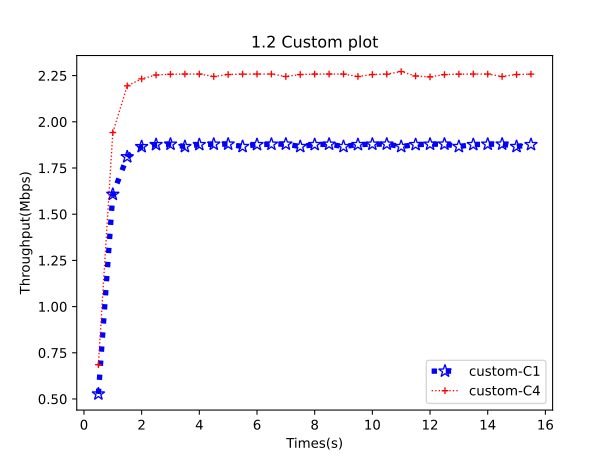
例如主动设置折现的样式、大小、颜色和标签等等等等
from ndnsimgraph.throughput import ThroughputGraph, ThroughputType, ThroughputTarget

ThroughputGraph.parse("throughput.txt"). \
    setThroughputType(ThroughputType.OutData). \
    setThroughputTarget(ThroughputTarget.Kilobytes_Mbps). \
    setSamplingInterval(0.5). \
    plot("C1", 258, linestyle="dotted", linewidth=4, markersize=10, marker="*", color="blue", label="custom-C1"). \
    plot("C4", 258, linewidth=1, markersize=5, marker="+", color="red", label="custom-C4"). \
    title("1.2 Custom plot"). \
    xlabel("Times(s)"). \
    ylabel("Throughput(Mbps)"). \
    legend(). \
    drawAndSave("output", "throughput-1.2.svg"). \
    close()
-
-
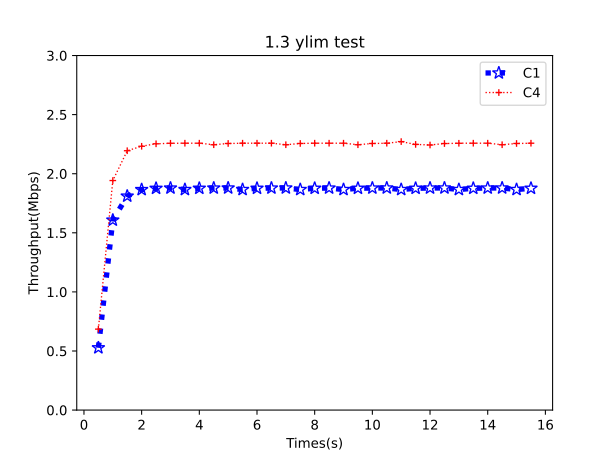
可以通过
xlim和ylim函数设置横纵坐标的显示范围from ndnsimgraph.throughput import ThroughputGraph, ThroughputType, ThroughputTarget ThroughputGraph.parse("throughput.txt"). \ setThroughputType(ThroughputType.OutData). \ setThroughputTarget(ThroughputTarget.Kilobytes_Mbps). \ setSamplingInterval(0.5). \ plot("C1", 258, linestyle="dotted", linewidth=4, markersize=10, marker="*", color="blue"). \ plot("C4", 258, linewidth=1, markersize=5, marker="+", color="red"). \ ylim((0, 3)). \ title("1.3 ylim test"). \ xlabel("Times(s)"). \ ylabel("Throughput(Mbps)"). \ legend(). \ drawAndSave("output", "throughput-1.3.svg"). \ close()
-
-
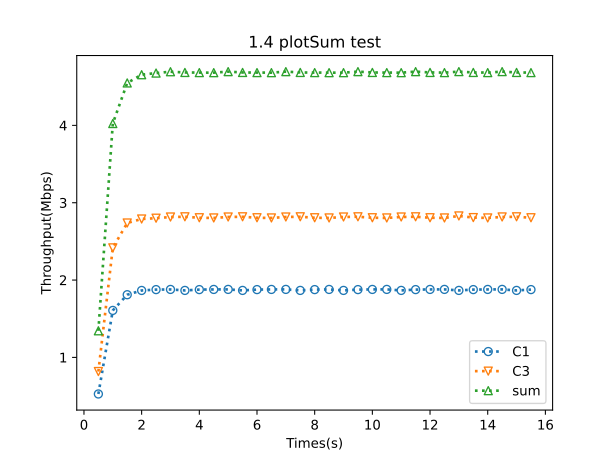
使用
plotSum实现多条折线的加和from ndnsimgraph.throughput import ThroughputGraph, ThroughputType, ThroughputTarget from ndnsimgraph.common import NodeItem ThroughputGraph.parse("throughput.txt"). \ setThroughputType(ThroughputType.OutData). \ setThroughputTarget(ThroughputTarget.Kilobytes_Mbps). \ setSamplingInterval(0.5). \ plot("C1", 258). \ plot("C3", 258). \ plotSum([NodeItem("C1", 258), NodeItem("C3", 258), ], label="sum"). \ title("1.4 plotSum test"). \ xlabel("Times(s)"). \ ylabel("Throughput(Mbps)"). \ legend(). \ drawAndSave("output", "throughput-1.4.svg"). \ close()
-
使用
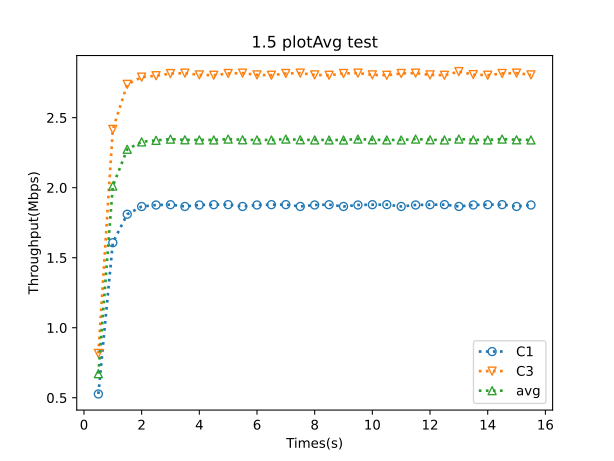
plotAvg实现多条折线取平均from ndnsimgraph.throughput import ThroughputGraph, ThroughputType, ThroughputTarget from ndnsimgraph.common import NodeItem ThroughputGraph.parse("throughput.txt"). \ setThroughputType(ThroughputType.OutData). \ setThroughputTarget(ThroughputTarget.Kilobytes_Mbps). \ setSamplingInterval(0.5). \ plot("C1", 258). \ plot("C3", 258). \ plotAvg([NodeItem("C1", 258), NodeItem("C3", 258), ], label="avg"). \ title("1.5 plotAvg test"). \ xlabel("Times(s)"). \ ylabel("Throughput(Mbps)"). \ legend(). \ drawAndSave("output", "throughput-1.5.svg"). \ close()
2.2 Delay
-
功能:
-
绘制某个Consumer的延迟;=>
plot -
绘制多个Consumer的延迟之和;=>
plotSum -
绘制多个Consumer的延迟的平均值; =>
plotAvg
-
-
基本使用
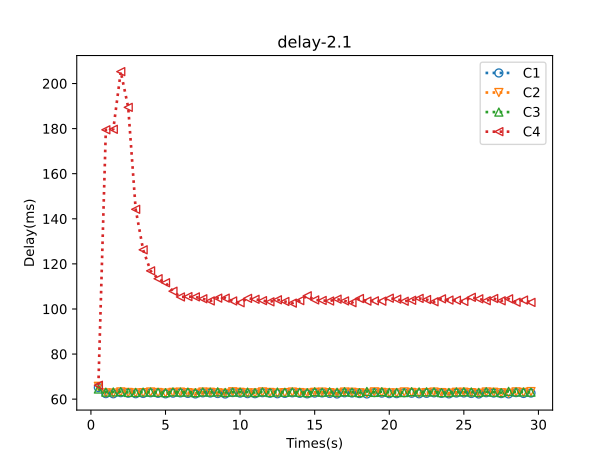
from ndnsimgraph.delay import DelayGraph, DelayType, DelayTarget

DelayGraph.parse("delay.txt"). \
    setDelayType(DelayType.LastDelay). \
    setDelayTarget(DelayTarget.DelayMS). \
    setSamplingInterval(0.5). \
    plot("C1", 0). \
    plot("C2", 0). \
    plot("C3", 0). \
    plot("C4", 0). \
    title("delay-2.1"). \
    xlabel("Times(s)"). \
    ylabel("Delay(ms)"). \
    legend(). \
    drawAndSave("output", "delay-2.1.svg"). \
    close()
-
可以通过
setDelayType设置不同的吞吐量类型,有效值如下:延迟类型 描述 DelayType.LastDelay LastDelay意味着DelayS和DelayUS代表最后发送的兴趣和接收的数据包之间的延迟 DelayType.FullDelay FullDelay是指DelayS和DelayUS代表发送的第一个感兴趣的数据包和接收的数据包之间的延迟 -
可以通过
setDelayTarget设置延迟目标,有效值如下:延迟目标 描述 DelayTarget.DelayS 按秒统计的延迟 DelayTarget.DelayMS 按毫秒统计的延迟 DelayTarget.DelayUS 按微秒统计的延迟 -
其它函数,
setSamplingInterval、plot、xlim、ylim等等的含义和 Throughput的一致,详情请见 2.1 节。
-
-
使用
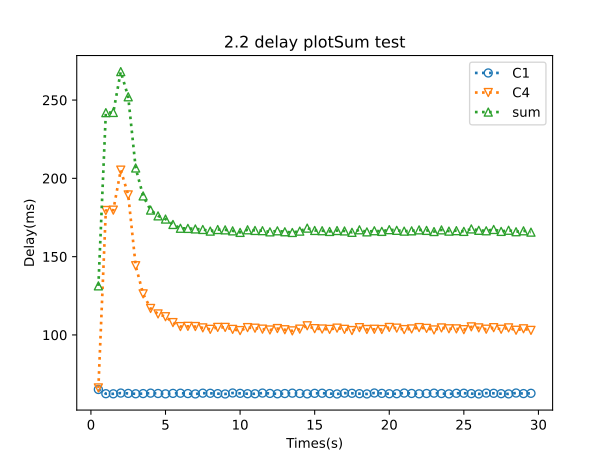
plotSum实现多条折线的加和:from ndnsimgraph.delay import DelayGraph, DelayType, DelayTarget from ndnsimgraph.common import NodeItem DelayGraph.parse("delay.txt"). \ setDelayType(DelayType.LastDelay). \ setDelayTarget(DelayTarget.DelayMS). \ setSamplingInterval(0.5). \ plot("C1", 0). \ plot("C4", 0). \ plotSum([NodeItem("C1", 0), NodeItem("C4", 0)], label="sum"). \ title("2.2 delay plotSum test"). \ xlabel("Times(s)"). \ ylabel("Delay(ms)"). \ legend(). \ drawAndSave("output", "delay-2.2.svg"). \ close()
-
使用
plotAvg实现多条折线取平均:from ndnsimgraph.delay import DelayGraph, DelayType, DelayTarget from ndnsimgraph.common import NodeItem DelayGraph.parse("delay.txt"). \ setDelayType(DelayType.LastDelay). \ setDelayTarget(DelayTarget.DelayMS). \ setSamplingInterval(0.5). \ plot("C1", 0). \ plot("C4", 0). \ plotAvg([NodeItem("C1", 0), NodeItem("C4", 0)], label="avg"). \ title("2.3 delay plotAvg test"). \ xlabel("Times(s)"). \ ylabel("Delay(ms)"). \ legend(). \ drawAndSave("output", "delay-2.3.svg"). \ close()

2.3 Drop
from ndnsimgraph.drop import DropGraph, DropType, DropTarget

DropGraph.parse("data_content_delivery/drop_abilene.txt").
    setDropType(DropType.Drop).
    setDropTarget(DropTarget.PacketRaw).
    setSamplingInterval(1).
    innerPlot("C1").
    innerPlot("C2").
    title("test title").
    xlabel("Drop(packets)").
    ylabel("Times(s)").
    ylim(0).
    legend().
    drawAndSave("output", "test-drop.svg").
    close()

3. Upload new packet
python3 setup.py sdist bdist_wheel
twine upload dist/*
Release history Release notifications | RSS feed


Download files
Download the file for your platform. If you're not sure which to choose, learn more about installing packages.
Source Distribution
Built Distribution
Filter files by name, interpreter, ABI, and platform.
If you're not sure about the file name format, learn more about wheel file names.
Copy a direct link to the current filters
File details
Details for the file ndnsimgraph-0.3.0.tar.gz.
File metadata
- Download URL: ndnsimgraph-0.3.0.tar.gz
- Upload date:
- Size: 22.2 kB
- Tags: Source
- Uploaded using Trusted Publishing? No
- Uploaded via: twine/6.1.0 CPython/3.9.18
File hashes
| Algorithm | Hash digest | |
|---|---|---|
| SHA256 |
373cc4127747a218dd1ecbc0b000771f9deed255585c4e01fe324491386d4c2e
|
|
| MD5 |
99dbf349e2ceb549a054a68d540c8a9a
|
|
| BLAKE2b-256 |
a7f17849e6825439cd179cf26a9a46bd42b77907a1e7f0278a933f04757c513d
|
File details
Details for the file ndnsimgraph-0.3.0-py3-none-any.whl.
File metadata
- Download URL: ndnsimgraph-0.3.0-py3-none-any.whl
- Upload date:
- Size: 24.9 kB
- Tags: Python 3
- Uploaded using Trusted Publishing? No
- Uploaded via: twine/6.1.0 CPython/3.9.18
File hashes
| Algorithm | Hash digest | |
|---|---|---|
| SHA256 |
cb70310bded08e834c25def2cde7c406280e12a175f417f6cfc413bac0d69514
|
|
| MD5 |
6db60a75dd56740fcc447da0998af294
|
|
| BLAKE2b-256 |
ce9ce4b27fe52c0d3c9ea6274cd5e7285759a3cecbc406fb515aec2a07aade92
|






