
NWB extension for storing binned spike data
Verified details
These details have been verified by PyPIProject links
GitHub Statistics
Maintainers


Project description
ndx-binned-spikes Extension for NWB
This extension provides two data interfaces for storing binned spike count data in the NWB (Neurodata Without Borders) format:
Overview
BinnedAlignedSpikes
Stores spike counts aligned to specific events (e.g., stimulus presentations, behavioral events). This is ideal for creating peri-stimulus time histograms (PSTH) or analyzing neural responses to repeated trials. The data is organized as a 3D array (units × events × bins), allowing you to store spike counts for multiple neurons across multiple event occurrences.
Use cases:
- PSTH analysis around stimulus presentations
- Trial-aligned neural responses
- Event-triggered spike analysis across multiple conditions
BinnedSpikes
Stores spike counts across continuous time bins without event alignment. This is designed for storing spike counts across an entire experimental session, typically with many bins covering the full recording duration from start to end. The data is organized as a 2D array (units × bins).
Use cases:
- Session-wide spike rate analysis
- Long-term neural activity patterns
- Continuous binned representations of neural data
Installation
Latest Release on PyPI
This extension is available on PyPI. Install the latest release with:
pip install -U ndx-binned-spikes
Development Version
To install the latest development version directly from GitHub:
pip install -U git+https://github.com/catalystneuro/ndx-binned-spikes.git
Usage
This section provides detailed examples for both data interfaces.
BinnedAlignedSpikes
The BinnedAlignedSpikes object stores spike counts around specific event timestamps (e.g., stimuli or behavioral events). Each event is characterized by a timestamp, and a bin structure stores the spike counts around each event. Spike counts are kept separate for each unit (neuron) while being aligned to the same set of events.
Simple example
The following code illustrates a minimal use of this extension:
import numpy as np
from ndx_binned_spikes import BinnedAlignedSpikes


data = np.array(
    [
        [  # Data of unit with index 0
            [5, 1, 3, 2],  # Bin counts around the first event's timestamp
            [6, 3, 4, 3],  # Bin counts around the second event's timestamp
            [4, 2, 1, 4],  # Bin counts around the third event's timestamp
        ],
        [ # Data of unit with index 1
            [8, 4, 0, 2],  # Bin counts around the first event's timestamp
            [3, 3, 4, 2],  # Bin counts around the second event's timestamp
            [2, 7, 4, 1],  # Bin counts around the third event's timestamp
        ],
    ],
    dtype="uint64",
)

event_timestamps = np.array([0.25, 5.0, 12.25])  # The timestamps to which we align the counts
event_to_bin_offset_in_ms = -50.0  # The first bin is 50 ms before the event
bin_width_in_ms = 100.0  # Each bin is 100 ms wide
binned_aligned_spikes = BinnedAlignedSpikes(
    data=data,
    event_timestamps=event_timestamps,
    bin_width_in_ms=bin_width_in_ms,
    event_to_bin_offset_in_ms=event_to_bin_offset_in_ms
)
The resulting object is usually added to a processing module in an NWB file. The following code illustrates how to add the BinnedAlignedSpikes object to an NWB file. We fist create a nwbfile, then add the BinnedAlignedSpikes object to a processing module and finally write the nwbfile to disk:
from datetime import datetime
from zoneinfo import ZoneInfo
from pynwb import NWBHDF5IO, NWBFile

session_description = "A session of data where a PSTH structure was produced"
session_start_time = datetime.now(ZoneInfo("Asia/Ulaanbaatar"))
identifier = "a_session_identifier"
nwbfile = NWBFile(
    session_description=session_description,
    session_start_time=session_start_time,
    identifier=identifier,
)

ecephys_processing_module = nwbfile.create_processing_module(
    name="ecephys", description="Intermediate data derived from extracellular electrophysiology recordings."
)
ecephys_processing_module.add(binned_aligned_spikes)

with NWBHDF5IO("binned_aligned_spikes.nwb", "w") as io:
    io.write(nwbfile)
Parameters and data structure
The structure of the bins are characterized with the following parameters:
event_to_bin_offset_in_ms: The time in milliseconds from the event to the beginning of the first bin. A negative value indicates that the first bin is before the event whereas a positive value indicates that the first bin is after the event.bin_width_in_ms: The width of each bin in milliseconds.
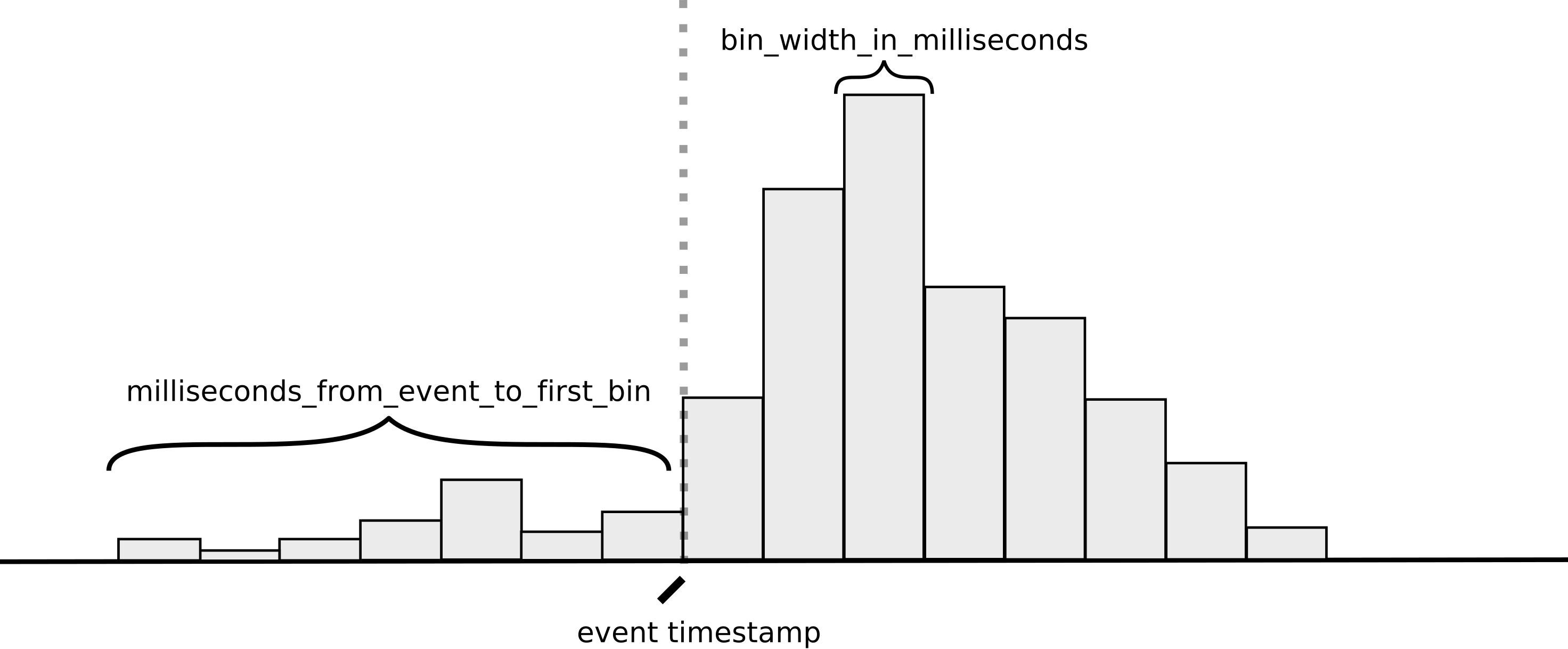
Note that in the diagram above, the event_to_bin_offset_in_ms is negative.
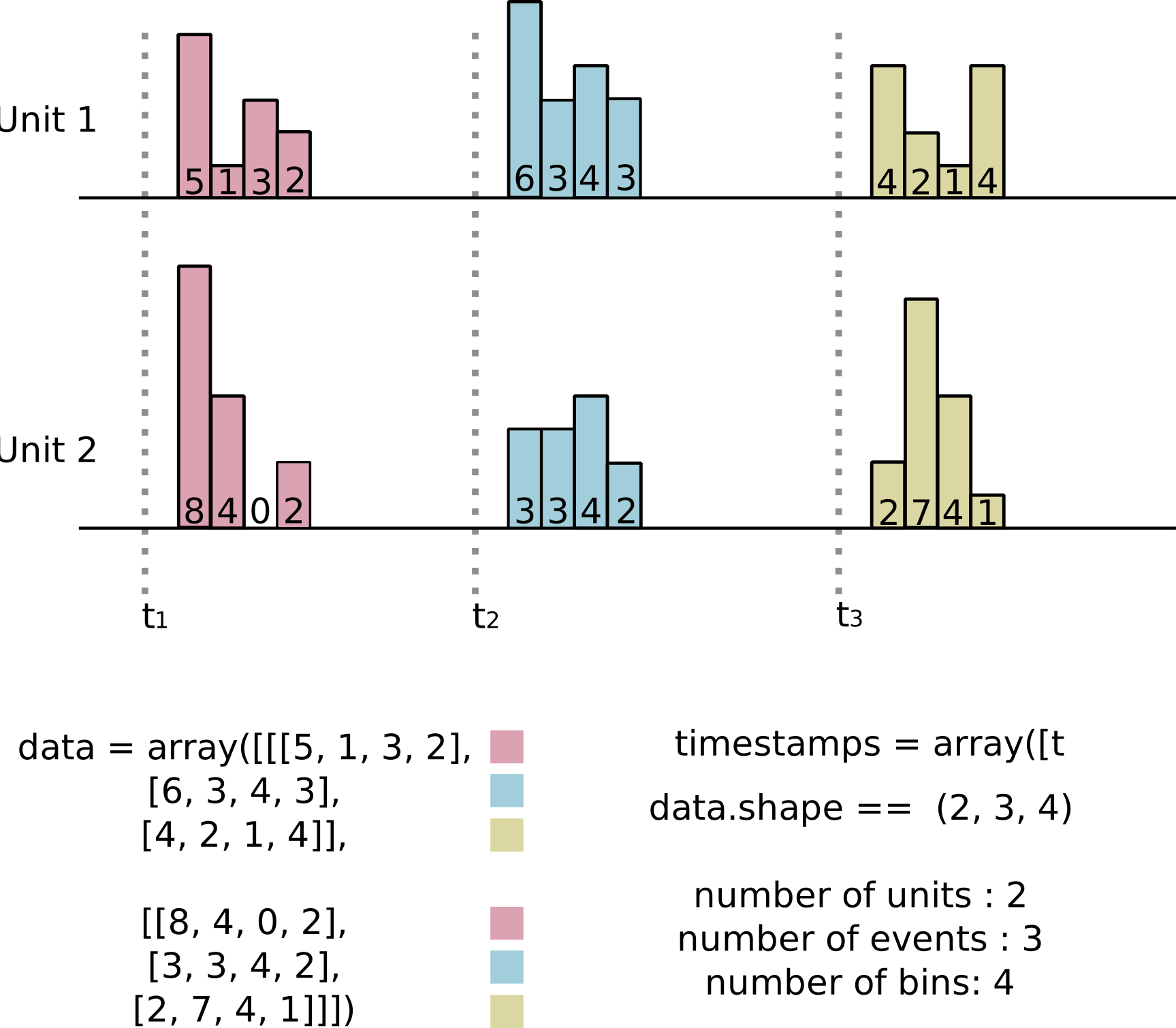
The data argument passed to the BinnedAlignedSpikes stores counts across all the event timestamps for each of the units. The data is a 3D array where the first dimension indexes the units, the second dimension indexes the event timestamps, and the third dimension indexes the bins where the counts are stored. The shape of the data is (number_of_units, number_of_events, number_of_bins).
The event_timestamps argument is used to store the timestamps of the events and should have the same length as the second dimension of data. Note that the event_timestamps should not decrease or in other words the events are expected to be in ascending order in time.
The first dimension of data works almost like a dictionary. That is, you select a specific unit by indexing the first dimension. For example, data[0] would return the data of the first unit. For each of the units, the data is organized with the time on the first axis as this is the convention in the NWB format. As a consequence of this choice the data of each unit is contiguous in memory.
The following diagram illustrates the structure of the data for a concrete example:
Linking to units table
One way to make the information stored in the BinnedAlignedSpikes object more useful for future users is to indicate exactly which units or neurons the first dimension of the data attribute corresponds to. This is optional but recommended as it makes the data more meaningful and easier to interpret. In NWB the units are usually stored in a Units table. To illustrate how to to create this link let's first create a toy Units table:
import numpy as np
from pynwb.misc import Units

num_units = 5
max_spikes_per_unit = 10

units_table = Units(name="units")
units_table.add_column(name="unit_name", description="name of the unit")

rng = np.random.default_rng(seed=0)

times = rng.random(size=(num_units, max_spikes_per_unit)).cumsum(axis=1)
spikes_per_unit = rng.integers(1, max_spikes_per_unit, size=num_units)

spike_times = []
for unit_index in range(num_units):

    # Not all units have the same number of spikes
    spike_times = times[unit_index, : spikes_per_unit[unit_index]]
    unit_name = f"unit_{unit_index}"
    units_table.add_unit(spike_times=spike_times, unit_name=unit_name)
This will create a Units table with 5 units. We can then link the BinnedAlignedSpikes object to this table by creating a DynamicTableRegion object. This allows to be very specific about which units the data in the BinnedAlignedSpikes object corresponds to. In the following code, the units described on the BinnedAlignedSpikes object correspond to the unit with indices 1 and 3 on the Units table. The rest of the procedure is the same as before:
from ndx_binned_spikes import BinnedAlignedSpikes
from hdmf.common import DynamicTableRegion


# Now we create the BinnedAlignedSpikes object and link it to the units table
data = np.array(
    [
        [  # Data of the unit 1 in the units table
            [5, 1, 3, 2],  # Bin counts around the first event's timestamp
            [6, 3, 4, 3],  # Bin counts around the second event's timestamp
            [4, 2, 1, 4],  # Bin counts around the third event's timestamp
        ],
        [ # Data of the unit 3 in the units table
            [8, 4, 0, 2],  # Bin counts around the first event's timestamp
            [3, 3, 4, 2],  # Bin counts around the second event's timestamp
            [2, 7, 4, 1],  # Bin counts around the third event's timestamp
        ],
    ],
)

region_indices = [1, 3]
units_region = DynamicTableRegion(
    data=region_indices, table=units_table, description="region of units table", name="units_region"
)

event_timestamps = np.array([0.25, 5.0, 12.25])
event_to_bin_offset_in_ms = -50.0  # The first bin is 50 ms before the event
bin_width_in_ms = 100.0
name = "BinnedAignedSpikesForMyPurpose"
description = "Spike counts that is binned and aligned to events."
binned_aligned_spikes = BinnedAlignedSpikes(
    data=data,
    event_timestamps=event_timestamps,
    bin_width_in_ms=bin_width_in_ms,
    event_to_bin_offset_in_ms=event_to_bin_offset_in_ms,
    description=description,
    name=name,
    units_region=units_region,
)
As with the previous example this can be then added to a processing module in an NWB file and then written to disk using exactly the same code as before.
Storing data from multiple conditions (i.e. multiple stimuli)
BinnedAlignedSpikes can also be used to store data that is aggregated across multiple conditions while at the same time keeping track of which condition each set of counts corresponds to. This is useful when you want to store the spike counts around multiple conditions (e.g., different stimuli, behavioral events, etc.) in a single structure. Since each condition may not occur the same number of times (e.g. different stimuli do not appear in the same frequency), an homogeneous data structure is not possible. Therefore an extra variable, condition_indices, is used to indicate which condition each set of counts corresponds to.
from ndx_binned_spikes import BinnedAlignedSpikes

binned_aligned_spikes = BinnedAlignedSpikes(
    bin_width_in_ms=bin_width_in_ms,
    event_to_bin_offset_in_ms=event_to_bin_offset_in_ms,
    data=data,  # Shape (number_of_units, number_of_events, number_of_bins)
    timestamps=timestamps,  # Shape (number_of_events,)
    condition_indices=condition_indices,  # Shape (number_of_events,)
    condition_labels=condition_labels,  # Shape (number_of_conditions,) or np.unique(condition_indices).size
)
Note that number_of_events here represents the total number of repetitions for all the conditions being aggregated. For example, if data is being aggregated from two stimuli where the first stimulus appeared twice and the second appeared three times, the number_of_events would be 5.
The condition_indices is an indicator vector that should be constructed so that data[:, condition_indices == condition_index, :] corresponds to the binned spike counts for the condition with the specified condition_index. You can retrieve the same data using the convenience method binned_aligned_spikes.get_data_for_condition(condition_index).
The condition_labels argument is optional and can be used to store the labels of the conditions. This is meant to help to understand the nature of the conditions
It's important to note that the timestamps must be in ascending order and must correspond positionally to the condition indices and the second dimension of the data. If they are not, a ValueError will be raised. To help organize the data correctly, you can use the convenience method BinnedAlignedSpikes.sort_data_by_event_timestamps(data=data, event_timestamps=event_timestamps, condition_indices=condition_indices), which ensures the data is properly sorted. Here’s how it can be used:
sorted_data, sorted_event_timestamps, sorted_condition_indices = BinnedAlignedSpikes.sort_data_by_event_timestamps(data=data, event_timestamps=event_timestamps, condition_indices=condition_indices)

binned_aligned_spikes = BinnedAlignedSpikes(
    bin_width_in_ms=bin_width_in_ms,
    event_to_bin_offset_in_ms=event_to_bin_offset_in_ms,
    data=sorted_data,
    event_timestamps=sorted_event_timestamps,
    condition_indices=sorted_condition_indices,
    condition_labels=condition_labels
)
The same can be achieved by using the following script:
sorted_indices = np.argsort(event_timestamps)
sorted_data = data[:, sorted_indices, :]
sorted_event_timestamps = event_timestamps[sorted_indices]
sorted_condition_indices = condition_indices[sorted_indices]
Example of building an BinnedAlignedSpikes for two conditions
To better understand how this object works, let's consider a specific example. Suppose we have data for two different stimuli and their associated timestamps:
import numpy as np

# Two units and 4 bins
data_for_first_stimuli = np.array(
    [
        # Unit 1
        [
            [0, 1, 2, 3],  # Bin counts around the first event's timestamp
            [4, 5, 6, 7],  # Bin counts around the second event's timestamp
        ],
        # Unit 2
        [
            [8, 9, 10, 11],  # Bin counts around the first event's timestamp
            [12, 13, 14, 15],  # Bin counts around the second event's timestamp
        ],
    ],
)

# Also two units and 4 bins but this condition occurred three times
data_for_second_stimuli = np.array(
    [
        # Unit 1
        [
            [0, 1, 2, 3],  # Bin counts around the first event's timestamp
            [4, 5, 6, 7],  # Bin counts around the second event's timestamp
            [8, 9, 10, 11],  # Bin counts around the third event's timestamp
        ],
        # Unit 2
        [
            [12, 13, 14, 15],  # Bin counts around the first event's timestamp
            [16, 17, 18, 19],  # Bin counts around the second event's timestamp
            [20, 21, 22, 23],  # Bin counts around the third event's timestamp
        ],
    ]
)

timestamps_first_stimuli = [5.0, 15.0]
timestamps_second_stimuli = [1.0, 10.0, 20.0]
The way that we would build the data for the BinnedAlignedSpikes object is as follows:
from ndx_binned_spikes import BinnedAlignedSpikes

bin_width_in_ms = 100.0
event_to_bin_offset_in_ms = -50.0

data = np.concatenate([data_for_first_stimuli, data_for_second_stimuli], axis=1)
event_timestamps = np.concatenate([timestamps_first_stimuli, timestamps_second_stimuli])
condition_indices = np.concatenate([np.zeros(2), np.ones(3)])
condition_labels = ["a", "b"]

sorted_data, sorted_event_timestamps, sorted_condition_indices = BinnedAlignedSpikes.sort_data_by_event_timestamps(data=data, event_timestamps=event_timestamps, condition_indices=condition_indices)

binned_aligned_spikes = BinnedAlignedSpikes(
    bin_width_in_ms=bin_width_in_ms,
    event_to_bin_offset_in_ms=event_to_bin_offset_in_ms,
    data=sorted_data,
    event_timestamps=sorted_event_timestamps,
    condition_indices=sorted_condition_indices,
)
Then we can recover the original data by calling the get_data_for_condition method:
retrieved_data_for_first_stimuli = binned_aligned_spikes.get_data_for_condition(condition_index=0)
np.testing.assert_array_equal(retrieved_data_for_first_stimuli, data_for_first_stimuli)
BinnedSpikes
The BinnedSpikes object is designed to store non-aligned binned spike counts as a 2D array (unit × bin). Unlike BinnedAlignedSpikes, this class is simpler and does not align the spike counts to specific events. It's intended for storing spike counts across the entire experimental session, typically with a large number of bins covering the full duration from session start to end.
Simple example
The following code illustrates a minimal use of the BinnedSpikes class:
import numpy as np
from ndx_binned_spikes import BinnedSpikes

data = np.array(
    [
        [5, 1, 3, 2, 6, 3, 4, 3, 4, 2],  # Bin counts for unit 0
        [8, 4, 0, 2, 3, 3, 4, 2, 2, 7],  # Bin counts for unit 1
    ],
    dtype="uint64",
)

bin_width_in_ms = 100.0  # Each bin is 100 ms wide
start_time_in_ms = 0.0  # The timestamp of the beginning of the first bin (0 = session start)

binned_spikes = BinnedSpikes(
    data=data,
    bin_width_in_ms=bin_width_in_ms,
    start_time_in_ms=start_time_in_ms
)
The resulting object can be added to a processing module in an NWB file just like the BinnedAlignedSpikes object:
from datetime import datetime
from zoneinfo import ZoneInfo
from pynwb import NWBHDF5IO, NWBFile

session_description = "A session with binned spike counts"
session_start_time = datetime.now(ZoneInfo("UTC"))
identifier = "binned_spikes_session"
nwbfile = NWBFile(
    session_description=session_description,
    session_start_time=session_start_time,
    identifier=identifier,
)

ecephys_processing_module = nwbfile.create_processing_module(
    name="ecephys", description="Processed electrophysiology data."
)
ecephys_processing_module.add(binned_spikes)

with NWBHDF5IO("binned_spikes.nwb", "w") as io:
    io.write(nwbfile)
Parameters and data structure
The structure of the bins is characterized with the following parameters:
bin_width_in_ms: The width of each bin in milliseconds.start_time_in_ms: The timestamp of the beginning of the first bin in milliseconds. The default value is 0, which represents the beginning of the session.
The data argument passed to the BinnedSpikes stores counts for each unit across all bins. The data is a 2D array where the first dimension indexes the units and the second dimension indexes the bins. The shape of the data is (number_of_units, number_of_bins).
Linking to units table
Just like with BinnedAlignedSpikes, you can link the BinnedSpikes object to a Units table to indicate which units the first dimension of the data attribute corresponds to:
from ndx_binned_spikes import BinnedSpikes
from hdmf.common import DynamicTableRegion
from pynwb.misc import Units

# Create a Units table
units_table = Units(name="units")
units_table.add_column(name="unit_name", description="name of the unit")

# Add some units to the table
for i in range(5):
    units_table.add_unit(spike_times=[1.1, 2.2, 3.3], unit_name=f"unit_{i}")

# Create a DynamicTableRegion to link specific units
region_indices = [1, 3]
units_region = DynamicTableRegion(
    data=region_indices, table=units_table, description="region of units table", name="units_region"
)

# Create the BinnedSpikes object with the units_region
data = np.array(
    [
        [5, 1, 3, 2, 6],  # Data for unit 1 in the units table
        [8, 4, 0, 2, 3],  # Data for unit 3 in the units table
    ],
    dtype="uint64",
)

binned_spikes = BinnedSpikes(
    data=data,
    bin_width_in_ms=100.0,
    start_time_in_ms=0.0,
    units_region=units_region,
)
This extension was created using ndx-template.
Project details
Verified details
These details have been verified by PyPIProject links
GitHub Statistics
Maintainers


Download files
Download the file for your platform. If you're not sure which to choose, learn more about installing packages.
Source Distribution
Built Distribution
Filter files by name, interpreter, ABI, and platform.
If you're not sure about the file name format, learn more about wheel file names.
Copy a direct link to the current filters
File details
Details for the file ndx_binned_spikes-0.3.0.tar.gz.
File metadata
- Download URL: ndx_binned_spikes-0.3.0.tar.gz
- Upload date:
- Size: 21.9 kB
- Tags: Source
- Uploaded using Trusted Publishing? Yes
- Uploaded via: twine/6.1.0 CPython/3.12.8
File hashes
| Algorithm | Hash digest | |
|---|---|---|
| SHA256 |
01354d59bb1d291980024264d028e07d74efaf33667f71e826fdc3d288c151c2
|
|
| MD5 |
435e5e62b0b0c425099b4dbee6bc0f09
|
|
| BLAKE2b-256 |
c5887ed888e3c91321764f8d6730701e0baffb3c3da74314653d6b95910406f5
|
Provenance
The following attestation bundles were made for ndx_binned_spikes-0.3.0.tar.gz:
Publisher:
publish.yml on catalystneuro/ndx-binned-spikes
-
Statement:
-
Statement type:
https://in-toto.io/Statement/v1 -
Predicate type:
https://docs.pypi.org/attestations/publish/v1 -
Subject name:
ndx_binned_spikes-0.3.0.tar.gz -
Subject digest:
01354d59bb1d291980024264d028e07d74efaf33667f71e826fdc3d288c151c2 - Sigstore transparency entry: 585911872
- Sigstore integration time:
-
Permalink:
catalystneuro/ndx-binned-spikes@33eca202267428335de46b1d3bb92020d0afa809 -
Branch / Tag:
refs/tags/v0.3.0 - Owner: https://github.com/catalystneuro
-
Access:
public
-
Token Issuer:
https://token.actions.githubusercontent.com -
Runner Environment:
github-hosted -
Publication workflow:
publish.yml@33eca202267428335de46b1d3bb92020d0afa809 -
Trigger Event:
release
-
Statement type:
File details
Details for the file ndx_binned_spikes-0.3.0-py3-none-any.whl.
File metadata
- Download URL: ndx_binned_spikes-0.3.0-py3-none-any.whl
- Upload date:
- Size: 13.3 kB
- Tags: Python 3
- Uploaded using Trusted Publishing? Yes
- Uploaded via: twine/6.1.0 CPython/3.12.8
File hashes
| Algorithm | Hash digest | |
|---|---|---|
| SHA256 |
16f8a41b266fa946ee74e430aee8a6406d5c2626e00e7573fe6be129d90cb3fc
|
|
| MD5 |
a976f12a6a84e5ab457429f2a626b77b
|
|
| BLAKE2b-256 |
c9a4692b0473181412ccb8f7031a2aed980fdd227820553a68e81df739a89999
|
Provenance
The following attestation bundles were made for ndx_binned_spikes-0.3.0-py3-none-any.whl:
Publisher:
publish.yml on catalystneuro/ndx-binned-spikes
-
Statement:
-
Statement type:
https://in-toto.io/Statement/v1 -
Predicate type:
https://docs.pypi.org/attestations/publish/v1 -
Subject name:
ndx_binned_spikes-0.3.0-py3-none-any.whl -
Subject digest:
16f8a41b266fa946ee74e430aee8a6406d5c2626e00e7573fe6be129d90cb3fc - Sigstore transparency entry: 585911885
- Sigstore integration time:
-
Permalink:
catalystneuro/ndx-binned-spikes@33eca202267428335de46b1d3bb92020d0afa809 -
Branch / Tag:
refs/tags/v0.3.0 - Owner: https://github.com/catalystneuro
-
Access:
public
-
Token Issuer:
https://token.actions.githubusercontent.com -
Runner Environment:
github-hosted -
Publication workflow:
publish.yml@33eca202267428335de46b1d3bb92020d0afa809 -
Trigger Event:
release
-
Statement type:






