
MLX-based translation CLI with PDF translation support.

Project description
🐈 NEKO-translate
NEKO-translate は、Mac の Apple Silicon で動く mlx フレームワークを用いて、翻訳を行う cli アプリケーションです。推論には mlx-lm で最適化しています。
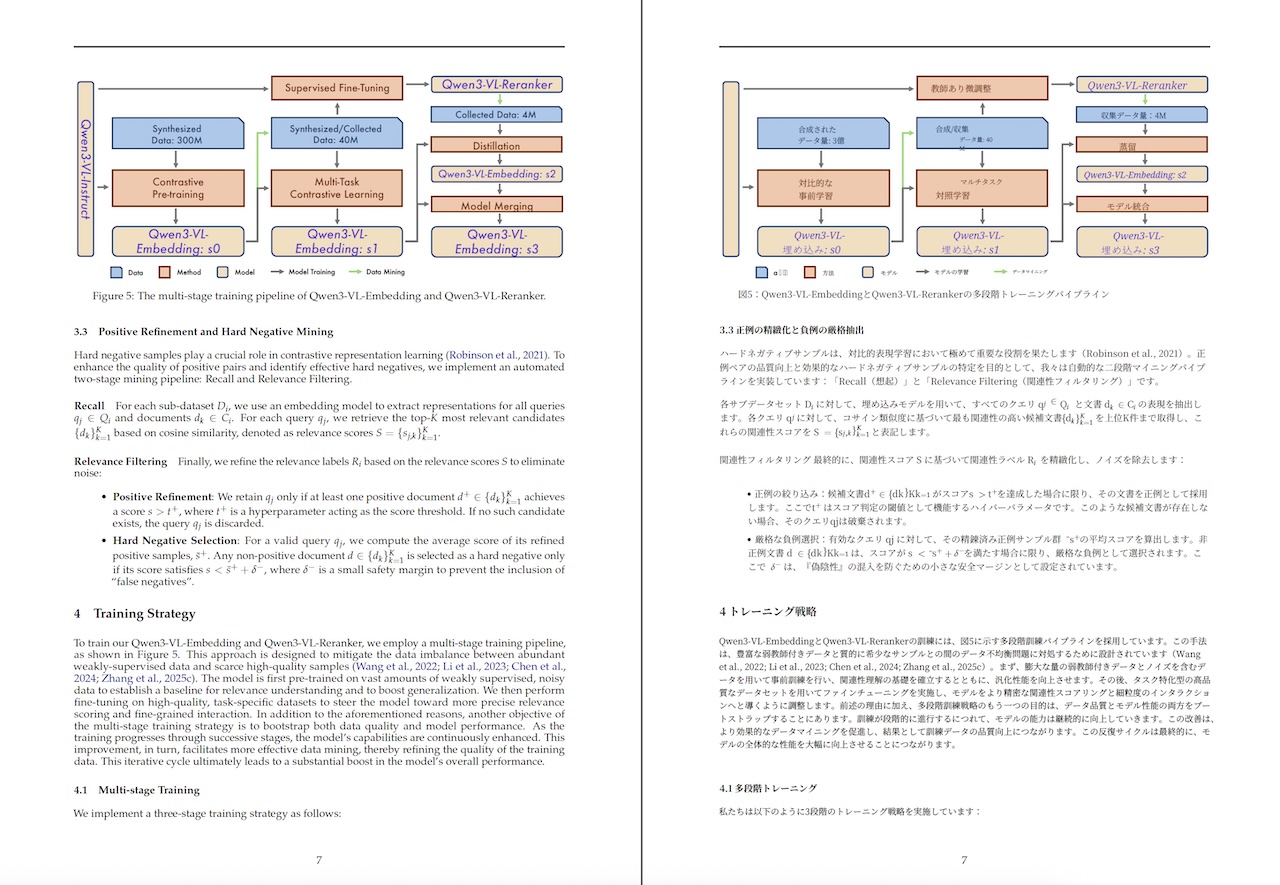
PDF の見開き翻訳コマンドも同梱されており、たとえば論文のページを原文・訳文と交互に読み進めるのに便利です。
できること
- 日英翻訳
- モデルによっては多言語翻訳にも対応
- サーバーモードで常駐可能・起動コストを削減
- 対話モード翻訳
- ストリーミング出力 (対話モードはデフォルト ON )
- PDF 見開き翻訳 - pdf2zh_next を内部で利用
インストール
uv tool(おすすめ)
まず python パッケージマネージャの uv のインストールが必要です。
その後
uv tool install neko-translate
でインストールすると、 neko-translate と neko-translate-pdf コマンドが使えます。
使い方
1) cli からの翻訳
neko-translate --text "こんにちは、可愛い🐈ですね"
# Hello.
なお、初回はモデルのダウンロードが行われるため、時間がかかるでしょう。言語を明示したい場合
neko-translate --text "Hello" --input-lang en --output-lang ja
# こんにちは。
なお、標準入力で文章が渡されると、その翻訳文を出力します。
2) 対話モード
引数なしで起動すると対話モードになります。
neko-translate
>> こんにちは
Hello.
>> exit
3) ストリーミング出力
neko-translate --stream --server never --text "こんにちは"
ストリーミングはサーバー経由では使えません。--stream を付けると直起動に切り替わります。
4) サーバーモード
起動コストが気になる場合はサーバーとして立ち上げることで、モデルのロードを省略することができます。
neko-translate server start
neko-translate --text "こんにちは"
neko-translate server stop
サーバーは ~/.config/neko-translate/ に通信用の socket とログを出力します。
- socket:
~/.config/neko-translate/neko-translate.sock - log:
~/.config/neko-translate/server.log
任意の場所を使いたい場合:
neko-translate server start \
  --socket ~/.config/neko-translate/test.sock \
  --log-file ~/.config/neko-translate/test.log
状態確認:
neko-translate server status
5) PDF 翻訳
pdf2zh_next を使って PDF を丸ごと翻訳します。翻訳は neko-translate サーバー経由です。
neko-translate-pdf paper.pdf
# 見開き翻訳しない
neko-translate-pdf paper.pdf --no-dual
デフォルトは --input en --output ja です。なお、出力ファイル/ディレクトリを指定も可能です。
neko-translate-pdf paper.pdf --output-pdf translated.pdf
neko-translate-pdf paper.pdf --output-dir ./out/
高品質な PLaMo 翻訳モデルも利用可能です。なお PLaMo モデルの利用には、PLaMo Community License への同意が必要です。
uv run neko-translate-pdf paper.pdf \
    --output-dir ./out \
    --model plamo
なお、PDF 翻訳には時間がかかります。mlx-community/plamo-2-translate を使って、論文を翻訳する場合、ページ数にもよりますが M4 Max で5分〜20分ほどかかります。
翻訳モデルの選択
何も指定しない場合、デフォルトは小型高速な以下のモデルです。
hotchpotch/CAT-Translate-0.8b-mlx-q4
短いエイリアスも用意しています(例: cat)。
おすすめモデル
- PLaMo 2 Translate(おすすめ)
- 論文や技術文書の翻訳が特に良いです。
- 利用には PLaMo Community License への同意が必要です(なお条件付きで商用利用も可能)。
- ライセンス: PLaMo Community License
- CAT-Translate
- MIT ライセンスのため、商用利用でも扱いやすいです。
- なお q8 が 8bit, q4 が 4bit モデルです。
なおこのプロジェクト(neko-translate)のソースコードは MIT ですが、利用する翻訳モデルのライセンスはモデルごとに異なります。利用の際は、必ず各モデルのライセンスを確認してください。
動作確認済みの MLX 翻訳モデル
| Model | Hugging Face | License |
|---|---|---|
| CAT-Translate | hotchpotch/CAT-Translate-0.8b-mlx-q4 |
MIT |
| CAT-Translate | hotchpotch/CAT-Translate-0.8b-mlx-q8 |
MIT |
| CAT-Translate | hotchpotch/CAT-Translate-1.4b-mlx-q4 |
MIT |
| CAT-Translate | hotchpotch/CAT-Translate-1.4b-mlx-q8 |
MIT |
| PLaMo 2 Translate | mlx-community/plamo-2-translate |
PLaMo Community License |
| HY-MT 1.5 | mlx-community/HY-MT1.5-1.8B-4bit / mlx-community/HY-MT1.5-1.8B-8bit / mlx-community/HY-MT1.5-7B-4bit / mlx-community/HY-MT1.5-7B-8bit |
HY-MT License |
開発
uv run tox
tox は pytest / ruff / ty をまとめて実行します。MLX 統合テストも走ります。
注意点
- Apple Silicon (macOS) での使用を想定しています。他の OS は想定しておりません。
- 初回はモデルのダウンロードが走ります。
uv run --no-sync neko-translate --text "こんにちは"
FAQ
- なんで server は mcp じゃないの?
- mcp 使わないので、つけることはないと思います
ライセンス
- ソースコード: MIT
謝辞
小型で使いやすそうな MIT ライセンスの翻訳モデル、CAT Translateモデルを mac からサクッと使ってみたくて作成しました。プロジェクト名もインスパイアされています。CAT Translate プロジェクトの関係者の方々、ありがとうございます。
また cli は plamo-translate-cli が便利だったので、同じように起動しっぱなしで翻訳できる実装を作ってみました。PLaMo は翻訳も cli も便利大変便利です、PLaMo 関連の方々、ありがとうございます。
Author
- Yuichi Tateno (@hotchpotch)
Release history Release notifications | RSS feed


Download files
Download the file for your platform. If you're not sure which to choose, learn more about installing packages.
Source Distribution
Built Distribution
Filter files by name, interpreter, ABI, and platform.
If you're not sure about the file name format, learn more about wheel file names.
Copy a direct link to the current filters
File details
Details for the file neko_translate-0.0.1.tar.gz.
File metadata
- Download URL: neko_translate-0.0.1.tar.gz
- Upload date:
- Size: 29.4 kB
- Tags: Source
- Uploaded using Trusted Publishing? No
- Uploaded via: uv/0.9.28 {"installer":{"name":"uv","version":"0.9.28","subcommand":["publish"]},"python":null,"implementation":{"name":null,"version":null},"distro":{"name":"macOS","version":null,"id":null,"libc":null},"system":{"name":null,"release":null},"cpu":null,"openssl_version":null,"setuptools_version":null,"rustc_version":null,"ci":null}
File hashes
| Algorithm | Hash digest | |
|---|---|---|
| SHA256 |
02cae0dc354c5a8c8ec7ab5609cf8c5d90eba76264ac3e54cb6bcea1c05e297e
|
|
| MD5 |
2a344adfe0cdc634465b9c7ccd1d2869
|
|
| BLAKE2b-256 |
d86c3df8dbdff56dcf265729adb9d1ec576f2a1ae9bc2c8b78a7de3c879b1dd5
|
File details
Details for the file neko_translate-0.0.1-py3-none-any.whl.
File metadata
- Download URL: neko_translate-0.0.1-py3-none-any.whl
- Upload date:
- Size: 27.0 kB
- Tags: Python 3
- Uploaded using Trusted Publishing? No
- Uploaded via: uv/0.9.28 {"installer":{"name":"uv","version":"0.9.28","subcommand":["publish"]},"python":null,"implementation":{"name":null,"version":null},"distro":{"name":"macOS","version":null,"id":null,"libc":null},"system":{"name":null,"release":null},"cpu":null,"openssl_version":null,"setuptools_version":null,"rustc_version":null,"ci":null}
File hashes
| Algorithm | Hash digest | |
|---|---|---|
| SHA256 |
48ef0ffd39de56dc3eadc8dae7e34826678b000d82664572440d01d6c6372484
|
|
| MD5 |
6bb063e08a5d0b3c0598479e921703a6
|
|
| BLAKE2b-256 |
62f9338878db29cbf29d69a697f50f9034ce9068c46c1461529ae8252568dbdb
|






