
DTensor-native pretraining and fine-tuning for LLMs/VLMs with day-0 Hugging Face support, GPU-acceleration, and memory efficiency.


Project description
🚀 NeMo AutoModel




📣 News and Discussions
- [11/6/2025]Accelerating Large-Scale Mixture-of-Experts Training in PyTorch
- [10/6/2025]Enabling PyTorch Native Pipeline Parallelism for 🤗 Hugging Face Transformer Models
- [9/22/2025]Fine-tune Hugging Face Models Instantly with Day-0 Support with NVIDIA NeMo AutoModel
- [9/18/2025]🚀 NeMo Framework Now Supports Google Gemma 3n: Efficient Multimodal Fine-tuning Made Simple
Overview
Nemo AutoModel is a Pytorch DTensor‑native SPMD open-source training library under NVIDIA NeMo Framework, designed to streamline and scale training and finetuning for LLMs and VLMs. Designed for flexibility, reproducibility, and scale, NeMo AutoModel enables both small-scale experiments and massive multi-GPU, multi-node deployments for fast experimentation in research and production environments.
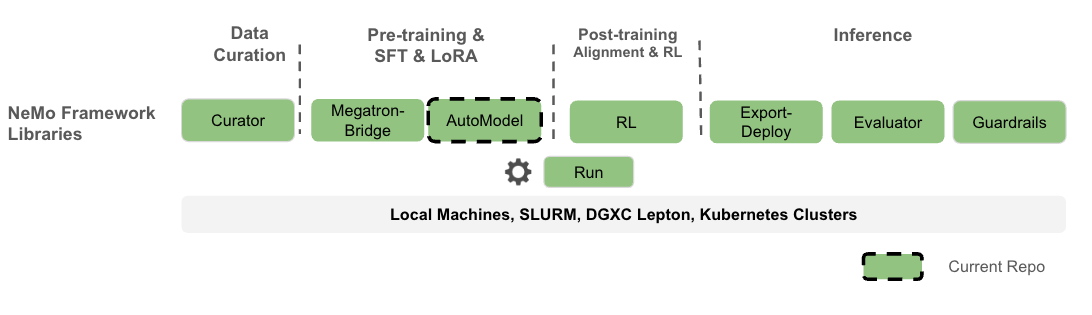
What you can expect:
- Hackable with a modular design that allows easy integration, customization and quick research prototypes.
- Minimal ceremony: YAML‑driven recipes; override any field via CLI.
- High performance and flexibility with custom kernels and DTensor support.
- Seamless integration with Hugging Face for day-0 model support, ease of use, and wide range of supported models.
- Efficient resource management using k8s and Slurm, enabling scalable and flexible deployment across configurations.
- Comprehensive documentation that is both detailed and user-friendly, with practical examples.
⚠️ Note: NeMo AutoModel is under active development. New features, improvements, and documentation updates are released regularly. We are working toward a stable release, so expect the interface to solidify over time. Your feedback and contributions are welcome, and we encourage you to follow along as new updates roll out.
Why PyTorch Distributed and SPMD
- One program, any scale: The same training script runs on 1 GPU or 1000+ by changing the mesh.
- PyTorch Distributed native: Partition model/optimizer states with
DeviceMesh+ placements (Shard,Replicate). - SPMD first: Parallelism is configuration. No model rewrites when scaling up or changing strategy.
- Decoupled concerns: Model code stays pure PyTorch; parallel strategy lives in config.
- Composability: Mix tensor, sequence, and data parallel by editing placements.
- Portability: Fewer bespoke abstractions; easier to reason about failure modes and restarts.
Table of Contents
- Feature Roadmap
- Getting Started
- LLM
- VLM
- Supported Models
- Performance
- Interoperability
- Contributing
- License
TL;DR: SPMD turns “how to parallelize” into a runtime layout choice, not a code fork.
Feature Roadmap
✅ Available now | 🔜 Coming in 25.11
-
✅ Advanced Parallelism - PyTorch native FSDP2, TP, CP, and SP for distributed training.
-
✅ HSDP - Multi-node Hybrid Sharding Data Parallelism based on FSDP2.
-
✅ Pipeline Support - Torch-native support for pipelining composable with FSDP2 and DTensor (3D Parallelism).
-
✅ Environment Support - Support for SLURM and interactive training.
-
✅ Learning Algorithms - SFT (Supervised Fine-Tuning), and PEFT (Parameter Efficient Fine-Tuning).
-
✅ Pre-training - Support for model pre-training, including DeepSeekV3.
-
✅ Knowledge Distillation - Support for knowledge distillation with LLMs; VLM support will be added post 25.09.
-
✅ HuggingFace Integration - Works with dense models (e.g., Qwen, Llama3, etc) and large MoEs (e.g., DSv3).
-
✅ Sequence Packing - Sequence packing for huge training perf gains.
-
✅ FP8 and mixed precision - FP8 support with torchao, requires torch.compile-supported models.
-
✅ DCP - Distributed Checkpoint support with SafeTensors output.
-
✅ VLM: Support for finetuning VLMs (e.g., Qwen2-VL, Gemma-3-VL). More families to be included in the future.
-
🔜 Extended MoE support - GPT-OSS, Qwen3 (Coder-480B-A35B, etc), Qwen-next.
-
🔜 Kubernetes - MUlti-node job launch with k8s.
Getting Started
We recommend using uv for reproducible Python environments.
# Setup environment before running any commands
uv venv
uv sync --frozen --all-extras

uv pip install nemo_automodel # latest release
# or: uv pip install git+https://github.com/NVIDIA-NeMo/Automodel.git
uv run python -c "import nemo_automodel; print('AutoModel ready')"
Run a Recipe
To run a NeMo AutoModel recipe, you need a recipe script (e.g., LLM, VLM) and a YAML config file (e.g., LLM, VLM):
# Command invocation format:
uv run <recipe_script_path> --config <yaml_config_path>

# LLM example: multi-GPU with FSDP2
uv run torchrun --nproc-per-node=8 examples/llm_finetune/finetune.py --config examples/llm_finetune/llama3_2/llama3_2_1b_hellaswag.yaml

# VLM example: single GPU fine-tuning (Gemma-3-VL) with LoRA
uv run examples/vlm_finetune/finetune.py --config examples/vlm_finetune/gemma3/gemma3_vl_4b_cord_v2_peft.yaml
LLM Pre-training
LLM Pre-training Single Node
We provide an example SFT experiment using the Fineweb dataset with a nano-GPT model, ideal for quick experimentation on a single node.
uv run torchrun --nproc-per-node=8 \
  examples/llm_pretrain/pretrain.py \
  -c examples/llm_pretrain/nanogpt_pretrain.yaml
LLM Supervised Fine-Tuning (SFT)
We provide an example SFT experiment using the SQuAD dataset.
LLM SFT Single Node
The default SFT configuration is set to run on a single GPU. To start the experiment:
uv run python3 \
  examples/llm_finetune/finetune.py \
  -c examples/llm_finetune/llama3_2/llama3_2_1b_squad.yaml
This fine-tunes the Llama3.2-1B model on the SQuAD dataset using a 1 GPU.
To use multiple GPUs on a single node in an interactive environment, you can run the same command
using torchrun and adjust the --proc-per-node argument to the number of needed GPUs.
uv run torchrun --nproc-per-node=8 \
  examples/llm_finetune/finetune.py \
  -c examples/llm_finetune/llama3_2/llama3_2_1b_squad.yaml
Alternatively, you can use the automodel CLI application to launch the same job, for example:
uv run automodel finetune llm \
  --nproc-per-node=8 \
  -c examples/llm_finetune/llama3_2/llama3_2_1b_squad.yaml
LLM SFT Multi Node
You can use the automodel CLI application to launch a job on a SLURM cluster, for example:
# First you need to specify the SLURM section in your YAML config, for example:

cat << EOF > examples/llm_finetune/llama3_2/llama3_2_1b_squad.yaml
slurm:
  job_name: llm-finetune # set to the job name you want to use
  nodes: 2 # set to the needed number of nodes
  ntasks_per_node: 8
  time: 00:30:00
  account: your_account
  partition: gpu
  container_image: nvcr.io/nvidia/nemo:25.07
  gpus_per_node: 8 # This adds "#SBATCH --gpus-per-node=8" to the script
  # Optional: Add extra mount points if needed
  extra_mounts:
    - /lustre:/lustre
  # Optional: Specify custom HF_HOME location (will auto-create if not specified)
  hf_home: /path/to/your/HF_HOME
  # Optional : Specify custom env vars
  # env_vars:
  #   ENV_VAR: value
  # Optional: Specify custom job directory (defaults to cwd/slurm_jobs)
  # job_dir: /path/to/slurm/jobs
EOF

# using the updated YAML you can launch the job.
uv run automodel finetune llm \
  -c examples/llm_finetune/llama3_2/llama3_2_1b_squad.yaml
LLM Parameter-Efficient Fine-Tuning (PEFT)
We provide a PEFT example using the HellaSwag dataset.
LLM PEFT Single Node
# Memory‑efficient SFT with LoRA
uv run examples/llm_finetune/finetune.py \
--config examples/llm_finetune/llama3_2/llama3_2_1b_hellaswag_peft.yaml

# You can always overwrite parameters by appending them to the command, for example,
# if you want to increase the micro-batch size you can do
uv run examples/llm_finetune/finetune.py \
  --config examples/llm_finetune/llama3_2/llama3_2_1b_hellaswag_peft.yaml \
  --step_scheduler.local_batch_size 16

# The above command will modify the `local_batch_size` variable to have value 16 in the
# section `step_scheduler` of the yaml file.
[!NOTE] Launching a multi-node PEFT example requires only adding a
slurmsection to your config, similarly to the SFT case.
VLM Supervised Fine-Tuning (SFT)
We provide a VLM SFT example using Qwen2.5‑VL for end‑to‑end fine‑tuning on image‑text data.
VLM SFT Single Node
# Qwen2.5‑VL on a 8 GPUs
uv run torchrun --nproc-per-node=8 \
  examples/vlm_finetune/finetune.py \
  --config examples/vlm_finetune/qwen2_5/qwen2_5_vl_3b_rdr.yaml
VLM Parameter-Efficient Fine-Tuning (PEFT)
We provide a VLM PEFT (LoRA) example for memory‑efficient adaptation with Gemma3 VLM.
VLM PEFT Single Node
# Qwen2.5‑VL on a 8 GPUs
uv run torchrun --nproc-per-node=8 \
  examples/vlm_finetune/finetune.py \
  --config examples/vlm_finetune/gemma3/gemma3_vl_4b_medpix_peft.yaml
Supported Models
NeMo AutoModel provides native support for a wide range of models available on the Hugging Face Hub, enabling efficient fine-tuning for various domains. Below is a small sample of ready‑to‑use families (train as‑is or swap any compatible 🤗 causal LM), you can specify nearly any LLM/VLM model available on 🤗 hub:
[!NOTE] Check out more LLM and VLM examples. Any causal LM on Hugging Face Hub can be used with the base recipe template, just overwrite
--model.pretrained_model_name_or_path <model-id>in the CLI or in the YAML config.
Performance
NeMo AutoModel achieves great training performance on NVIDIA GPUs. Below are highlights from our benchmark results:
| Model | #GPUs | Seq Length | Model TFLOPs/sec/GPU | Tokens/sec/GPU | Kernel Optimizations |
|---|---|---|---|---|---|
| DeepSeek V3 671B | 256 | 4096 | 250 | 1,002 | TE + DeepEP |
| GPT-OSS 20B | 8 | 4096 | 279 | 13,058 | TE + DeepEP + FlexAttn |
| Qwen3 MoE 30B | 8 | 4096 | 212 | 11,842 | TE + DeepEP |
For complete benchmark results including configuration details, see the Performance Summary.
🔌 Interoperability
- NeMo RL: Use AutoModel checkpoints directly as starting points for DPO/RM/GRPO pipelines.
- Hugging Face: Train any LLM/VLM from 🤗 without format conversion.
- Megatron Bridge: Optional conversions to/from Megatron formats for specific workflows.
🗂️ Project Structure
NeMo-Automodel/
├── examples
│   ├── llm_finetune            # LLM finetune recipes
│   ├── llm_kd                  # LLM knowledge-distillation recipes
│   ├── llm_pretrain            # LLM pretrain recipes
│   ├── vlm_finetune            # VLM finetune recipes
│   └── vlm_generate            # VLM generate recipes
├── nemo_automodel
│   ├── _cli
│   │   └── app.py              # the `automodel` CLI job launcher
│   ├── components              # Core library
│   │   ├── _peft               # PEFT implementations (LoRA)
│   │   ├── _transformers       # HF model integrations
│   │   ├── checkpoint          # Distributed checkpointing
│   │   ├── config
│   │   ├── datasets            # LLM (HellaSwag, etc.) & VLM datasets
│   │   ├── distributed         # FSDP2, Megatron FSDP, Pipelining, etc.
│   │   ├── launcher            # The job launcher component (SLURM)
│   │   ├── loggers             # loggers
│   │   ├── loss                # Optimized loss functions
│   │   ├── models              # User-defined model examples
│   │   ├── moe                 # Optimized kernels for MoE models
│   │   ├── optim               # Optimizer/LR scheduler components
│   │   ├── quantization        # FP8
│   │   ├── training            # Train utils
│   │   └── utils               # Misc utils
│   ├── recipes
│   │   ├── llm                 # Main LLM train loop
│   │   └── vlm                 # Main VLM train loop
│   └── shared
└── tests/                      # Comprehensive test suite
Citation
If you use NeMo AutoModel in your research, please cite it using the following BibTeX entry:
@misc{nemo-automodel,
title = {NeMo AutoModel: DTensor‑native SPMD library for scalable and efficient training},
howpublished = {\url{https://github.com/NVIDIA-NeMo/Automodel}},
year = {2025},
note = {GitHub repository},
}
🤝 Contributing
We welcome contributions! Please see our Contributing Guide for details.
📄 License
NVIDIA NeMo AutoModel is licensed under the Apache License 2.0.
Release history Release notifications | RSS feed


Download files
Download the file for your platform. If you're not sure which to choose, learn more about installing packages.
Source Distribution
Built Distribution
Filter files by name, interpreter, ABI, and platform.
If you're not sure about the file name format, learn more about wheel file names.
Copy a direct link to the current filters
File details
Details for the file nemo_automodel-0.2.0.tar.gz.
File metadata
- Download URL: nemo_automodel-0.2.0.tar.gz
- Upload date:
- Size: 385.5 kB
- Tags: Source
- Uploaded using Trusted Publishing? No
- Uploaded via: twine/6.0.1 CPython/3.12.3
File hashes
| Algorithm | Hash digest | |
|---|---|---|
| SHA256 |
22154f95cacc70c9f3fb4c346122f563d968dc34a2c20fb12a8aee8ef6eb54f1
|
|
| MD5 |
494e1bea9ff40edc1d925876f92f21cc
|
|
| BLAKE2b-256 |
049395f77d79f5f349e67c6d8659811af544013b5f860e9479ce63774956b579
|
File details
Details for the file nemo_automodel-0.2.0-py3-none-any.whl.
File metadata
- Download URL: nemo_automodel-0.2.0-py3-none-any.whl
- Upload date:
- Size: 520.4 kB
- Tags: Python 3
- Uploaded using Trusted Publishing? No
- Uploaded via: twine/6.0.1 CPython/3.12.3
File hashes
| Algorithm | Hash digest | |
|---|---|---|
| SHA256 |
1287bed50e215fac990938d3933a95b03d02f4b0ada474b93efc647e8387945e
|
|
| MD5 |
832677bcd030187b54b9c12a9ce75665
|
|
| BLAKE2b-256 |
d6d469610c71c9d0182918d5ca9f4f4ca68d08c83c3689cf224fa9bc5c1a09b9
|






