
nenya




Intro
Nenya is a general purpose 0.5B active, 2.5B total parameter mixture-of-experts (MoE) base model. Nenya rivals Qwen3.5 2B on pretraining benchmarks with 500× lower training compute and 3.4× fewer active FLOPs/token.
This package is the model's code. Importing it registers Nenya with transformers, so the model loads from
ArsalanZ/Nenya-2.5B-A0.5B-Base without
trust_remote_code, and it adds nenya.load() and nenya.generate(). The weights (5.2 GB) download on first use.
Install
| Command | For | What you get |
|---|---|---|
pip install nenya |
Any device: CPU, NVIDIA GPU, or a Mac's GPU through PyTorch | The model code, nenya.load() and nenya.generate(). The Gated DeltaNet-2 (GDN-2) layers run a pure-PyTorch recurrence |
pip install "nenya[cuda]" |
NVIDIA GPUs | Adds flash-linear-attention: the GDN-2 layers run on its Triton kernels, much faster on long prompts |
pip install "nenya[mac]" |
Macs with Apple silicon | Adds the Metal engine (nenya-mac): nenya.generate() runs on the Mac's GPU, about 125 tok/s on an M4 |
Quick start
Any device: pip install nenya
import nenya
print(nenya.generate("The mitochondrion is the organelle responsible for", max_new_tokens=40))
print(nenya.generate("Question: What is the capital of Australia?\nAnswer:", max_new_tokens=8, temperature=0))
nenya.generate() returns the continuation. It runs on an NVIDIA GPU if there is one, else on the Mac's GPU (MPS),
else on the CPU, in bf16. The first call loads the model and later calls reuse it; nenya.unload() frees it.
nenya.load() returns the model and tokenizer themselves:
import nenya

model, tok = nenya.load()                       # the model (bf16, on the best device) and its tokenizer
print(sum(p.numel() for p in model.parameters()))
print(nenya.generate("The theory of relativity states that", max_new_tokens=40, model=model, tokenizer=tok))
Or with transformers directly. The package registers the model, so trust_remote_code is not needed:
import torch
import nenya                                    # registers the model with transformers
from transformers import AutoModelForCausalLM, AutoTokenizer

device = "cuda" if torch.cuda.is_available() else "mps" if torch.backends.mps.is_available() else "cpu"
repo = "ArsalanZ/Nenya-2.5B-A0.5B-Base"
tok = AutoTokenizer.from_pretrained(repo)
model = AutoModelForCausalLM.from_pretrained(repo, dtype=torch.bfloat16).to(device)

inputs = tok("The mitochondrion is the organelle responsible for", return_tensors="pt").to(model.device)
out = model.generate(**inputs, max_new_tokens=40)     # samples: temperature 0.9, top-k 20 (the default)
print(tok.decode(out[0], skip_special_tokens=True))

# maths, code and short factual answers: greedy decoding
out = model.generate(**inputs, max_new_tokens=40, do_sample=False)
NVIDIA GPUs: pip install "nenya[cuda]"
The same code, faster: with flash-linear-attention installed, the GDN-2 layers run on its Triton kernels instead of the PyTorch recurrence. Nothing in the code changes:
import nenya
print(nenya.generate("def quicksort(arr):", max_new_tokens=80, temperature=0))      # greedy for code
To make sure the kernels are used, set NENYA_GDN2_BACKEND=fla: the model then raises an error instead of falling
back to the PyTorch recurrence.
Note: nenya[cuda] is not optimised and simply runs a PyTorch forward pass.
Macs with Apple silicon: pip install "nenya[mac]"
import nenya
print(nenya.generate("The mitochondrion is the organelle responsible for", max_new_tokens=40))
print(nenya.generate("Question: What is the capital of Australia?\nAnswer:", max_new_tokens=8, temperature=0))
nenya.generate() runs on the Mac's GPU through the Metal engine: about 125 tok/s on an M4, with prompts processed
at up to 1,800 tok/s. The first call downloads the engine's weight file (3.5 GB) from
ArsalanZ/Nenya-2.5B-A0.5B-Base-Metal-8bit, and the
engine stays loaded between calls. A call with transformers' own generate() arguments (e.g. repetition_penalty)
runs on transformers instead, with a warning. Speed, memory and the engine's own API:
nenya-mac.
nenya.generate() and nenya.load()
nenya.generate(prompt, ...) continues prompt and returns the new text. Nenya is a base model: it continues plain
text and has no chat template.
| Argument | Default | Meaning |
|---|---|---|
max_new_tokens |
128 | Tokens to generate |
temperature |
0.9 | 0 is greedy decoding |
top_k |
20 | 0 turns top-k off |
top_p, min_p |
off | Nucleus and min-p sampling |
seed |
none | Makes a sampled call repeatable |
backend |
"auto" |
"auto": the Metal engine on a Mac that has it, else transformers. "mac" or "transformers" picks one |
model, tokenizer |
none | Your own model and tokenizer (e.g. from nenya.load()), used instead (transformers) |
repo_id |
"ArsalanZ/Nenya-2.5B-A0.5B-Base" |
The model repo |
| Other keywords | Passed to transformers' generate() (e.g. repetition_penalty); they select transformers |
nenya.load(repo_id="ArsalanZ/Nenya-2.5B-A0.5B-Base", revision=None, device=None, dtype=torch.bfloat16) returns
(model, tokenizer), the model in eval mode on device (default: CUDA, else MPS, else CPU). bf16 is the precision
the model was trained and evaluated in; dtype=torch.float32 also works. Other keyword arguments go to
from_pretrained().
nenya.unload() frees what nenya.generate() keeps loaded between calls: the transformers model (one at a time:
another repo_id replaces it) and the Metal engine's session.
Sampling
nenya.generate() and transformers' generate() both sample with the model's recommended settings, temperature 0.9
with top-k 20. These are its generation_config.json defaults, chosen from 75 settings for the best quality with the
fewest repetition loops.
For maths, use greedy decoding, and also for code you will run and short factual answers. Sampling costs accuracy there: GSM8K drops from 36.2% greedy to 21.4%.
- With
nenya.generate(), passtemperature=0. - With transformers, pass
do_sample=False.temperature=0raises an error while sampling is on.
Benchmarks
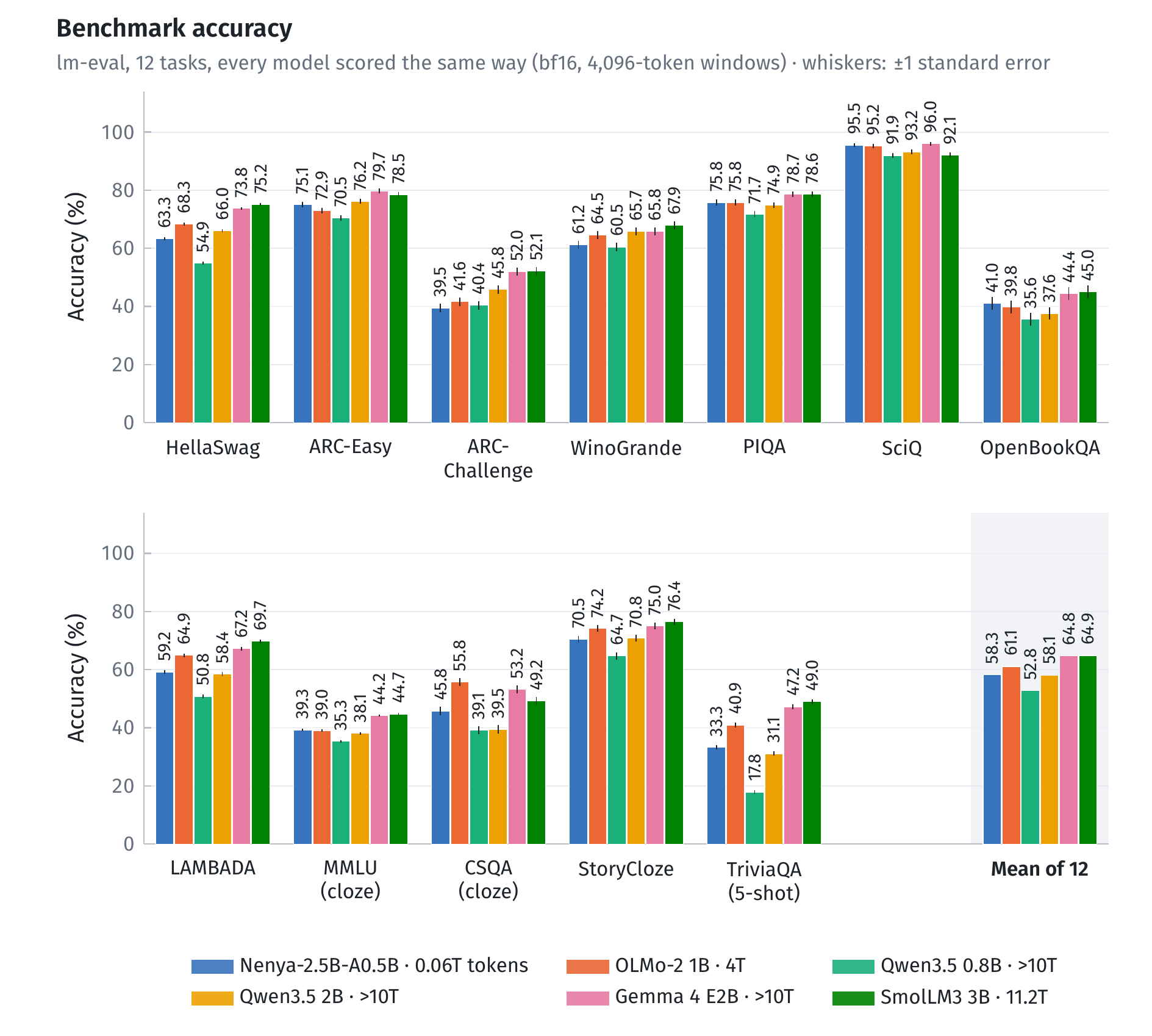
The full results, how they were measured and how to reproduce them are on the model card.
Requirements and tested versions
Python 3.12 or later, torch 2.11 to 2.14, and transformers 5.18 or later (5.x). Tested: Python 3.12, with torch 2.11 and transformers 5.18, 5.21 and 5.22, and with torch 2.14 and transformers 5.22 (flash-linear-attention 0.5.2), on Linux with CUDA; with torch 2.14 and transformers 5.20 on macOS 27 (Apple M4), and torch 2.14 and transformers 5.22 on macOS 14.8 (Apple M2).
The package's model files are the same as the Hub repo's remote code, so the model computes the same thing either way.
License
Apache 2.0 (LICENSE; third-party notices in NOTICE).
1 maintainer

Metadata
1 maintainer
Release files for nenya 1.0.0
For a detailed explanation of source distributions (sdists) and built distributions (wheels), please see the package formats documentation.
Source distribution (sdist)
| File | Size | Uploaded | Provenance | Actions |
|---|---|---|---|---|
| nenya-1.0.0.tar.gz | 38.1 kB | Without provenance | Details for nenya-1.0.0.tar.gz |
Built distribution (wheel)
| File | Interpreter | ABI | Platform | Actions Reset |
|---|---|---|---|---|
| nenya-1.0.0-py3-none-any.whl | Python 3 | none | any | Details for nenya-1.0.0-py3-none-any.whl |
Total release size: 75.9 kB
Release files / nenya-1.0.0.tar.gz
| Download URL | nenya-1.0.0.tar.gz |
|---|---|
| Size | 38.1 kB |
| Tags | Source |
|
SHA-256 checksum How to use checksums |
02a1ef18a11a0e4e70c1038cd2db2f437951a2e36bf8bfd21e783d7c088eb2f3
|
|
BLAKE2b-256 checksum How to use checksums |
e88c0c0dccbf58c8d841df6be3fe916bd4b45f191f390e51af8345bd697802a2
|
| Upload date | |
|
Uploaded using Trusted Publishing? What is trusted publishing? |
No |
| Uploaded via |
twine/7.0.0 CPython/3.12.3
|
Release files / nenya-1.0.0-py3-none-any.whl
| Download URL | nenya-1.0.0-py3-none-any.whl |
|---|---|
| Size | 37.8 kB |
| Tags | Python 3 |
|
SHA-256 checksum How to use checksums |
d7c382ad0ea3a8db6d0351042ebbca66273553b555c3e43ff1bdfc06f8eefa02
|
|
BLAKE2b-256 checksum How to use checksums |
23c6deecb9db0860b85cb5bf1131e294c65e1a2d82cdb8b5a4bb2ec7d7d957d8
|
| Upload date | |
|
Uploaded using Trusted Publishing? What is trusted publishing? |
No |
| Uploaded via |
twine/7.0.0 CPython/3.12.3
|
Security for nenya 1.0.0
Provenance
Provenance describes where a file came from. On PyPI, provenance is shared via attestations, which provide a verifiable record of the build or publishing details. View details, limitations and caveats.
No provenance found
None of the files in this release were uploaded with provenance metadata.
A note on package security
PyPI is a repository for distributing packages, not a service for auditing them. While third-party security researchers and our staff do their best to detect and remove malicious packages, PyPI cannot guarantee the quality, security or suitability of any given package.
To learn more about protecting yourself from malicious actors, visit our package security documentation.













