

Forget your environment sorrows




nepenthe builds, versions, and distributes large shared conda/PyPI environments. It solves a dependency manifest with rattler and records the result in a portable lockfile. Publish that lock to a versioned registry so other machines can install the same packages without re-solving.
- Manifests describe dependencies and compose environments.
- Rust solver uses rattler without a Python interpreter.
- Multi-platform locks store
linux-64,osx-arm64, andwin-64environments in onerattler_lockfile, solved from one host. - Storage backends read and write specs using
file://,s3://, andhttps://; package channels can use servers such as Artifactory. - Versioned registry tracks each environment independently and stores immutable, content-addressed locks.
- Installation links packages into a prefix with rattler; conda, mamba, and micromamba are not required.
- Conda export converts a lock to an
@EXPLICITspec forconda create --file. - Credentials are supplied at use time and never written into artifacts.
The CLI and Python API support building, publishing, and installing environments.
Use pack / unpack bundles for air-gapped machines and pyproject.toml
integration to check a project's dependencies against its shared environment.
Why nepenthe?
Frozen environments keep package versions consistent across machines and over time. Maintaining every pin by hand makes upgrades difficult and can lead to dependency hell.
With nepenthe, you specify dependencies and the version constraints you need. Each release solves that list and freezes the result. Consumers install those packages without re-solving.
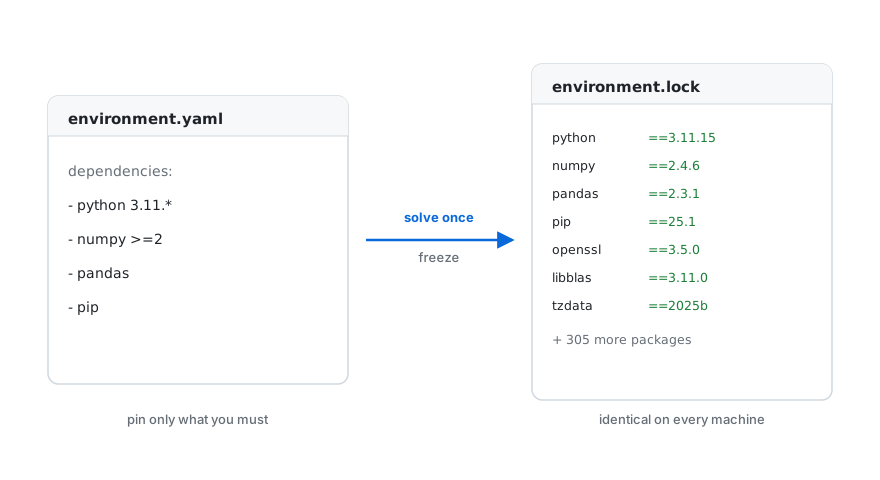
To update an environment, edit its root dependencies and build a new release. Teams can choose when to adopt it.
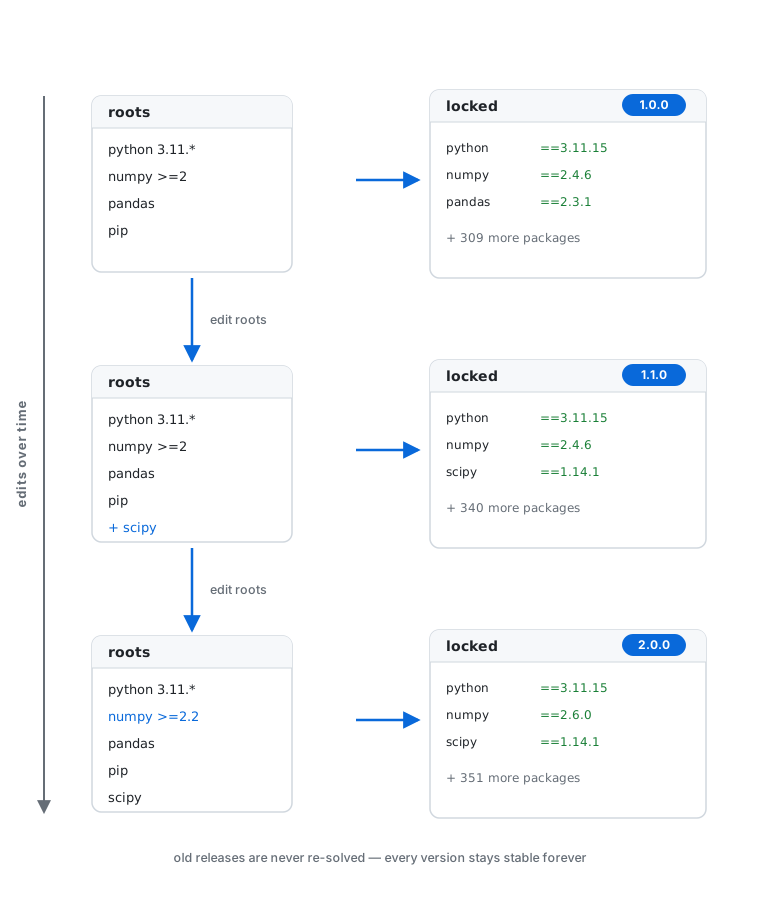
Unlike per-project lockfiles (pixi, uv) and re-solved manifests
(environment.yml), nepenthe distributes versioned, immutable environments for
multiple repos to share. See
Motivation for the full comparison.
Documentation
| For | Read |
|---|---|
| Why it exists: the problem and alternatives | Motivation |
| Users: concepts and how-to guides | The wiki: Concepts, Manifests, Channels & Artifactory, Registry, Installing, Consuming in a Project, Packing, Python API, Backends |
| Getting started | Installation |
| Contributors: how it's built | Architecture |
Quickstart
Create a manifest with the dependencies and version constraints you need:
# environment.yaml
project:
  name: demo
  channels: [conda-forge]
  platforms: [linux-64]
  python: ["3.11"]

dependencies:
  - numpy >=2
  - pip

environments:
  app: []
Build a fully pinned lockfile without a registry or conda:
nepenthe build --manifest environment.yaml --env app --output-dir .
# → app-py3.11.lock      the reproducible artifact: every install gives these exact packages
Export the lock as an @EXPLICIT spec for installation with conda or mamba:
nepenthe export --env app --lock app-py3.11.lock --platform linux-64 -o app.txt
# → app.txt              @EXPLICIT list of package URLs
Install from the spec with conda, or publish the lock and install with nepenthe:
# with conda/mamba, from the spec — nepenthe not needed on this machine
conda create --name app --file app.txt

# …or publish the lock to a versioned registry and install with nepenthe — no conda:
nepenthe build --manifest environment.yaml --env app \
  --registry file:///srv/nepenthe --version 1.0.0
nepenthe create app --registry file:///srv/nepenthe --python 3.11 --prefix ./envs/app
eval "$(nepenthe activate --prefix ./envs/app)"
The CLI is a single multicall binary: np and npb are symlinks to nepenthe
(dispatch on the invoked name). np behaves exactly like nepenthe, and npb
is a shortcut for nepenthe build (so the build step above is just
npb --manifest environment.yaml --env app --output-dir .).
The Python API provides the same operations without requiring conda:
import nepenthe

# producer: solve "app" and publish its lock as v1.0.0
nepenthe.build("environment.yaml", "app", registry="file:///srv/nepenthe", version="1.0.0")

# consumer: install the latest published lock into a prefix
nepenthe.create("app", "file:///srv/nepenthe", "./envs/app")
print(nepenthe.activate("./envs/app"))
A repo can pin its shared environment in pyproject.toml and check that its
dependencies are compatible:
[tool.nepenthe]
environment = "app"
registry = "file:///srv/nepenthe"
version = "1.0.0"
nepenthe sync      # install the referenced environment into .venv
nepenthe check     # verify [project.dependencies] are compatible (fails on conflicts)
See Installing Environments for the complete CLI
reference, Consuming in a Project for the
pyproject.toml workflow, Python API for the bindings,
Manifests for the manifest format, and the
runnable rust/examples/ for the producer side.
Contributing
Contributions are welcome under the Apache 2.0 license. See Contributing and Build from Source.
License
Apache-2.0. See LICENSE for details.


Release files for nepenthe 0.2.1
For a detailed explanation of source distributions (sdists) and built distributions (wheels), please see the package formats documentation.
Source distribution (sdist)
| File | Size | Uploaded | Provenance | Actions |
|---|---|---|---|---|
| nepenthe-0.2.1.tar.gz | 268.5 kB | Without provenance | Details for nepenthe-0.2.1.tar.gz |
Built distributions (wheels)
| File | Actions Reset | |||
|---|---|---|---|---|
| nepenthe-0.2.1-cp311-abi3-win_amd64.whl | CPython 3.11 | abi3 | Windows x86-64 | Details for nepenthe-0.2.1-cp311-abi3-win_amd64.whl |
| nepenthe-0.2.1-cp311-abi3-manylinux_2_28_x86_64.whl | CPython 3.11 | abi3 | Linux glibc 2.28+ x86-64 | Details for nepenthe-0.2.1-cp311-abi3-manylinux_2_28_x86_64.whl |
| nepenthe-0.2.1-cp311-abi3-manylinux_2_28_aarch64.whl | CPython 3.11 | abi3 | Linux glibc 2.28+ ARM64 | Details for nepenthe-0.2.1-cp311-abi3-manylinux_2_28_aarch64.whl |
| nepenthe-0.2.1-cp311-abi3-macosx_11_0_arm64.whl | CPython 3.11 | abi3 | macOS 11.0+ ARM64 | Details for nepenthe-0.2.1-cp311-abi3-macosx_11_0_arm64.whl |
Total release size: 87.9 MB
Release files / nepenthe-0.2.1.tar.gz
| Download URL | nepenthe-0.2.1.tar.gz |
|---|---|
| Size | 268.5 kB |
| Tags | Source |
|
SHA-256 checksum How to use checksums |
cb76847b1392cf368deed60fb5330713dd44c95c2e94f9ba2ce0231a1c996ae4
|
|
BLAKE2b-256 checksum How to use checksums |
c4a3665e4a61d474528d087c9d64a2db3859648c97c4ed4646c721a20d37b07e
|
| Upload date | |
|
Uploaded using Trusted Publishing? What is trusted publishing? |
No |
| Uploaded via |
twine/7.0.0 CPython/3.12.15
|
Release files / nepenthe-0.2.1-cp311-abi3-win_amd64.whl
| Download URL | nepenthe-0.2.1-cp311-abi3-win_amd64.whl |
|---|---|
| Size | 19.5 MB |
| Tags | CPython 3.11 Windows x86-64 abi3 |
|
SHA-256 checksum How to use checksums |
dce93ef35a63abd8b59d56f4e7ae1ac59bf527773533b439f1ae4a404c07e467
|
|
BLAKE2b-256 checksum How to use checksums |
14f42d4f3ce69c3b4a4111a87a3b1543bb448a0053f244a071b989a2f0b7a5d0
|
| Upload date | |
|
Uploaded using Trusted Publishing? What is trusted publishing? |
No |
| Uploaded via |
twine/7.0.0 CPython/3.12.15
|
Release files / nepenthe-0.2.1-cp311-abi3-manylinux_2_28_x86_64.whl
| Download URL | nepenthe-0.2.1-cp311-abi3-manylinux_2_28_x86_64.whl |
|---|---|
| Size | 23.4 MB |
| Tags | CPython 3.11 Linux glibc 2.28+ x86-64 abi3 |
|
SHA-256 checksum How to use checksums |
4b0c5dd03eed69065e16b0af7c1724a8ac192f71ff27de8d1eea9f5c4917ea05
|
|
BLAKE2b-256 checksum How to use checksums |
9e700f883472a7688706b30b1f4555ab79c1720407000f6a60af1b425b771773
|
| Upload date | |
|
Uploaded using Trusted Publishing? What is trusted publishing? |
No |
| Uploaded via |
twine/7.0.0 CPython/3.12.15
|
Release files / nepenthe-0.2.1-cp311-abi3-manylinux_2_28_aarch64.whl
| Download URL | nepenthe-0.2.1-cp311-abi3-manylinux_2_28_aarch64.whl |
|---|---|
| Size | 23.8 MB |
| Tags | CPython 3.11 Linux glibc 2.28+ ARM64 abi3 |
|
SHA-256 checksum How to use checksums |
56604381ef08fc07276fc8d3f09daeebe1dc01d5eddc400382e88919412c396c
|
|
BLAKE2b-256 checksum How to use checksums |
f322fc830fc2ebc631fc271a91c82230c95a11ab4d6c4fde1db8bf29b932977c
|
| Upload date | |
|
Uploaded using Trusted Publishing? What is trusted publishing? |
No |
| Uploaded via |
twine/7.0.0 CPython/3.12.15
|
Release files / nepenthe-0.2.1-cp311-abi3-macosx_11_0_arm64.whl
| Download URL | nepenthe-0.2.1-cp311-abi3-macosx_11_0_arm64.whl |
|---|---|
| Size | 20.9 MB |
| Tags | CPython 3.11 abi3 macOS 11.0+ ARM64 |
|
SHA-256 checksum How to use checksums |
f64ac3782b45959f573c3e480539aa64caa3d5a8af2562eb35d6ffa1b628f49f
|
|
BLAKE2b-256 checksum How to use checksums |
a7caacefff461bca600a5f493044bd8db5807618a052ebb77750a411e2437177
|
| Upload date | |
|
Uploaded using Trusted Publishing? What is trusted publishing? |
No |
| Uploaded via |
twine/7.0.0 CPython/3.12.15
|
Security for nepenthe 0.2.1
Provenance
Provenance describes where a file came from. On PyPI, provenance is shared via attestations, which provide a verifiable record of the build or publishing details. View details, limitations and caveats.
No provenance found
None of the files in this release were uploaded with provenance metadata.
A note on package security
PyPI is a repository for distributing packages, not a service for auditing them. While third-party security researchers and our staff do their best to detect and remove malicious packages, PyPI cannot guarantee the quality, security or suitability of any given package.
To learn more about protecting yourself from malicious actors, visit our package security documentation.














