
NerGuard
Entropy-Gated Hybrid NER for Privacy-Compliant PII Detection






🤗 Model on HuggingFace · 📦 PyPI: nerguard ·

NerGuard is a pre-ingestion privacy layer for RAG pipelines: it detects and redacts PII from text before documents are indexed, keeping sensitive data out of vector databases and LLM context windows. It runs a multilingual mDeBERTa-v3 base model for fast, high-confidence predictions, then selectively routes only uncertain spans to an LLM (OpenAI or local Ollama) for correction, typically less than 3% of tokens. A three-stage regex layer handles structured PII (credit cards, SSNs, IBANs) with deterministic validation. The result is a hybrid pipeline that matches or exceeds larger models on PII recall while remaining GDPR-auditable: every prediction carries its source, confidence score, and routing decision.
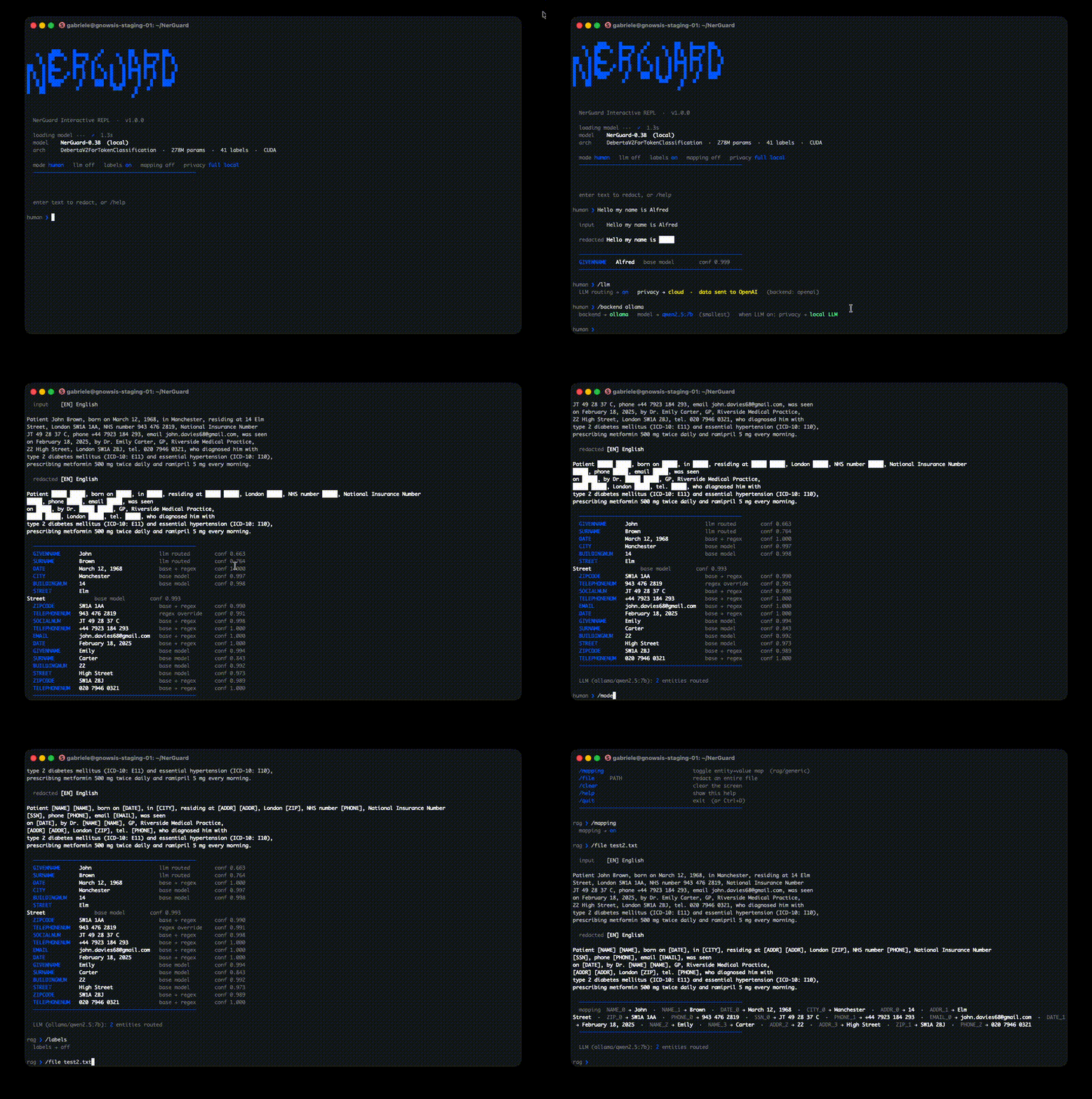
Install
pip install nerguard
The NER model (~300 MB) downloads automatically from HuggingFace on first use.
Quick start
from nerguard import Redactor

ng = Redactor(
    model_path=None,        # str  — local path or HuggingFace Hub ID for the NER model
    llm_routing=False,      # bool — enable entropy-gated LLM routing
    llm_source="openai",    # str  — "openai" or "ollama"
    llm_model="gpt-4o",     # str  — LLM model name
    api_key=None,           # str  — API key for OpenAI (or None to use OPENAI_API_KEY env var)
    typed=True,             # bool — typed placeholders ([NAME]) vs generic ([PII])
)
result = ng.redact("Hi, I'm John Smith. Email: john@acme.com")

print(result.text)
# "Hi, I'm [NAME] [NAME]. Email: [EMAIL]"

print(result.mapping)
# {"NAME_0": "John", "NAME_1": "Smith", "EMAIL_0": "john@acme.com"}

print(result.entities)
# [{"label": "GIVENNAME", "text": "John", "confidence": 0.998, "source": "base"}, ...]
Batch:
texts = [
    "Hi, I'm John Smith. Email: john@acme.com",
    "Call me at +1-800-555-0199 or find me on LinkedIn.",
]

results = [ng.redact(t) for t in texts]  # model stays cached across calls

for r in results:
    print(r.text)
# "Hi, I'm [NAME] [NAME]. Email: [EMAIL]"
# "Call me at [PHONE] or find me on LinkedIn."

# Collect all mappings
all_mappings = {k: v for r in results for k, v in r.mapping.items()}
# {"NAME_0": "John", "NAME_1": "Smith", "EMAIL_0": "john@acme.com", "PHONE_0": "+1-800-555-0199"}
LLM routing
Improves recall on ambiguous spans (phone numbers, IDs, dates) by routing uncertain predictions to an LLM.
# Cloud — pass key explicitly or set OPENAI_API_KEY env var
ng = Redactor(llm_routing=True, llm_source="openai", llm_model="gpt-4o", api_key="sk-...")

# Local — no data leaves the machine (requires Ollama)
ng = Redactor(llm_routing=True, llm_source="ollama", llm_model="qwen2.5:7b")
CLI / interactive REPL
nerguard                                         # interactive REPL
nerguard --file report.txt                       # redact a file
nerguard --llm --backend ollama --model qwen2.5:7b  # with local LLM
nerguard --format rag                            # RAG-optimised output
| REPL command | Description |
|---|---|
/mode [human|rag|json|generic] |
Switch output format |
/llm |
Toggle LLM routing |
/backend [openai|ollama] |
Switch LLM backend |
/model NAME |
Set LLM model |
/file PATH |
Redact a file |
/help |
Show all commands |
Constructor parameters
Redactor(
    model_path=None,        # str  — local path or HuggingFace Hub ID for the NER model
    llm_routing=False,      # bool — enable entropy-gated LLM routing
    llm_source="openai",    # str  — "openai" or "ollama"
    llm_model="gpt-4o",     # str  — LLM model name
    api_key=None,           # str  — API key for OpenAI (or None to use OPENAI_API_KEY env var)
    typed=True,             # bool — typed placeholders ([NAME]) vs generic ([PII])
)
| Parameter | Type | Default | Description |
|---|---|---|---|
model_path |
str |
HuggingFace auto-download | Local filesystem path or HuggingFace Hub ID for the NER model. Omit to download exdsgift/NerGuard-0.3B automatically on first use. |
llm_routing |
bool |
False |
Enable entropy-gated LLM routing. When True, spans where the base model is uncertain are re-evaluated by the LLM. Improves recall on ambiguous tokens (phone numbers, dates, IDs) at the cost of extra latency. |
llm_source |
str |
"openai" |
LLM backend to use when llm_routing=True. "openai" calls the OpenAI API; "ollama" runs inference locally via Ollama (no data leaves the machine). |
llm_model |
str |
"gpt-4o" |
Model name passed to the selected LLM backend. Examples: "gpt-4o", "gpt-4o-mini" for OpenAI; "qwen2.5:7b", "llama3.1:8b" for Ollama. Only used when llm_routing=True. |
api_key |
str |
None |
API key for the OpenAI backend. If None, falls back to the OPENAI_API_KEY environment variable. Ignored when llm_source="ollama". |
typed |
bool |
True |
Controls placeholder style. True → typed placeholders such as [NAME], [EMAIL], [PHONE] (preserves semantic context for downstream LLMs). False → every entity becomes [PII] regardless of type (maximum compression, no semantic signal). |
RedactResult fields
ng.redact(text) returns a RedactResult dataclass with three fields:
| Field | Type | Description |
|---|---|---|
text |
str |
Redacted text with placeholders replacing PII spans. |
entities |
list[dict] |
One dict per detected entity, with keys: label (entity type), text (original value), start/end (char offsets), confidence (0–1), source ("base" or "llm"). |
mapping |
dict[str, str] |
Maps each placeholder instance to its original value, keyed as "<LABEL>_<index>" (e.g. "NAME_0", "EMAIL_0"). Useful for auditing or selective de-redaction. |
result = ng.redact("Hi, I'm John Smith. Email: john@acme.com")

result.text
# "Hi, I'm [NAME] [NAME]. Email: [EMAIL]"

result.mapping
# {"NAME_0": "John", "NAME_1": "Smith", "EMAIL_0": "john@acme.com"}

result.entities
# [
#   {"label": "GIVENNAME", "text": "John",          "start": 8,  "end": 12, "confidence": 0.998, "source": "base"},
#   {"label": "SURNAME",   "text": "Smith",         "start": 13, "end": 18, "confidence": 0.995, "source": "base"},
#   {"label": "EMAIL",     "text": "john@acme.com", "start": 27, "end": 40, "confidence": 0.991, "source": "base"},
# ]
Detected entity types
GIVENNAME · SURNAME · EMAIL · TELEPHONENUM · SOCIALNUM · CREDITCARDNUMBER · IBAN · PASSPORTNUM · IDCARDNUM · DRIVERLICENSENUM · TAXNUM · STREET · BUILDINGNUM · CITY · ZIPCODE · DATE · TIME · AGE · SEX · TITLE
LangChain integration
NerGuard works as a LangChain DocumentTransformer and Tool out of the box.
pip install nerguard[langchain]
Anonymize documents in a RAG pipeline:
from langchain_core.documents import Document
from nerguard.langchain import NerGuardAnonymizer

anonymizer = NerGuardAnonymizer()
docs = [Document(page_content="John Smith's email is john@acme.com")]
anon_docs = anonymizer.transform_documents(docs)

print(anon_docs[0].page_content)
# "John Smith's email is [EMAIL]"

print(anon_docs[0].metadata["nerguard_mapping"])
# {"EMAIL_0": "john@acme.com"}
As a Tool for LangChain agents:
from nerguard.langchain import NerGuardTool

tool = NerGuardTool()
result = tool.invoke({"text": "Call Alice at +33 6 12 34 56 78"})
# "Call [NAME] at [PHONE]"
Links
License
MIT
1 maintainer

Release files for nerguard 1.1.0
For a detailed explanation of source distributions (sdists) and built distributions (wheels), please see the package formats documentation.
Source distribution (sdist)
| File | Size | Uploaded | |
|---|---|---|---|
| nerguard-1.1.0.tar.gz | 2.1 MB | Details |
Built distribution (wheel)
| File | Interpreter | ABI | Platform | Reset |
|---|---|---|---|---|
| nerguard-1.1.0-py3-none-any.whl | Python 3 | none | any | Details |
Total release size: 2.3 MB
Release files / nerguard-1.1.0.tar.gz
| Download URL | nerguard-1.1.0.tar.gz |
|---|---|
| Size | 2.1 MB |
| Tags | Source |
|
SHA-256 checksum How to use checksums |
ccafc14d9f4d07f8dc80472210498af72c347cc01c6c91f1c1b1cf4fd877834b
|
|
BLAKE2b-256 checksum How to use checksums |
98690fa7bb48883c0ff0867393986a32dbb012ed0f7ee611a2deb9b07a62c23f
|
| Upload date | |
|
Uploaded using Trusted Publishing? What is trusted publishing? |
No |
| Uploaded via |
twine/6.2.0 CPython/3.11.13
|
Release files / nerguard-1.1.0-py3-none-any.whl
| Download URL | nerguard-1.1.0-py3-none-any.whl |
|---|---|
| Size | 253.7 kB |
| Tags | Python 3 |
|
SHA-256 checksum How to use checksums |
0623a30e134a2630dbe6f43d84268bea726611f87f644a076bdcc56816063512
|
|
BLAKE2b-256 checksum How to use checksums |
4e77425374d35ad0aa64502c014fcedfb90c5af312eb51dbdce642791a4912d8
|
| Upload date | |
|
Uploaded using Trusted Publishing? What is trusted publishing? |
No |
| Uploaded via |
twine/6.2.0 CPython/3.11.13
|














