
Entropy-gated hybrid NER for privacy-compliant PII detection

Project description
NerGuard
Entropy-Gated Hybrid NER for Privacy-Compliant PII Detection






🤗 Model on HuggingFace · 📦 PyPI: nerguard ·

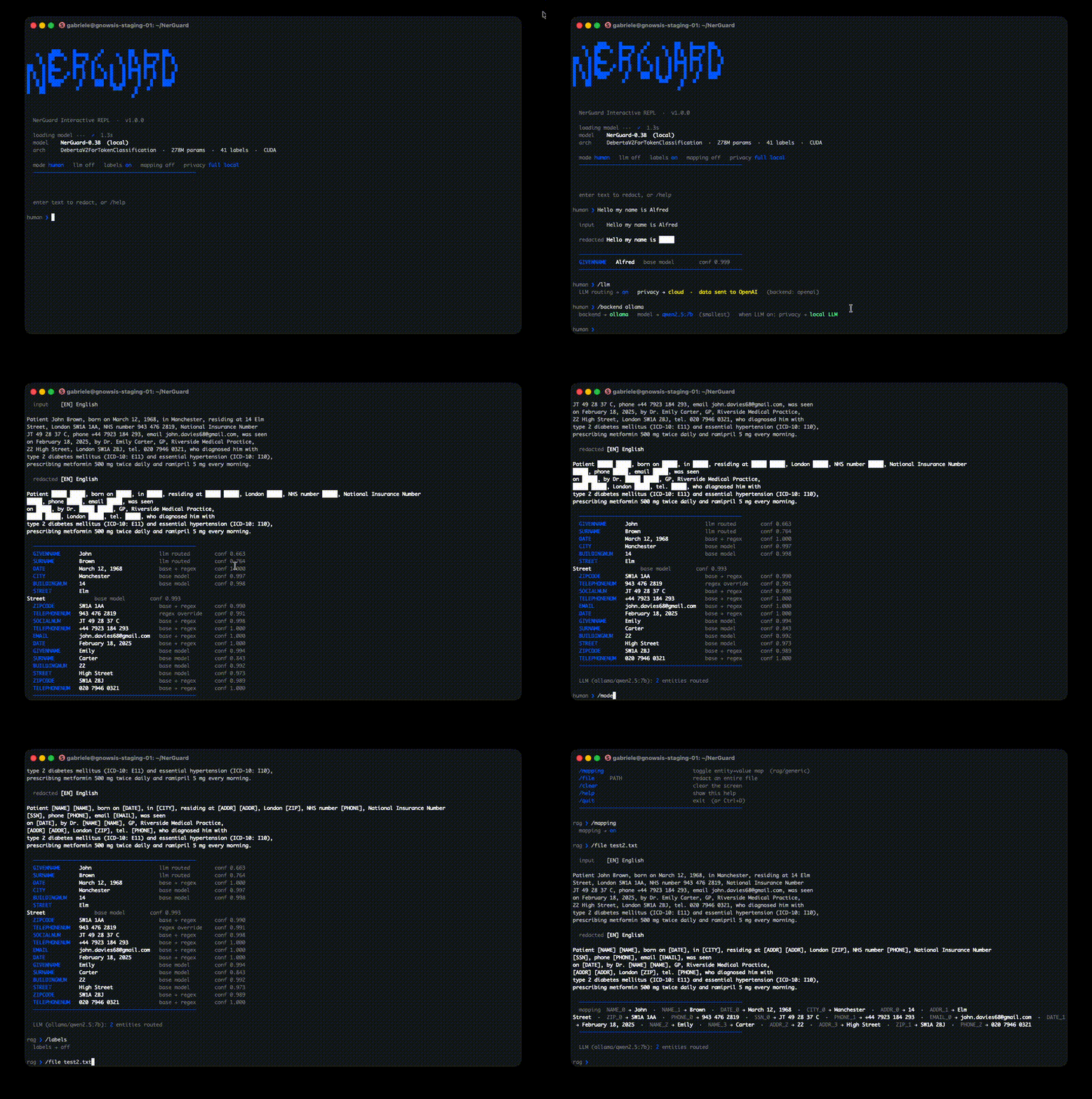
NerGuard is a pre-ingestion privacy layer for RAG pipelines: it detects and redacts PII from text before documents are indexed, keeping sensitive data out of vector databases and LLM context windows. It runs a multilingual mDeBERTa-v3 base model for fast, high-confidence predictions, then selectively routes only uncertain spans to an LLM (OpenAI or local Ollama) for correction, typically less than 3% of tokens. A three-stage regex layer handles structured PII (credit cards, SSNs, IBANs) with deterministic validation. The result is a hybrid pipeline that matches or exceeds larger models on PII recall while remaining GDPR-auditable: every prediction carries its source, confidence score, and routing decision.
Install
pip install nerguard
The NER model (~300 MB) downloads automatically from HuggingFace on first use.
Quick start
from nerguard import Redactor

ng = Redactor(
    model_path=None,        # str  — local path or HuggingFace Hub ID for the NER model
    llm_routing=False,      # bool — enable entropy-gated LLM routing
    llm_source="openai",    # str  — "openai" or "ollama"
    llm_model="gpt-4o",     # str  — LLM model name
    api_key=None,           # str  — API key for OpenAI (or None to use OPENAI_API_KEY env var)
    typed=True,             # bool — typed placeholders ([NAME]) vs generic ([PII])
)
result = ng.redact("Hi, I'm John Smith. Email: john@acme.com")

print(result.text)
# "Hi, I'm [NAME] [NAME]. Email: [EMAIL]"

print(result.mapping)
# {"NAME_0": "John", "NAME_1": "Smith", "EMAIL_0": "john@acme.com"}

print(result.entities)
# [{"label": "GIVENNAME", "text": "John", "confidence": 0.998, "source": "base"}, ...]
Batch:
texts = [
    "Hi, I'm John Smith. Email: john@acme.com",
    "Call me at +1-800-555-0199 or find me on LinkedIn.",
]

results = [ng.redact(t) for t in texts]  # model stays cached across calls

for r in results:
    print(r.text)
# "Hi, I'm [NAME] [NAME]. Email: [EMAIL]"
# "Call me at [PHONE] or find me on LinkedIn."

# Collect all mappings
all_mappings = {k: v for r in results for k, v in r.mapping.items()}
# {"NAME_0": "John", "NAME_1": "Smith", "EMAIL_0": "john@acme.com", "PHONE_0": "+1-800-555-0199"}
LLM routing
Improves recall on ambiguous spans (phone numbers, IDs, dates) by routing uncertain predictions to an LLM.
# Cloud — pass key explicitly or set OPENAI_API_KEY env var
ng = Redactor(llm_routing=True, llm_source="openai", llm_model="gpt-4o", api_key="sk-...")

# Local — no data leaves the machine (requires Ollama)
ng = Redactor(llm_routing=True, llm_source="ollama", llm_model="qwen2.5:7b")
CLI / interactive REPL
nerguard                                         # interactive REPL
nerguard --file report.txt                       # redact a file
nerguard --llm --backend ollama --model qwen2.5:7b  # with local LLM
nerguard --format rag                            # RAG-optimised output
| REPL command | Description |
|---|---|
/mode [human|rag|json|generic] |
Switch output format |
/llm |
Toggle LLM routing |
/backend [openai|ollama] |
Switch LLM backend |
/model NAME |
Set LLM model |
/file PATH |
Redact a file |
/help |
Show all commands |
Constructor parameters
Redactor(
    model_path=None,        # str  — local path or HuggingFace Hub ID for the NER model
    llm_routing=False,      # bool — enable entropy-gated LLM routing
    llm_source="openai",    # str  — "openai" or "ollama"
    llm_model="gpt-4o",     # str  — LLM model name
    api_key=None,           # str  — API key for OpenAI (or None to use OPENAI_API_KEY env var)
    typed=True,             # bool — typed placeholders ([NAME]) vs generic ([PII])
)
| Parameter | Type | Default | Description |
|---|---|---|---|
model_path |
str |
HuggingFace auto-download | Local filesystem path or HuggingFace Hub ID for the NER model. Omit to download exdsgift/NerGuard-0.3B automatically on first use. |
llm_routing |
bool |
False |
Enable entropy-gated LLM routing. When True, spans where the base model is uncertain are re-evaluated by the LLM. Improves recall on ambiguous tokens (phone numbers, dates, IDs) at the cost of extra latency. |
llm_source |
str |
"openai" |
LLM backend to use when llm_routing=True. "openai" calls the OpenAI API; "ollama" runs inference locally via Ollama (no data leaves the machine). |
llm_model |
str |
"gpt-4o" |
Model name passed to the selected LLM backend. Examples: "gpt-4o", "gpt-4o-mini" for OpenAI; "qwen2.5:7b", "llama3.1:8b" for Ollama. Only used when llm_routing=True. |
api_key |
str |
None |
API key for the OpenAI backend. If None, falls back to the OPENAI_API_KEY environment variable. Ignored when llm_source="ollama". |
typed |
bool |
True |
Controls placeholder style. True → typed placeholders such as [NAME], [EMAIL], [PHONE] (preserves semantic context for downstream LLMs). False → every entity becomes [PII] regardless of type (maximum compression, no semantic signal). |
RedactResult fields
ng.redact(text) returns a RedactResult dataclass with three fields:
| Field | Type | Description |
|---|---|---|
text |
str |
Redacted text with placeholders replacing PII spans. |
entities |
list[dict] |
One dict per detected entity, with keys: label (entity type), text (original value), start/end (char offsets), confidence (0–1), source ("base" or "llm"). |
mapping |
dict[str, str] |
Maps each placeholder instance to its original value, keyed as "<LABEL>_<index>" (e.g. "NAME_0", "EMAIL_0"). Useful for auditing or selective de-redaction. |
result = ng.redact("Hi, I'm John Smith. Email: john@acme.com")

result.text
# "Hi, I'm [NAME] [NAME]. Email: [EMAIL]"

result.mapping
# {"NAME_0": "John", "NAME_1": "Smith", "EMAIL_0": "john@acme.com"}

result.entities
# [
#   {"label": "GIVENNAME", "text": "John",          "start": 8,  "end": 12, "confidence": 0.998, "source": "base"},
#   {"label": "SURNAME",   "text": "Smith",         "start": 13, "end": 18, "confidence": 0.995, "source": "base"},
#   {"label": "EMAIL",     "text": "john@acme.com", "start": 27, "end": 40, "confidence": 0.991, "source": "base"},
# ]
Detected entity types
GIVENNAME · SURNAME · EMAIL · TELEPHONENUM · SOCIALNUM · CREDITCARDNUMBER · IBAN · PASSPORTNUM · IDCARDNUM · DRIVERLICENSENUM · TAXNUM · STREET · BUILDINGNUM · CITY · ZIPCODE · DATE · TIME · AGE · SEX · TITLE
LangChain integration
NerGuard works as a LangChain DocumentTransformer and Tool out of the box.
pip install nerguard[langchain]
Anonymize documents in a RAG pipeline:
from langchain_core.documents import Document
from nerguard.langchain import NerGuardAnonymizer

anonymizer = NerGuardAnonymizer()
docs = [Document(page_content="John Smith's email is john@acme.com")]
anon_docs = anonymizer.transform_documents(docs)

print(anon_docs[0].page_content)
# "John Smith's email is [EMAIL]"

print(anon_docs[0].metadata["nerguard_mapping"])
# {"EMAIL_0": "john@acme.com"}
As a Tool for LangChain agents:
from nerguard.langchain import NerGuardTool

tool = NerGuardTool()
result = tool.invoke({"text": "Call Alice at +33 6 12 34 56 78"})
# "Call [NAME] at [PHONE]"
Links
License
MIT


Download files
Download the file for your platform. If you're not sure which to choose, learn more about installing packages.
Source Distribution
Built Distribution
Filter files by name, interpreter, ABI, and platform.
If you're not sure about the file name format, learn more about wheel file names.
Copy a direct link to the current filters
File details
Details for the file nerguard-1.1.0.tar.gz.
File metadata
- Download URL: nerguard-1.1.0.tar.gz
- Upload date:
- Size: 2.1 MB
- Tags: Source
- Uploaded using Trusted Publishing? No
- Uploaded via: twine/6.2.0 CPython/3.11.13
File hashes
| Algorithm | Hash digest | |
|---|---|---|
| SHA256 |
ccafc14d9f4d07f8dc80472210498af72c347cc01c6c91f1c1b1cf4fd877834b
|
|
| MD5 |
05118950fcebc3eb0db84c42bb2d815f
|
|
| BLAKE2b-256 |
98690fa7bb48883c0ff0867393986a32dbb012ed0f7ee611a2deb9b07a62c23f
|
File details
Details for the file nerguard-1.1.0-py3-none-any.whl.
File metadata
- Download URL: nerguard-1.1.0-py3-none-any.whl
- Upload date:
- Size: 253.7 kB
- Tags: Python 3
- Uploaded using Trusted Publishing? No
- Uploaded via: twine/6.2.0 CPython/3.11.13
File hashes
| Algorithm | Hash digest | |
|---|---|---|
| SHA256 |
0623a30e134a2630dbe6f43d84268bea726611f87f644a076bdcc56816063512
|
|
| MD5 |
0464c1904ddf7e01955e818574745502
|
|
| BLAKE2b-256 |
4e77425374d35ad0aa64502c014fcedfb90c5af312eb51dbdce642791a4912d8
|






