
NetBox Cisco Support Plugin






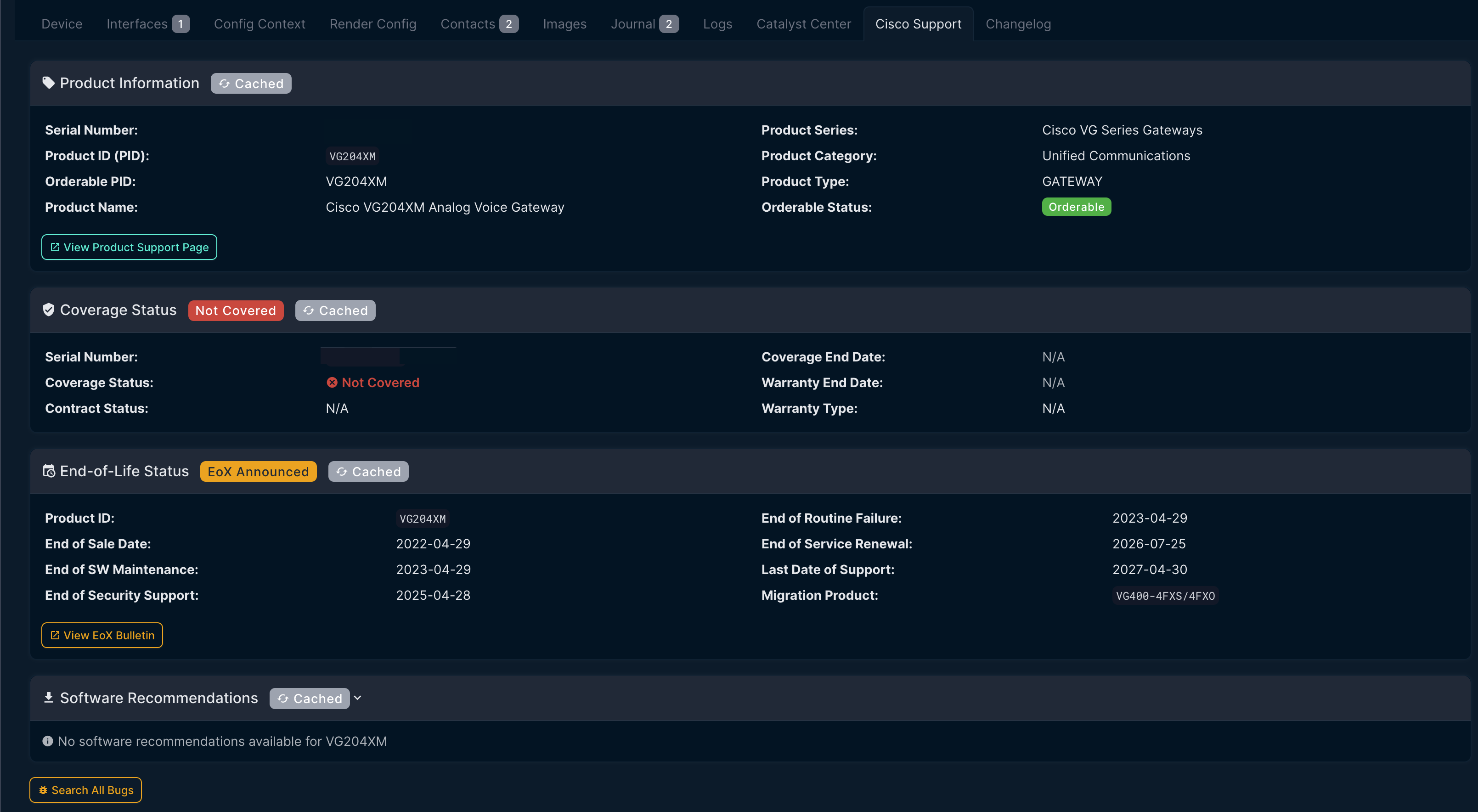
A NetBox plugin that displays Cisco Support information for devices, including:
- Product Information - Product name, series, category, and orderable status
- End-of-Life (EoX) - Key lifecycle dates with migration recommendations
- Security Advisories (PSIRT) - Cisco security advisories affecting the product
- Known Bugs - Critical bugs (severity 1-3) from Cisco Bug Search
- Software Recommendations - Suggested software releases
Features
- Serial Number Based - Tab only appears on devices with a valid serial number
- Manufacturer Filtering - Configurable pattern to match Cisco manufacturers
- Direct Cisco API Integration - Uses Cisco Support APIs with OAuth2 authentication
- Caching - API responses are cached to reduce load and improve performance
- Visual Status Indicators - Color-coded badges for EoX dates and advisory severity
Requirements
- NetBox 4.0.0 or higher
- Python 3.10 or higher
- Cisco API credentials (from Cisco API Console)
Installation
Via pip (recommended)
pip install netbox-cisco-support-api
From source
git clone https://github.com/sieteunoseis/netbox-cisco-support.git
cd netbox-cisco-support
pip install .
Configuration
Add the plugin to your NetBox configuration.py:
PLUGINS = [
    'netbox_cisco_support',
]

PLUGINS_CONFIG = {
    'netbox_cisco_support': {
        # Required: Cisco API credentials
        'cisco_client_id': 'your-client-id',
        'cisco_client_secret': 'your-client-secret',

        # Optional: Manufacturer matching pattern (regex, case-insensitive)
        # Default: r'cisco'
        'manufacturer_pattern': r'cisco',

        # Optional: API request timeout in seconds
        'timeout': 30,

        # Optional: Cache duration for API responses in seconds
        'cache_timeout': 300,
    }
}
Restart NetBox after making configuration changes.
Getting Cisco API Credentials
- Go to Cisco API Console
- Sign in with your Cisco CCO ID
- Create a new application (or use an existing one)
- Add the following APIs to your application:
| API Name | Purpose | Required |
|---|---|---|
| Serial Number to Information (SN2Info) v2 | Coverage status, warranty dates | Yes |
| Product Information API | Product name, series, orderable status | Yes |
| End of Life (EoX) API | End-of-Life/Sale dates, migration info | Yes |
| Bug API v2 | Known bugs by product/software version | Recommended |
| PSIRT API | Security advisories | Recommended |
| Software Suggestion API | Recommended software versions | Optional |
- Copy your Client ID and Client Secret
API Endpoints Used
The plugin calls these specific endpoints:
# Coverage/Warranty
GET /sn2info/v2/coverage/status/serial_numbers/{serial}
GET /sn2info/v2/coverage/summary/serial_numbers/{serials}

# Product Information
GET /product/v1/information/serial_numbers/{serial}

# End of Life
GET /supporttools/eox/rest/5/EOXBySerialNumber/1/{serial}

# Bugs
GET /bug/v3.0/bugs/products/product_id/{pid}
GET /bug/v3.0/bugs/software_version/{version}

# Security Advisories
GET /security/advisories/v2/product

# Software Suggestions
GET /software/v4.0/suggestions/releases/productIds/{pid}
All APIs use OAuth2 client credentials flow with the same client_id/client_secret.
Usage
Once configured, the "Cisco Support" tab will automatically appear on device detail pages that meet these requirements:
- Device has a serial number assigned
- Device manufacturer matches the
manufacturer_pattern(default: "cisco")
The tab displays:
- Product information from the serial number lookup
- End-of-Life status with key dates
- Security advisories affecting the product
- Known bugs (severity 1-3)
- Software recommendations
Screenshots
Device Cisco Support Tab
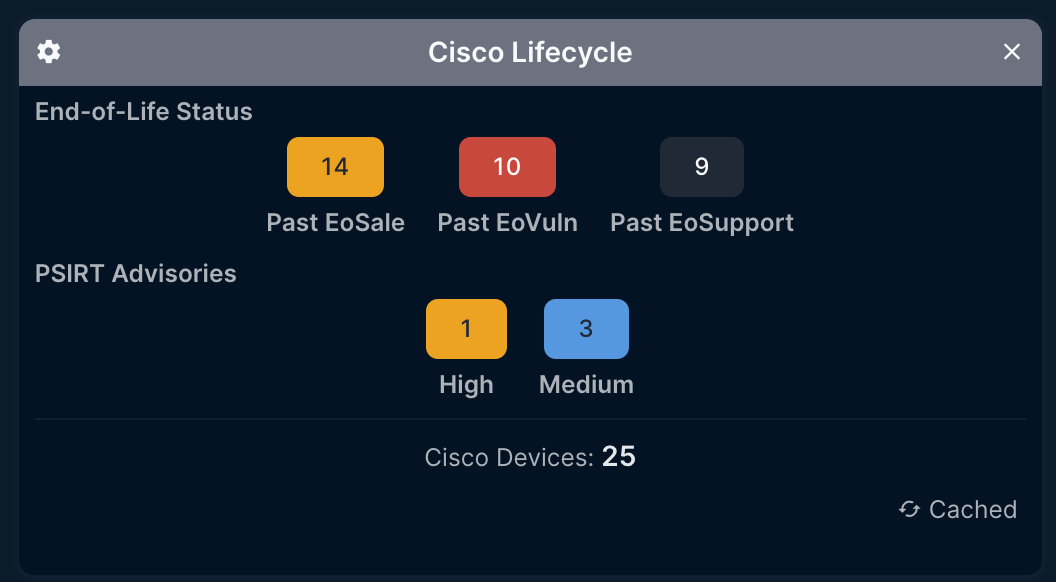
Dashboard Widget
Cisco lifecycle widget showing End-of-Life status and PSIRT advisories.
Development
Setup
git clone https://github.com/sieteunoseis/netbox-cisco-support.git
cd netbox-cisco-support
pip install -e .
Code Quality
# Format code
black netbox_cisco_support/
isort netbox_cisco_support/

# Lint
flake8 netbox_cisco_support/
License
Apache License 2.0 - See LICENSE for details.
Author
Jeremy Worden (@sieteunoseis)
Support
If you find this plugin helpful, consider supporting development:

Links
1 maintainer

Release files for netbox-cisco-support-api 1.0.13
For a detailed explanation of source distributions (sdists) and built distributions (wheels), please see the package formats documentation.
Source distribution (sdist)
| File | Size | Uploaded | |
|---|---|---|---|
| netbox_cisco_support_api-1.0.13.tar.gz | 27.0 kB | Details |
Built distribution (wheel)
| File | Interpreter | ABI | Platform | Reset |
|---|---|---|---|---|
| netbox_cisco_support_api-1.0.13-py3-none-any.whl | Python 3 | none | any | Details |
Total release size: 56.4 kB
Release files / netbox_cisco_support_api-1.0.13.tar.gz
| Download URL | netbox_cisco_support_api-1.0.13.tar.gz |
|---|---|
| Size | 27.0 kB |
| Tags | Source |
|
SHA-256 checksum How to use checksums |
e29b74ee8e8c34e7c91eb78d058f12109e29eb8a3e6d6dbb1d726f628c753432
|
|
BLAKE2b-256 checksum How to use checksums |
c52b2afb14f640e150c841e8b03222a2c366aeb92b1f99eb20e2f03771c2d0b2
|
| Upload date | |
|
Uploaded using Trusted Publishing? What is trusted publishing? |
Yes |
| Uploaded via |
twine/6.1.0 CPython/3.13.12
|
Provenance
Provenance describes where a file came from. On PyPI, provenance is shared via attestations, which provide a verifiable record of the build or publishing details. View details, limitations and caveats.


PyPI Publish Attestation
PyPI verified that this artifact, at this checksum, originated from the publisher listed below.
Signed by GitHub Actions, verified by PyPI on Jun 17, 2026.
Transparency logRelease files / netbox_cisco_support_api-1.0.13-py3-none-any.whl
| Download URL | netbox_cisco_support_api-1.0.13-py3-none-any.whl |
|---|---|
| Size | 29.4 kB |
| Tags | Python 3 |
|
SHA-256 checksum How to use checksums |
c142a3a2421fc78da944d84f1481ea62f8291dff322f7ac41b69151212e4f019
|
|
BLAKE2b-256 checksum How to use checksums |
71356785cf9193a1afe98a275e9dbf3e6148d311f4a3af6f98f28713303c448b
|
| Upload date | |
|
Uploaded using Trusted Publishing? What is trusted publishing? |
Yes |
| Uploaded via |
twine/6.1.0 CPython/3.13.12
|
Provenance
Provenance describes where a file came from. On PyPI, provenance is shared via attestations, which provide a verifiable record of the build or publishing details. View details, limitations and caveats.
PyPI Publish Attestation
PyPI verified that this artifact, at this checksum, originated from the publisher listed below.
Signed by GitHub Actions, verified by PyPI on Jun 17, 2026.
Transparency log













