
NetBox plugin for Cisco Support information including product details, EoX dates, bugs, and security advisories
Verified details
These details have been verified by PyPIProject links
GitHub Statistics
Maintainers

Project description
NetBox Cisco Support Plugin






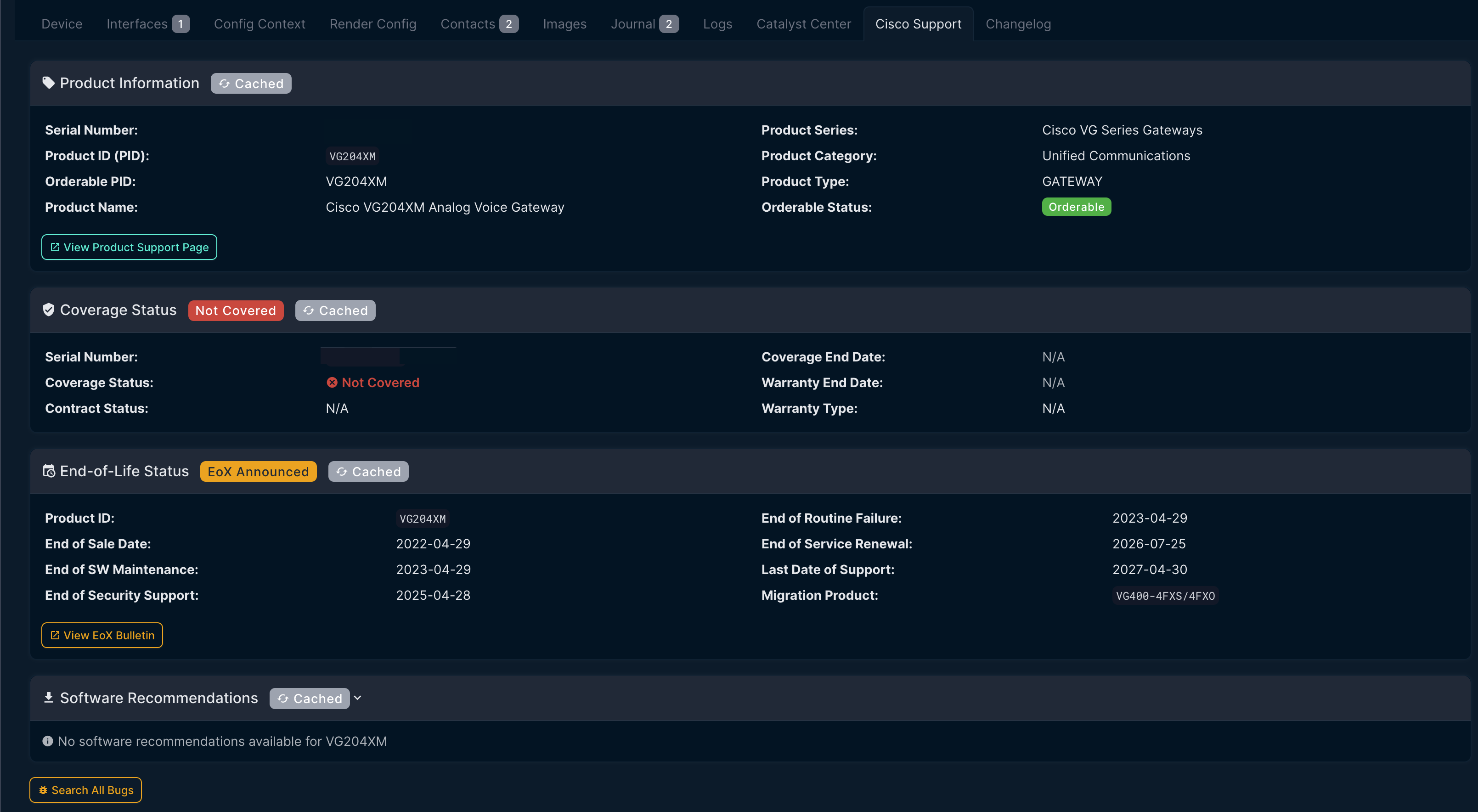
A NetBox plugin that displays Cisco Support information for devices, including:
- Product Information - Product name, series, category, and orderable status
- End-of-Life (EoX) - Key lifecycle dates with migration recommendations
- Security Advisories (PSIRT) - Cisco security advisories affecting the product
- Known Bugs - Critical bugs (severity 1-3) from Cisco Bug Search
- Software Recommendations - Suggested software releases
Features
- Serial Number Based - Tab only appears on devices with a valid serial number
- Manufacturer Filtering - Configurable pattern to match Cisco manufacturers
- Direct Cisco API Integration - Uses Cisco Support APIs with OAuth2 authentication
- Caching - API responses are cached to reduce load and improve performance
- Visual Status Indicators - Color-coded badges for EoX dates and advisory severity
Requirements
- NetBox 4.0.0 or higher
- Python 3.10 or higher
- Cisco API credentials (from Cisco API Console)
Installation
Via pip (recommended)
pip install netbox-cisco-support-api
From source
git clone https://github.com/sieteunoseis/netbox-cisco-support.git
cd netbox-cisco-support
pip install .
Configuration
Add the plugin to your NetBox configuration.py:
PLUGINS = [
    'netbox_cisco_support',
]

PLUGINS_CONFIG = {
    'netbox_cisco_support': {
        # Required: Cisco API credentials
        'cisco_client_id': 'your-client-id',
        'cisco_client_secret': 'your-client-secret',

        # Optional: Manufacturer matching pattern (regex, case-insensitive)
        # Default: r'cisco'
        'manufacturer_pattern': r'cisco',

        # Optional: API request timeout in seconds
        'timeout': 30,

        # Optional: Cache duration for API responses in seconds
        'cache_timeout': 300,
    }
}
Restart NetBox after making configuration changes.
Getting Cisco API Credentials
- Go to Cisco API Console
- Sign in with your Cisco CCO ID
- Create a new application (or use an existing one)
- Add the following APIs to your application:
| API Name | Purpose | Required |
|---|---|---|
| Serial Number to Information (SN2Info) v2 | Coverage status, warranty dates | Yes |
| Product Information API | Product name, series, orderable status | Yes |
| End of Life (EoX) API | End-of-Life/Sale dates, migration info | Yes |
| Bug API v2 | Known bugs by product/software version | Recommended |
| PSIRT API | Security advisories | Recommended |
| Software Suggestion API | Recommended software versions | Optional |
- Copy your Client ID and Client Secret
API Endpoints Used
The plugin calls these specific endpoints:
# Coverage/Warranty
GET /sn2info/v2/coverage/status/serial_numbers/{serial}
GET /sn2info/v2/coverage/summary/serial_numbers/{serials}

# Product Information
GET /product/v1/information/serial_numbers/{serial}

# End of Life
GET /supporttools/eox/rest/5/EOXBySerialNumber/1/{serial}

# Bugs
GET /bug/v3.0/bugs/products/product_id/{pid}
GET /bug/v3.0/bugs/software_version/{version}

# Security Advisories
GET /security/advisories/v2/product

# Software Suggestions
GET /software/v4.0/suggestions/releases/productIds/{pid}
All APIs use OAuth2 client credentials flow with the same client_id/client_secret.
Usage
Once configured, the "Cisco Support" tab will automatically appear on device detail pages that meet these requirements:
- Device has a serial number assigned
- Device manufacturer matches the
manufacturer_pattern(default: "cisco")
The tab displays:
- Product information from the serial number lookup
- End-of-Life status with key dates
- Security advisories affecting the product
- Known bugs (severity 1-3)
- Software recommendations
Screenshots
Device Cisco Support Tab
Development
Setup
git clone https://github.com/sieteunoseis/netbox-cisco-support.git
cd netbox-cisco-support
pip install -e .
Code Quality
# Format code
black netbox_cisco_support/
isort netbox_cisco_support/

# Lint
flake8 netbox_cisco_support/
License
Apache License 2.0 - See LICENSE for details.
Author
Jeremy Worden (@sieteunoseis)
Support
If you find this plugin helpful, consider supporting development:

Links
Project details
Verified details
These details have been verified by PyPIProject links
GitHub Statistics
Maintainers
Release history Release notifications | RSS feed


Download files
Download the file for your platform. If you're not sure which to choose, learn more about installing packages.
Source Distribution
Built Distribution
Filter files by name, interpreter, ABI, and platform.
If you're not sure about the file name format, learn more about wheel file names.
Copy a direct link to the current filters
File details
Details for the file netbox_cisco_support_api-1.0.10.tar.gz.
File metadata
- Download URL: netbox_cisco_support_api-1.0.10.tar.gz
- Upload date:
- Size: 23.7 kB
- Tags: Source
- Uploaded using Trusted Publishing? Yes
- Uploaded via: twine/6.1.0 CPython/3.13.7
File hashes
| Algorithm | Hash digest | |
|---|---|---|
| SHA256 |
7ea615dea6a284a12ed5bbcaef44b64a735020d3586aee38b515fb633d29290a
|
|
| MD5 |
09093c84e71b6489d3e8940d22409087
|
|
| BLAKE2b-256 |
710a994510b0d61f1db46ada934499ffe2812be9a0f7005de743bc7cfb1e26ca
|
Provenance
The following attestation bundles were made for netbox_cisco_support_api-1.0.10.tar.gz:
Publisher:
release.yml on sieteunoseis/netbox-cisco-support
-
Statement:
-
Statement type:
https://in-toto.io/Statement/v1 -
Predicate type:
https://docs.pypi.org/attestations/publish/v1 -
Subject name:
netbox_cisco_support_api-1.0.10.tar.gz -
Subject digest:
7ea615dea6a284a12ed5bbcaef44b64a735020d3586aee38b515fb633d29290a - Sigstore transparency entry: 1044835837
- Sigstore integration time:
-
Permalink:
sieteunoseis/netbox-cisco-support@b796c7b78a58120e5d59197da352b7498faffc58 -
Branch / Tag:
refs/tags/v1.0.10 - Owner: https://github.com/sieteunoseis
-
Access:
public
-
Token Issuer:
https://token.actions.githubusercontent.com -
Runner Environment:
github-hosted -
Publication workflow:
release.yml@b796c7b78a58120e5d59197da352b7498faffc58 -
Trigger Event:
push
-
Statement type:
File details
Details for the file netbox_cisco_support_api-1.0.10-py3-none-any.whl.
File metadata
- Download URL: netbox_cisco_support_api-1.0.10-py3-none-any.whl
- Upload date:
- Size: 25.3 kB
- Tags: Python 3
- Uploaded using Trusted Publishing? Yes
- Uploaded via: twine/6.1.0 CPython/3.13.7
File hashes
| Algorithm | Hash digest | |
|---|---|---|
| SHA256 |
a1eb92cdeca90238a2ae86cb8bb88635ca06d16c3f3f6ea7e2c5cb6cf3131d81
|
|
| MD5 |
333530da2f7e35f298a1e8aba263d402
|
|
| BLAKE2b-256 |
d1e69f0c2a7f665da53d9c92ea69b4c4c59772028cbfa2419b4c77fccf4fb388
|
Provenance
The following attestation bundles were made for netbox_cisco_support_api-1.0.10-py3-none-any.whl:
Publisher:
release.yml on sieteunoseis/netbox-cisco-support
-
Statement:
-
Statement type:
https://in-toto.io/Statement/v1 -
Predicate type:
https://docs.pypi.org/attestations/publish/v1 -
Subject name:
netbox_cisco_support_api-1.0.10-py3-none-any.whl -
Subject digest:
a1eb92cdeca90238a2ae86cb8bb88635ca06d16c3f3f6ea7e2c5cb6cf3131d81 - Sigstore transparency entry: 1044835895
- Sigstore integration time:
-
Permalink:
sieteunoseis/netbox-cisco-support@b796c7b78a58120e5d59197da352b7498faffc58 -
Branch / Tag:
refs/tags/v1.0.10 - Owner: https://github.com/sieteunoseis
-
Access:
public
-
Token Issuer:
https://token.actions.githubusercontent.com -
Runner Environment:
github-hosted -
Publication workflow:
release.yml@b796c7b78a58120e5d59197da352b7498faffc58 -
Trigger Event:
push
-
Statement type:






