NetBox Device View plugin

Project description

NetBox Device View Plugin


Version Downloads CI License

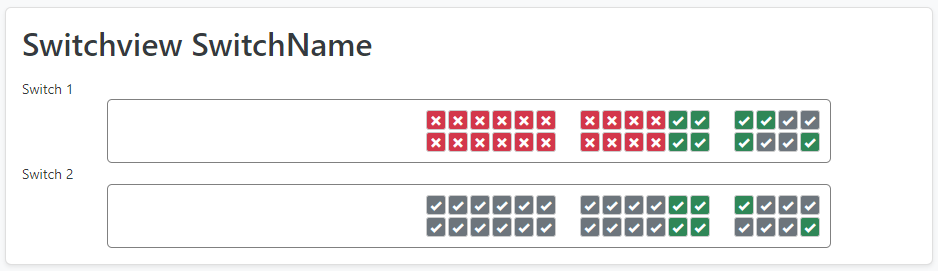
Renders a visual CSS grid representation of a device's physical ports and interfaces directly on the NetBox device detail page.

example

Requirements

Installation

Install from PyPI into the NetBox virtual environment:

source /opt/netbox/venv/bin/activate
pip install netbox-device-view

To ensure the plugin is reinstalled on future NetBox upgrades, add it to local_requirements.txt:

echo netbox-device-view >> /opt/netbox/local_requirements.txt

Run the migration and collect static files:

cd /opt/netbox/netbox
python manage.py migrate netbox_device_view
python manage.py collectstatic --no-input

Configuration

Enable the plugin in your NetBox configuration.py:

PLUGINS = ["netbox_device_view"]

PLUGINS_CONFIG = {
    "netbox_device_view": {
        # Show the port grid inline on the main device tab (default: False)
        # When False, the grid is only shown on a dedicated "Device View" tab
        "show_on_device_tab": False,
        # Where to render the grid when show_on_device_tab is True (default: "bottom")
        # "bottom" — below main device content (full_width_page)
        # "top"    — above main device content (alerts area)
        "device_tab_position": "bottom",
    },
}

How It Works

For each Device Type you create a DeviceView object (at Plugins → Device Views → Add) containing a CSS grid-template-areas definition. When you visit a device of that type, the plugin renders every interface and port as a clickable cell in the grid.

Port/Interface name → CSS grid-area name

The plugin derives a stylename for each interface and port, which must match the area names in your CSS:

Interface name Stylename
GigabitEthernet0/0/1 gigabitethernet0-1
TenGigabitEthernet1/1/4 tengigabitethernet1-4
GigabitEthernet0/1 gigabitethernet-1
Management0 management-0
eth0 eth-0
1 (numeric only) p1

Rules:

  • Names are lowercased
  • For the 3-part Cisco format Type{dev}/{module}/{port}, stylename is type{module}-{port}
  • For the 2-part format Type{dev}/{port}, stylename is type-{port}
  • All other names: non-alphanumeric/dot characters are replaced with -
  • Purely numeric stylenames are prefixed with p
  • Virtual and LAG interfaces are skipped

CSS layout format

The grid_template_area field stores raw CSS. The grid has 32 columns and uses 20 px cells.

Placeholder names:

  • x — leading empty cell
  • z — trailing empty cell
  • s0s99 — interior spacer cells

Example for a Cisco C9300-24T with an optional 8x 10G module (more in the examples/ folder):

/* C9300-24T */
.deviceview.area {
	grid-template-areas:
	"x x x x x x x x x x x x x x gigabitethernet0-1 gigabitethernet0-3 gigabitethernet0-5 gigabitethernet0-7 gigabitethernet0-9 gigabitethernet0-11 s0 gigabitethernet0-13 gigabitethernet0-15 gigabitethernet0-17 gigabitethernet0-19 gigabitethernet0-21 gigabitethernet0-23 z z z z z"
	"x x x x x x x x x x x x x x gigabitethernet0-2 gigabitethernet0-4 gigabitethernet0-6 gigabitethernet0-8 gigabitethernet0-10 gigabitethernet0-12 s0 gigabitethernet0-14 gigabitethernet0-16 gigabitethernet0-18 gigabitethernet0-20 gigabitethernet0-22 gigabitethernet0-24 z z z z z";
}

/* C9300-24T with C9300-NM-8X */
.deviceview.moduleC9300-NM-8X.area {
	grid-template-areas:
	"x x x x x x x x x x x x x x gigabitethernet0-1 gigabitethernet0-3 gigabitethernet0-5 gigabitethernet0-7 gigabitethernet0-9 gigabitethernet0-11 s0 gigabitethernet0-13 gigabitethernet0-15 gigabitethernet0-17 gigabitethernet0-19 gigabitethernet0-21 gigabitethernet0-23 s1 tengigabitethernet1-1 tengigabitethernet1-3 tengigabitethernet1-5 tengigabitethernet1-7"
	"x x x x x x x x x x x x x x gigabitethernet0-2 gigabitethernet0-4 gigabitethernet0-6 gigabitethernet0-8 gigabitethernet0-10 gigabitethernet0-12 s0 gigabitethernet0-14 gigabitethernet0-16 gigabitethernet0-18 gigabitethernet0-20 gigabitethernet0-22 gigabitethernet0-24 s1 tengigabitethernet1-2 tengigabitethernet1-4 tengigabitethernet1-6 tengigabitethernet1-8";
}

Module variants

If a device has an installed module, an additional CSS class matching the module model is added. Define a separate rule to override the layout when that module is present (see the example above).

Virtual Chassis

For virtual chassis devices, each member's CSS areas are scoped with a .d{vc_position} suffix automatically. Define per-member layouts using those suffixes:

/* Member at vc_position 1 */
.deviceview.area.d1 {
    grid-template-areas: "gigabitethernet0-1 gigabitethernet0-2";
}

/* Member at vc_position 2 */
.deviceview.area.d2 {
    grid-template-areas: "gigabitethernet0-1 gigabitethernet0-2";
}

More ready-made layouts for Cisco C2960X, C8300, C9200, C9300, generic patch panels, and Ubiquiti switches are in the examples/ folder.

Troubleshooting

Tab not showing / badge count is zero No DeviceView exists for this device's type. Go to Plugins → Device Views → Add and create one.

A port is not appearing in the grid The port's stylename is not referenced in the CSS. Check what stylename the plugin derives: it follows the rules in the table above. Add a corresponding area name to your grid-template-areas.

Layout looks wrong after adding a module Add a .deviceview.module{ModelName}.area rule to your CSS that includes the new module ports.

Virtual chassis ports missing Ensure your CSS uses .area.d{vc_position} scoped selectors. Each VC member needs its own rule.

Project details


Download files

Download the file for your platform. If you're not sure which to choose, learn more about installing packages.

Source Distribution

netbox_device_view-0.2.0.tar.gz (17.5 kB view details)

Uploaded Source

Built Distribution

If you're not sure about the file name format, learn more about wheel file names.

netbox_device_view-0.2.0-py3-none-any.whl (21.4 kB view details)

Uploaded Python 3

File details

Details for the file netbox_device_view-0.2.0.tar.gz.

File metadata

  • Download URL: netbox_device_view-0.2.0.tar.gz
  • Upload date:
  • Size: 17.5 kB
  • Tags: Source
  • Uploaded using Trusted Publishing? Yes
  • Uploaded via: twine/6.1.0 CPython/3.13.7

File hashes

Hashes for netbox_device_view-0.2.0.tar.gz
Algorithm Hash digest
SHA256 ef5eba5b649ecb3fa7cd8eb8078ad6f64f6d486a51c734fa55a12a003265d446
MD5 7a9c3429935812f82d9c2129cb5ac0e9
BLAKE2b-256 8c0444adee828fcaa96e68b61711698665bad7245bb1bf203881e7822aebb985

See more details on using hashes here.

Provenance

The following attestation bundles were made for netbox_device_view-0.2.0.tar.gz:

Publisher: release.yml on peterbaumert/netbox-device-view

Attestations: Values shown here reflect the state when the release was signed and may no longer be current.

File details

Details for the file netbox_device_view-0.2.0-py3-none-any.whl.

File metadata

File hashes

Hashes for netbox_device_view-0.2.0-py3-none-any.whl
Algorithm Hash digest
SHA256 6ecfb332016935ab062090410491bc3d88f09707024c92bbeb3618a9a99d13be
MD5 cc6809cb5938621864022c7ffa0a085b
BLAKE2b-256 a4e785bbbc70ebeddbe9aaea473f5e622643988885da68ab66a58c611e777a45

See more details on using hashes here.

Provenance

The following attestation bundles were made for netbox_device_view-0.2.0-py3-none-any.whl:

Publisher: release.yml on peterbaumert/netbox-device-view

Attestations: Values shown here reflect the state when the release was signed and may no longer be current.

Supported by

AWS Cloud computing and Security Sponsor Datadog Monitoring Depot Continuous Integration Fastly CDN Google Download Analytics Pingdom Monitoring Sentry Error logging StatusPage Status page