
NetBox Device View plugin
Verified details
These details have been verified by PyPIProject links
GitHub Statistics
Maintainers

Project description
NetBox Device View Plugin




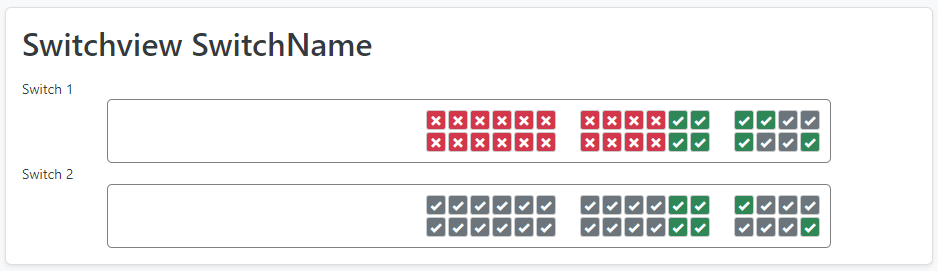
Renders a visual CSS grid representation of a device's physical ports and interfaces directly on the NetBox device detail page. An SVG renderer is also available for YAML-based layouts.
Requirements
- Python 3.12+
- NetBox 3.5+ (see COMPATIBILITY.md)
Installation
Install from PyPI into the NetBox virtual environment:
source /opt/netbox/venv/bin/activate
pip install netbox-device-view
To ensure the plugin is reinstalled on future NetBox upgrades, add it to local_requirements.txt:
echo netbox-device-view >> /opt/netbox/local_requirements.txt
Run the migration and collect static files:
cd /opt/netbox/netbox
python manage.py migrate netbox_device_view
python manage.py collectstatic --no-input
Configuration
Enable the plugin in your NetBox configuration.py:
PLUGINS = ["netbox_device_view"]

PLUGINS_CONFIG = {
    "netbox_device_view": {
        # Show the port grid inline on the main device tab (default: False)
        # When False, the grid is only shown on a dedicated "Device View" tab
        "show_on_device_tab": False,
        # Where to render the grid when show_on_device_tab is True (default: "bottom")
        # "bottom" — below main device content (full_width_page)
        # "top"    — above main device content (alerts area)
        "device_tab_position": "bottom",
    },
}
How It Works
For each Device Type you create a DeviceView object (at Plugins → Device Views → Add) with either a YAML layout or a raw CSS layout. When you visit a device of that type, the plugin renders every interface and port as a clickable cell in the grid.
Port/Interface name → CSS grid-area name
The plugin derives a stylename for each interface and port:
| Interface name | Stylename |
|---|---|
GigabitEthernet0/0/1 |
gigabitethernet0-1 |
TenGigabitEthernet1/1/4 |
tengigabitethernet1-4 |
GigabitEthernet0/1 |
gigabitethernet-1 |
Management0 |
management-0 |
eth0 |
eth-0 |
1 (numeric only) |
p1 |
Rules:
- Names are lowercased
- For the 3-part Cisco format
Type{dev}/{module}/{port}, stylename istype{module}-{port} - For the 2-part format
Type{dev}/{port}, stylename istype-{port} - All other names: non-alphanumeric/dot characters are replaced with
- - Purely numeric stylenames are prefixed with
p - Virtual and LAG interfaces are skipped
Layout formats
A DeviceView supports two layout formats. YAML is preferred — it is easier to write, validate, and maintain. Legacy CSS is still fully supported for backward compatibility.
Render modes
A DeviceView also has a Render Mode field:
| Mode | Description |
|---|---|
css (default) |
CSS Grid renderer — works with both YAML and legacy CSS layouts |
svg |
SVG renderer — requires a YAML layout; produces a scalable <svg> element |
SVG mode produces the same port positions as CSS mode (using canvas.cell_size for coordinates) and supports front/rear faces, module variants, hover tooltips, and click targets. Virtual Chassis devices always fall back to CSS mode.
YAML layout (recommended)
Fill the YAML Layout field with a YAML document describing the device layout. The plugin compiles it to CSS at render time.
Example for a Cisco C9300-24T with an optional 8x 10G expansion module:
version: 1

meta:
  description: "Cisco Catalyst 9300-24T"

canvas:
  columns: 32
  rows: 2

views:
  front:
    rows:
      - blank: 14
      - group:
          spacer: 1
          sections:
            - sequence:
                kind: interface
                prefix: "gigabitethernet1-"
                start: 1
                count: 12
                pattern: top-odd
            - sequence:
                kind: interface
                prefix: "gigabitethernet1-"
                start: 13
                count: 12
                pattern: top-odd
      - spacer: 4

variants:
  C9300-NM-8X:
    match: module
    rows:
      - blank: 14
      - group:
          spacer: 1
          sections:
            - sequence:
                kind: interface
                prefix: "gigabitethernet1-"
                start: 1
                count: 12
                pattern: top-odd
            - sequence:
                kind: interface
                prefix: "gigabitethernet1-"
                start: 13
                count: 12
                pattern: top-odd
            - sequence:
                kind: interface
                prefix: "tengigabitethernet1-"
                start: 1
                count: 8
                pattern: top-odd
See docs/yaml-layout-schema.md
CSS layout (legacy)
Fill the Grid Template Area field with raw CSS. The grid has 32 columns and uses 20 px cells.
Placeholder names: x — leading blank, z — trailing blank, s0–s99 — interior spacers.
/* C9300-24T */
.deviceview.area {
    grid-template-areas:
    "x x x x x x x x x x x x x x gigabitethernet0-1 gigabitethernet0-3 ... z z z z z"
    "x x x x x x x x x x x x x x gigabitethernet0-2 gigabitethernet0-4 ... z z z z z";
}
See examples/ for ready-made CSS files.
Precedence: if a DeviceView has a YAML layout, it is used and the CSS field is ignored.
Migrating from CSS to YAML
[!IMPORTANT] If you have existing DeviceViews with CSS
grid_template_arealayouts and want to switch to the SVG renderer, run the bundled management command to convert them automatically:cd /opt/netbox/netbox python manage.py css_to_yamlThis converts every DeviceView that has a CSS layout but no YAML layout, writes the result into the YAML Layout field, and leaves the original CSS untouched (so you can roll back by clearing the YAML field). After running it, set Render Mode → SVG on the DeviceViews you want to upgrade.
Module variants
When a device has an installed module, an extra CSS class matching the module model is added to the device div. In YAML, declare a variants: block. In CSS, add a .deviceview.module{ModelName}.area rule.
Virtual Chassis
For virtual chassis devices, each member's CSS areas are scoped with a .d{vc_position} suffix automatically. YAML-rendered CSS is scoped the same way.
Troubleshooting
Tab not showing / badge count is zero No DeviceView exists for this device's type. Go to Plugins → Device Views → Add and create one.
A port is not appearing in the grid
The port's stylename is not referenced in the CSS. Check what stylename the plugin derives: it follows the rules in the table above. Add a corresponding area name to your grid-template-areas.
Layout looks wrong after adding a module
Add a .deviceview.module{ModelName}.area rule to your CSS that includes the new module ports.
Virtual chassis ports missing
Ensure your CSS uses .area.d{vc_position} scoped selectors. Each VC member needs its own rule.
SVG mode shows nothing / falls back to CSS SVG mode requires a YAML layout. If the DeviceView has no YAML layout, or the device is part of a Virtual Chassis, it silently falls back to CSS rendering.
Port status colours not showing in SVG mode
Status classes (bg-success, bg-secondary, bg-danger) are applied by JavaScript using the data-stylename attribute. Ensure the static file netbox_device_view/css/device_view_svg.css is collected (python manage.py collectstatic).
Project details
Verified details
These details have been verified by PyPIProject links
GitHub Statistics
Maintainers
Release history Release notifications | RSS feed


Download files
Download the file for your platform. If you're not sure which to choose, learn more about installing packages.
Source Distribution
Built Distribution
Filter files by name, interpreter, ABI, and platform.
If you're not sure about the file name format, learn more about wheel file names.
Copy a direct link to the current filters
File details
Details for the file netbox_device_view-0.3.0b1.tar.gz.
File metadata
- Download URL: netbox_device_view-0.3.0b1.tar.gz
- Upload date:
- Size: 50.7 kB
- Tags: Source
- Uploaded using Trusted Publishing? Yes
- Uploaded via: twine/6.1.0 CPython/3.13.12
File hashes
| Algorithm | Hash digest | |
|---|---|---|
| SHA256 |
0e93609585347023d8ad2160fa098edb03ec05d4102a0100176d10e0c292afb2
|
|
| MD5 |
cb552da37894a08afba76290739daefe
|
|
| BLAKE2b-256 |
189afb9fb548ef7ac34699ed8594d58d56a6555f7dfc5241d68b24ae40509213
|
Provenance
The following attestation bundles were made for netbox_device_view-0.3.0b1.tar.gz:
Publisher:
release.yml on peterbaumert/netbox-device-view
-
Statement:
-
Statement type:
https://in-toto.io/Statement/v1 -
Predicate type:
https://docs.pypi.org/attestations/publish/v1 -
Subject name:
netbox_device_view-0.3.0b1.tar.gz -
Subject digest:
0e93609585347023d8ad2160fa098edb03ec05d4102a0100176d10e0c292afb2 - Sigstore transparency entry: 1247244959
- Sigstore integration time:
-
Permalink:
peterbaumert/netbox-device-view@327c7fb970e5291ee398c2c68edb6f0797b4ad6a -
Branch / Tag:
refs/tags/v0.3.0b1 - Owner: https://github.com/peterbaumert
-
Access:
public
-
Token Issuer:
https://token.actions.githubusercontent.com -
Runner Environment:
github-hosted -
Publication workflow:
release.yml@327c7fb970e5291ee398c2c68edb6f0797b4ad6a -
Trigger Event:
release
-
Statement type:
File details
Details for the file netbox_device_view-0.3.0b1-py3-none-any.whl.
File metadata
- Download URL: netbox_device_view-0.3.0b1-py3-none-any.whl
- Upload date:
- Size: 62.2 kB
- Tags: Python 3
- Uploaded using Trusted Publishing? Yes
- Uploaded via: twine/6.1.0 CPython/3.13.12
File hashes
| Algorithm | Hash digest | |
|---|---|---|
| SHA256 |
e0baa462f03e3929924f8b0e844c45f0bb64a4c9ecd3d76e9fb6c799357b293c
|
|
| MD5 |
8e32729e2e90fbc82c0a65994311d3c2
|
|
| BLAKE2b-256 |
70926367ae279be8bdbdb8354993bd8f245d3063a69adef8fceb9554fc2deaaa
|
Provenance
The following attestation bundles were made for netbox_device_view-0.3.0b1-py3-none-any.whl:
Publisher:
release.yml on peterbaumert/netbox-device-view
-
Statement:
-
Statement type:
https://in-toto.io/Statement/v1 -
Predicate type:
https://docs.pypi.org/attestations/publish/v1 -
Subject name:
netbox_device_view-0.3.0b1-py3-none-any.whl -
Subject digest:
e0baa462f03e3929924f8b0e844c45f0bb64a4c9ecd3d76e9fb6c799357b293c - Sigstore transparency entry: 1247244995
- Sigstore integration time:
-
Permalink:
peterbaumert/netbox-device-view@327c7fb970e5291ee398c2c68edb6f0797b4ad6a -
Branch / Tag:
refs/tags/v0.3.0b1 - Owner: https://github.com/peterbaumert
-
Access:
public
-
Token Issuer:
https://token.actions.githubusercontent.com -
Runner Environment:
github-hosted -
Publication workflow:
release.yml@327c7fb970e5291ee398c2c68edb6f0797b4ad6a -
Trigger Event:
release
-
Statement type:






