
NetBox Graylog Plugin

A NetBox plugin that displays recent Graylog logs in Device and VirtualMachine detail pages.





Features
- Logs Tab: Adds a "Logs" tab to Device and VirtualMachine detail pages
- Time Range Selection: Quick buttons for 5m, 15m, 1h, 4h, 24h, and 7d time ranges
- Smart Search: Searches by hostname first, falls back to primary IP if no results
- Caching: Caches API responses to reduce load on Graylog
- Error Handling: Graceful degradation when Graylog is unavailable
Screenshots
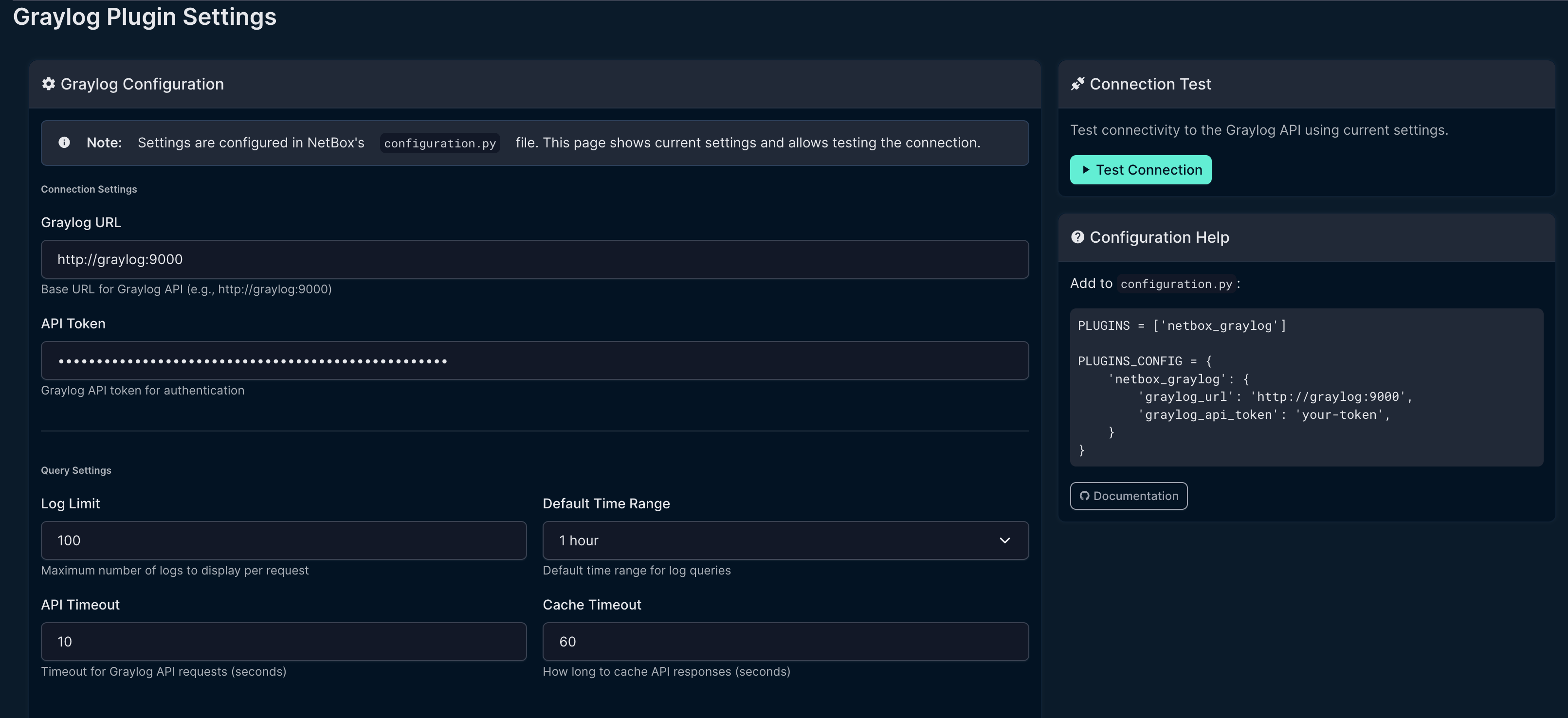
Settings Page
Configure Graylog connection settings directly in the NetBox UI.
Logs Tab
View Graylog logs directly on Device and VirtualMachine pages.

Dashboard Widget
Graylog summary widget showing total log volume, errors, and warnings.

Requirements
- NetBox 4.0 or higher (tested on NetBox 4.x only)
- Graylog 4.0 or higher with API access
- Python 3.10+
Note: This plugin is developed and tested exclusively on NetBox 4.x. It is not compatible with NetBox 3.x due to API and model changes.
Installation
From PyPI (when published)
pip install netbox-graylog
From Source
git clone https://github.com/sieteunoseis/netbox-graylog.git
cd netbox-graylog
pip install -e .
Docker Installation
Add to your NetBox Docker requirements file:
# requirements-extra.txt
netbox-graylog
Or for development:
# In docker-compose.override.yml, mount the plugin:
volumes:
  - /path/to/netbox-graylog:/opt/netbox/netbox/netbox_graylog
Configuration
Add the plugin to your NetBox configuration:
# configuration.py or plugins.py

PLUGINS = [
    'netbox_graylog',
]

PLUGINS_CONFIG = {
    'netbox_graylog': {
        # Required: Graylog API URL
        'graylog_url': 'http://graylog:9000',

        # Required: Graylog API token
        'graylog_api_token': 'your-api-token-here',

        # Optional settings with defaults:
        'log_limit': 50,           # Max logs to display
        'time_range': 3600,        # Default time range (1 hour)
        'timeout': 10,             # API timeout in seconds
        'cache_timeout': 60,       # Cache duration in seconds
        'search_field': 'source',  # Field to search (source or gl2_remote_ip)
        'use_fqdn': True,          # Use FQDN for hostname matching
        'fallback_to_ip': True,    # Try primary IP if hostname not found
    }
}
Graylog API Token
- Log into Graylog as an admin user
- Go to System → Users and Teams → Your User
- Click Edit Tokens
- Create a new token with at least these permissions:
searches:relativestreams:read(if filtering by stream)
Usage
Once installed and configured:
- Navigate to any Device or VirtualMachine in NetBox
- Click the Logs tab
- View recent logs from Graylog
- Use the time range buttons to adjust the search window
Search Behavior
The plugin searches for logs using this strategy:
- Hostname search:
source:{device.name} - IP fallback (if enabled and no results):
gl2_remote_ip:{primary_ip} - Source IP fallback:
source:{primary_ip}
Troubleshooting
No logs appearing
- Verify the device name in NetBox matches the
sourcefield in Graylog - Check if logs are being sent with FQDN or shortname
- Try disabling
use_fqdnif your devices use shortnames - Enable
fallback_to_ipto search by IP address
Connection errors
- Verify
graylog_urlis accessible from NetBox container - Check that the API token has correct permissions
- For Docker, ensure both containers are on the same network
Authentication errors
- Verify the API token is valid and not expired
- Check Graylog user has required permissions
Development
Setup
git clone https://github.com/sieteunoseis/netbox-graylog.git
cd netbox-graylog
pip install -e ".[dev]"
Code Style
black netbox_graylog/
flake8 netbox_graylog/
Documentation
Full documentation is available in the GitHub Wiki.
Changelog
See CHANGELOG.md for release history and breaking changes.
License
Apache License 2.0 - See LICENSE for details.
Contributing
Contributions are welcome! Please:
- Fork the repository
- Create a feature branch
- Submit a pull request
Support
If you find this plugin helpful, consider supporting development:

Credits
Inspired by the LibreNMS Graylog integration.
1 maintainer

Release files for netbox-graylog 1.1.9
For a detailed explanation of source distributions (sdists) and built distributions (wheels), please see the package formats documentation.
Source distribution (sdist)
| File | Size | Uploaded | |
|---|---|---|---|
| netbox_graylog-1.1.9.tar.gz | 22.8 kB | Details |
Built distribution (wheel)
| File | Interpreter | ABI | Platform | Reset |
|---|---|---|---|---|
| netbox_graylog-1.1.9-py3-none-any.whl | Python 3 | none | any | Details |
Total release size: 50.5 kB
Release files / netbox_graylog-1.1.9.tar.gz
| Download URL | netbox_graylog-1.1.9.tar.gz |
|---|---|
| Size | 22.8 kB |
| Tags | Source |
|
SHA-256 checksum How to use checksums |
86d9005e842507a88141adcce2e7f387b57acf5b75df833341a90ad043b6c6fd
|
|
BLAKE2b-256 checksum How to use checksums |
392e31f22195c07a6660b4c651fc1b952a436fd4d529dadf2fc4ab651e0abb76
|
| Upload date | |
|
Uploaded using Trusted Publishing? What is trusted publishing? |
Yes |
| Uploaded via |
twine/6.1.0 CPython/3.13.12
|
Provenance
Provenance describes where a file came from. On PyPI, provenance is shared via attestations, which provide a verifiable record of the build or publishing details. View details, limitations and caveats.


PyPI Publish Attestation
PyPI verified that this artifact, at this checksum, originated from the publisher listed below.
Signed by GitHub Actions, verified by PyPI on May 5, 2026.
Transparency logRelease files / netbox_graylog-1.1.9-py3-none-any.whl
| Download URL | netbox_graylog-1.1.9-py3-none-any.whl |
|---|---|
| Size | 27.7 kB |
| Tags | Python 3 |
|
SHA-256 checksum How to use checksums |
404af9de16444ff7fbbf83f31fd55fb0a8cc3b564528f6d225c62708c80ef843
|
|
BLAKE2b-256 checksum How to use checksums |
75df3bc60fde1fcfeb19e1f2eb4fabe5ef3c3af516f0c26899e845a8d3ef7f89
|
| Upload date | |
|
Uploaded using Trusted Publishing? What is trusted publishing? |
Yes |
| Uploaded via |
twine/6.1.0 CPython/3.13.12
|
Provenance
Provenance describes where a file came from. On PyPI, provenance is shared via attestations, which provide a verifiable record of the build or publishing details. View details, limitations and caveats.
PyPI Publish Attestation
PyPI verified that this artifact, at this checksum, originated from the publisher listed below.
Signed by GitHub Actions, verified by PyPI on May 5, 2026.
Transparency log













