
NetBox plugin to display Graylog logs in device and VM detail pages
Verified details
These details have been verified by PyPIProject links
GitHub Statistics
Maintainers

Project description
NetBox Graylog Plugin

A NetBox plugin that displays recent Graylog logs in Device and VirtualMachine detail pages.





Features
- Logs Tab: Adds a "Logs" tab to Device and VirtualMachine detail pages
- Time Range Selection: Quick buttons for 5m, 15m, 1h, 4h, 24h, and 7d time ranges
- Smart Search: Searches by hostname first, falls back to primary IP if no results
- Caching: Caches API responses to reduce load on Graylog
- Error Handling: Graceful degradation when Graylog is unavailable
Screenshots
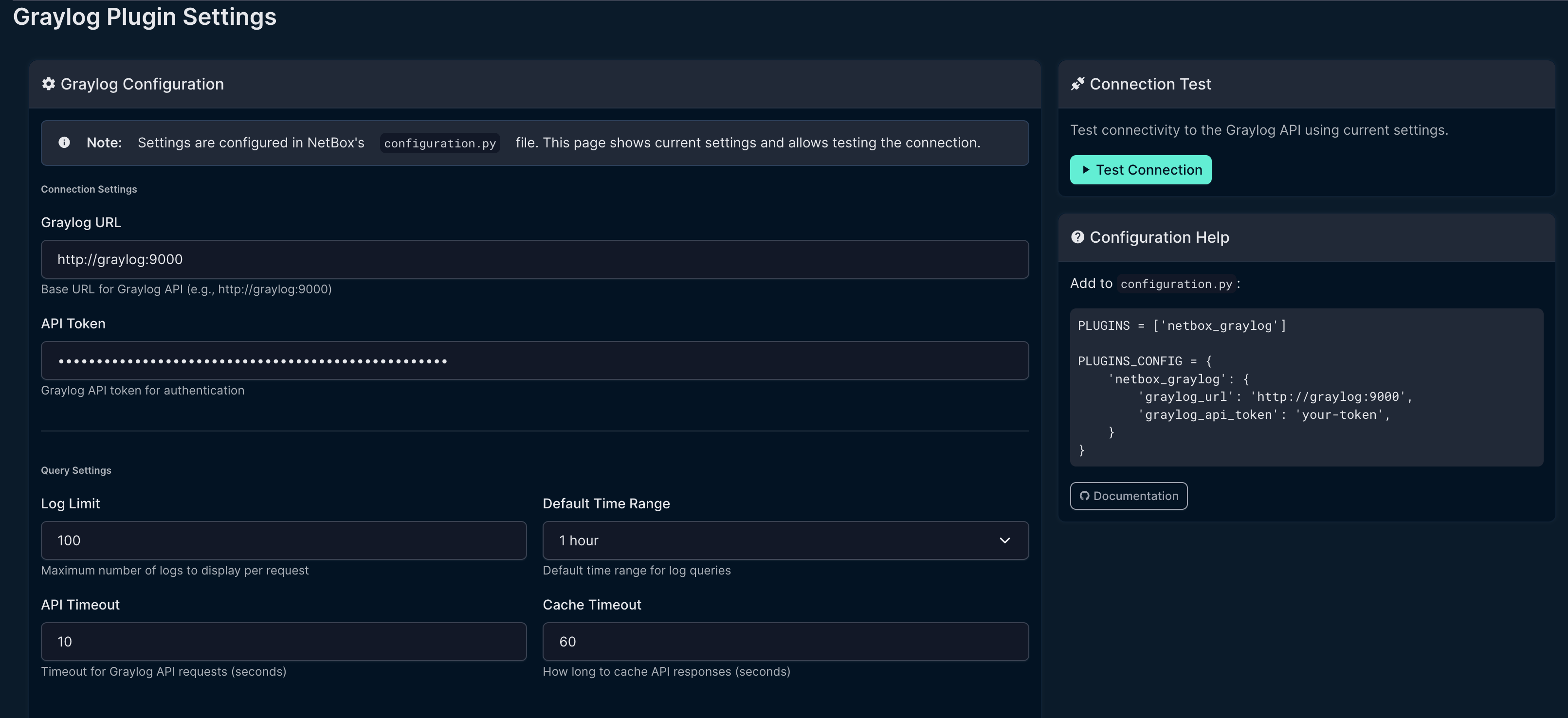
Settings Page
Configure Graylog connection settings directly in the NetBox UI.
Logs Tab
View Graylog logs directly on Device and VirtualMachine pages.

Requirements
- NetBox 4.0 or higher (tested on NetBox 4.x only)
- Graylog 4.0 or higher with API access
- Python 3.10+
Note: This plugin is developed and tested exclusively on NetBox 4.x. It is not compatible with NetBox 3.x due to API and model changes.
Installation
From PyPI (when published)
pip install netbox-graylog
From Source
git clone https://github.com/sieteunoseis/netbox-graylog.git
cd netbox-graylog
pip install -e .
Docker Installation
Add to your NetBox Docker requirements file:
# requirements-extra.txt
netbox-graylog
Or for development:
# In docker-compose.override.yml, mount the plugin:
volumes:
  - /path/to/netbox-graylog:/opt/netbox/netbox/netbox_graylog
Configuration
Add the plugin to your NetBox configuration:
# configuration.py or plugins.py

PLUGINS = [
    'netbox_graylog',
]

PLUGINS_CONFIG = {
    'netbox_graylog': {
        # Required: Graylog API URL
        'graylog_url': 'http://graylog:9000',

        # Required: Graylog API token
        'graylog_api_token': 'your-api-token-here',

        # Optional settings with defaults:
        'log_limit': 50,           # Max logs to display
        'time_range': 3600,        # Default time range (1 hour)
        'timeout': 10,             # API timeout in seconds
        'cache_timeout': 60,       # Cache duration in seconds
        'search_field': 'source',  # Field to search (source or gl2_remote_ip)
        'use_fqdn': True,          # Use FQDN for hostname matching
        'fallback_to_ip': True,    # Try primary IP if hostname not found
    }
}
Graylog API Token
- Log into Graylog as an admin user
- Go to System → Users and Teams → Your User
- Click Edit Tokens
- Create a new token with at least these permissions:
searches:relativestreams:read(if filtering by stream)
Usage
Once installed and configured:
- Navigate to any Device or VirtualMachine in NetBox
- Click the Logs tab
- View recent logs from Graylog
- Use the time range buttons to adjust the search window
Search Behavior
The plugin searches for logs using this strategy:
- Hostname search:
source:{device.name} - IP fallback (if enabled and no results):
gl2_remote_ip:{primary_ip} - Source IP fallback:
source:{primary_ip}
Troubleshooting
No logs appearing
- Verify the device name in NetBox matches the
sourcefield in Graylog - Check if logs are being sent with FQDN or shortname
- Try disabling
use_fqdnif your devices use shortnames - Enable
fallback_to_ipto search by IP address
Connection errors
- Verify
graylog_urlis accessible from NetBox container - Check that the API token has correct permissions
- For Docker, ensure both containers are on the same network
Authentication errors
- Verify the API token is valid and not expired
- Check Graylog user has required permissions
Development
Setup
git clone https://github.com/sieteunoseis/netbox-graylog.git
cd netbox-graylog
pip install -e ".[dev]"
Code Style
black netbox_graylog/
flake8 netbox_graylog/
Documentation
Full documentation is available in the GitHub Wiki.
Changelog
See CHANGELOG.md for release history and breaking changes.
License
Apache License 2.0 - See LICENSE for details.
Contributing
Contributions are welcome! Please:
- Fork the repository
- Create a feature branch
- Submit a pull request
Support
If you find this plugin helpful, consider supporting development:

Credits
Inspired by the LibreNMS Graylog integration.
Project details
Verified details
These details have been verified by PyPIProject links
GitHub Statistics
Maintainers
Release history Release notifications | RSS feed


Download files
Download the file for your platform. If you're not sure which to choose, learn more about installing packages.
Source Distribution
Built Distribution
Filter files by name, interpreter, ABI, and platform.
If you're not sure about the file name format, learn more about wheel file names.
Copy a direct link to the current filters
File details
Details for the file netbox_graylog-1.1.1.tar.gz.
File metadata
- Download URL: netbox_graylog-1.1.1.tar.gz
- Upload date:
- Size: 18.8 kB
- Tags: Source
- Uploaded using Trusted Publishing? Yes
- Uploaded via: twine/6.1.0 CPython/3.13.7
File hashes
| Algorithm | Hash digest | |
|---|---|---|
| SHA256 |
37b7c7daf730a8a5afda1e1eefed0af555de8e8fae39bacc93b6f3154809b057
|
|
| MD5 |
f11a2951c0f930baa5076456739467e4
|
|
| BLAKE2b-256 |
70743c9af8f2de27c55364578abcdf563103a642d23ff5ea30cd237fb544154e
|
Provenance
The following attestation bundles were made for netbox_graylog-1.1.1.tar.gz:
Publisher:
release.yml on sieteunoseis/netbox-graylog
-
Statement:
-
Statement type:
https://in-toto.io/Statement/v1 -
Predicate type:
https://docs.pypi.org/attestations/publish/v1 -
Subject name:
netbox_graylog-1.1.1.tar.gz -
Subject digest:
37b7c7daf730a8a5afda1e1eefed0af555de8e8fae39bacc93b6f3154809b057 - Sigstore transparency entry: 909237177
- Sigstore integration time:
-
Permalink:
sieteunoseis/netbox-graylog@48dd38b15b57bc31b8ab6a80fd5e113e7c62431e -
Branch / Tag:
refs/tags/v1.1.1 - Owner: https://github.com/sieteunoseis
-
Access:
public
-
Token Issuer:
https://token.actions.githubusercontent.com -
Runner Environment:
github-hosted -
Publication workflow:
release.yml@48dd38b15b57bc31b8ab6a80fd5e113e7c62431e -
Trigger Event:
push
-
Statement type:
File details
Details for the file netbox_graylog-1.1.1-py3-none-any.whl.
File metadata
- Download URL: netbox_graylog-1.1.1-py3-none-any.whl
- Upload date:
- Size: 21.2 kB
- Tags: Python 3
- Uploaded using Trusted Publishing? Yes
- Uploaded via: twine/6.1.0 CPython/3.13.7
File hashes
| Algorithm | Hash digest | |
|---|---|---|
| SHA256 |
1ed0fc035c8b8b8ca5cd7af307b9e3ced92c90dfcb1b86eedc791ebcdcacb1e0
|
|
| MD5 |
d67ec62e408b7b6555436c4a3418d55b
|
|
| BLAKE2b-256 |
839dd470225a44e94d0364e07945039fcf9e11a3f4f927f0d4d6885f2f9102ea
|
Provenance
The following attestation bundles were made for netbox_graylog-1.1.1-py3-none-any.whl:
Publisher:
release.yml on sieteunoseis/netbox-graylog
-
Statement:
-
Statement type:
https://in-toto.io/Statement/v1 -
Predicate type:
https://docs.pypi.org/attestations/publish/v1 -
Subject name:
netbox_graylog-1.1.1-py3-none-any.whl -
Subject digest:
1ed0fc035c8b8b8ca5cd7af307b9e3ced92c90dfcb1b86eedc791ebcdcacb1e0 - Sigstore transparency entry: 909237187
- Sigstore integration time:
-
Permalink:
sieteunoseis/netbox-graylog@48dd38b15b57bc31b8ab6a80fd5e113e7c62431e -
Branch / Tag:
refs/tags/v1.1.1 - Owner: https://github.com/sieteunoseis
-
Access:
public
-
Token Issuer:
https://token.actions.githubusercontent.com -
Runner Environment:
github-hosted -
Publication workflow:
release.yml@48dd38b15b57bc31b8ab6a80fd5e113e7c62431e -
Trigger Event:
push
-
Statement type:






