
NetBox Maintenance Device Plugin




A comprehensive NetBox plugin for managing device preventive and corrective maintenance with enhanced visual indicators, scheduling capabilities, and multi-language support.
Features
- Maintenance Plans: Create and manage maintenance plans for devices and virtual machines with configurable frequency
- Virtual Machine Support: Plans can target either a
dcim.Deviceor avirtualization.VirtualMachine, with the same UX on both detail pages (#14) - Calendar-based Scheduling: Schedule every N days / weeks / months / quarters / years, with an optional calendar anchor to avoid drift — e.g. "1st day of every month" or "start of each quarter" stays aligned with the calendar regardless of when previous executions happened (#15)
- Maintenance Executions: Record and track maintenance executions with status monitoring
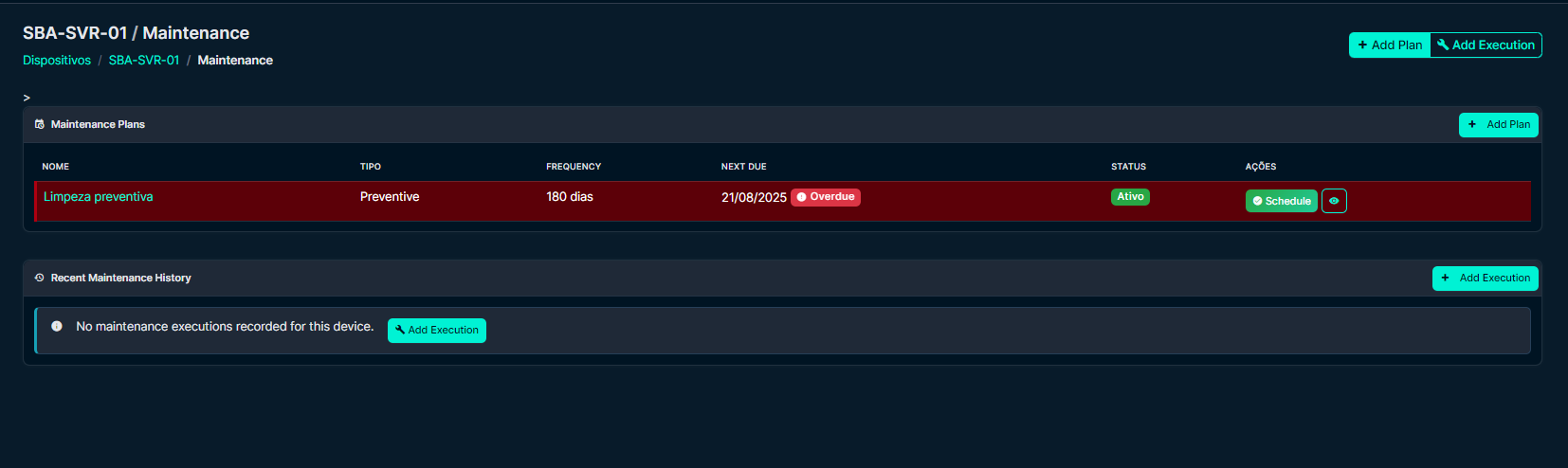
- Device & VM Integration: View maintenance history directly on device and VM pages with dedicated tabs
- Quick Actions: Schedule and complete maintenance directly from the interface
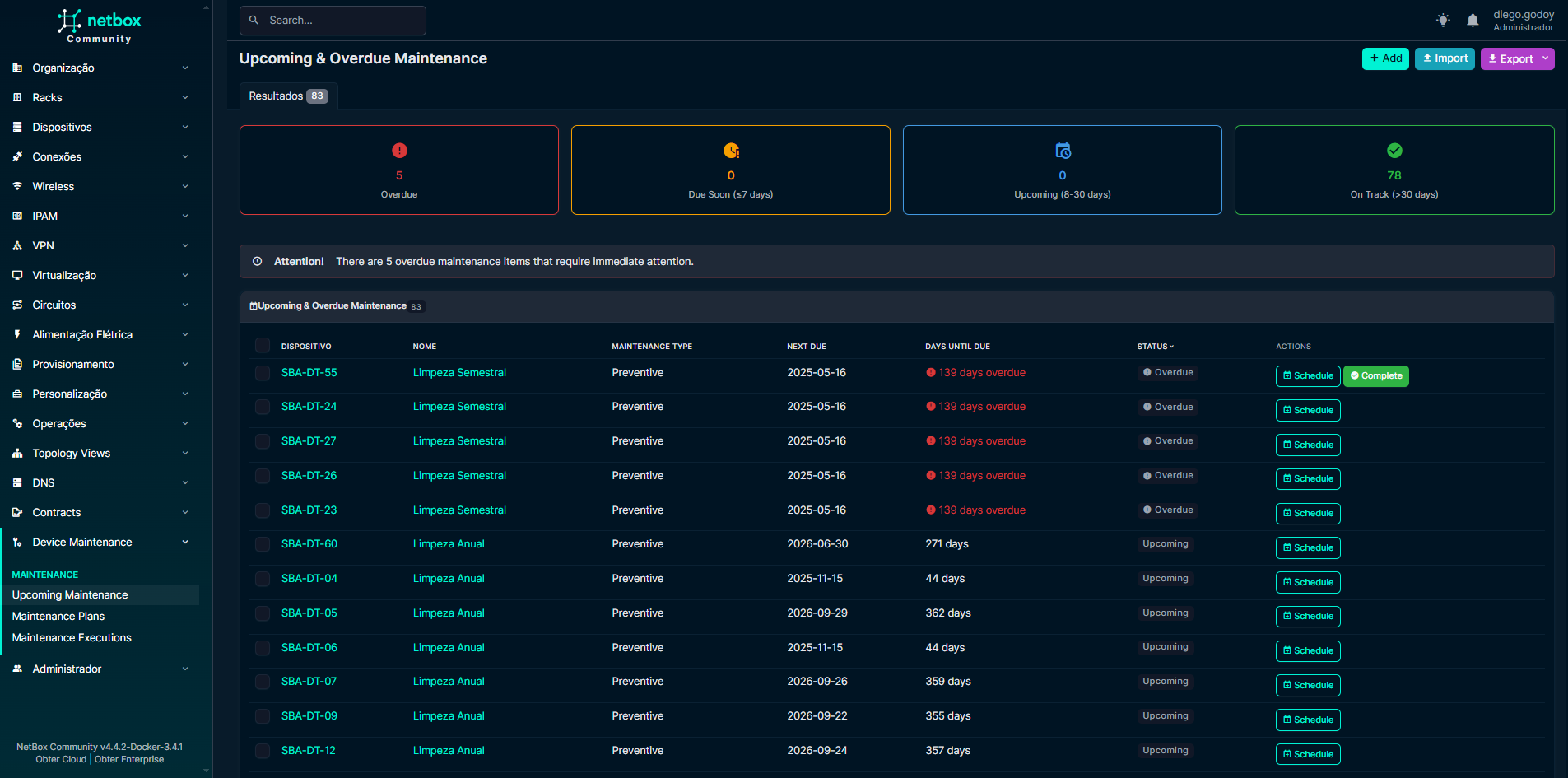
- Upcoming & Overdue Dashboard: Filter by status (Overdue / Due Soon / Upcoming / On Track), maintenance type, and target type (Device / VM)
- REST API: Complete REST API for external integrations and automation
- Advanced Filtering: Powerful filtering and search capabilities
- Custom Actions: Schedule, complete, and cancel maintenance via API
- Statistics: Get maintenance statistics and overdue/upcoming reports
Compatibility
| NetBox Version | Plugin Support | Notes |
|---|---|---|
| 4.6.x | Tested & Supported | Current target version |
| 4.5.x | Tested & Supported | Fully compatible |
| 4.4.x | Tested & Supported | Fully compatible |
| 4.3.x | Likely Compatible | Not officially tested |
| 4.2.x | Likely Compatible | Not officially tested |
| 4.1.x | Likely Compatible | Not officially tested |
| 4.0.x | Likely Compatible | Not officially tested |
| 3.x | Not Supported | Breaking changes |
Note: This version (v1.4.3) is specifically tested and certified for NetBox 4.4.x, 4.5.x, and 4.6.x. While it may work with other 4.x versions, we recommend testing in a development environment first.
Python Requirements: NetBox 4.5.x and 4.6.x require Python 3.12, 3.13, or 3.14. NetBox 4.6.x also runs on Django 6.0. If you're using NetBox 4.4.x or earlier, you can use Python 3.8+.
Installation
Method 1: PyPI Installation (Recommended)
Now officially available on PyPI!
# Install the latest version
pip install netbox-maintenance-device

# Or install a specific version
pip install netbox-maintenance-device==1.4.3
For Docker deployments, add to your plugin_requirements.txt:
echo "netbox-maintenance-device>=1.4.3" >> plugin_requirements.txt
Method 2: GitHub Installation
# Install from GitHub (development version)
pip install git+https://github.com/diegogodoy06/netbox-maintenance-device.git
Method 3: Docker Installation
For Docker-based NetBox installations using netbox-docker:
📋 For detailed Docker installation instructions in English and Portuguese, see DOCKER_INSTALL.md
Configuration
Basic Configuration
Add the plugin to your NetBox configuration.py:
# configuration.py

PLUGINS = [
    'netbox_maintenance_device',
    # ... other plugins
]

# Optional: Plugin-specific settings
PLUGINS_CONFIG = {
    'netbox_maintenance_device': {
        # Future configuration options will be added here
        # Currently, the plugin uses default settings
    }
}
Language Configuration (Optional)
To enable Portuguese-BR by default:
# configuration.py

# Enable internationalization
USE_I18N = True
USE_L10N = True

# Set default language
LANGUAGE_CODE = 'pt-br'
TIME_ZONE = 'America/Sao_Paulo'

# Available languages
LANGUAGES = [
    ('en', 'English'),
    ('pt-br', 'Português (Brasil)'),
]
Restart Services
Restart your NetBox services:
# For systemd
sudo systemctl restart netbox netbox-rq

# For Docker
docker compose restart netbox netbox-worker
Usage
For detailed usage instructions, please refer to the USAGE.md guide, which includes:
- Creating and managing maintenance plans
- Scheduling and completing maintenance
- Monitoring maintenance status
- Using the REST API
- Troubleshooting common issues
Quick Start:
- Create maintenance plans for your devices
- View upcoming/overdue maintenance in the dashboard
- Use quick action buttons to schedule or complete maintenance
- Monitor device-specific maintenance on device pages
Screenshots
Device Maintenance Section
View maintenance plans and status directly on device pages
Upcoming Maintenance Dashboard
Monitor all upcoming and overdue maintenance across your infrastructure
Maintenance Plan Management
Create and manage maintenance plans with flexible scheduling

🤝 Contributing
Contributions are welcome! Please feel free to submit a Pull Request.
📄 License
This project is licensed under the Apache 2.0 License - see the LICENSE file for details.
🙏 Acknowledgments
- NetBox community for the excellent platform
- Contributors and users providing feedback
1 maintainer

Metadata
1 maintainer
Release files for netbox-maintenance-device 1.4.3
For a detailed explanation of source distributions (sdists) and built distributions (wheels), please see the package formats documentation.
Source distribution (sdist)
| File | Size | Uploaded | Provenance | |
|---|---|---|---|---|
| netbox_maintenance_device-1.4.3.tar.gz | 59.4 kB | Without provenance | Details |
Built distribution (wheel)
| File | Interpreter | ABI | Platform | Reset |
|---|---|---|---|---|
| netbox_maintenance_device-1.4.3-py3-none-any.whl | Python 3 | none | any | Details |
Total release size: 124.1 kB
Release files / netbox_maintenance_device-1.4.3.tar.gz
| Download URL | netbox_maintenance_device-1.4.3.tar.gz |
|---|---|
| Size | 59.4 kB |
| Tags | Source |
|
SHA-256 checksum How to use checksums |
a96344ad3fa73052dcd5207989913e0b26eb72b59cac0701ad1f0b16ae6783bd
|
|
BLAKE2b-256 checksum How to use checksums |
b3c307886705a8d526474edaa210ad2f1bc7c0f06d95eca0a4efdf04224a555b
|
| Upload date | |
|
Uploaded using Trusted Publishing? What is trusted publishing? |
No |
| Uploaded via |
twine/7.0.0 CPython/3.13.14
|
Release files / netbox_maintenance_device-1.4.3-py3-none-any.whl
| Download URL | netbox_maintenance_device-1.4.3-py3-none-any.whl |
|---|---|
| Size | 64.7 kB |
| Tags | Python 3 |
|
SHA-256 checksum How to use checksums |
a3d485a6ac99e9a9edc508e8bce6461ba53d0a6294f3e263ce6b9d8747dcf577
|
|
BLAKE2b-256 checksum How to use checksums |
e7bb47a3e5ba3bd355aa1a8eff3403c4c1ae50dba0d4c6e855e8ae2c0d74c9a8
|
| Upload date | |
|
Uploaded using Trusted Publishing? What is trusted publishing? |
No |
| Uploaded via |
twine/7.0.0 CPython/3.13.14
|
Security for netbox-maintenance-device 1.4.3
Provenance
Provenance describes where a file came from. On PyPI, provenance is shared via attestations, which provide a verifiable record of the build or publishing details. View details, limitations and caveats.
No provenance found
None of the files in this release were uploaded with provenance metadata.
A note on package security
PyPI is a repository for distributing packages, not a service for auditing them. While third-party security researchers and our staff do their best to detect and remove malicious packages, PyPI cannot guarantee the quality, security or suitability of any given package.
To learn more about protecting yourself from malicious actors, visit our package security documentation.














