
NetBox PRTG Plugin

A NetBox plugin that displays PRTG Network Monitor status on Device and Virtual Machine detail pages.





Features
- Device Tab: Shows PRTG monitoring summary on device detail pages
- Virtual Machine Tab: Shows PRTG monitoring summary on VM detail pages
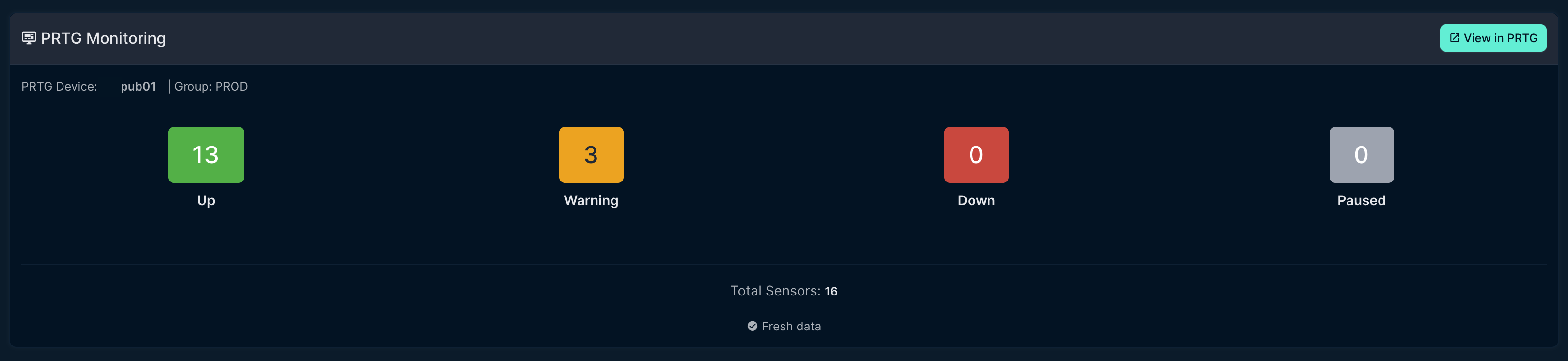
- Sensor Summary: Displays sensor counts by status (Up, Warning, Down, Paused)
- Export to PRTG: Create devices in PRTG directly from NetBox with auto-discovery
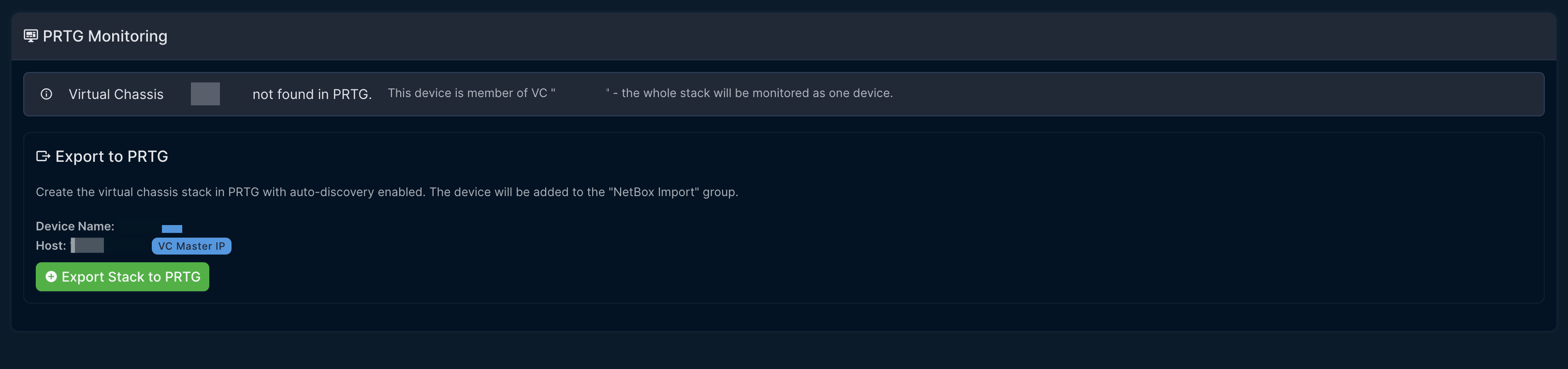
- Virtual Chassis Support: Monitors entire stack using VC name and master IP
- Direct Links: Quick link to view the device in PRTG
- Caching: Configurable caching to minimize API calls
- Custom Field: Optional
prtg_device_idfield for explicit device mapping
Screenshots
Device Tab
Shows sensor status summary with color-coded badges for quick status overview.
Export to PRTG
Export devices from NetBox to PRTG with one click.
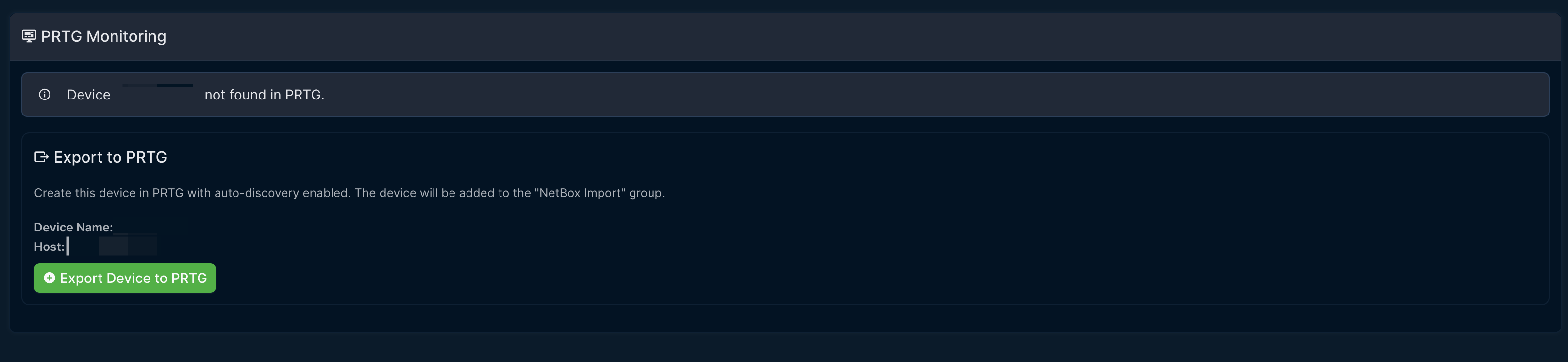
Export Confirmation
Confirmation dialog showing device details before export.
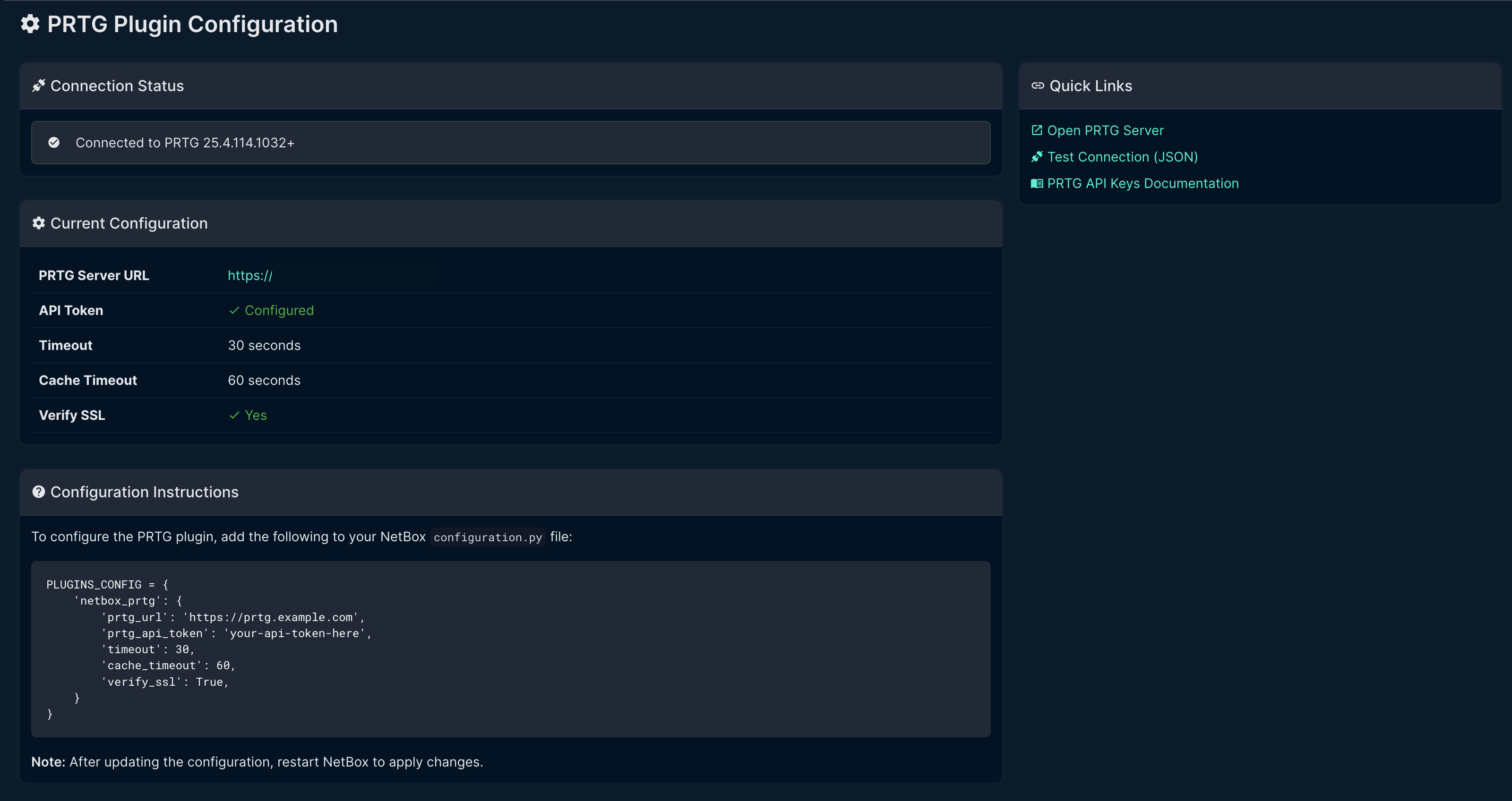
Settings Page
Displays current configuration and connection status.
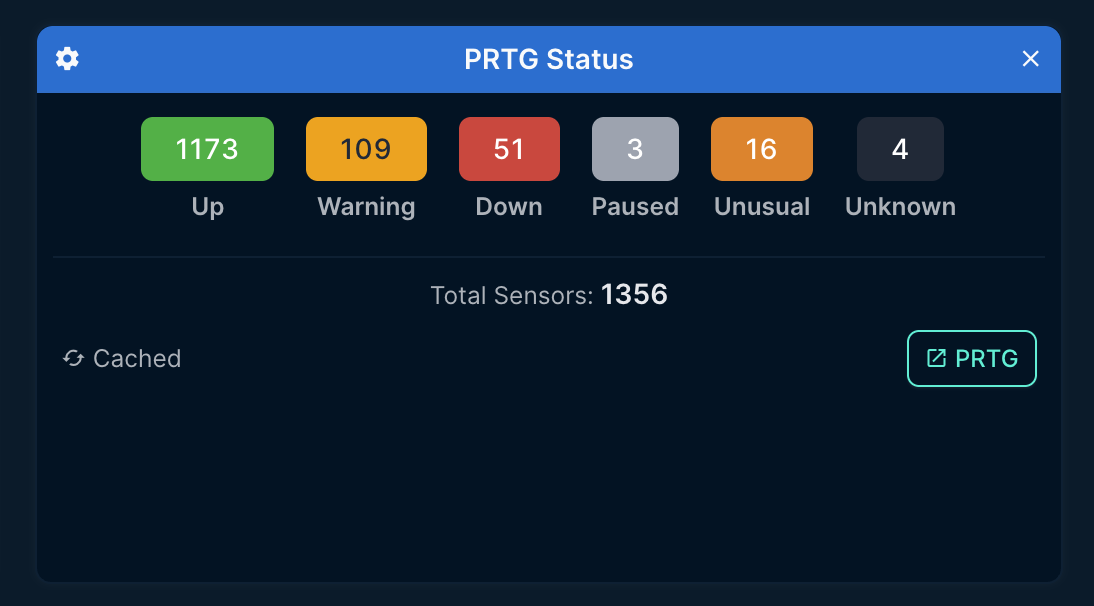
Dashboard Widget
PRTG status widget showing sensor counts by status.
Requirements
- NetBox 4.0.0 or higher
- PRTG Network Monitor with API access
- PRTG API Token
Note: This plugin is developed and tested exclusively on NetBox 4.x. It is not compatible with NetBox 3.x due to API and model changes.
Installation
Via pip (recommended)
pip install netbox-prtg
From source
git clone https://github.com/sieteunoseis/netbox-prtg.git
cd netbox-prtg
pip install .
Configuration
- Add the plugin to your NetBox
configuration.py:
PLUGINS = [
    'netbox_prtg',
]

PLUGINS_CONFIG = {
    'netbox_prtg': {
        'prtg_url': 'https://prtg.example.com',
        'prtg_api_token': 'your-api-token-here',
        'timeout': 30,
        'cache_timeout': 60,
        'verify_ssl': True,
    }
}
Display Options
Optional PLUGINS_CONFIG["netbox_prtg"] keys that control where the plugin appears in the UI:
| Setting | Default | Description |
|---|---|---|
tab_weight |
9006 |
Position of this plugin's tab on object pages (lower = further left). Tabs with equal weight fall back to registration order. |
top_level_menu |
True |
True = own top-level sidebar menu. False = items listed under the shared Plugins menu, to shorten the sidebar. |
- Restart NetBox to load the plugin.
Configuration Options
| Option | Type | Default | Description |
|---|---|---|---|
prtg_url |
string | "" |
PRTG server URL (e.g., https://prtg.example.com) |
prtg_api_token |
string | "" |
API token from PRTG account settings |
timeout |
int | 30 |
API request timeout in seconds |
cache_timeout |
int | 60 |
How long to cache API responses in seconds |
verify_ssl |
bool | True |
Verify SSL certificates |
Getting a PRTG API Token
- Log into your PRTG web interface
- Go to Setup > Account Settings > My Account
- Under API Keys, click Create API Key
- Copy the token and add it to your NetBox configuration
Usage
Device Matching
The plugin matches NetBox devices to PRTG devices by hostname. The device name in NetBox must match the device name in PRTG.
For explicit mapping, you can set the prtg_device_id custom field on a device with the PRTG object ID.
Virtual Chassis Support
For devices that are members of a Virtual Chassis (VC), the plugin:
- Uses the VC name for PRTG device lookup/export (not individual member names)
- Uses the VC master's IP address as the host for monitoring
- Displays VC information in the PRTG tab
This allows you to monitor an entire switch stack as a single PRTG device.
Viewing Monitoring Status
- Navigate to any device or virtual machine detail page
- Click the PRTG tab
- View the sensor status summary
Exporting Devices to PRTG
When a device is not found in PRTG, you can export it directly:
- Click the Export to PRTG button
- The device is created in the "NetBox Import" group
- Auto-discovery runs to detect available sensors
- Move the device to the appropriate group in PRTG as needed
Status Indicators
| Status | Color | Description |
|---|---|---|
| Up | Green | Sensor is healthy |
| Warning | Orange | Sensor has warnings |
| Down | Red | Sensor is down/critical |
| Paused | Gray | Sensor is paused |
| Unusual | Amber | Sensor has unusual readings |
Development
Setup
cd ~/development
git clone https://github.com/sieteunoseis/netbox-prtg.git
cd netbox-prtg
python -m venv .venv
source .venv/bin/activate
pip install -e ".[dev]"
Running Lint Checks
black netbox_prtg/
isort netbox_prtg/
flake8 netbox_prtg/
Testing with NetBox Dev Instance
- Add to
netbox-dev/configuration/plugins.py - Mount in
netbox-dev/docker-compose.yml - Restart:
docker-compose restart netbox
API Endpoints Used
The plugin uses the following PRTG API endpoints:
GET /api/status.json- Test connectionGET /api/table.json?content=devices- Find devices by hostnameGET /api/table.json?content=sensors- Get device sensorsGET /api/table.json?content=groups- Find groupsGET /api/addgroup.htm- Create groupsGET /api/adddevice2.htm- Create devices with auto-discovery
Future Enhancements
- Detailed sensor list view
- Sensor alerts history
- Bulk device status view
- Conditional tab visibility
License
Apache License 2.0
Author
- sieteunoseis - GitHub
Links
1 maintainer

Metadata
1 maintainer
Release files for netbox-prtg 0.5.0
For a detailed explanation of source distributions (sdists) and built distributions (wheels), please see the package formats documentation.
Source distribution (sdist)
| File | Size | Uploaded | Provenance | Actions |
|---|---|---|---|---|
| netbox_prtg-0.5.0.tar.gz | 25.2 kB | With provenance | Details for netbox_prtg-0.5.0.tar.gz |
Built distribution (wheel)
| File | Interpreter | ABI | Platform | Actions Reset |
|---|---|---|---|---|
| netbox_prtg-0.5.0-py3-none-any.whl | Python 3 | none | any | Details for netbox_prtg-0.5.0-py3-none-any.whl |
Total release size: 51.7 kB
Release files / netbox_prtg-0.5.0.tar.gz
| Download URL | netbox_prtg-0.5.0.tar.gz |
|---|---|
| Size | 25.2 kB |
| Tags | Source |
|
SHA-256 checksum How to use checksums |
934893d32c7aa1bb52d74661e2230af317a8c9d1d47a0fdd6d304372d68cc768
|
|
BLAKE2b-256 checksum How to use checksums |
18d6bdb6719b901c789289fe97921b904a9a6984003c276c48cc12602d1761c8
|
| Upload date | |
|
Uploaded using Trusted Publishing? What is trusted publishing? |
Yes |
| Uploaded via |
twine/7.0.0 CPython/3.13.16
|
Provenance
Provenance describes where a file came from. On PyPI, provenance is shared via attestations, which provide a verifiable record of the build or publishing details. View details, limitations and caveats.


PyPI Publish Attestation
PyPI verified that this artifact, at this checksum, originated from the publisher listed below.
Signed by GitHub Actions, verified by PyPI on Nov 17, 2026.
Transparency logRelease files / netbox_prtg-0.5.0-py3-none-any.whl
| Download URL | netbox_prtg-0.5.0-py3-none-any.whl |
|---|---|
| Size | 26.5 kB |
| Tags | Python 3 |
|
SHA-256 checksum How to use checksums |
ad77771f642e0fd75c3586d91b7eb942a8d6f8aee7795e7d7dc4738d2241f075
|
|
BLAKE2b-256 checksum How to use checksums |
a53351d2f1efca111d42f5f7d81e908c2f4ea248c9d2ddcfbf32457511ed9a8c
|
| Upload date | |
|
Uploaded using Trusted Publishing? What is trusted publishing? |
Yes |
| Uploaded via |
twine/7.0.0 CPython/3.13.16
|
Provenance
Provenance describes where a file came from. On PyPI, provenance is shared via attestations, which provide a verifiable record of the build or publishing details. View details, limitations and caveats.
PyPI Publish Attestation
PyPI verified that this artifact, at this checksum, originated from the publisher listed below.
Signed by GitHub Actions, verified by PyPI on Nov 17, 2026.
Transparency logSecurity for netbox-prtg 0.5.0
Provenance
Provenance describes where a file came from. On PyPI, provenance is shared via attestations, which provide a verifiable record of the build or publishing details. View details, limitations and caveats.
Full provenance
Both files in this release have been uploaded with provenance metadata.
Attestation for netbox_prtg-0.5.0.tar.gz
PyPI Publish Attestation
PyPI verified that this artifact, at this checksum, originated from the publisher listed below.
Signed by GitHub Actions, verified by PyPI on Nov 17, 2026.
Transparency logA note on package security
PyPI is a repository for distributing packages, not a service for auditing them. While third-party security researchers and our staff do their best to detect and remove malicious packages, PyPI cannot guarantee the quality, security or suitability of any given package.
To learn more about protecting yourself from malicious actors, visit our package security documentation.














