
NetBox Services Plugin


A NetBox plugin for service providers who need a service-centric inventory on top of DCIM/IPAM.
NetBox already models devices, prefixes, circuits, and VRFs. What it does not model natively is the commercial / operational service that those objects deliver — the Cogent DIA circuit NW-123456, the customer L3VPN, the IP transit handoff.
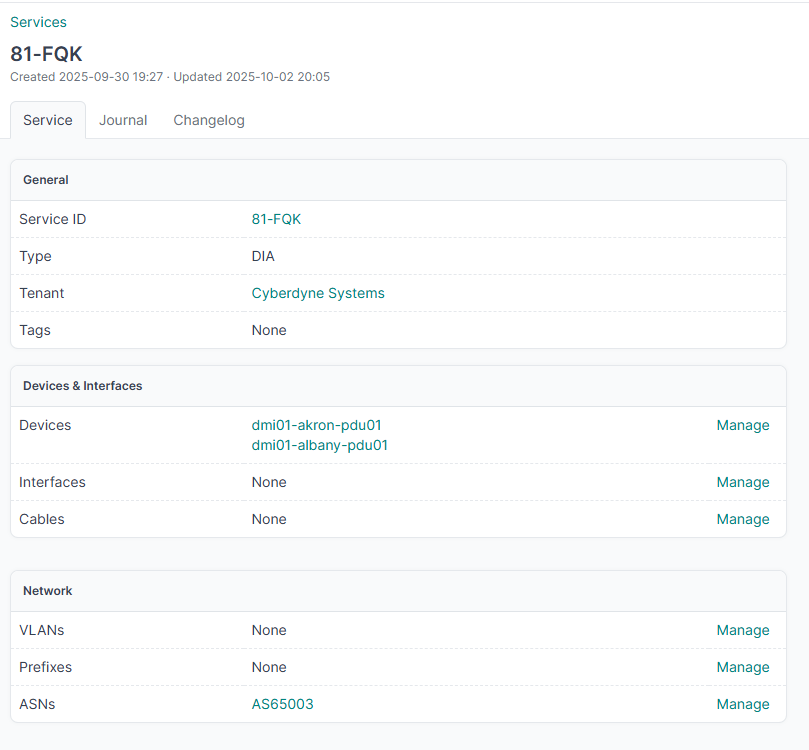
This plugin adds a Service object: a unique service ID, a type, a tenant, a lifecycle, and many-to-many links to the NetBox objects that implement it. Tags are still useful for loose labels; a Service is the object you open when someone asks “what does this customer product actually run on?”
What a Service is
Each Service has:
| Area | Fields |
|---|---|
| Identity | Unique service_id, type (L2VPN, L3VPN, DIA, IP Transit, CDN, Voice), description, status, tenant |
| Lifecycle | Order date, planned activation, installed, contract start/end, requested disconnect, decommissioned |
| Delivery | Devices, interfaces, cables, VLANs, prefixes, VRFs, ASNs, route targets, L2VPNs, tunnels, VMs |
| Files | PDF/other files (ServiceAttachment) plus NetBox image attachments (photos) on the Images tab |
Status reuses NetBox circuit statuses so services line up with how circuits are already tracked.
Date checks: contract end cannot precede start; decommissioned cannot precede installed or requested disconnect.
Why not just tags?
Tagging a prefix dia does not tell you which customer product it belongs to, when it was ordered, or which handoff interface delivers it.
With a Service you can, for example, create DIA NW-123456 for a tenant and then:
- Point at the PE/CE devices and the exact interfaces
- Attach the WAN prefixes, VRF, and ASN
- Record order / install / contract dates
- Store the signed PDF and site photos next to the inventory
The detail page is split for that workflow: technical inventory on the left, lifecycle and attachments on the right.
Features
- CRUD for business services from Business Services in the nav
- Relate/unrelate DCIM, IPAM, VPN, and virtualization objects from the service detail view
- Filter and search by service ID, description, tenant, status, and dates
- Bulk delete from the list view
- Changelog, tags, and custom fields (
NetBoxModel) - REST API under
/api/plugins/services/(list/detail includeidand lifecycle fields) - File attachments and native image attachments
Usage
- Open Business Services in the plugin menu.
- Create a service (ID + type at minimum).
- On the detail page, use Assign on each technical card to attach inventory.
- Fill lifecycle dates when the order, install, or disconnect happens.
- Add contracts/PDFs under Attachments; photos go on the Images tab.
Requirements
- NetBox 4.4+
- Python 3.10+
Installation
Install the package:
pip install netbox-services
Or clone this repo next to your NetBox plugins and install in editable mode.
Enable it in configuration.py:
PLUGINS = [
    'netbox_services',
]
Apply migrations and restart NetBox:
python manage.py migrate netbox_services
The UI lives at /plugins/services/. The API lives at /api/plugins/services/ (no extra /services/ segment).
License
MIT
1 maintainer

Release files for netbox-services 0.0.16
For a detailed explanation of source distributions (sdists) and built distributions (wheels), please see the package formats documentation.
Source distribution (sdist)
| File | Size | Uploaded | |
|---|---|---|---|
| netbox_services-0.0.16.tar.gz | 13.7 kB | Details |
Built distribution (wheel)
| File | Interpreter | ABI | Platform | Reset |
|---|---|---|---|---|
| netbox_services-0.0.16-py3-none-any.whl | Python 3 | none | any | Details |
Total release size: 30.3 kB
Release files / netbox_services-0.0.16.tar.gz
| Download URL | netbox_services-0.0.16.tar.gz |
|---|---|
| Size | 13.7 kB |
| Tags | Source |
|
SHA-256 checksum How to use checksums |
982d8399418e7993cbd45e139be043e0cea508142e80889f7bd8f3b68e391a9b
|
|
BLAKE2b-256 checksum How to use checksums |
7e48e82a10e8f4145f715203b525410482dd7fb1b44e83740c4137f7d7b8f871
|
| Upload date | |
|
Uploaded using Trusted Publishing? What is trusted publishing? |
No |
| Uploaded via |
twine/6.2.0 CPython/3.9.25
|
Release files / netbox_services-0.0.16-py3-none-any.whl
| Download URL | netbox_services-0.0.16-py3-none-any.whl |
|---|---|
| Size | 16.6 kB |
| Tags | Python 3 |
|
SHA-256 checksum How to use checksums |
130e09bbb214a610ed4834c6457e9458bc3a600db0e6e83b74750aeec8bdc653
|
|
BLAKE2b-256 checksum How to use checksums |
1d000ab4d158f3f609e4bbf173d6715abb4be76a8091b3283d111a9d35a373f0
|
| Upload date | |
|
Uploaded using Trusted Publishing? What is trusted publishing? |
No |
| Uploaded via |
twine/6.2.0 CPython/3.9.25
|














