
NetBox Services Plugin


A NetBox plugin for service providers who need a service-centric inventory on top of DCIM/IPAM.
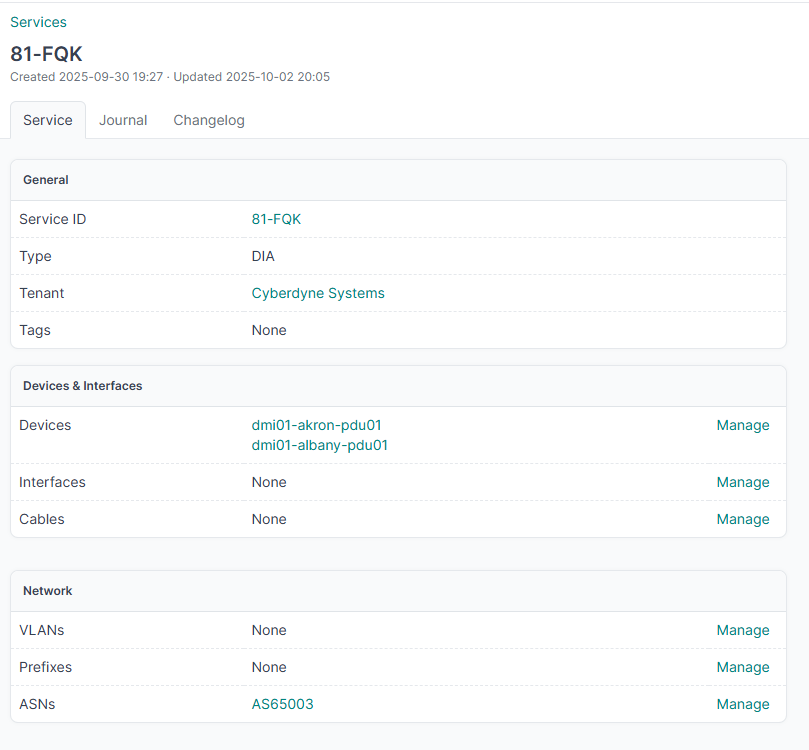
It adds a Service object: a unique ID, a type, a tenant, a lifecycle, and links out to whatever DCIM/IPAM/VPN objects actually deliver it — the PE/CE devices, interfaces, prefixes, VRFs, whatever makes up the Cogent DIA circuit NW-123456 or the customer's L3VPN. It's the page you open when someone asks "what does this customer's product actually run on?"
What a Service is
Each Service has:
| Area | Fields |
|---|---|
| Identity | Unique service_id, type (L2VPN, L3VPN, DIA, IP Transit, CDN, Voice), description, status, tenant |
| Capacity | Bandwidth and CIR (Mbps), SLA uptime target |
| Lifecycle | Order date, planned activation, installed, contract start/end, requested disconnect, decommissioned, decommission reason |
| Delivery | Devices, interfaces, cables, VLANs, prefixes, VRFs, ASNs, route targets, L2VPNs, tunnels, VMs |
| Dependencies | Other services this one depends on, and the services that depend on it in turn |
| Files | PDF/other files (ServiceAttachment) plus NetBox image attachments (photos) on the Images tab |
Status reuses NetBox circuit statuses so services line up with how circuits are already tracked.
Why not just tags?
A tag is a label; a Service is a record. Tagging a prefix dia doesn't tell you which customer it's for, when it was ordered, or which interface hands it off — a Service does.
Say you're onboarding DIA NW-123456 for a tenant. With a Service you'd:
- Point at the PE/CE devices and the exact interfaces
- Attach the WAN prefixes, VRF, and ASN
- Log the order / install / contract dates
- Keep the signed PDF and site photos right next to the inventory
The detail page is laid out for that: technical inventory on the left, lifecycle and paperwork on the right.
Features
- CRUD for business services from Business Services in the nav
- Relate/unrelate DCIM, IPAM, VPN, and virtualization objects from the service detail view
- Service-to-service dependencies (e.g. a CDN service riding over an L2L circuit), with direct and indirect cycle detection, visible on the detail page and the list view
- Bandwidth/CIR and an SLA uptime target per service, plus a decommission reason for churn tracking
- Filter and search by service ID, description, tenant, status, dates, dependencies, bandwidth/CIR range, SLA uptime, and decommission reason
- Bulk delete from the list view
- Changelog, tags, and custom fields (
NetBoxModel) - REST API under
/api/plugins/services/(list/detail includeid, lifecycle fields, and dependencies; query-string filtering works the same as the UI) - File attachments and native image attachments
Usage
- Open Business Services in the plugin menu.
- Create a service — ID and type is all you need to start.
- On the detail page, hit Assign on each technical card to attach inventory.
- Fill in lifecycle dates as the order, install, or disconnect actually happen.
- Drop contracts/PDFs under Attachments; photos go on the Images tab.
Requirements
- NetBox 4.4+
- Python 3.10+
Installation
Install the package:
pip install netbox-services
Or clone this repo next to your NetBox plugins and install it in editable mode if you want to hack on it.
Enable it in configuration.py:
PLUGINS = [
    'netbox_services',
]
Apply migrations and restart NetBox:
python manage.py migrate netbox_services
The UI lives at /plugins/services/. The API lives at /api/plugins/services/.
License
MIT
1 maintainer

Metadata
1 maintainer
Release files for netbox-services 0.2.0
For a detailed explanation of source distributions (sdists) and built distributions (wheels), please see the package formats documentation.
Source distribution (sdist)
| File | Size | Uploaded | Provenance | |
|---|---|---|---|---|
| netbox_services-0.2.0.tar.gz | 15.6 kB | Without provenance | Details |
Built distribution (wheel)
| File | Interpreter | ABI | Platform | Reset |
|---|---|---|---|---|
| netbox_services-0.2.0-py3-none-any.whl | Python 3 | none | any | Details |
Total release size: 35.2 kB
Release files / netbox_services-0.2.0.tar.gz
| Download URL | netbox_services-0.2.0.tar.gz |
|---|---|
| Size | 15.6 kB |
| Tags | Source |
|
SHA-256 checksum How to use checksums |
28f381522458ca240c6fa3e79e7cfeb452583a4a40d53674ee39293dc66f1a61
|
|
BLAKE2b-256 checksum How to use checksums |
2648d26fc074792dfe24bb6ef2c993697bbba67687d1e56ba63ef881f245ae88
|
| Upload date | |
|
Uploaded using Trusted Publishing? What is trusted publishing? |
No |
| Uploaded via |
twine/6.2.0 CPython/3.9.25
|
Release files / netbox_services-0.2.0-py3-none-any.whl
| Download URL | netbox_services-0.2.0-py3-none-any.whl |
|---|---|
| Size | 19.6 kB |
| Tags | Python 3 |
|
SHA-256 checksum How to use checksums |
efa82ce3740ae149af37871a79a870e4532e915deb91f47c10c6afc273510d39
|
|
BLAKE2b-256 checksum How to use checksums |
9e58bee7b210b8c8a3e6e7bbd947bff42da81841fd48b9d206feb80f8f14f0ab
|
| Upload date | |
|
Uploaded using Trusted Publishing? What is trusted publishing? |
No |
| Uploaded via |
twine/6.2.0 CPython/3.9.25
|
Security for netbox-services 0.2.0
Provenance
Provenance describes where a file came from. On PyPI, provenance is shared via attestations, which provide a verifiable record of the build or publishing details. View details, limitations and caveats.
No provenance found
None of the files in this release were uploaded with provenance metadata.
A note on package security
PyPI is a repository for distributing packages, not a service for auditing them. While third-party security researchers and our staff do their best to detect and remove malicious packages, PyPI cannot guarantee the quality, security or suitability of any given package.
To learn more about protecting yourself from malicious actors, visit our package security documentation.














