
NetFL
NetFL is a framework for executing Federated Learning (FL) experiments in simulated IoT and Fog/Edge computing environments. It enables the modeling of heterogeneous and resource-constrained scenarios, incorporating factors such as computational disparities among devices, limited bandwidth, latency, packet loss, and diverse network topologies.
Using its native abstractions for tasks, devices, and networks, NetFL allows researchers to configure and execute FL experiments in a declarative and reproducible manner, providing realistic evaluations of algorithms under non-ideal, real-world conditions.
Under the hood, NetFL leverages Fogbed for distributed network emulation and Flower for federated learning orchestration. These libraries provide robust foundations for virtualization and FL training, and NetFL integrates and extends them into a unified framework designed specifically for FL research in IoT and Fog/Edge Computing.
Installation
Requirements: Ubuntu 22.04 LTS or later, Python 3.9 or higher.
1. Set up Containernet
Refer to the Containernet documentation for further details.
Install Ansible:
sudo apt-get install ansible
Clone the Containernet repository:
git clone https://github.com/containernet/containernet.git
Run the installation playbook:
sudo ansible-playbook -i "localhost," -c local containernet/ansible/install.yml
Create and activate a virtual environment:
python3 -m venv venv
source venv/bin/activate
Note: The virtual environment must be activated before installing or using any Python packages, including Containernet and NetFL.
Install Containernet into the active virtual environment:
pip install containernet/.
2. Install NetFL
While the virtual environment is still active, run:
pip install netfl
Running and Understanding a NetFL Experiment
NetFL experiments are designed to be modular and declarative, making it easy to set up federated learning scenarios. The steps below describe how to set up and run an experiment using NetFL. The example uses the MNIST dataset. You can find more examples in the examples folder:
1. Define the Task
The Task class encapsulates the dataset, model, partitioning strategy, and training configuration. You can inherit from it and override methods to specify:
- Dataset information: Source, input/label keys, data types
- Partitioning: How data is split among clients (IID, non-IID, etc.)
- Preprocessing: Any transformations applied to the data
- Model: The model architecture and optimizer
- Aggregation strategy: Federated averaging or custom strategies
- Training configs: Batch size, epochs, number of clients, etc.
After implementing the task, export an
FLTaskclass that extends it for use by NetFL.
from typing import Any

import tensorflow as tf
from keras import models, optimizers
from flwr.server.strategy import Strategy, FedAvg

from netfl.core.task import Task, Dataset, DatasetInfo, DatasetPartitioner, TrainConfigs
from netfl.core.models import cnn3
from netfl.core.partitioners import IidPartitioner


class MNIST(Task):
    def dataset_info(self) -> DatasetInfo:
        return DatasetInfo(
            huggingface_path="ylecun/mnist",
            input_key="image",
            label_key="label",
            input_dtype=tf.float32,
            label_dtype=tf.int32,
        )

    def dataset_partitioner(self) -> DatasetPartitioner:
        return IidPartitioner()

    def preprocess_dataset(self, dataset: Dataset, training: bool) -> Dataset:
        x = tf.cast(dataset.x, tf.float32) / 255.0
        x_normalized = (x - 0.5) / 0.5
        return Dataset(x=x_normalized, y=dataset.y)

    def model(self) -> models.Model:
        return cnn3(
            input_shape=(28, 28, 1),
            output_classes=10,
            optimizer=optimizers.SGD(learning_rate=0.01),
        )

    def aggregation_strategy(self) -> tuple[type[Strategy], dict[str, Any]]:
        return FedAvg, {}

    def train_configs(self) -> TrainConfigs:
        return TrainConfigs(
            batch_size=16,
            epochs=1,
            num_clients=4,
            num_partitions=4,
            num_rounds=3,
            seed_data=42,
            shuffle_data=True,
        )


class FLTask(MNIST):
    pass
2. Build the Experiment
NetFL uses resource classes to model the infrastructure. You can create heterogeneous environments by varying these parameters, simulating real-world IoT and edge scenarios:
NetworkResource: Defines network links between clusters/devicesDeviceResource: Represents a server or client device (CPU, memory, bandwidth)ClusterResource: Groups devices into clusters (cloud, edge, etc.)
Use FLExperiment to assemble the experiment:
- Create the network, device, and cluster resources
- Instantiate the experiment with a name, task, and cluster resources
- Create server and client devices
- Assign devices to clusters
- Register remote workers (for distributed execution)
- Link clusters with network resources to define topology
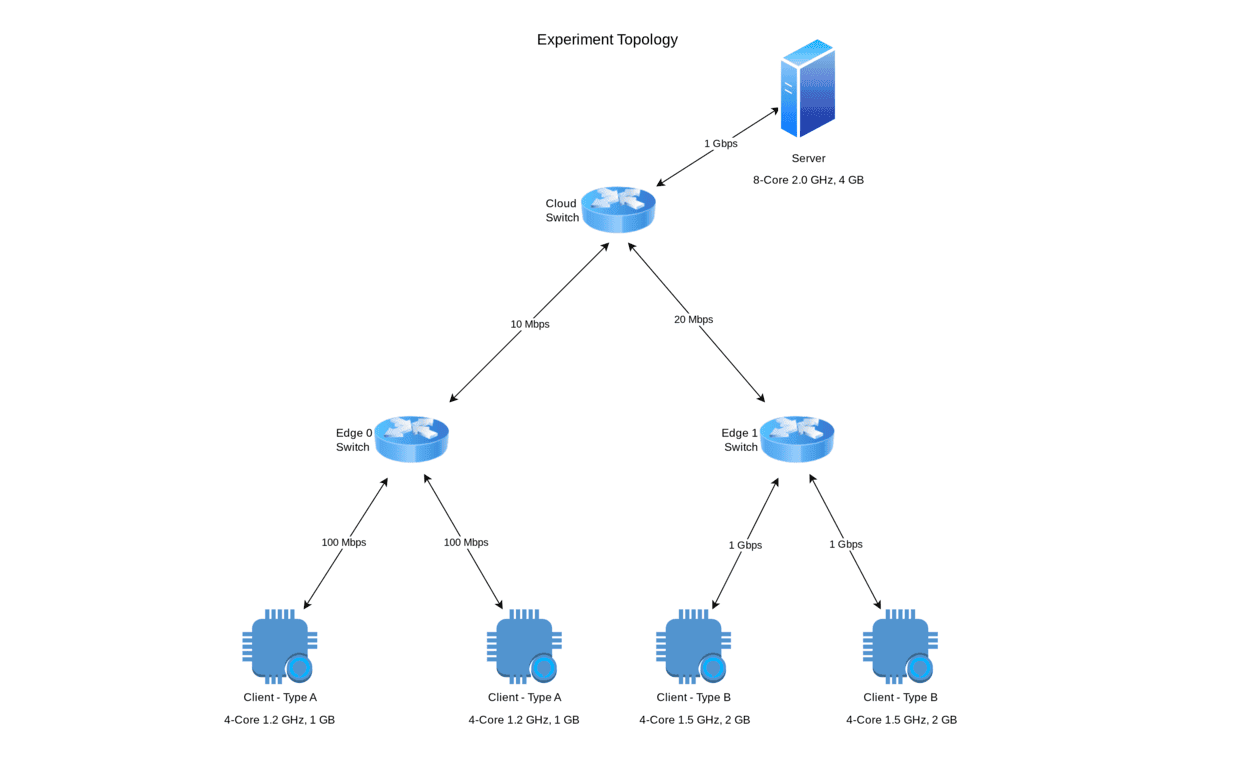
from netfl.core.experiment import FLExperiment
from netfl.utils.resources import (
    WorkerHostResource,
    NetworkResource,
    DeviceResource,
    ClusterResource,
    ClusterResourceType,
)

from task import FLTask


task = FLTask()
clients_per_edge = task.train_configs().num_clients // 2

worker_host_resource = WorkerHostResource()

server_resource = DeviceResource(
    name="server",
    cpu_cores=8,
    cpu_clock=2.0,
    memory=4096,
    network_resource=NetworkResource(bw=1000),
    worker_host_resource=worker_host_resource,
)

client_a_resource = DeviceResource(
    name="client_a",
    cpu_cores=4,
    cpu_clock=1.2,
    memory=1024,
    network_resource=NetworkResource(bw=100),
    worker_host_resource=worker_host_resource,
)

client_b_resource = DeviceResource(
    name="client_b",
    cpu_cores=4,
    cpu_clock=1.5,
    memory=2048,
    network_resource=NetworkResource(bw=1000),
    worker_host_resource=worker_host_resource,
)

cloud_resource = ClusterResource(
    name="cloud",
    type=ClusterResourceType.CLOUD,
    device_resources=[server_resource],
)

edge_0_resource = ClusterResource(
    name="edge_0",
    type=ClusterResourceType.EDGE,
    device_resources=clients_per_edge * [client_a_resource],
)

edge_1_resource = ClusterResource(
    name="edge_1",
    type=ClusterResourceType.EDGE,
    device_resources=clients_per_edge * [client_b_resource],
)

exp = FLExperiment(
    name="mnist-exp",
    task=task,
    cluster_resources=[cloud_resource, edge_0_resource, edge_1_resource],
)

server = exp.create_server(server_resource)
edge_0_clients = exp.create_clients(client_a_resource, edge_0_resource.num_devices)
edge_1_clients = exp.create_clients(client_b_resource, edge_1_resource.num_devices)

cloud = exp.create_cluster(cloud_resource)
edge_0 = exp.create_cluster(edge_0_resource)
edge_1 = exp.create_cluster(edge_1_resource)

exp.add_to_cluster(server, cloud)

for client in edge_0_clients:
    exp.add_to_cluster(client, edge_0)
for client in edge_1_clients:
    exp.add_to_cluster(client, edge_1)

worker = exp.register_remote_worker(ip="127.0.0.1", port=5000)
worker.add_cluster(cloud)
worker.add_cluster(edge_0)
worker.add_cluster(edge_1)
worker.create_cluster_link(cloud, edge_0, NetworkResource(bw=10))
worker.create_cluster_link(cloud, edge_1, NetworkResource(bw=20))

try:
    exp.start()
except Exception as ex:
    print(ex)
finally:
    exp.stop()
3. Run the Experiment
Start the required worker(s), and then run your experiment script. Refer to the Fogbed documentation for detailed instructions on starting workers.
For example:
RunWorker -p=5000
python3 experiment.py
The experiment result files are saved in the
logsfolder located in the directory where the experiment script is executed.
More information
License
NetFL is licensed under the Apache License 2.0. See LICENSE for details.
1 maintainer

Metadata
1 maintainer
Release files for netfl 1.5.0
For a detailed explanation of source distributions (sdists) and built distributions (wheels), please see the package formats documentation.
Source distribution (sdist)
| File | Size | Uploaded | |
|---|---|---|---|
| netfl-1.5.0.tar.gz | 25.7 kB | Details |
Built distribution (wheel)
| File | Interpreter | ABI | Platform | Reset |
|---|---|---|---|---|
| netfl-1.5.0-py3-none-any.whl | Python 3 | none | any | Details |
Total release size: 50.0 kB
Release files / netfl-1.5.0.tar.gz
| Download URL | netfl-1.5.0.tar.gz |
|---|---|
| Size | 25.7 kB |
| Tags | Source |
|
SHA-256 checksum How to use checksums |
e839fd37ab6108b0f72ed2fa2a807e57e3f7ca91f65eaed198946eefcac74b2f
|
|
BLAKE2b-256 checksum How to use checksums |
9377190617706efa46f06719892ae49b6c1c3b9fc92ed229d4461ab0f7b293b0
|
| Upload date | |
|
Uploaded using Trusted Publishing? What is trusted publishing? |
Yes |
| Uploaded via |
twine/6.1.0 CPython/3.13.7
|
Provenance
Provenance describes where a file came from. On PyPI, provenance is shared via attestations, which provide a verifiable record of the build or publishing details. View details, limitations and caveats.


PyPI Publish Attestation
PyPI verified that this artifact, at this checksum, originated from the publisher listed below.
Signed by GitHub Actions, verified by PyPI on Dec 16, 2025.
Transparency logRelease files / netfl-1.5.0-py3-none-any.whl
| Download URL | netfl-1.5.0-py3-none-any.whl |
|---|---|
| Size | 24.3 kB |
| Tags | Python 3 |
|
SHA-256 checksum How to use checksums |
ec0722fee7064654747f81a86ccdf448cfeafd6c70cdecd3fa21bdcf25748f40
|
|
BLAKE2b-256 checksum How to use checksums |
699330ab6fcb8b47ef7d5651a22c4e3cb5462b3a3c1380dc9d845e4b8ca1422c
|
| Upload date | |
|
Uploaded using Trusted Publishing? What is trusted publishing? |
Yes |
| Uploaded via |
twine/6.1.0 CPython/3.13.7
|
Provenance
Provenance describes where a file came from. On PyPI, provenance is shared via attestations, which provide a verifiable record of the build or publishing details. View details, limitations and caveats.
PyPI Publish Attestation
PyPI verified that this artifact, at this checksum, originated from the publisher listed below.
Signed by GitHub Actions, verified by PyPI on Dec 16, 2025.
Transparency log













