
Netkiller Chart

Project description
netkiller-chart
安装
下载地址:https://pypi.org/project/netkiller-chart/
pip install netkiller-chart
Gantt 甘特图
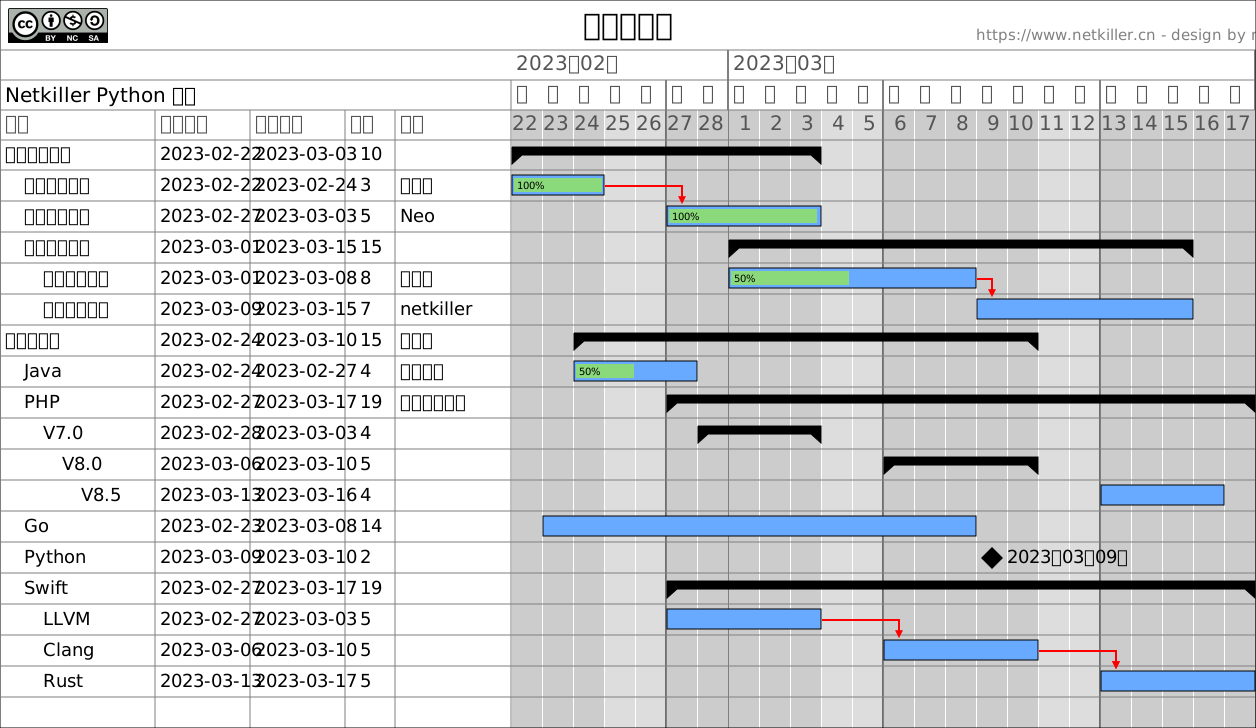
Markdown 生成甘特图
#!/usr/bin/env python3
# -*- coding: UTF-8 -*-
##############################################
# Home	: https://www.netkiller.cn
# Author: Neo <netkiller@msn.com>
# Data: 2025-08-04
##############################################
import os
import sys

module = os.path.dirname(os.path.dirname(os.path.abspath(__file__)))
sys.path.insert(0, ".")
sys.path.insert(1, module)

try:
    from src.netkiller.gantt import Gantt, Data, Workload
    from src.netkiller.markdown import Markdown

except ImportError as err:
    print("Error: %s" % (err))
    exit()


def main():
    text = """
    # Table
    | id | name | start | finish | resource | predecessor | milestone | parent |
    |------|------|--------|
    | 1 | 测试麦克风 | 2025-07-01 | 2025-07-02 | 工程师 |
    | 2 | 设备送检 | 2025-07-03 | 2025-07-04   | 设计师 |
    | 3 | 完成包装 | 2025-07-05 | 2025-07-10   | 设计师 |
    | 4 | 竞品评估 | 2025-07-02 | 2025-07-04   | 设计师 |
    | 5 | 分析报告 | 2025-07-08 | 2025-07-15   | 设计师 |
    | 6 | 集成测试 | 2025-07-01 | 2025-07-06   | 设计师 |

    https://www.netkiller.cn/python/
        """

    markdown = Markdown(text)
    items = markdown.table2dict()
    print(items)
    tmp = Data()
    no = 1
    for item in items:
        print(item)
        # tmp.add(item["id"], item["name"], item["start"], item["finish"], item["resource"],
        #         item["predecessor"], item["milestone"], item["parent"])
        tmp.add(no, item["name"], item["start"], item["finish"], item["resource"],
                None, None, None)
        no += 1
    data = tmp.data
    print(data)

    try:

        gantt = Gantt()
        # gantt.hideTable()
        gantt.load(data)
        gantt.author("Neo Chen")
        # gantt.setWorkweeks(workweeks, options.oddeven)
        gantt.title("Test")
        gantt.legend(False)
        gantt.save("markdown.svg")
    except KeyboardInterrupt as e:
        print(e)
    except Exception as e:
        print(e)


if __name__ == "__main__":
    main()
Mindmap 思维导图
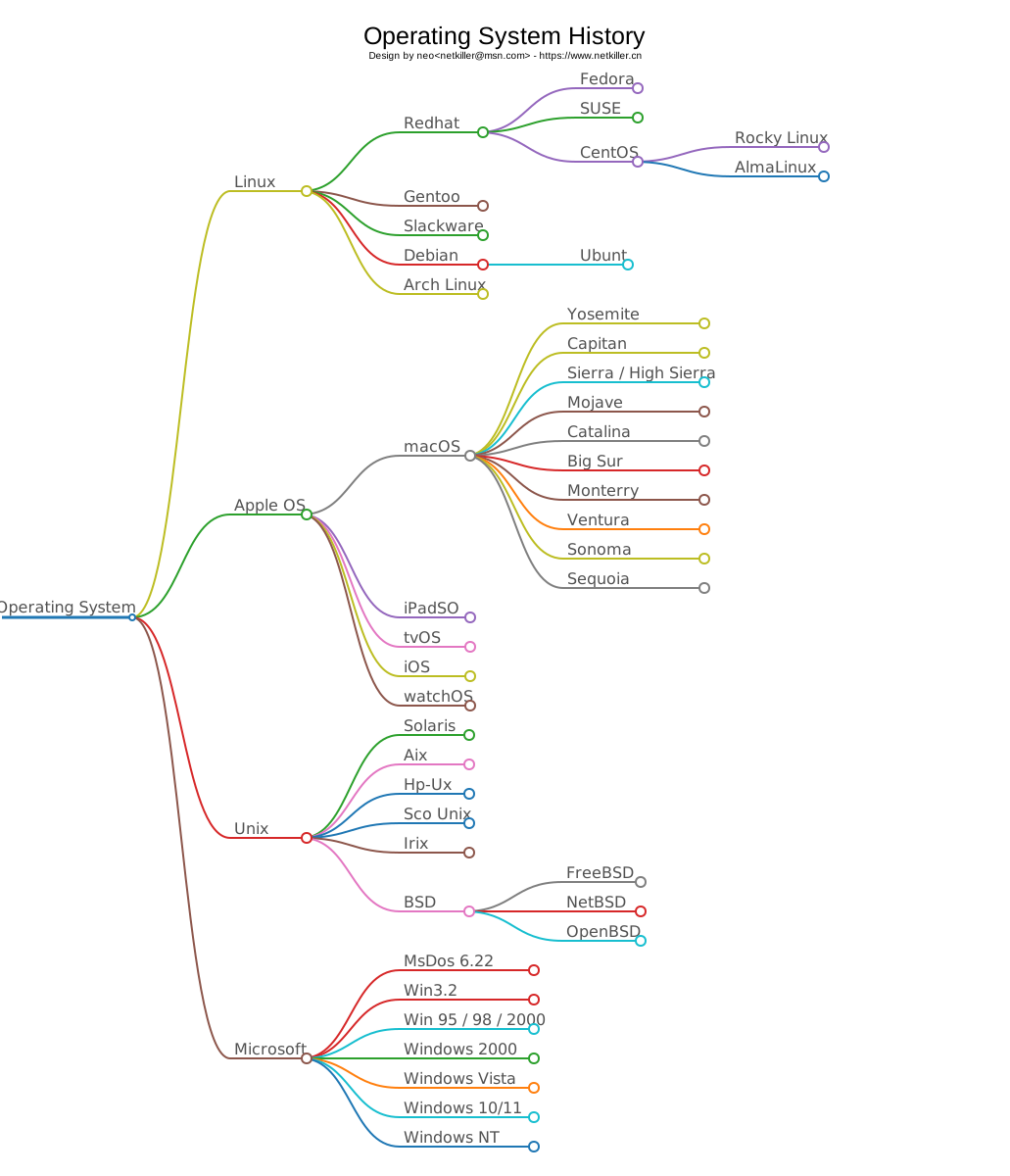
命令行
usage: mindmap.py [-h] [-m /path/to/yout.md] [-s] [-o example.svg]

Markdown To Mindmap

options:
  -h, --help            show this help message and exit
  -m, --markdown /path/to/yout.md
                        Markfown file
  -s, --stdin           Standard input from the terminal
  -o, --output example.svg
                        output picture
创建 Mindmap
mindmap -m /path/to/neo.md -o /path/to/netkiller.svg
编程方式
from netkiller.mindmap import Mindmap

markdown = """
# 操作系统
- Operating System
  - Linux
    - Redhat
    - CentOS
    - Rocky Linux
  - Apple OS
    - macOS
      - nojava
      - catalina
    - iPadSO
    - tvOS
    - iOS
    - watchOS
  - Unix
    - Solaris
    - Aix
    - Hp-Ux
    - Sco Unix
"""
mindmap = Mindmap(markdown)
mindmap.save('example.svg')
从标准输入创建思维导图
(.venv) neo@netkiller netkiller-chart % cat test/mindmap/os.md
# Operating System History

- Operating System
  - Linux
    - Redhat
      - Fedora
      - SUSE
      - CentOS
        - Rocky Linux
        - AlmaLinux
    - Gentoo
    - Slackware
    - Debian
      - Ubuntu
    - Arch Linux
  - Apple OS
    - macOS
      - Yosemite
      - Capitan
      - Sierra / High Sierra
      - Mojave
      - Catalina
      - Big Sur
      - Monterry
      - Ventura
      - Sonoma
      - Sequoia
    - iPadSO
    - tvOS
    - iOS
    - watchOS
  - Unix
    - Solaris
    - Aix
    - Hp-Ux
    - Sco Unix
    - Irix
    - BSD
      - FreeBSD
      - NetBSD
      - OpenBSD
  - Microsoft
    - MsDos 6.22
    - Win3.2
    - Win 95 / 98 / 2000
    - Windows Phone
    - Windows Vista
    - Windows 10/11
    - Windows NT%
(.venv) neo@netkiller netkiller-chart % cat test/mindmap/os.md | mindmap -o test/mindmap/os.svg -s
Release history Release notifications | RSS feed


Download files
Download the file for your platform. If you're not sure which to choose, learn more about installing packages.
Source Distribution
netkiller_chart-0.1.7.tar.gz
(33.1 kB
view details)
Built Distribution
Filter files by name, interpreter, ABI, and platform.
If you're not sure about the file name format, learn more about wheel file names.
Copy a direct link to the current filters
File details
Details for the file netkiller_chart-0.1.7.tar.gz.
File metadata
- Download URL: netkiller_chart-0.1.7.tar.gz
- Upload date:
- Size: 33.1 kB
- Tags: Source
- Uploaded using Trusted Publishing? No
- Uploaded via: twine/6.1.0 CPython/3.13.0
File hashes
| Algorithm | Hash digest | |
|---|---|---|
| SHA256 |
d8851e3b4d20cbb18a5d6cc7856189337deb74569c621ff92291f85ed9d6df75
|
|
| MD5 |
d77a3481165050e513b0a39accfc5bab
|
|
| BLAKE2b-256 |
aa64fe8eef90e234fd0e4c6b4059f7c67030a50f68f00a8259e2151f896566b5
|
File details
Details for the file netkiller_chart-0.1.7-py3-none-any.whl.
File metadata
- Download URL: netkiller_chart-0.1.7-py3-none-any.whl
- Upload date:
- Size: 33.2 kB
- Tags: Python 3
- Uploaded using Trusted Publishing? No
- Uploaded via: twine/6.1.0 CPython/3.13.0
File hashes
| Algorithm | Hash digest | |
|---|---|---|
| SHA256 |
179dfd3dcac839b6831f7bbbd3e2036b483ffbb0aad42659b81959fd73599ee3
|
|
| MD5 |
cb918d6055bad51707bf9d4d5b3283b4
|
|
| BLAKE2b-256 |
fd91900f59845e46223fd60b1f4a3428c43050297c21ce0737a7e9110acda536
|






