
Netkiller Chart(Mindmap,Gantt,Fishbone(Ishikawa Diagram),SVG)

Project description
netkiller-chart
安装
下载地址:https://pypi.org/project/netkiller-chart/
pip install netkiller-chart
Gantt 甘特图
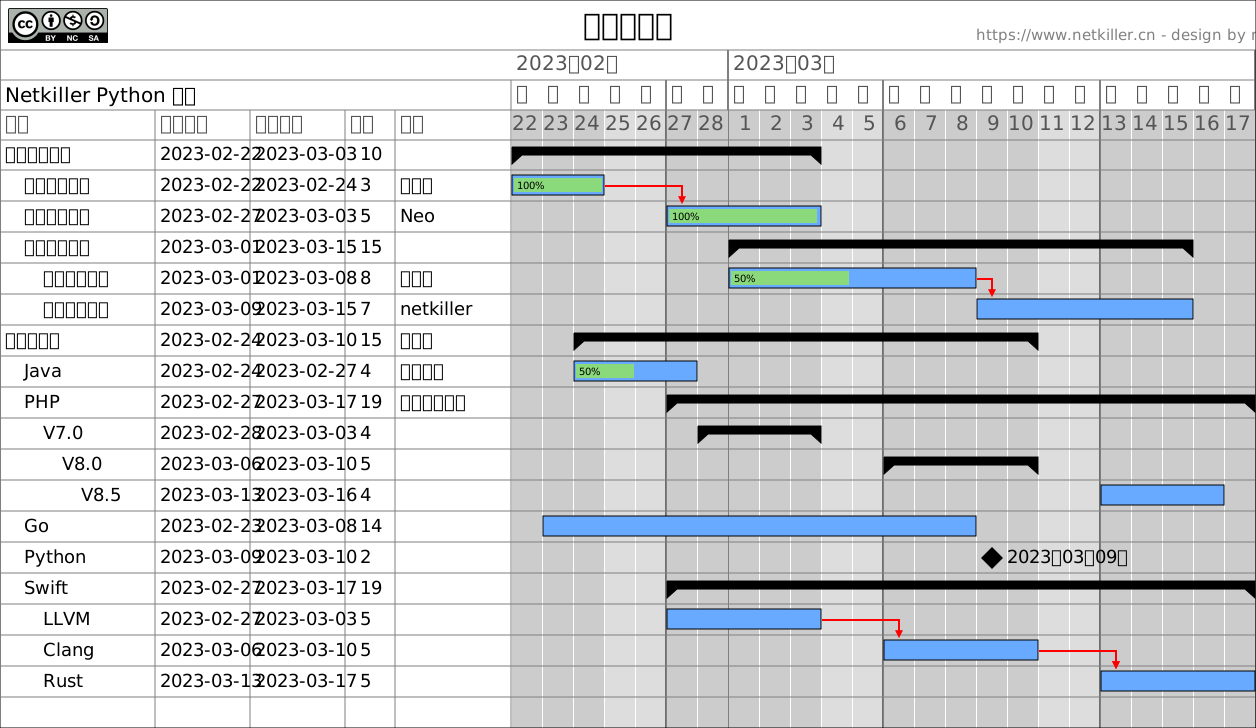
Markdown 生成甘特图
#!/usr/bin/env python3
# -*- coding: UTF-8 -*-
##############################################
# Home	: https://www.netkiller.cn
# Author: Neo <netkiller@msn.com>
# Data: 2025-08-04
##############################################
import os
import sys

module = os.path.dirname(os.path.dirname(os.path.abspath(__file__)))
sys.path.insert(0, ".")
sys.path.insert(1, module)

try:
    from netkiller.gantt import Gantt, Data, Workload
    from netkiller.markdown import Markdown

except ImportError as err:
    print("Error: %s" % (err))
    exit()


def main():
    text = """
    # Table
    | id | name | start | finish | resource | predecessor | milestone | parent |
    |------|------|--------|
    | 1 | 测试麦克风 | 2025-07-01 | 2025-07-02 | 工程师 |
    | 2 | 设备送检 | 2025-07-03 | 2025-07-04   | 设计师 |
    | 3 | 完成包装 | 2025-07-05 | 2025-07-10   | 设计师 |
    | 4 | 竞品评估 | 2025-07-02 | 2025-07-04   | 设计师 |
    | 5 | 分析报告 | 2025-07-08 | 2025-07-15   | 设计师 |
    | 6 | 集成测试 | 2025-07-01 | 2025-07-06   | 设计师 |

    https://www.netkiller.cn/python/
        """

    markdown = Markdown(text)
    items = markdown.table2dict()
    print(items)
    tmp = Data()
    no = 1
    for item in items:
        print(item)
        # tmp.add(item["id"], item["name"], item["start"], item["finish"], item["resource"],
        #         item["predecessor"], item["milestone"], item["parent"])
        tmp.add(no, item["name"], item["start"], item["finish"], item["resource"],
                None, None, None)
        no += 1
    data = tmp.data
    print(data)

    try:

        gantt = Gantt()
        # gantt.hideTable()
        gantt.load(data)
        gantt.author("Neo Chen")
        # gantt.setWorkweeks(workweeks, options.oddeven)
        gantt.title("Test")
        gantt.legend(False)
        gantt.save("markdown.svg")
    except KeyboardInterrupt as e:
        print(e)
    except Exception as e:
        print(e)


if __name__ == "__main__":
    main()
Mindmap 思维导图
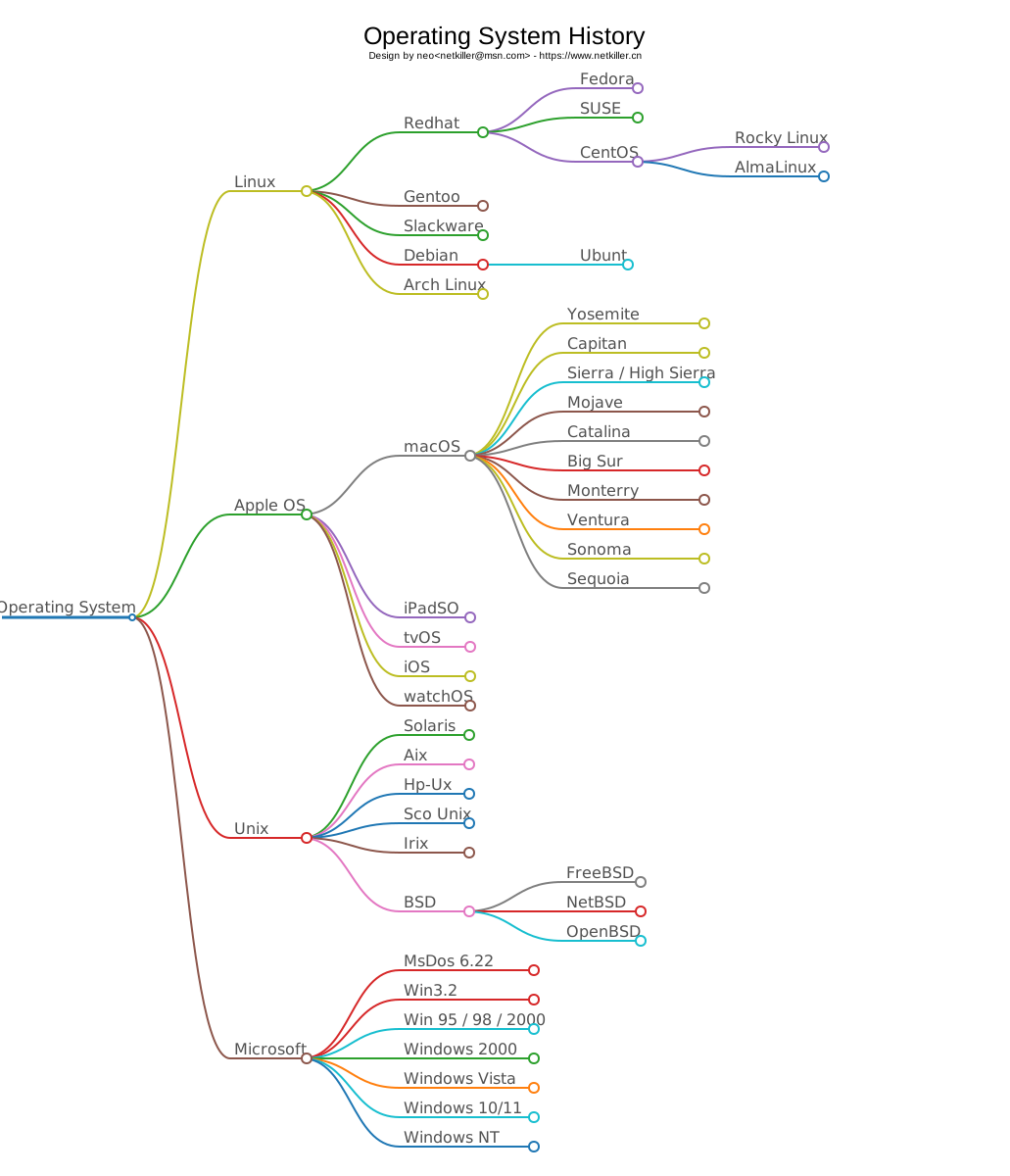
命令行
usage: mindmap.py [-h] [-m /path/to/yout.md] [-s] [-o example.svg]

Markdown To Mindmap

options:
  -h, --help            show this help message and exit
  -m, --markdown /path/to/yout.md
                        Markfown file
  -s, --stdin           Standard input from the terminal
  -o, --output example.svg
                        output picture
创建 Mindmap
mindmap -m /path/to/neo.md -o /path/to/netkiller.svg
编程方式
from netkiller.markdown import Markdown
from netkiller.mindmap import Mindmap

data = """
# 操作系统
- Operating System
  - Linux
    - Redhat
    - CentOS
    - Rocky Linux
  - Apple OS
    - macOS
      - nojava
      - catalina
    - iPadSO
    - tvOS
    - iOS
    - watchOS
  - Unix
    - Solaris
    - Aix
    - Hp-Ux
    - Sco Unix
"""

markdown = Markdown(data)
jsonData = markdown.mindmap()

mindmap = Mindmap(jsonData)
mindmap.save('example.svg')
从标准输入创建思维导图
(.venv) neo@netkiller netkiller-chart % cat test/mindmap/os.md
# Operating System History

- Operating System
  - Linux
    - Redhat
      - Fedora
      - SUSE
      - CentOS
        - Rocky Linux
        - AlmaLinux
    - Gentoo
    - Slackware
    - Debian
      - Ubuntu
    - Arch Linux
  - Apple OS
    - macOS
      - Yosemite
      - Capitan
      - Sierra / High Sierra
      - Mojave
      - Catalina
      - Big Sur
      - Monterry
      - Ventura
      - Sonoma
      - Sequoia
    - iPadSO
    - tvOS
    - iOS
    - watchOS
  - Unix
    - Solaris
    - Aix
    - Hp-Ux
    - Sco Unix
    - Irix
    - BSD
      - FreeBSD
      - NetBSD
      - OpenBSD
  - Microsoft
    - MsDos 6.22
    - Win3.2
    - Win 95 / 98 / 2000
    - Windows Phone
    - Windows Vista
    - Windows 10/11
    - Windows NT%
(.venv) neo@netkiller netkiller-chart % cat test/mindmap/os.md | mindmap -o test/mindmap/os.svg -s
生成 Xmind 格式的思维导图
-x 表示输出 Xmind 格式
-t 是参考模版
usage: mindmap [-h] [-m /path/to/yout.md] [-s] [-o example.svg] [-x example.xmind] [-t /path/to/your/template.xmind]

Markdown To Mindmap

options:
  -h, --help            show this help message and exit
  -m, --markdown /path/to/yout.md
                        Markfown file
  -s, --stdin           Standard input from the terminal
  -o, --output example.svg
                        output picture
  -x, --xmind example.xmind
                        output xmind
  -t, --template /path/to/your/template.xmind
                        xmind template
命令行
(.venv) neo@Mac netkiller-chart % cat test/mindmap/os.md| mindmap -s -x test/test.xmind
Python 编码方式
from netkiller.markdown import Markdown

from netkiller.mindmap import Mindmap


def main():
    data = """# Netkiller Linux 手札
- Linux
  - Redhat
  - CentOS
  - Rocky Linux
  - AlmaLinux
    """

    markdown = Markdown(data)
    jsonData = markdown.mindmap()

    mindmap = Mindmap(jsonData)
    mindmap.xmind('none.xmind', 'test.xmind')


if __name__ == "__main__":
    main()
Release history Release notifications | RSS feed


Download files
Download the file for your platform. If you're not sure which to choose, learn more about installing packages.
Source Distributions
No source distribution files available for this release.See tutorial on generating distribution archives.
Built Distribution
Filter files by name, interpreter, ABI, and platform.
If you're not sure about the file name format, learn more about wheel file names.
Copy a direct link to the current filters
File details
Details for the file netkiller_chart-0.4.9-py3-none-any.whl.
File metadata
- Download URL: netkiller_chart-0.4.9-py3-none-any.whl
- Upload date:
- Size: 60.3 kB
- Tags: Python 3
- Uploaded using Trusted Publishing? No
- Uploaded via: twine/6.1.0 CPython/3.13.0
File hashes
| Algorithm | Hash digest | |
|---|---|---|
| SHA256 |
1742176c80779195143b1b3a1314044dd3aa6ac46ecf168bb47cab902916d77e
|
|
| MD5 |
3728e3823e443d0cb5261ccb1b697e18
|
|
| BLAKE2b-256 |
37650e54fa81fd36aa0de0c798008221c6644cbfd08126924e20fe1aa409efaf
|






