
Netops_Cadiz
This is a tiny Python library that aims to facilitate the retrieval of spectral responses for a range of satellites (Sentinel 2 A&B (MSI sensor), Landsat 4-9 (TM, ETM+, OLI & OLI2 sensors)) and drone cameras (just Sequoia at this point, but more will be added) from field spectroradiometry data obtained with ASD Spectroradiometers.
The library has been created through the collaboration of LAST-EBD and Speclab in the framework of the Spanish Network of Optical Proximal Sensing (NetOPS). The idea comes from a radiometry course held at the XX Spanish Remote Sensing Asociation Congress in Cádiz (and now y'all know where the name is coming from).
Instalation
Just go with pip install.
pip install netops_cadiz
What's behind and what can you get
netops_cadiz have been designed to provide the theoretical values of the satellite bands that would be obtained from surface reflectivity data acquired with a radiometer.
To this end, an Excel table (we need to change this) has been created in which the spectral response function of each band for the aforementioned satellites/sensors is stored.
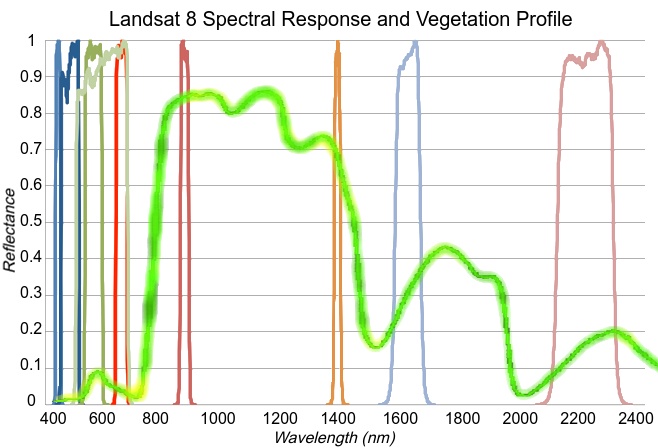
The objective is to combine each measured spectrum with each spectral response function of the sensor in order to obtain a weighted measurement that reflects how the spectrum would be captured by the sensor. This is achieved by combining the sensor's spectral response function with the measured spectrum in order to obtain a weighted measurement that reflects how the sensor would capture the spectrum.
In developing the library, our initial focus was on .txt files generated by the ViewSpecPro software. However, the advent of the wonderful Specdal Python library has enabled us to expand our scope to encompass ASD files as well.
Usage
Basic usage would be use the method spec2sat. Where one spectrum should be passed and one satellite should be selected to get the expected response for each one of its bands.
from netops_cadiz.netops import asd

# path to srf table (should be fixed)
srf_table = 'path/to/sensores_srs.xlsx'
# path to spectral profile
spec_path = "path/to/asd_or_txt_file"

# instance the class and choose wich sat you want data for
a = asd(srf_table, spec_path, 'S2A')
a.txt2sat(spec_path, "Vegetación")
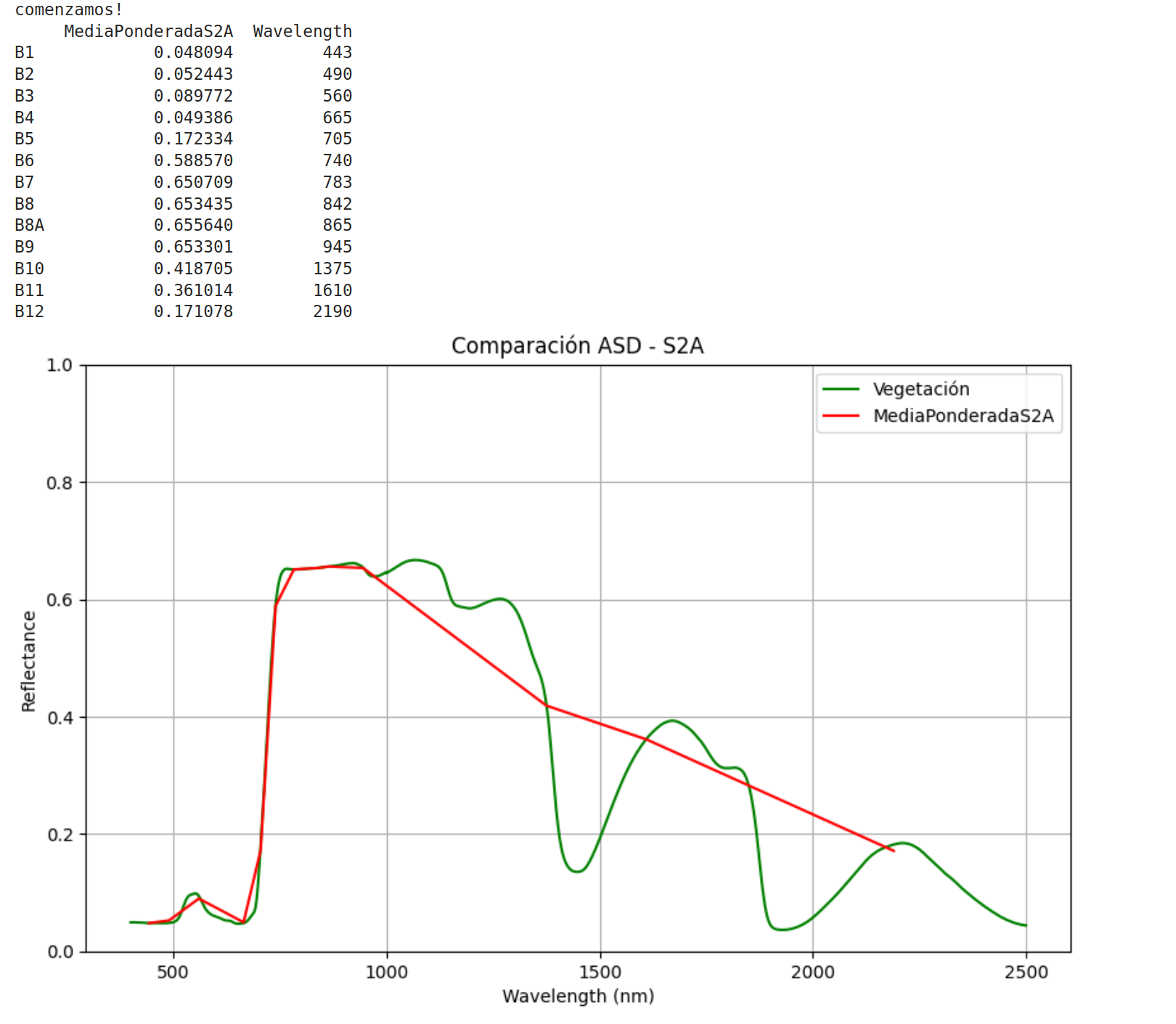
Output would be something like this:
There are also 4 more methods:
- plotSpecs To plot several spectrum and satellite response profiles.
- satTable To generate a table with teh response for the selected satellite for all the spectrums inside a folder.
- specsTable To generate one table for each specturm inside a folder with the expected values for all the satellites.
- ndiCalc To compute a Normalized Difference Index between 2 parts of the spectrum and its equivalent bands in all the satellites/sensors available.
There's a tutorial that goes into more detail about how to use the asd class and all its methods.. You sould find it here
ToDo
Lots of things, main idea right now (moreover adding more satellites and drone cameras to get the spectral response, such as MODIS, ASTER, Sentinel 3, Micasense, etc...) is to add the possibility to work with hyperspectral satellites as inputs (also outputs?).
working with other spectrometers should be immediate, but I have not had access to other data to test it yet.
Acknowledgements
- PTI Teledetec: An interdisciplinary thematic platform to coordinate and integrate the remote sensing activities of Spanish Research Council.
- To all the teachers of the course Spectroradiometry as a support for Remote Sensing research: Fundamentals and applications.
- Special thanks to Joan Cristian Padró because he performed the interpolation needed to correctly calculate some Landsat bands for his article Radiometric Correction of Simultaneously Acquired Landsat-7/Landsat-8 and Sentinel-2A Imagery Using Pseudoinvariant Areas (PIA): Contributing to the Landsat Time Series Legacy.
1 maintainer

Metadata
1 maintainer
Release files for netops-cadiz 0.1.0
For a detailed explanation of source distributions (sdists) and built distributions (wheels), please see the package formats documentation.
Source distribution (sdist)
| File | Size | Uploaded | Provenance | Actions |
|---|---|---|---|---|
| netops_cadiz-0.1.0.tar.gz | 11.8 kB | Without provenance | Details for netops_cadiz-0.1.0.tar.gz |
Built distribution (wheel)
| File | Interpreter | ABI | Platform | Actions Reset |
|---|---|---|---|---|
| netops_cadiz-0.1.0-py3-none-any.whl | Python 3 | none | any | Details for netops_cadiz-0.1.0-py3-none-any.whl |
Total release size: 21.7 kB
Release files / netops_cadiz-0.1.0.tar.gz
| Download URL | netops_cadiz-0.1.0.tar.gz |
|---|---|
| Size | 11.8 kB |
| Tags | Source |
|
SHA-256 checksum How to use checksums |
f4d3a2e84af6aecbcf1fb0215daaa1742c280723fc0e2e6b784aa962babb0513
|
|
BLAKE2b-256 checksum How to use checksums |
765de508d20c38085eeb04c547b207b7815f22fd9b0ece3d40ba52867d85282e
|
| Upload date | |
|
Uploaded using Trusted Publishing? What is trusted publishing? |
No |
| Uploaded via |
twine/5.1.1 CPython/3.12.4
|
Release files / netops_cadiz-0.1.0-py3-none-any.whl
| Download URL | netops_cadiz-0.1.0-py3-none-any.whl |
|---|---|
| Size | 9.8 kB |
| Tags | Python 3 |
|
SHA-256 checksum How to use checksums |
2ea09942e2130de5ae50c3d646d9deba0f62464b4fa8b2e132200cc1496432bf
|
|
BLAKE2b-256 checksum How to use checksums |
5cfc4f597c6d8315ad49de23f0f816335aacd9f7827a8215ce1c49711b5f839b
|
| Upload date | |
|
Uploaded using Trusted Publishing? What is trusted publishing? |
No |
| Uploaded via |
twine/5.1.1 CPython/3.12.4
|
Security for netops-cadiz 0.1.0
Provenance
Provenance describes where a file came from. On PyPI, provenance is shared via attestations, which provide a verifiable record of the build or publishing details. View details, limitations and caveats.
No provenance found
None of the files in this release were uploaded with provenance metadata.
A note on package security
PyPI is a repository for distributing packages, not a service for auditing them. While third-party security researchers and our staff do their best to detect and remove malicious packages, PyPI cannot guarantee the quality, security or suitability of any given package.
To learn more about protecting yourself from malicious actors, visit our package security documentation.













