


GitHub | Docker Image | Model Download | Dataset Download | Inference Space | Paper





A Squeeze-and-Excitation Transformer Network for Khmer Optical Character Recognition
Khmer and English scans, photos and PDFs in, editable documents out. A 19M-parameter text-line recognizer that runs on the CPU, with a ready-made web app.
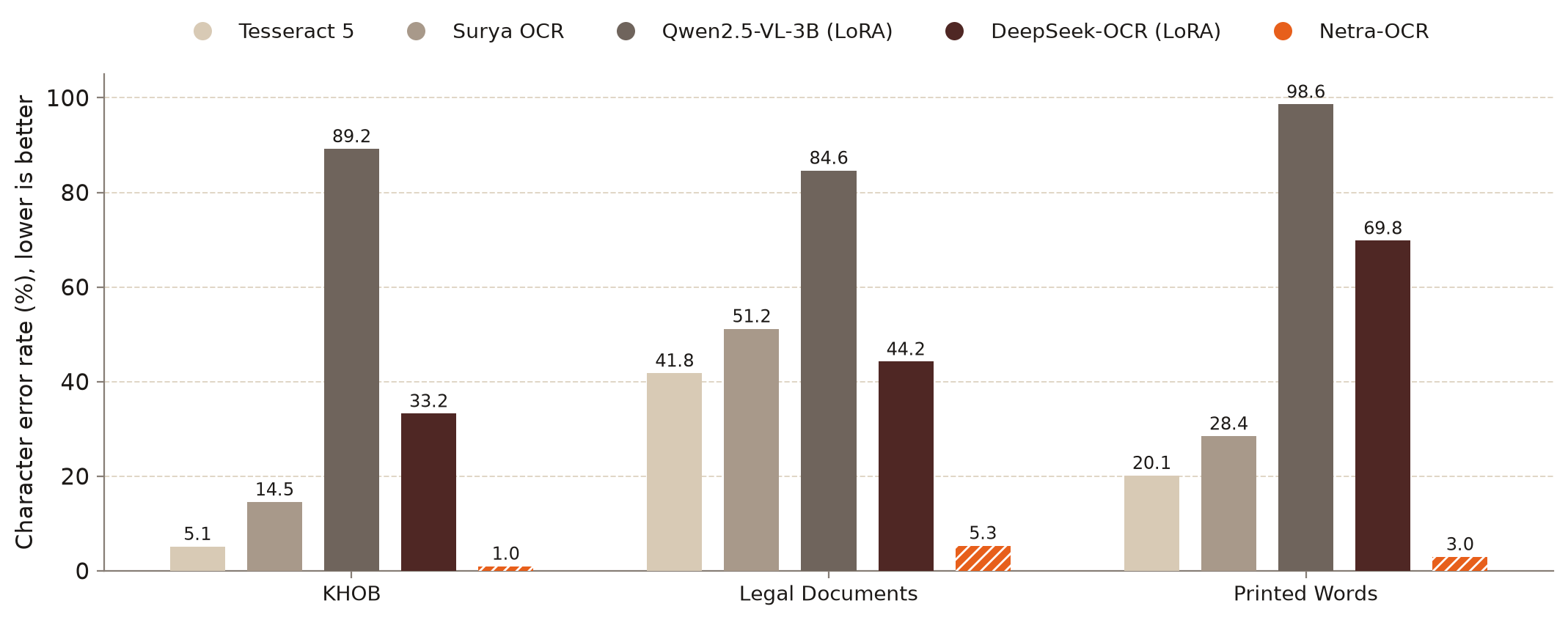
Character error rate on three Khmer test sets. Lower is better. Netra-OCR has the lowest error on all three, including against two 3B vision-language models fine-tuned on Khmer. Its highest error is on phone photos of legal documents.
1. Abstract
This repository presents Netra-OCR, a 19M-parameter text-line recognizer for Khmer and English, trained from scratch on 1.3M synthetic text-line images. It is an encoder-decoder model:
- A text line is cut into overlapping chunks, and a Squeeze-and-Excitation CNN with a Transformer encoder turns each chunk into vision tokens.
- The chunks' tokens are merged into one sequence and smoothed across the chunk seams by a bidirectional LSTM.
- A Transformer decoder writes the text. English is tokenised by character, and Khmer by a mix of characters and character clusters.
On the public KHOB benchmark, Netra-OCR reaches 0.96% CER, against 5.12% for Tesseract 5, the next best. On phone photos of legal documents it reaches 5.31%, against 41.78% for Tesseract. An optional blockwise parallel decoder gives the same output 1.55× faster in PyTorch.
Around the model, the package adds text-line and layout detection, PDF input, a browser editor and Word export, and ships as one Docker image.
2. Dataset
Netra-OCR was trained entirely on synthetic data: 1.3M text-line images, of which 200,000 were generated for this project in 11 fonts.
Sources
| Dataset | Type | Size | Augmentation |
|---|---|---|---|
| Custom document text | Synthetic, Pillow + a Khmer corpus | 100,000 | Erosion, noise, thinning and thickening, perspective distortion |
| Custom scene text | Synthetic, SynthTIGER + Stanford Background | 100,000 | Rotation, blur, noise, real backgrounds |
| SoyVitou/KhmerSynthetic1M | Synthetic | 1,000,000 | Applied by the source authors |
| seanghay/khmer-hanuman-100k | Synthetic | 100,000 | Applied by the source authors |
| Total | 1.3M |
Test sets
| Test set | Type | Lines | What it tests |
|---|---|---|---|
| KHOB | Real | 325 | The public Khmer OCR benchmark: clean backgrounds, compression artefacts |
| Legal Documents | Real, our annotation | 220 | Phone photos of birth certificates, diplomas and ID cards: degradation, lighting, distortion |
| Printed Words | Synthetic | 500 | Short isolated words in 10 fonts. Training lines are mostly mid-to-long, so this tests short input |
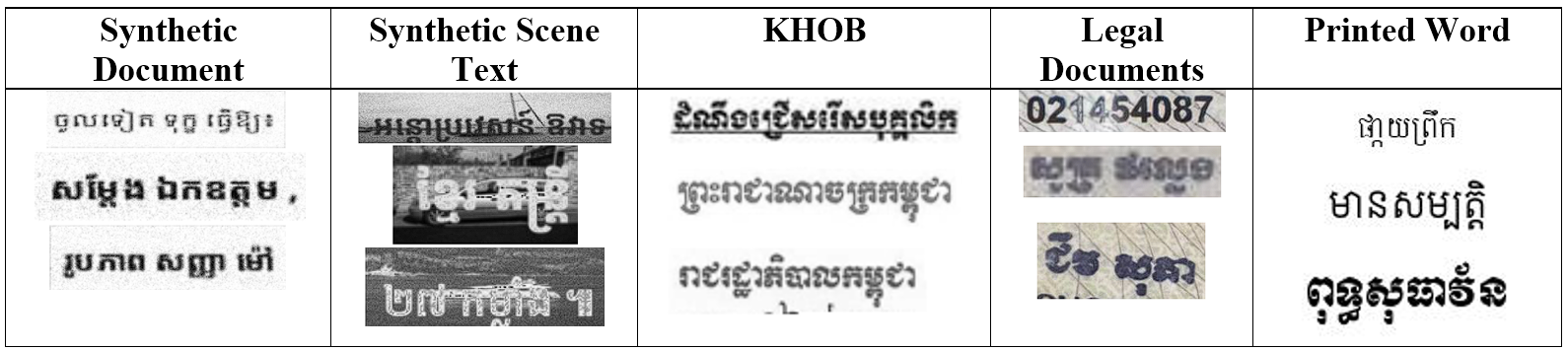
Figure 1: Example lines from each training and test set.
Preprocessing
- Resize. Each line image is resized to 48 px high, keeping its aspect ratio, and converted to greyscale.
- Chunk. The line is split into 48 × 100 px chunks that overlap by 16 px, so long lines are never squeezed.
- Tokenise. Khmer text becomes character clusters (a consonant with its subscripts and vowels) or single characters; English stays as characters. This makes Khmer sequences about 43% shorter.
3. Model Architecture
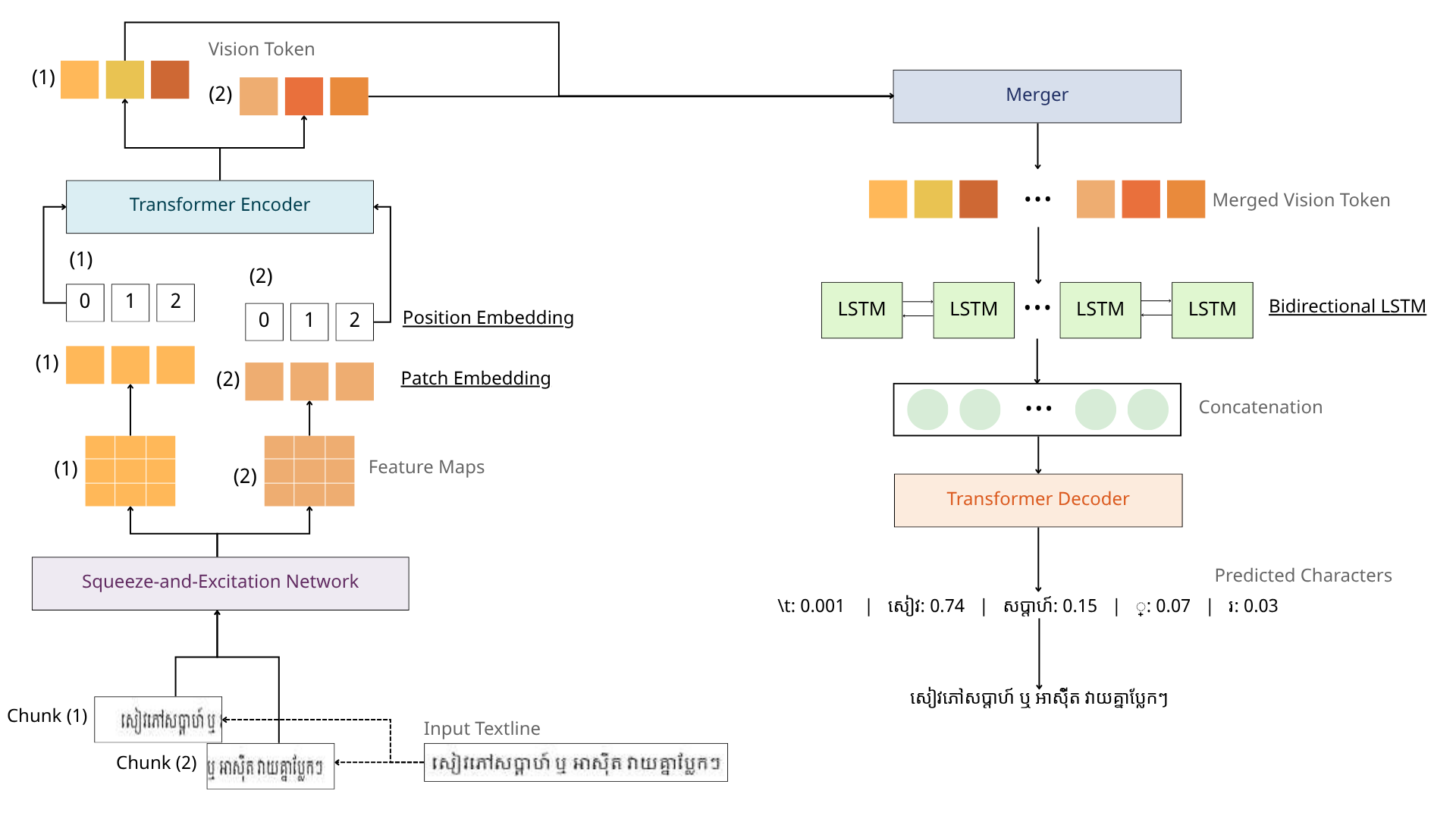
Figure 2: A text line is chunked, each chunk is encoded in parallel by the Squeeze-and-Excitation network, patch embedding and Transformer encoder, and the vision tokens are merged into one sequence. A bidirectional LSTM smooths the chunk seams, and the Transformer decoder writes the text one character cluster at a time.
The encoder. Each chunk goes through:
- a Squeeze-and-Excitation network: 5 VGG-style convolution blocks, with an SE module in blocks 3–5 that squeezes over height only, so each horizontal position gets its own channel weighting;
- a patch module that turns each feature-map column into a 384-dimensional token with a positional embedding;
- a Transformer encoder that lets the tokens of one chunk attend to each other.
Across chunks. The tokens of all chunks are concatenated with a second, line-level positional embedding. A bidirectional LSTM then carries context across each seam, so a character split between two chunks reads the same from both sides. docs/ARCHITECTURE.md explains each module.
Blockwise parallel decoding. The optional blockwise decoder (Stern et al., 2018) adds a small proposal head to the frozen decoder, so one step can write several tokens instead of one.
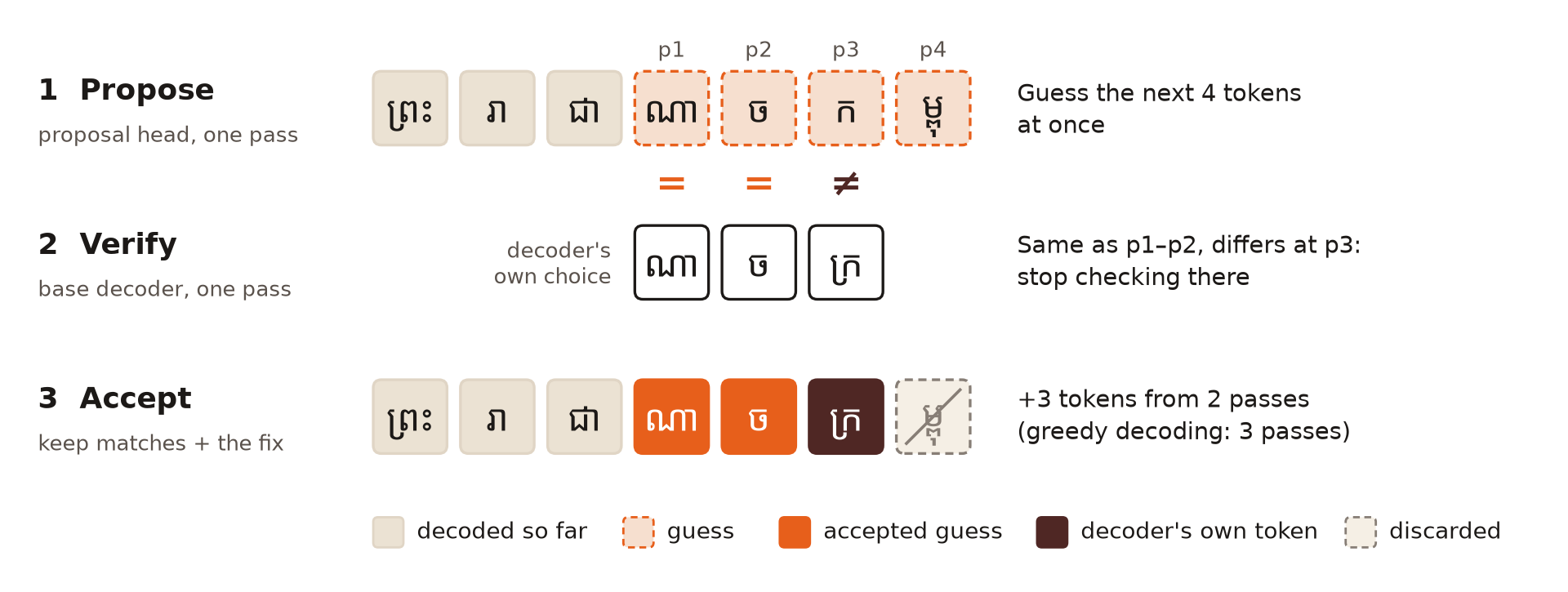
Figure 3: One step of blockwise parallel decoding, reading ព្រះរាជាណាចក្រកម្ពុជា (“Kingdom of Cambodia”) one character cluster per token. (1) The proposal head guesses the next 4 tokens at once. (2) The decoder reads all the guesses in one parallel pass and gives its own greedy choice under each one; here it agrees with p1 and p2 and differs at p3 (ក against ក្រ). (3) The matching guesses are kept, the decoder's own ក្រ is added, and the rest is discarded: 3 tokens from 2 passes, where greedy decoding needs 3. Every kept token is one greedy decoding would also write, so the output is identical.
Speed on KHOB (325 lines), same PyTorch model, greedy decoding:
| Decoder | CER | Exact match | ms per line | Lines per second | Tokens per step | Speed-up |
|---|---|---|---|---|---|---|
| Autoregressive | 1.17 | 84.9 | 17.60 | 56.8 | 1 | 1.00× |
| Blockwise, 4 proposed | 1.17 | 84.9 | 11.35 | 88.1 | 2.7 | 1.55× |
The decoder runs about 2.7× fewer passes; the end-to-end gain is smaller because the encoder costs the same (docs/RESULTS.md). The package's ONNX models cache the decoder's keys and values, which makes each pass cheap, so there both decoders run at the same speed (about 13 ms per line on CPU or CUDA).
| Feature | Detail |
|---|---|
| Input | One text-line image, any width, resized to 48 px high |
| Chunking | 48 × 100 px chunks, 16 px overlap, encoded in parallel |
| Channel attention | Height-only Squeeze-and-Excitation, one gate vector per column |
| Seam smoothing | One-layer bidirectional LSTM over the merged sequence |
| Decoding | Autoregressive (greedy or beam search), or blockwise parallel with identical output |
| Hyperparameter | |
|---|---|
| Input height × chunk width (overlap) | 48 × 100 px (16 px) |
| Model dimension | 384 |
| Transformer encoder | 2 layers, 8 heads, FFN 1,024 |
| BiLSTM | 1 layer, bidirectional |
| Transformer decoder | 2 layers, 8 heads, FFN 1,536 |
| Vocabulary | 2,101 tokens (Khmer clusters and characters, Latin characters) |
| Blockwise proposal size | 4 tokens |
| Total parameters | 19.2M |
4. Evaluation
| Model | Params | KHOB (CER) | Legal Documents (CER) | Printed Words (CER) |
|---|---|---|---|---|
Tesseract 5 (khm) |
– | 5.12 | 41.78 | 20.14 |
| Surya OCR | – | 14.52 | 51.16 | 28.45 |
| Qwen2.5-VL-3B (LoRA on Khmer) | 3B | 89.21 | 84.63 | 98.62 |
| DeepSeek-OCR (LoRA on Khmer) | 3B | 33.23 | 44.22 | 69.79 |
| Netra-OCR (ours) | 19M | 0.96 | 5.31 | 2.95 |
- Scoring. Character error rate in %, on single text-line crops. Netra-OCR uses beam search with width 3. Every engine's output is normalised the same way (
khmerspellnormalisation and whitespace collapse). - Baselines.
- Tesseract 5 uses the official
khm+engmodels in single-line mode. - Qwen2.5-VL and DeepSeek-OCR don't document Khmer support, so each was given a short LoRA fine-tune on 6,000 of our training lines (300 steps). Without it, both score above 100% CER on KHOB.
- Tesseract 5 uses the official
- Printed Words uses the first 500 of its 5,000 lines for every engine.
- More results. docs/RESULTS.md adds word error rate, exact match, the zero-shot vision-language models, a community Khmer fine-tune of DeepSeek-OCR and the decoder comparison.
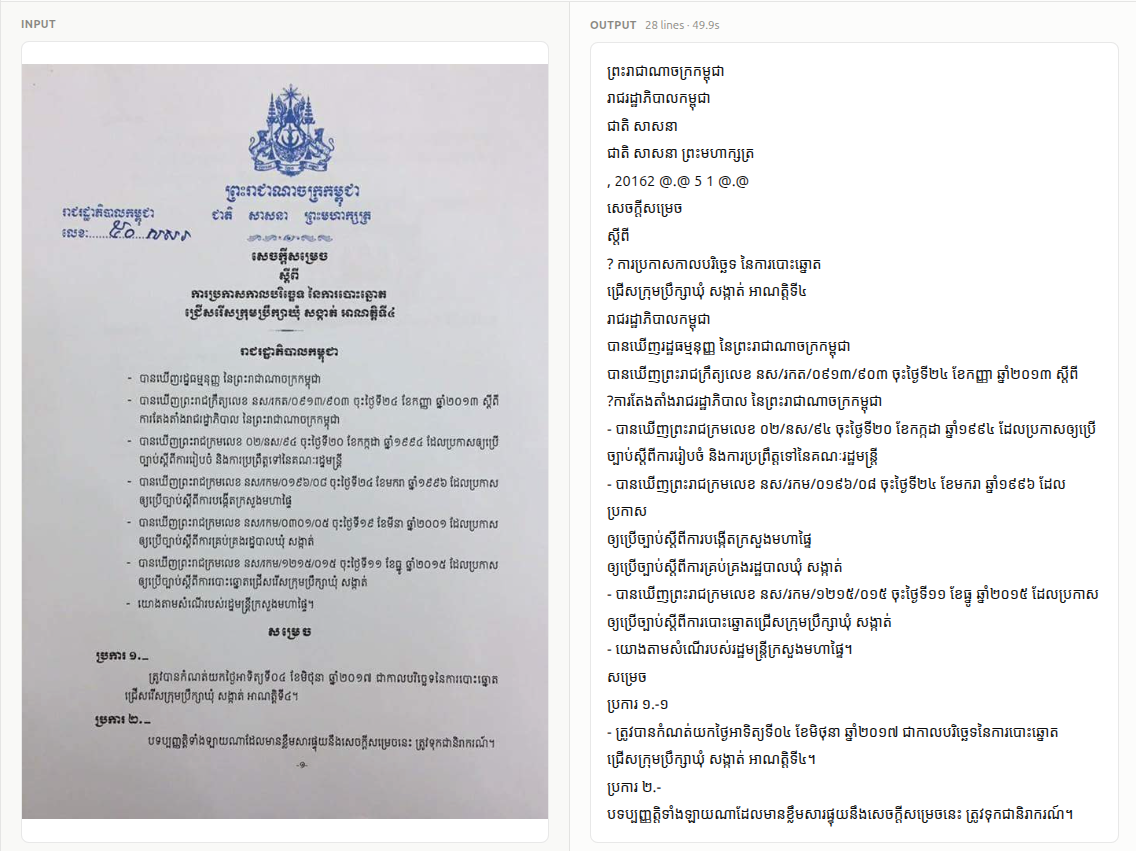
Figure 4: A phone photo of a Khmer government notice (left) and the text the app read from it (right). Most lines read cleanly; the handwritten reference number comes back as noise, and two lines gain a stray “?”.
5. Quick start
-
Install Docker Desktop for Windows, Mac or Linux. In its settings, give it at least 4 GB of memory.
-
Open a terminal (PowerShell on Windows, Terminal on Mac) and run:
docker run -d --name netra-ocr -p 8000:8000 -v netra-data:/data ghcr.io/netra-ai-lab/netra-ocr
-
Open http://localhost:8000 and drop in a scan, a photo or a PDF.
The page won't open? The app needs port 8000, which
-p 8000:8000sets up. If you start the image from Docker Desktop's Images tab instead, open Optional settings and set Host port to8000.
To update to a new version:
docker pull ghcr.io/netra-ai-lab/netra-ocr
docker rm -f netra-ocr
docker run -d --name netra-ocr -p 8000:8000 -v netra-data:/data ghcr.io/netra-ai-lab/netra-ocr
| Platforms | Windows and Linux PCs (x86-64) and ARM64, including Apple Silicon Macs |
| GPU | Not needed; the image is CPU-only |
| Download | About 260 MB (780 MB on disk), every model included |
| Speed | About 1.1 s per page on a desktop CPU (0.8–1.7 s); longer on a laptop |
| Memory | About 0.4 GB with the models loaded; up to 2.3 GB while reading a 10-page PDF |
| Internet | Not needed after the download. Files never leave your computer. |
| Input | JPG, PNG, TIFF, BMP, WebP or PDF; up to 50 MB and 100 pages by default |
| Output | An editable document, exported as Word, HTML, Markdown, JSON or plain text |
6. Install
pip install "netra-ocr[cpu]"      # or "netra-ocr[gpu]" for an NVIDIA GPU
# or, from a checkout:  pip install -e ".[full]"
| Extra | Adds |
|---|---|
cpu |
ONNX Runtime for the CPU. Pick this or gpu: every model needs one of them |
gpu |
ONNX Runtime for NVIDIA GPUs (CUDA), with the CPU as fallback. Don't install it beside cpu |
| (always) | The recognizer, the YOLO text-line and logo detector and layout analysis |
docx |
Word output |
pdf |
PDF input |
server |
The web app and REST API (netra_ocr serve), with pdf and docx |
legacy |
The classic computer-vision line detector (adds OpenCV) |
tesseract |
The Tesseract line detector (adds OpenCV, SciPy, scikit-image); also needs the system Tesseract binary |
full |
Everything above, on the CPU |
netra-ocr[cpu] is about 55 MB of packages (numpy, Pillow, ONNX Runtime, huggingface_hub), and the models it downloads on first use take about 120 MB: no PyTorch, no OpenCV.
Every model runs on ONNX Runtime (the cpu or gpu extra installs it); PyTorch isn't needed. Each model downloads from Hugging Face the first time it's used, only the files your device needs, and is cached under ~/.cache/huggingface (HF_HOME). A GPU is used when the gpu extra is installed; NETRA_DEVICE=cpu forces the CPU.
7. Usage
Python, one text line. If you already have line crops, the recognizer alone is enough: it takes a path or a PIL image and returns the text.
from netra_ocr.recognition import recognize, recognize_batch

text = recognize("line_crop.png")                              # one crop
texts = recognize_batch(my_line_crops, batch_size=16)          # many crops, model stays loaded
Python, a whole page. KhmerOCRPipeline detects the lines, reads them and writes the result; the output file's extension picks the format.
from netra_ocr.ocr_engine import KhmerOCRPipeline

pipeline = KhmerOCRPipeline(detector="yolo", decoder="blockwise")   # create once, reuse
text = pipeline.process_image(image_path="document.png", output_path="document.docx")
Command line.
netra_ocr --image scan.jpg --output result.txt                    # YOLO detector, plain text
netra_ocr --image scan.jpg --output result.docx                   # Word, logos embedded as images
netra_ocr --image letter.pdf --output letter.docx --layout        # headings, tables and figures kept
netra_ocr --image scan.jpg --output result.txt --detector legacy  # needs the legacy extra
Web app and REST API. The Docker image above, or without Docker:
pip install "netra-ocr[server,cpu]"
netra_ocr serve                                                    # http://localhost:8000, API docs at /docs
curl -F file=@scan.jpg http://localhost:8000/v1/ocr               # returns the finished document
| Reference | |
|---|---|
| Usage | Every detector, decoder, output format and option; structured documents; the REST API and its settings; the standalone Hugging Face script |
| Architecture | Each module in detail: chunking, the SE network, merging, the BiLSTM, decoding, tokenisation |
| Results | The full benchmark against Tesseract, Surya and the vision-language models; greedy against blockwise decoding |
| Releasing | Publishing to PyPI and the Docker registry |
| Training | The research code, kept apart from the app: training, evaluation, and exporting a checkpoint to the model files the app runs |
8. Limitations
- Khmer first. Netra-OCR is trained mostly on Khmer, so English text can come back with small errors.
- Hard photos cost accuracy. On phone photos of legal documents the error is 5.31%, against 0.96% on KHOB. Flat, well-lit scans read best.
- Short words are weaker. Training lines are mostly mid-to-long, so isolated words have about 3× the error of full lines (2.95% against 0.96%).
- Text lines only. The recognizer reads one line at a time. Seals, logos and handwriting aren't read, and a page's reading order comes from the detector and the layout model.
- Synthetic training data. No real scans were used in training, so unusual fonts or layouts can fall outside what the model has seen.
- The baselines are short fine-tunes. The two vision-language models had a 300-step LoRA on 6,000 lines, not a full training run, so they show what a quick adaptation gives, not their ceiling.
9. Licensing
Netra-OCR's code is released under the MIT License (see LICENSE).
- AGPL-3.0 model: the YOLO text-line detector's weights (
lines/) were trained with Ultralytics YOLO and are AGPL-3.0. They're used by the defaultyolodetector and are part of the Docker image. Read THIRD_PARTY_LICENSES.md before redistributing the image or running a modified version as a public service. The app runs no AGPL code;ultralyticsanddoclayout-yoloare used only by the training code intraining/. The recognizer, the layout model (Apache-2.0) and thelegacyandtesseractdetectors carry no AGPL terms. - Training data: the recognition weights were trained partly on SoyVitou/KhmerSynthetic1M, which is licensed for research and academic use only. Check that licence before any commercial use of the weights.
- Fonts: Kantumruy Pro, used in the web app, is under the SIL Open Font License 1.1.
References
-
An Image is Worth 16x16 Words: Transformers for Image Recognition at Scale
Alexey Dosovitskiy, Lucas Beyer, Alexander Kolesnikov, et al.
ICLR 2021.
arXiv:2010.11929 -
TrOCR: Transformer-based Optical Character Recognition with Pre-trained Models
Minghao Li, Tengchao Lv, Lei Cui, Yijuan Lu, Dinei Florencio, Cha Zhang, Zhoujun Li, Furu Wei
AAAI 2023.
arXiv:2109.10282 -
Toward a Low-Resource Non-Latin-Complete Baseline: An Exploration of Khmer Optical Character Recognition
R. Buoy, M. Iwamura, S. Srun, K. Kise
IEEE Access, vol. 11, pp. 128044–128060, 2023.
DOI: 10.1109/ACCESS.2023.3332361 -
Squeeze-and-Excitation Networks
Jie Hu, Li Shen, Gang Sun
CVPR 2018.
arXiv:1709.01507 -
Bidirectional Recurrent Neural Networks
Mike Schuster, Kuldip K. Paliwal
IEEE Transactions on Signal Processing, 1997.
DOI: 10.1109/78.650093 -
Blockwise Parallel Decoding for Deep Autoregressive Models
Mitchell Stern, Noam Shazeer, Jakob Uszkoreit
NeurIPS 2018.
arXiv:1811.03115 -
Balraj98. (2018). Stanford background dataset [Data set]. Kaggle. https://www.kaggle.com/datasets/balraj98/stanford-background-dataset
-
EKYC Solutions. (n.d.). Khmer OCR benchmark dataset (KHOB) [Data set]. GitHub. https://github.com/EKYCSolutions/khmer-ocr-benchmark-dataset
-
Em, H., Valy, D., Gosselin, B., & Kong, P. (2024). Khmer text recognition dataset [Data set]. Kaggle. https://www.kaggle.com/datasets/emhengly/khmer-text-recognition-dataset
1 maintainer

Metadata
1 maintainer
Release files for netra-ocr 1.2.0
For a detailed explanation of source distributions (sdists) and built distributions (wheels), please see the package formats documentation.
Source distribution (sdist)
| File | Size | Uploaded | Provenance | Actions |
|---|---|---|---|---|
| netra_ocr-1.2.0.tar.gz | 245.5 kB | Without provenance | Details for netra_ocr-1.2.0.tar.gz |
Built distribution (wheel)
| File | Interpreter | ABI | Platform | Actions Reset |
|---|---|---|---|---|
| netra_ocr-1.2.0-py3-none-any.whl | Python 3 | none | any | Details for netra_ocr-1.2.0-py3-none-any.whl |
Total release size: 479.3 kB
Release files / netra_ocr-1.2.0.tar.gz
| Download URL | netra_ocr-1.2.0.tar.gz |
|---|---|
| Size | 245.5 kB |
| Tags | Source |
|
SHA-256 checksum How to use checksums |
2268c94d2143573feaaceb63b1996db430e9567a969fb0a06765ee7397135230
|
|
BLAKE2b-256 checksum How to use checksums |
03da6c50800a191915d712423dbfa791f7a249827c1231d37c1bf57c37f49885
|
| Upload date | |
|
Uploaded using Trusted Publishing? What is trusted publishing? |
No |
| Uploaded via |
uv/0.12.21 {"installer":{"name":"uv","version":"0.12.21","subcommand":["publish"]},"python":null,"implementation":{"name":null,"version":null},"distro":{"name":"Ubuntu","version":"26.04","id":"resolute","libc":null},"system":{"name":null,"release":null},"cpu":null,"openssl_version":null,"setuptools_version":null,"rustc_version":null,"ci":null}
|
Release files / netra_ocr-1.2.0-py3-none-any.whl
| Download URL | netra_ocr-1.2.0-py3-none-any.whl |
|---|---|
| Size | 233.7 kB |
| Tags | Python 3 |
|
SHA-256 checksum How to use checksums |
d4a78214b814a0af79c82ed7cffd53c5c8d2ec26148a6c83e8a686827382cfcc
|
|
BLAKE2b-256 checksum How to use checksums |
fab51b50688e184adecb44f3d8f8ce021f70af25eb6612ade809d619efb46249
|
| Upload date | |
|
Uploaded using Trusted Publishing? What is trusted publishing? |
No |
| Uploaded via |
uv/0.12.21 {"installer":{"name":"uv","version":"0.12.21","subcommand":["publish"]},"python":null,"implementation":{"name":null,"version":null},"distro":{"name":"Ubuntu","version":"26.04","id":"resolute","libc":null},"system":{"name":null,"release":null},"cpu":null,"openssl_version":null,"setuptools_version":null,"rustc_version":null,"ci":null}
|
Security for netra-ocr 1.2.0
Provenance
Provenance describes where a file came from. On PyPI, provenance is shared via attestations, which provide a verifiable record of the build or publishing details. View details, limitations and caveats.
No provenance found
None of the files in this release were uploaded with provenance metadata.
A note on package security
PyPI is a repository for distributing packages, not a service for auditing them. While third-party security researchers and our staff do their best to detect and remove malicious packages, PyPI cannot guarantee the quality, security or suitability of any given package.
To learn more about protecting yourself from malicious actors, visit our package security documentation.














