






🤖 What is Neuracore
✨ Neuracore is a powerful robot learning library that enables data collection and visualization, model training, deployment, and real-time inference with support for custom data types. Get started with Neuracore today, sign up for a Neuracore account!
🌟 Features
- 🚀 Streaming data logging with custom data types
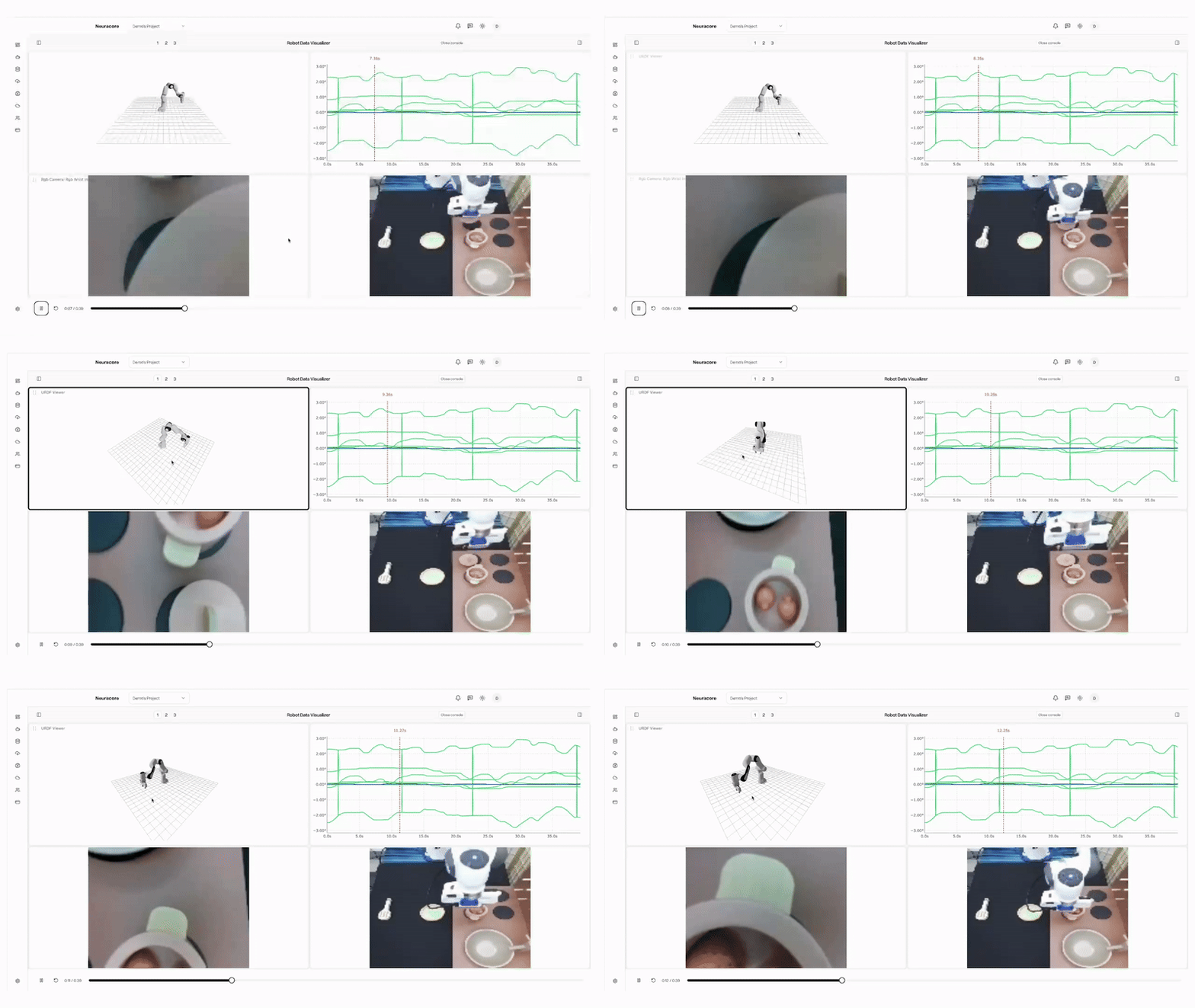
- 📊 Dataset visualization and synchronization
- ☁️ Train robot learning algorithms on cloud
- 🤖 Policy inference and deployment
🛠️ Installation
Neuracore has been tested on Ubuntu 24.04 and MacOS 26 (Arm64, Apple Silicon, M1 series Chips). If you're on Windows, please use Windows Subsystem for Linux (WSL)
On macOS, Neuracore supports Apple Silicon only.
To install the basic package for data logging and visualization:
pip install neuracore
Note: installing the ffmpeg binary is recommended for faster video encoding (during recording) and decoding (during playback/import). If not available, Neuracore falls back to PyAV for encoding.
Linux (Debian/Ubuntu):
sudo apt-get update && sudo apt-get install -y ffmpeg
For training and ML development:
pip install neuracore[ml]
For bulk importing datasets:
pip install neuracore[import]
To run our examples:
pip install neuracore[examples]
For MuJoCo MJCF model support:
pip install neuracore[mjcf]
🍰 A Short Taste
Here is a short taste on what neuracore can do.
For a detailed walk-through, please refer to the tutorial and documentation.
import neuracore as nc # pip install neuracore
import time

# ensure you have an account at neuracore.com
nc.login()

# Connect to a robot with URDF
nc.connect_robot(
    robot_name="MyRobot",
    urdf_path="/path/to/robot.urdf",
)

# Create a dataset for recording
nc.create_dataset(
    name="My Robot Dataset",
    description="Example dataset with multiple data types"
)

# Recording and streaming data
nc.start_recording()
t = time.time()
nc.log_joint_positions(positions={'joint1': 0.5, 'joint2': -0.3}, timestamp=t)
nc.log_rgb(name="top_camera", rgb=image_array, timestamp=t)
# Stop recording, the dataset is automatically uploaded to the cloud
nc.stop_recording()

# Kick off cloud training
job_data = nc.start_training_run(
    name="MyTrainingJob",
    dataset_name="My Robot Dataset",
    algorithm_name="diffusion_policy",
    num_gpus=5,
    frequency=50,
    ...
)

# Load a trained model locally
policy = nc.policy(
    train_run_name="MyTrainingJob",
    ...
)

# Get model inputs
nc.log_joint_positions(positions={'joint1': 0.5, 'joint2': -0.3})
nc.log_rgb(name="top_camera", rgb=image_array)
# Model Inference
predictions = policy.predict(timeout=5)
📚 Documentation
- Examples
- Tutorial
- Training
- Command Line Tools
- Dataset Importer
- Automatic Batch Size Search
- Environment Variables
- Contribution Guide
- Data Daemon
- Rust Data Daemon — Developer Guide — building the rust/ workspace that ships inside the wheel as the data-daemon binary +
neuracore.data_daemon._data_bridgecdylib.
💬 Community
We are building Neuracore to help everyone accelerate their robot learning workflows, and we'd love to hear from you! Join our community to get help, share ideas, and stay updated:
- Discord - Chat with the community and get support
- GitHub Issues - Report bugs and request features
🧾 Citation
If you use Neuracore in your research, please consider citing:
@software{Neuracore,
  author = {Neuracore Team},
  title = {Neuracore},
  month = {January},
  year = {2026},
  url = {https://github.com/NeuracoreAI/neuracore}
}
Metadata
Release files for neuracore 20.0.0
For a detailed explanation of source distributions (sdists) and built distributions (wheels), please see the package formats documentation.
Built distributions (wheels)
Total release size: 155.3 MB
Release files / neuracore-20.0.0-cp314-cp314-manylinux_2_28_x86_64.whl
| Download URL | neuracore-20.0.0-cp314-cp314-manylinux_2_28_x86_64.whl |
|---|---|
| Size | 10.5 MB |
| Tags | CPython 3.14 Linux glibc 2.28+ x86-64 |
|
SHA-256 checksum How to use checksums |
830c8d750e2f5390eac52579eeebe5a64260172188763075f712bd7bdecbe39d
|
|
BLAKE2b-256 checksum How to use checksums |
2f7e562fe683272f1187b6274d44c3e31469c75f601b1b7af51d056f0179bdef
|
| Upload date | |
|
Uploaded using Trusted Publishing? What is trusted publishing? |
No |
| Uploaded via |
twine/7.0.0 CPython/3.12.3
|
Release files / neuracore-20.0.0-cp314-cp314-manylinux_2_28_aarch64.whl
| Download URL | neuracore-20.0.0-cp314-cp314-manylinux_2_28_aarch64.whl |
|---|---|
| Size | 10.8 MB |
| Tags | CPython 3.14 Linux glibc 2.28+ ARM64 |
|
SHA-256 checksum How to use checksums |
be79862de1cddf1541bd1568e6a982036c5583b7cf33c02ea5f82a37430f3bb2
|
|
BLAKE2b-256 checksum How to use checksums |
389f8687671ca6cad3804e8a4349e8a860818320f1f6ac1c76063713c60647ec
|
| Upload date | |
|
Uploaded using Trusted Publishing? What is trusted publishing? |
No |
| Uploaded via |
twine/7.0.0 CPython/3.12.3
|
Release files / neuracore-20.0.0-cp314-cp314-macosx_11_0_arm64.whl
| Download URL | neuracore-20.0.0-cp314-cp314-macosx_11_0_arm64.whl |
|---|---|
| Size | 9.8 MB |
| Tags | CPython 3.14 macOS 11.0+ ARM64 |
|
SHA-256 checksum How to use checksums |
9d2fd33663f566ec35c6caf6fb696202e3d35bdf69dd855957891ae7c24c570a
|
|
BLAKE2b-256 checksum How to use checksums |
5baffe4ade3b49e99e8dbb810fc36d69ac5588cbaba8c4b171751681371ed50c
|
| Upload date | |
|
Uploaded using Trusted Publishing? What is trusted publishing? |
No |
| Uploaded via |
twine/7.0.0 CPython/3.12.3
|
Release files / neuracore-20.0.0-cp313-cp313-manylinux_2_28_x86_64.whl
| Download URL | neuracore-20.0.0-cp313-cp313-manylinux_2_28_x86_64.whl |
|---|---|
| Size | 10.5 MB |
| Tags | CPython 3.13 Linux glibc 2.28+ x86-64 |
|
SHA-256 checksum How to use checksums |
92c4a740ad1108792efcbb205b676923de1507032c95bc1a7a4b33e01dd3d0d7
|
|
BLAKE2b-256 checksum How to use checksums |
4899f964e9d98f48cdecc408b6573a12f0eab356648995390a2bc3c002a1802a
|
| Upload date | |
|
Uploaded using Trusted Publishing? What is trusted publishing? |
No |
| Uploaded via |
twine/7.0.0 CPython/3.12.3
|
Release files / neuracore-20.0.0-cp313-cp313-manylinux_2_28_aarch64.whl
| Download URL | neuracore-20.0.0-cp313-cp313-manylinux_2_28_aarch64.whl |
|---|---|
| Size | 10.8 MB |
| Tags | CPython 3.13 Linux glibc 2.28+ ARM64 |
|
SHA-256 checksum How to use checksums |
524ebbb53aac34c85f16fc92b993847f76e216d2109fbf5f3adc4db84bc4082f
|
|
BLAKE2b-256 checksum How to use checksums |
aa5a762b59507ce3dd668dbcc814b961aef6b9dac1c2db15b30265c867d45b6c
|
| Upload date | |
|
Uploaded using Trusted Publishing? What is trusted publishing? |
No |
| Uploaded via |
twine/7.0.0 CPython/3.12.3
|
Release files / neuracore-20.0.0-cp313-cp313-macosx_11_0_arm64.whl
| Download URL | neuracore-20.0.0-cp313-cp313-macosx_11_0_arm64.whl |
|---|---|
| Size | 9.8 MB |
| Tags | CPython 3.13 macOS 11.0+ ARM64 |
|
SHA-256 checksum How to use checksums |
8de7de1ac202ed376ab62bd97847b38eefb06387b233934158388759b123cbab
|
|
BLAKE2b-256 checksum How to use checksums |
e966487598fc717772442b05ca75ebe28bd0ad7c4e6e30709613ddbec02c5f3c
|
| Upload date | |
|
Uploaded using Trusted Publishing? What is trusted publishing? |
No |
| Uploaded via |
twine/7.0.0 CPython/3.12.3
|
Release files / neuracore-20.0.0-cp312-cp312-manylinux_2_28_x86_64.whl
| Download URL | neuracore-20.0.0-cp312-cp312-manylinux_2_28_x86_64.whl |
|---|---|
| Size | 10.5 MB |
| Tags | CPython 3.12 Linux glibc 2.28+ x86-64 |
|
SHA-256 checksum How to use checksums |
ad9e333e4b6d781394a98dcc04ea950a7068e3cee68d6cb3298f8a99967aae04
|
|
BLAKE2b-256 checksum How to use checksums |
8212e6ce55266c44e48566ad339e204afc4a287284327574be0cd445c50b06ce
|
| Upload date | |
|
Uploaded using Trusted Publishing? What is trusted publishing? |
No |
| Uploaded via |
twine/7.0.0 CPython/3.12.3
|
Release files / neuracore-20.0.0-cp312-cp312-manylinux_2_28_aarch64.whl
| Download URL | neuracore-20.0.0-cp312-cp312-manylinux_2_28_aarch64.whl |
|---|---|
| Size | 10.8 MB |
| Tags | CPython 3.12 Linux glibc 2.28+ ARM64 |
|
SHA-256 checksum How to use checksums |
f6ad2862cd98468b592e1a1b4136f31128f5d21af08c49290b612ad55d54d51e
|
|
BLAKE2b-256 checksum How to use checksums |
531da095cb237ca1ec081e60245663ce3fade96a1b26e26598845087eaa1f883
|
| Upload date | |
|
Uploaded using Trusted Publishing? What is trusted publishing? |
No |
| Uploaded via |
twine/7.0.0 CPython/3.12.3
|
Release files / neuracore-20.0.0-cp312-cp312-macosx_11_0_arm64.whl
| Download URL | neuracore-20.0.0-cp312-cp312-macosx_11_0_arm64.whl |
|---|---|
| Size | 9.8 MB |
| Tags | CPython 3.12 macOS 11.0+ ARM64 |
|
SHA-256 checksum How to use checksums |
2118c08c0e8fbc359605ba915df557b800ea54aced7b3e25a9553cc39d2479c1
|
|
BLAKE2b-256 checksum How to use checksums |
940d2877b9c44715f960af444724edb698b2b423125b306881315bbf39b09c31
|
| Upload date | |
|
Uploaded using Trusted Publishing? What is trusted publishing? |
No |
| Uploaded via |
twine/7.0.0 CPython/3.12.3
|
Release files / neuracore-20.0.0-cp311-cp311-manylinux_2_28_x86_64.whl
| Download URL | neuracore-20.0.0-cp311-cp311-manylinux_2_28_x86_64.whl |
|---|---|
| Size | 10.5 MB |
| Tags | CPython 3.11 Linux glibc 2.28+ x86-64 |
|
SHA-256 checksum How to use checksums |
5158d1321da686104713b64fdfc56795e62fb4fe93ca03ece4a9385d9c51edf8
|
|
BLAKE2b-256 checksum How to use checksums |
c77dc130cb2e1c2dbfafd8a27f250480723edc3c4dd322cfee8aff767b7069b4
|
| Upload date | |
|
Uploaded using Trusted Publishing? What is trusted publishing? |
No |
| Uploaded via |
twine/7.0.0 CPython/3.12.3
|
Release files / neuracore-20.0.0-cp311-cp311-manylinux_2_28_aarch64.whl
| Download URL | neuracore-20.0.0-cp311-cp311-manylinux_2_28_aarch64.whl |
|---|---|
| Size | 10.8 MB |
| Tags | CPython 3.11 Linux glibc 2.28+ ARM64 |
|
SHA-256 checksum How to use checksums |
a87c5ff33a752bfb053b9a348d071a22429a150b81bea2b0f5feab95901cecce
|
|
BLAKE2b-256 checksum How to use checksums |
3adfc3f62441f89d30c5e7134b5884926d21a0fd9b7c1ad8eeb4cfe1c961885a
|
| Upload date | |
|
Uploaded using Trusted Publishing? What is trusted publishing? |
No |
| Uploaded via |
twine/7.0.0 CPython/3.12.3
|
Release files / neuracore-20.0.0-cp311-cp311-macosx_11_0_arm64.whl
| Download URL | neuracore-20.0.0-cp311-cp311-macosx_11_0_arm64.whl |
|---|---|
| Size | 9.8 MB |
| Tags | CPython 3.11 macOS 11.0+ ARM64 |
|
SHA-256 checksum How to use checksums |
821c10c1ca17946e2d2ca6ddacc9e681ee6a8bbd7509b4f10c79da59691fd40a
|
|
BLAKE2b-256 checksum How to use checksums |
33d084202de40750c66e2ad68a9fe751f1d190ddec7b21aa9fd7b571642aaeff
|
| Upload date | |
|
Uploaded using Trusted Publishing? What is trusted publishing? |
No |
| Uploaded via |
twine/7.0.0 CPython/3.12.3
|
Release files / neuracore-20.0.0-cp310-cp310-manylinux_2_28_x86_64.whl
| Download URL | neuracore-20.0.0-cp310-cp310-manylinux_2_28_x86_64.whl |
|---|---|
| Size | 10.5 MB |
| Tags | CPython 3.10 Linux glibc 2.28+ x86-64 |
|
SHA-256 checksum How to use checksums |
6cf9983c6e3700f149aee752bf59714b3e5badebb233ec6aa77bae0e3a803f44
|
|
BLAKE2b-256 checksum How to use checksums |
71b6c7b54b1a784a95f8c35c7f829f293c805984a94960b8b8cd16b0910ba086
|
| Upload date | |
|
Uploaded using Trusted Publishing? What is trusted publishing? |
No |
| Uploaded via |
twine/7.0.0 CPython/3.12.3
|
Release files / neuracore-20.0.0-cp310-cp310-manylinux_2_28_aarch64.whl
| Download URL | neuracore-20.0.0-cp310-cp310-manylinux_2_28_aarch64.whl |
|---|---|
| Size | 10.8 MB |
| Tags | CPython 3.10 Linux glibc 2.28+ ARM64 |
|
SHA-256 checksum How to use checksums |
ff358afdc5c282e1b9bdfb48b5a18c1742a7c4f79e8fd771c057a8bb2a0266c4
|
|
BLAKE2b-256 checksum How to use checksums |
3f20c32285b7e04311832dc05d2ce7fe43d3097604a8ac6c6e13d1adc415e35e
|
| Upload date | |
|
Uploaded using Trusted Publishing? What is trusted publishing? |
No |
| Uploaded via |
twine/7.0.0 CPython/3.12.3
|
Release files / neuracore-20.0.0-cp310-cp310-macosx_11_0_arm64.whl
| Download URL | neuracore-20.0.0-cp310-cp310-macosx_11_0_arm64.whl |
|---|---|
| Size | 9.8 MB |
| Tags | CPython 3.10 macOS 11.0+ ARM64 |
|
SHA-256 checksum How to use checksums |
52cf49fed3b2bf06029abb31e8689f86917731684d6a68defb40e1e3c2484d7b
|
|
BLAKE2b-256 checksum How to use checksums |
f2f8c7ed34db45bbc9bb0c04cd49460d5ca40ce380b08cd129f955634b336d74
|
| Upload date | |
|
Uploaded using Trusted Publishing? What is trusted publishing? |
No |
| Uploaded via |
twine/7.0.0 CPython/3.12.3
|
Security for neuracore 20.0.0
Provenance
Provenance describes where a file came from. On PyPI, provenance is shared via attestations, which provide a verifiable record of the build or publishing details. View details, limitations and caveats.
No provenance found
None of the files in this release were uploaded with provenance metadata.
A note on package security
PyPI is a repository for distributing packages, not a service for auditing them. While third-party security researchers and our staff do their best to detect and remove malicious packages, PyPI cannot guarantee the quality, security or suitability of any given package.
To learn more about protecting yourself from malicious actors, visit our package security documentation.














