
A domain-specific language and debugger for neural networks

Project description

Neural: A Neural Network Programming Language
Simplify deep learning development with a powerful DSL, cross-framework support, and built-in debugging






⚠️ BETA STATUS: Neural-dsl is under active development—bugs may exist, feedback welcome! Not yet recommended for production use.

📋 Table of Contents
- Overview
- Pain Points Solved
- Key Features
- Installation
- Quick Start
- Debugging with NeuralDbg
- Why Neural?
- Documentation
- Examples
- Contributing
- Community
- Support
Overview
Neural is a domain-specific language (DSL) designed for defining, training, debugging, and deploying neural networks. With declarative syntax, cross-framework support, and built-in execution tracing (NeuralDbg), it simplifies deep learning development whether via code, CLI, or a no-code interface.
Pain Points Solved
Neural addresses deep learning challenges across Criticality (how essential) and Impact Scope (how transformative):
| Criticality / Impact | Low Impact | Medium Impact | High Impact |
|---|---|---|---|
| High | - Shape Mismatches: Pre-runtime validation stops runtime errors. - Debugging Complexity: Real-time tracing & anomaly detection. |
||
| Medium | - Steep Learning Curve: No-code GUI eases onboarding. | - Framework Switching: One-flag backend swaps. - HPO Inconsistency: Unified tuning across frameworks. |
|
| Low | - Boilerplate: Clean DSL syntax saves time. | - Model Insight: FLOPs & diagrams. - Config Fragmentation: Centralized setup. |
Why It Matters
- Core Value: Fix critical blockers like shape errors and debugging woes with game-changing tools.
- Strategic Edge: Streamline framework switches and HPO for big wins.
- User-Friendly: Lower barriers and enhance workflows with practical features.
Feedback
Help us improve Neural DSL! Share your feedback: Typeform link.
Features
- YAML-like Syntax: Define models intuitively without framework boilerplate.
- Shape Propagation: Catch dimension mismatches before runtime.
- ✅ Interactive shape flow diagrams included.
- Multi-Framework HPO: Optimize hyperparameters for both PyTorch and TensorFlow with a single DSL config (#434).
- Multi-Backend Export: Generate code for TensorFlow, PyTorch, or ONNX.
- Training Orchestration: Configure optimizers, schedulers, and metrics in one place.
- Visual Debugging: Render interactive 3D architecture diagrams.
- Extensible: Add custom layers/losses via Python plugins.
- NeuralDbg: Built-in Neural Network Debugger and Visualizer.
- No-Code Interface: Quick Prototyping for researchers and ean ducational, accessible tool for beginners.
NeuralDbg: Built-in Neural Network Debugger
NeuralDbg provides real-time execution tracing, profiling, and debugging, allowing you to visualize and analyze deep learning models in action.
✅ Real-Time Execution Monitoring – Track activations, gradients, memory usage, and FLOPs.
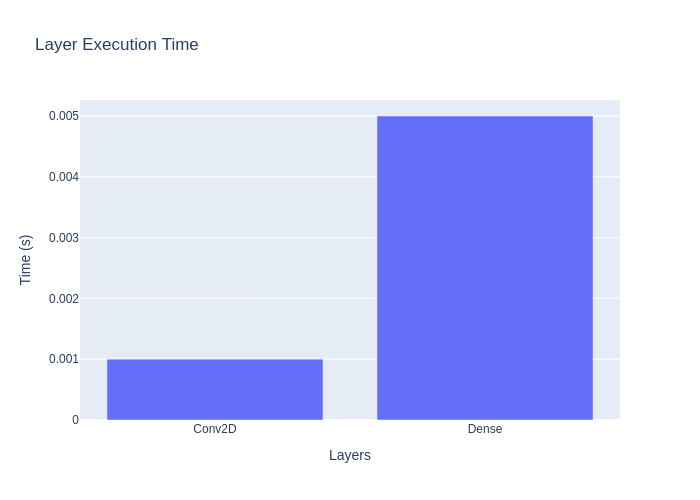
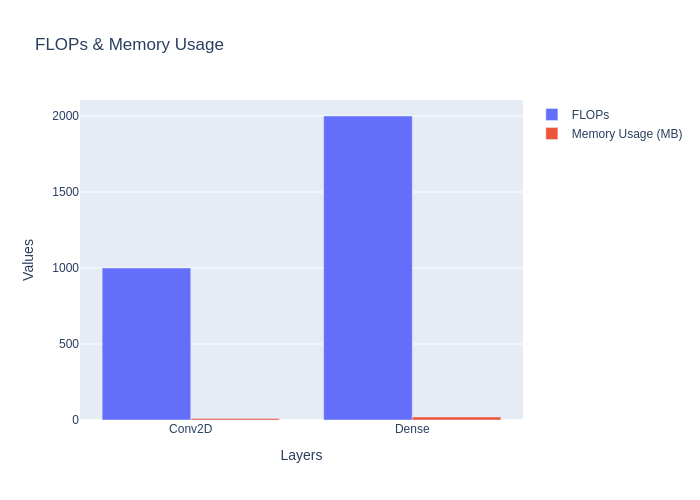
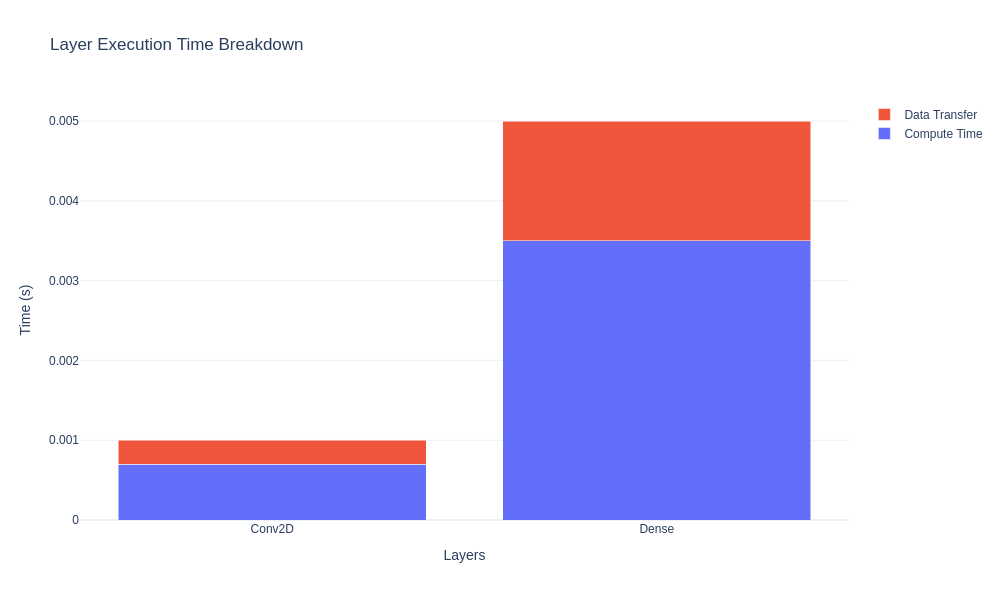
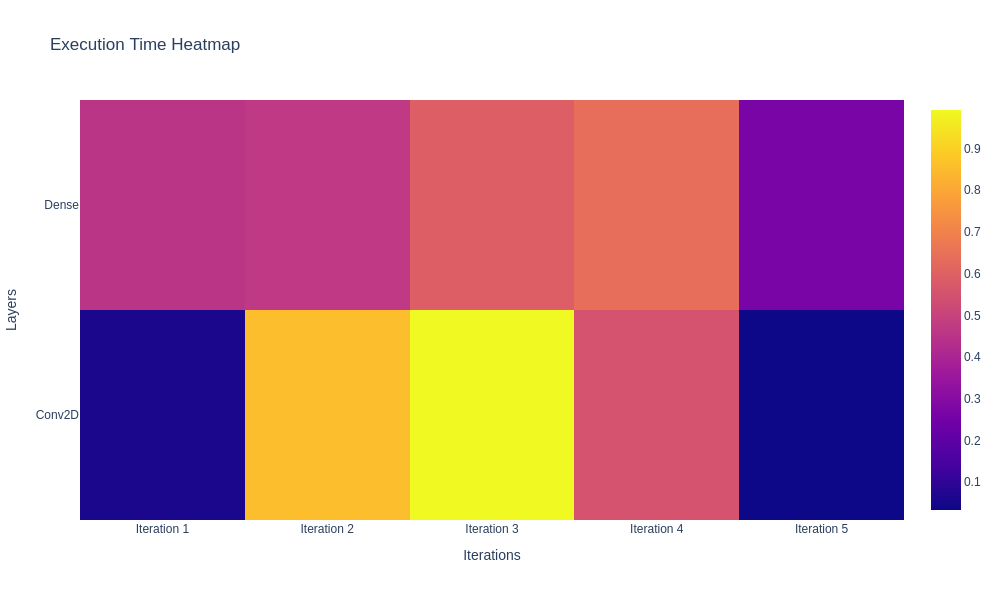
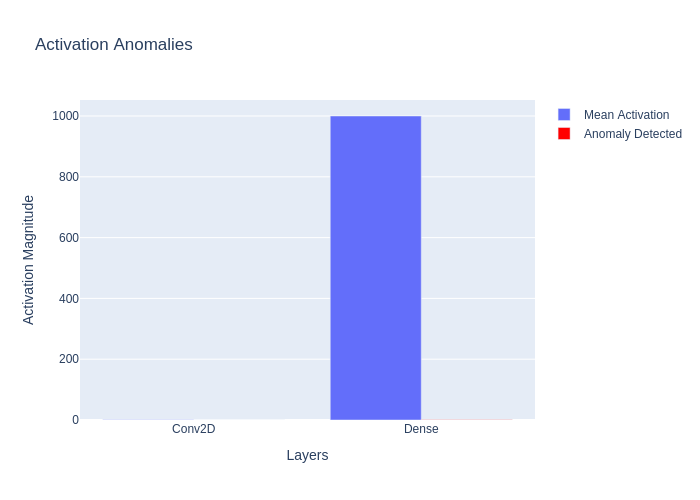
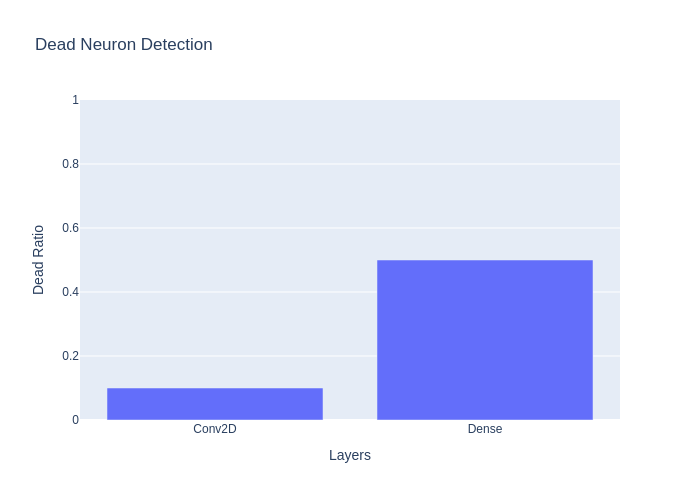
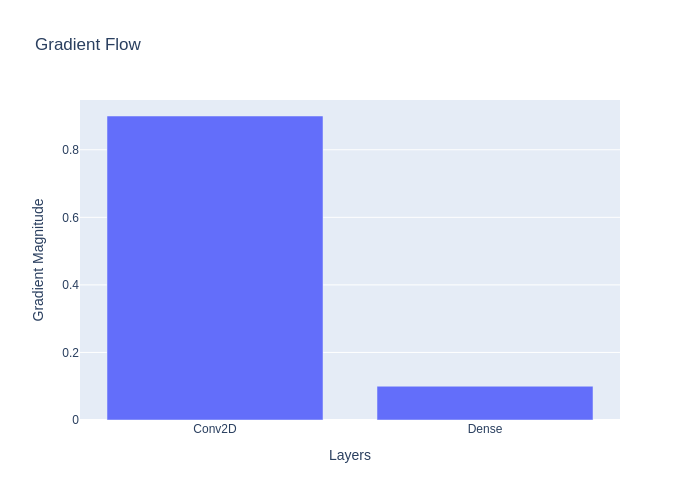
✅ Shape Propagation Debugging – Visualize tensor transformations at each layer. ✅ Gradient Flow Analysis – Detect vanishing & exploding gradients. ✅ Dead Neuron Detection – Identify inactive neurons in deep networks. ✅ Anomaly Detection – Spot NaNs, extreme activations, and weight explosions. ✅ Step Debugging Mode – Pause execution and inspect tensors manually.
Installation
Prerequisites: Python 3.8+, pip
Option 1: Install from PyPI (Recommended)
# Install the latest stable version
pip install neural-dsl

# Or specify a version
pip install neural-dsl==0.2.5  # Latest version with HPO optimizer fixes
Option 2: Install from Source
# Clone the repository
git clone https://github.com/Lemniscate-world/Neural.git
cd Neural

# Create a virtual environment (recommended)
python -m venv venv
source venv/bin/activate  # Linux/macOS
venv\Scripts\activate     # Windows

# Install dependencies
pip install -r requirements.txt
Quick Start
1. Define a Model
Create a file named mnist.neural with your model definition:
network MNISTClassifier {
  input: (28, 28, 1)  # Channels-last format

  layers:
    Conv2D(filters=32, kernel_size=(3,3), activation="relu")
    MaxPooling2D(pool_size=(2,2))
    Flatten()
    Dense(units=128, activation="relu")
    Dropout(rate=0.5)
    Output(units=10, activation="softmax")

  loss: "sparse_categorical_crossentropy"
  optimizer: Adam(learning_rate=0.001)
  metrics: ["accuracy"]

  train {
    epochs: 15
    batch_size: 64
    validation_split: 0.2
  }
}
2. Run or Compile the Model
# Generate and run TensorFlow code
neural run mnist.neural --backend tensorflow --output mnist_tf.py

# Or generate and run PyTorch code
neural run mnist.neural --backend pytorch --output mnist_torch.py
3. Visualize Architecture
neural visualize mnist.neural --format png
This will create visualization files for inspecting the network structure and shape propagation:
architecture.png: Visual representation of your modelshape_propagation.html: Interactive tensor shape flow diagramtensor_flow.html: Detailed tensor transformations
4. Debug with NeuralDbg
neural debug mnist.neural
Open your browser to http://localhost:8050 to monitor execution traces, gradients, and anomalies interactively.
5. Use the No-Code Interface
neural --no_code
Open your browser to http://localhost:8051 to build and compile models via a graphical interface.
🛠 Debugging with NeuralDbg
🔹 1️⃣ Start Real-Time Execution Tracing
python neural.py debug mnist.neural
Features: ✅ Layer-wise execution trace ✅ Memory & FLOP profiling ✅ Live performance monitoring
🔹 2️⃣ Analyze Gradient Flow
python neural.py debug --gradients mnist.neural
Detect vanishing/exploding gradients with interactive charts.
🔹 3️⃣ Identify Dead Neurons
python neural.py debug --dead-neurons mnist.neural
🛠 Find layers with inactive neurons (common in ReLU networks).
🔹 4️⃣ Detect Training Anomalies
python neural.py debug --anomalies mnist.neural
Flag NaNs, weight explosions, and extreme activations.
🔹 5️⃣ Step Debugging (Interactive Tensor Inspection)
python neural.py debug --step mnist.neural
🔍 Pause execution at any layer and inspect tensors manually.
Why Neural?
| Feature | Neural | Raw TensorFlow/PyTorch |
|---|---|---|
| Shape Validation | ✅ Auto | ❌ Manual |
| Framework Switching | 1-line flag | Days of rewriting |
| Architecture Diagrams | Built-in | Third-party tools |
| Training Config | Unified | Fragmented configs |
🔄 Cross-Framework Code Generation
| Neural DSL | TensorFlow Output | PyTorch Output |
|---|---|---|
Conv2D(filters=32) |
tf.keras.layers.Conv2D(32) |
nn.Conv2d(in_channels, 32) |
Dense(units=128) |
tf.keras.layers.Dense(128) |
nn.Linear(in_features, 128) |
Benchmarks
| Task | Neural | Baseline (TF/PyTorch) |
|---|---|---|
| MNIST Training | 1.2x ⚡ | 1.0x |
| Debugging Setup | 5min 🕒 | 2hr+ |
Documentation
Explore advanced features:
Examples
Explore common use cases in examples/ with step-by-step guides in docs/examples/:
🕸 Architecture Graphs


Note: You may need to zoom in to see details in these architecture diagrams.
Contributing
We welcome contributions! See our:
To set up a development environment:
git clone https://github.com/Lemniscate-world/Neural.git
cd Neural
pip install -r requirements-dev.txt  # Includes linter, formatter, etc.
pre-commit install  # Auto-format code on commit
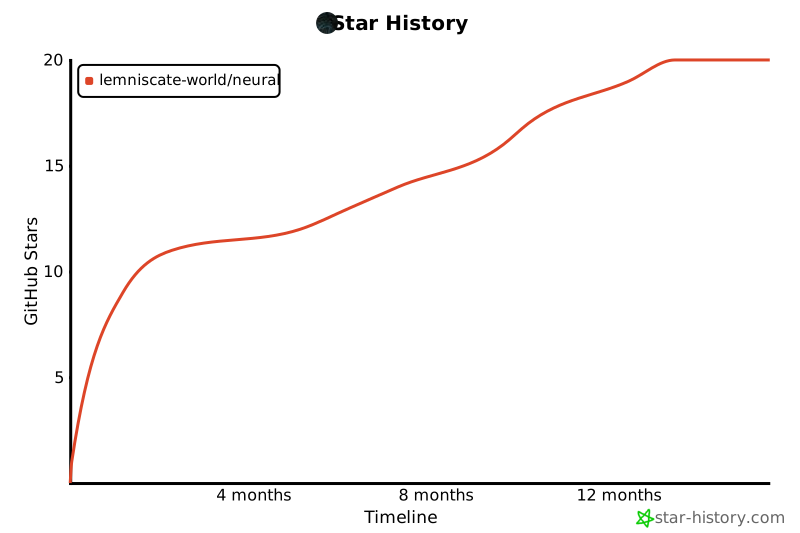
Star History
Support
If you find Neural useful, please consider supporting the project:
- ⭐ Star the repository: Help us reach more developers by starring the project on GitHub
- 🔄 Share with others: Spread the word on social media, blogs, or developer communities
- 🐛 Report issues: Help us improve by reporting bugs or suggesting features
- 🤝 Contribute: Submit pull requests to help us enhance Neural (see Contributing)
Repository Status
This repository has been cleaned and optimized for better performance. Large files have been removed from the Git history to ensure a smoother experience when cloning or working with the codebase.
Community
Join our growing community of developers and researchers:
- Discord Server: Chat with developers, get help, and share your projects
- Twitter @NLang4438: Follow for updates, announcements, and community highlights
- GitHub Discussions: Participate in discussions about features, use cases, and best practices

Building the future of neural network development, one line of DSL at a time.
Note: See v0.2.6 release notes for latest fixes and improvements!
Release history Release notifications | RSS feed


Download files
Download the file for your platform. If you're not sure which to choose, learn more about installing packages.
Source Distribution
Built Distribution
Filter files by name, interpreter, ABI, and platform.
If you're not sure about the file name format, learn more about wheel file names.
Copy a direct link to the current filters
File details
Details for the file neural_dsl-0.2.6.tar.gz.
File metadata
- Download URL: neural_dsl-0.2.6.tar.gz
- Upload date:
- Size: 90.6 kB
- Tags: Source
- Uploaded using Trusted Publishing? No
- Uploaded via: twine/6.1.0 CPython/3.12.3
File hashes
| Algorithm | Hash digest | |
|---|---|---|
| SHA256 |
d1bb929d1a98a6ae159be3da66ea79c8f5ed537924fca0cd2196aa0a55772c2f
|
|
| MD5 |
556ffc85777dc5530d341327f6f200dc
|
|
| BLAKE2b-256 |
3a9e419485b8eb3e1c02f961bcfac6e5a9c21316d21334bf9007a52192d4d190
|
File details
Details for the file neural_dsl-0.2.6-py3-none-any.whl.
File metadata
- Download URL: neural_dsl-0.2.6-py3-none-any.whl
- Upload date:
- Size: 82.9 kB
- Tags: Python 3
- Uploaded using Trusted Publishing? No
- Uploaded via: twine/6.1.0 CPython/3.12.3
File hashes
| Algorithm | Hash digest | |
|---|---|---|
| SHA256 |
7c42b2fc1658981541c055dd1fae029139307717d0c543884005d89acc63730e
|
|
| MD5 |
19cde2720200178ba38307ea59793f53
|
|
| BLAKE2b-256 |
55fcd0438a7e0a76d8558728199a551161375a9a1afb8223b3c3b43aac819000
|






