










Neuro SAN library





Neuro SAN Studio
Your launchpad for building intelligent multi-agent systems. Neuro SAN Studio is a hands-on playground for the Neuro SAN framework, featuring ready-to-run examples, tutorials, and tools that let you design, test, and deploy sophisticated agent networks in minutes—not months. Whether you're a researcher exploring adaptive AI systems, a developer prototyping production solutions, or a domain expert configuring agents without code, this studio handles the orchestration complexity so you can focus on solving real problems.
🚀 Try Neuro SAN now, no install required: https://neuro-san.evolution.ml/

This is a Bring Your Own Key (BYOK) instance, so you will need an API key from OpenAI, Anthropic or Gemini.
Neuro SAN is the open-source library powering the Cognizant Neuro® AI Multi-Agent Accelerator, allowing domain experts, researchers and developers to immediately start prototyping and building agent networks across any industry vertical.
What is Neuro SAN?
Neuro AI system of agent networks (Neuro SAN) is an open-source, data-driven multi-agent orchestration framework designed to simplify and accelerate the development of collaborative AI systems. It allows users—from machine learning engineers to business domain experts—to quickly build sophisticated multi-agent applications without extensive coding, using declarative configuration files (in HOCON format).
Neuro SAN enables multiple large language model (LLM)-powered agents to collaboratively solve complex tasks, dynamically delegating subtasks through adaptive inter-agent communication protocols. This approach addresses the limitations inherent to single-agent systems, where no single model has all the expertise or context necessary for multifaceted problems.
| Build a multi-agent network in minutes | Neuro SAN overview | Quick start |
|---|---|---|
 |
 |
 |
✨ Key Features
- 🗂️ Data-Driven Configuration: Entire agent networks are defined declaratively via simple HOCON files, empowering technical and non-technical stakeholders to design agent interactions intuitively.
- 🔀 Adaptive Communication (AAOSA Protocol): Agents autonomously determine how to delegate tasks, making interactions fluid and dynamic with decentralized decision-making.
- 🔒 Sly-Data: Sly Data facilitates safe handling and transfer of sensitive data between agents without exposing it directly to any language models.
- 🧩 Dynamic Agent Network Designer: Includes a meta-agent called the Agent Network Designer – essentially, an agent that creates other agent networks. Provided as an example with Neuro SAN, it can take a high-level description of a use-case as input and generate a new custom agent network for it.
- 🛠️ Flexible Tool Integration: Integrate custom Python-based "coded tools," APIs, databases, and even external agent ecosystems (Agentforce, Agentspace, CrewAI, MCP, A2A agents, LangChain tools and more) seamlessly into your agent workflows.
- 📈 Robust Traceability: Detailed logging, tracing, and session-level metrics enhance transparency, debugging, and operational monitoring.
- 🌐 Extensible and Cloud-Agnostic: Compatible with a wide variety of LLM providers (OpenAI, Anthropic, Azure, Ollama, etc.) and deployable in diverse environments (local machines, containers, or cloud infrastructures).
Use Cases
Here are a few examples of use-cases that have been implemented with Neuro SAN. For more examples, check out docs/examples.md.
| Agent Network | Use-Case | Description |
|---|---|---|
| 🧬 Agent Network Designer | Automated generation of multi-agent HOCON configurations. | Generates complex multi-agent configurations from natural language input, simplifying the creation of intricate agent workflows. |
| 🛫 Airline Policy Assistance | Customer support for airline policies. | Agents interpret and explain airline policies, assisting customers with inquiries about baggage allowances, cancellations, and travel-related concerns. |
| 🏦 Banking Operations & Compliance | Automated financial operations and regulatory compliance. | Automates tasks such as transaction monitoring, fraud detection, and compliance reporting, ensuring adherence to regulations and efficient routine operations. |
| 🛍️ Consumer Packaged Goods (CPG) | Market analysis and product development in CPG. | Gathers and analyzes market trends, customer feedback, and sales data to support product development and strategic marketing. |
| 🛡️ Insurance Agents | Claims processing and risk assessment. | Automates claims evaluation, assesses risk factors, ensures policy compliance, and improves claim-handling efficiency and customer satisfaction. |
| 🏢 Intranet Agents | Internal knowledge management and employee support. | Provides employees with quick access to policies, HR, and IT support, enhancing internal communications and resource accessibility. |
| 🛒 Retail Operations & Customer Service | Enhancing retail customer experience and operational efficiency. | Handles customer inquiries, inventory management, and supports sales processes to optimize operations and service quality. |
| 📞 Telco Network Support | Technical support and network issue resolution. | Diagnoses network problems, guides troubleshooting, and escalates complex issues, reducing downtime and enhancing customer service. |
| 📞 Therapy Vignette Supervision | Generates treatment plan for a given therapy vignette. | A good example of using multiple different expert agents working together to come up with a single plan. |
And many more: check out docs/examples.md.
High level Architecture

Install
These instructions are for Linux and macOS systems. Please adjust the commands accordingly for Windows.
Install uv
uv is a fast Python package and project manager built by Astral.
Official installation docs: 👉 https://docs.astral.sh/uv/getting-started/installation/
Create a new Python project
Create a folder for your project:
mkdir my_project
cd my_project
Create a virtual environment, initialize a git repo and install neuro-san-studio
uv init
uv venv
source .venv/bin/activate
uv add neuro-san-studio
Initialize neuro-san-studio
Run ns init to initialize a Neuro SAN Studio project. ns stands for Neuro SAN. You can also use the long command
neuro-san-studio instead. It will:
- let you choose an LLM provider
- create a
configfolder with your choice of LLM models and plugins configuration - create an
mcpfolder with a list of MCP tools - create a
registriesfolder with a simple agent network and the Agent Network Designer, so you can start designing your own networks right away - create
coded_toolsandmiddlewarefolders with the Python code those agent networks need
To learn more about the ns command run ns --help.
ns init
Which LLM providers do you want to enable?

#  Provider       Default model
1  OpenAI         gpt-5.2 (default)
2  Anthropic      claude-sonnet
3  Google Gemini  gemini-3-flash

Enter numbers separated by commas (default: 1):
Note: To access all Neuro SAN Studio capabilities, clone this repository and follow the setup instructions in the docs/dev_guide.md.
Set your LLM API key(s)
-
Set your provider key, e.g.
OPENAI_API_KEY,ANTHROPIC_API_KEYorGOOGLE_API_KEY(or create a.envfile in the current directory). See docs/api_key.md for details and other providers.export OPENAI_API_KEY="XXX"
-
Check your LLM API keys are correctly configured:
ns check-llm-keys -
Check your
config/llm_config.hoconis working:ns check-configIf the configuration is valid you will get a
helloresponse from the configured LLMs.
Import agent networks
ns init already installs the Agent Network Designer, so you can start building right away.
Use ns import to add any of the other agent network examples that ship with neuro-san-studio.
Run it with no arguments to pick from an interactive list:
ns import
Or name a group or a single network directly:
ns import basic         # every network in the "basic" group
ns import hello_world   # a single network
Each imported network brings its dependencies with it -- coded tools, middleware, sub-networks -- and is registered in
registries/manifest.hocon. A running server picks it up within a few seconds.
See docs/cli/import.md for the full set of options.
Start the developer UI
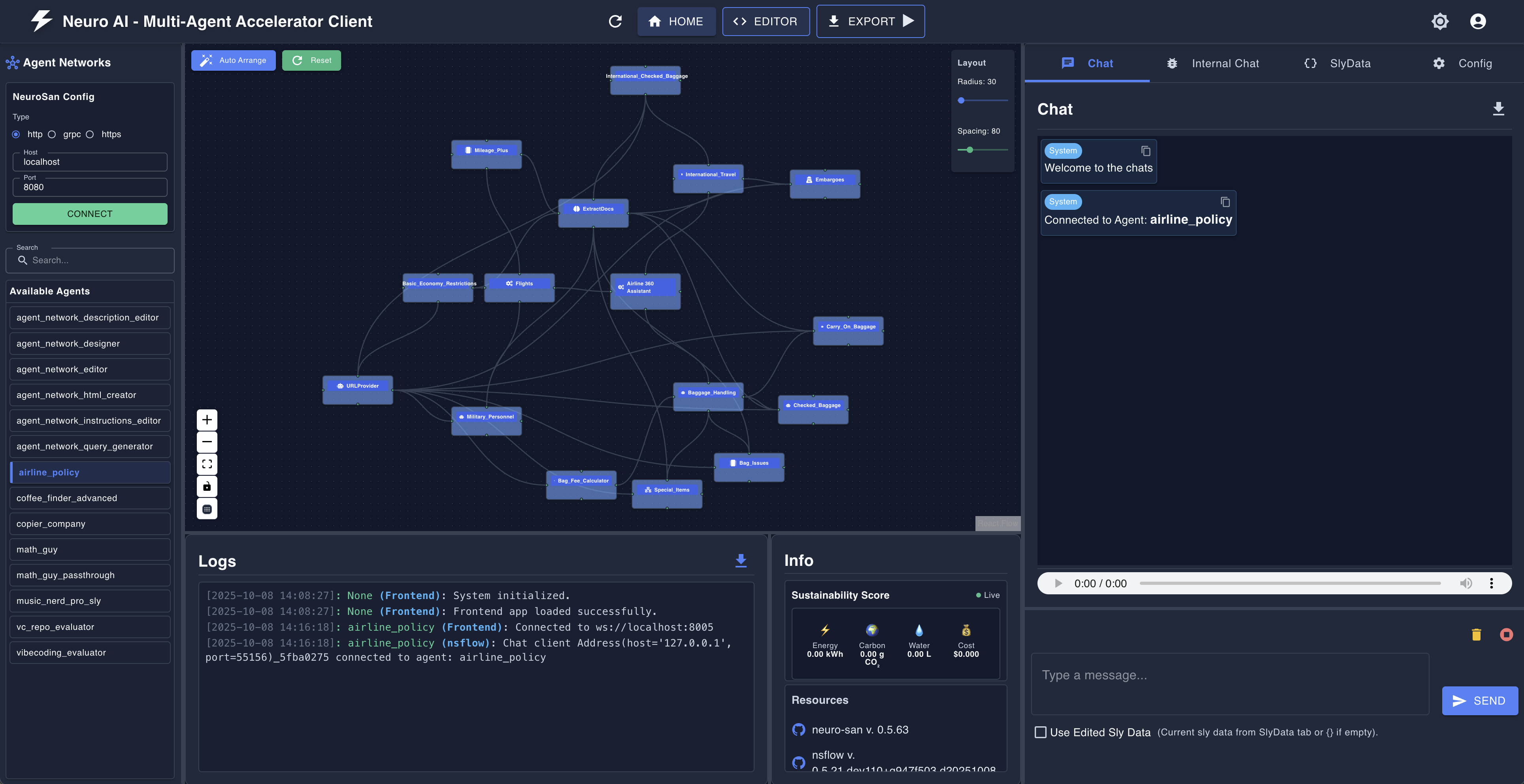
You can start a neuro-san server and the nsflow UI with the ns run command:
ns run
The Neuro SAN server listens on localhost:8080.
The nsflow UI is served at http://localhost:4173/.
Logs land under logs/ (server.log, nsflow.log, thinking_dir/).
Screenshot:
Agent Network Designer
Use the Agent Network Designer to create your own agent network.
- From the
nsflowUI, click theNEWbutton at the top, center of the screen. - In the new window that opens, type your prompts in the text box in the bottom right
corner of the screen. Then Agent Network Designer:
- Creates the agents
- Links them together
- Writes instructions for each agent
- Generates a few sample queries you can ask this agent network
- Saves the agent network in the
registries/generatedfolder
- Once the Agent Network Designer is done and comes back with an answer in the chat window, you can continue the design by asking it to make changes
- Once you're happy with the design, test it! Click the blue
Launchbutton at the top center of the screen. It opens a new window from which you can chat with the agent network. - If you want to make modifications, go back to the editor window and ask for changes.
- You can also edit any agent network by clicking the pen icon next to its name in the main window.

Import a project from a file / Export to a file
You can import a project from a .hocon file or from a zip file using the ns import <PATH>.
ns import ~/Downloads/my_project.hocon
Similarly, you can export an agent network and all its dependencies using the ns export command:
ns export my_project.hocon
See docs/cli/export.md for details.
Command reference
| Command | Purpose | Key flags |
|---|---|---|
ns init |
Scaffold a starter project in the current dir. | --providers openai,anthropic,google |
ns run |
Start the Neuro SAN server and nsflow UI. | --server-host, --server-http-port, --nsflow-port, --log-level, --client-only, --server-only |
ns chat |
Chat with an agent network directly (no server needed). | Positional: agent name, --connection, --host, --port, --one-shot, --list. |
ns import |
Import agent networks into the current project. | Positional: space-separated group names, network names, or all; or local .hocon / .zip paths (don't mix the two). --force to overwrite. Omit args for interactive mode. |
ns export |
Bundle a network from the current project into a shareable file. | Positional: network name (e.g. music_nerd or basic/music_nerd). -o / --output to set the output path. Omit args for interactive picker. |
ns check-llm-keys |
Validate LLM API keys / env vars. | --tier 1 (placeholder), --tier 2 (format), --tier 3 (live API call, default) |
ns check-config |
Validate the LLM configurations in a HOCON file. | --hocon-path (defaults to config/llm_config.hocon) |
ns validate |
Validate the structure of an agent network HOCON file. | Positional: HOCON path. --verbose, --manifest, --external-agents, --registry-dir. References to other networks (/name) are checked against the networks served by the manifest. |
Use ns <command> --help for the full flag list of any subcommand.
User guide
Ready to dive in? Check out the user guide for a detailed overview of the neuro-san library and its features.
Tutorial
For a detailed tutorial, refer to docs/tutorial.md.
Examples
For examples of agent networks, check out docs/examples.md.
Developer Guide
For local development setup and contribution instructions, see the docs/dev_guide.md.
Community Projects
Applications
- Climate Change: a tool to answer questions about COP, the Paris Agreement or the Kyoto Protocol using UNFCCC documents.
- Enterprise Access Portal: an AI-powered multi-agent system for managing enterprise application access requests and IT operations.
- F1 fans eval: an app that evaluates F1 fan submissions about why they are the biggest F1 fans.
- PDF Knowledge Assistant: a Flask web app that queries PDFs using RAG with topic-based long-term memory synthesis across documents.
- Loopy Agents: run Neuro SAN agents continuously or on triggers through a separate service, with asynchronous messaging.
- Annual Report Reader: analyzes a LinkedIn profile and delivers a personalized summary of Cognizant's 2024 Annual Report, surfacing content most relevant to the user's industry and seniority level.
- Tochiro File Organizer: a macOS file organization assistant with a dedicated UI to analyze a folder, create a plan for moving the files, ask for approval and execute the moves.
- Legacy Business-Rule Extractor: a 6-agent network that extracts business rules from legacy COBOL, Java, and PL/SQL code, pairing deterministic CodedTool parsers with LLM agents to produce a modernization-ready specification document.
Utilities
- Neuro SAN Web Client: a basic Flask web client interface for Neuro SAN.
- Neuro SAN Slack app a Slack integration that lets you interact with Neuro SAN directly from your workspace.
Links
- Website: Cognizant AI Lab
- YouTube: Decision AI
- X: @cognizantailab
- LinkedIn: Cognizant AI Lab
- Amazon Marketplace: Cognizant Neuro SAN
- Azure Marketplace: Cognizant Neuro SAN
More details
For more information, check out the Cognizant AI Lab Neuro SAN landing page.
1 maintainer

Metadata
1 maintainer
Release files for neuro-san-studio 0.4.3
For a detailed explanation of source distributions (sdists) and built distributions (wheels), please see the package formats documentation.
Source distribution (sdist)
| File | Size | Uploaded | Provenance | |
|---|---|---|---|---|
| neuro_san_studio-0.4.3.tar.gz | 9.4 MB | With provenance | Details |
Built distribution (wheel)
| File | Interpreter | ABI | Platform | Reset |
|---|---|---|---|---|
| neuro_san_studio-0.4.3-py3-none-any.whl | Python 3 | none | any | Details |
Total release size: 10.4 MB
Release files / neuro_san_studio-0.4.3.tar.gz
| Download URL | neuro_san_studio-0.4.3.tar.gz |
|---|---|
| Size | 9.4 MB |
| Tags | Source |
|
SHA-256 checksum How to use checksums |
34ba8fae029ee6b2f613a81b586258de8db8b3057c44aebcf73c3097513efa8b
|
|
BLAKE2b-256 checksum How to use checksums |
54fee7ac87c6d969376b89449339efe0ce10a7bd825e80fe36b715ea1d1f8c42
|
| Upload date | |
|
Uploaded using Trusted Publishing? What is trusted publishing? |
Yes |
| Uploaded via |
twine/6.1.0 CPython/3.13.13
|
Provenance
Provenance describes where a file came from. On PyPI, provenance is shared via attestations, which provide a verifiable record of the build or publishing details. View details, limitations and caveats.


PyPI Publish Attestation
PyPI verified that this artifact, at this checksum, originated from the publisher listed below.
Signed by GitHub Actions, verified by PyPI on Oct 20, 2026.
Transparency logRelease files / neuro_san_studio-0.4.3-py3-none-any.whl
| Download URL | neuro_san_studio-0.4.3-py3-none-any.whl |
|---|---|
| Size | 1.0 MB |
| Tags | Python 3 |
|
SHA-256 checksum How to use checksums |
7c6ed0420b83b62f84e9c18e63a27f97982df024914518fabcc79c6b5060d477
|
|
BLAKE2b-256 checksum How to use checksums |
85f8c91a163d359e525f0aed1c35e7409aed0a48a51b573ac40f299132c3ca08
|
| Upload date | |
|
Uploaded using Trusted Publishing? What is trusted publishing? |
Yes |
| Uploaded via |
twine/6.1.0 CPython/3.13.13
|
Provenance
Provenance describes where a file came from. On PyPI, provenance is shared via attestations, which provide a verifiable record of the build or publishing details. View details, limitations and caveats.
PyPI Publish Attestation
PyPI verified that this artifact, at this checksum, originated from the publisher listed below.
Signed by GitHub Actions, verified by PyPI on Oct 20, 2026.
Transparency logSecurity for neuro-san-studio 0.4.3
Provenance
Provenance describes where a file came from. On PyPI, provenance is shared via attestations, which provide a verifiable record of the build or publishing details. View details, limitations and caveats.
Full provenance
All 2 files in this release have been uploaded with provenance metadata.
Attestation for neuro_san_studio-0.4.3.tar.gz
PyPI Publish Attestation
PyPI verified that this artifact, at this checksum, originated from the publisher listed below.
Signed by GitHub Actions, verified by PyPI on Oct 20, 2026.
Transparency logA note on package security
PyPI is a repository for distributing packages, not a service for auditing them. While third-party security researchers and our staff do their best to detect and remove malicious packages, PyPI cannot guarantee the quality, security or suitability of any given package.














