
Multi-agent orchestration studio built on the neuro-san framework.
Verified details
These details have been verified by PyPIProject links
GitHub Statistics
Maintainers

Project description
Neuro SAN Studio
Your launchpad for building intelligent multi-agent systems. Neuro SAN Studio is a hands-on playground for the Neuro SAN framework, featuring ready-to-run examples, tutorials, and tools that let you design, test, and deploy sophisticated agent networks in minutes—not months. Whether you're a researcher exploring adaptive AI systems, a developer prototyping production solutions, or a domain expert configuring agents without code, this studio handles the orchestration complexity so you can focus on solving real problems.

Neuro SAN is the open-source library powering the Cognizant Neuro® AI Multi-Agent Accelerator, allowing domain experts, researchers and developers to immediately start prototyping and building agent networks across any industry vertical.






Neuro SAN library




What is Neuro SAN?
Neuro AI system of agent networks (Neuro SAN) is an open-source, data-driven multi-agent orchestration framework designed to simplify and accelerate the development of collaborative AI systems. It allows users—from machine learning engineers to business domain experts—to quickly build sophisticated multi-agent applications without extensive coding, using declarative configuration files (in HOCON format).
Neuro SAN enables multiple large language model (LLM)-powered agents to collaboratively solve complex tasks, dynamically delegating subtasks through adaptive inter-agent communication protocols. This approach addresses the limitations inherent to single-agent systems, where no single model has all the expertise or context necessary for multifaceted problems.
| Build a multi-agent network in minutes | Neuro SAN overview | Quick start |
|---|---|---|
 |
 |
 |
✨ Key Features
- 🗂️ Data-Driven Configuration: Entire agent networks are defined declaratively via simple HOCON files, empowering technical and non-technical stakeholders to design agent interactions intuitively.
- 🔀 Adaptive Communication (AAOSA Protocol): Agents autonomously determine how to delegate tasks, making interactions fluid and dynamic with decentralized decision-making.
- 🔒 Sly-Data: Sly Data facilitates safe handling and transfer of sensitive data between agents without exposing it directly to any language models.
- 🧩 Dynamic Agent Network Designer: Includes a meta-agent called the Agent Network Designer – essentially, an agent that creates other agent networks. Provided as an example with Neuro SAN, it can take a high-level description of a use-case as input and generate a new custom agent network for it.
- 🛠️ Flexible Tool Integration: Integrate custom Python-based "coded tools," APIs, databases, and even external agent ecosystems (Agentforce, Agentspace, CrewAI, MCP, A2A agents, LangChain tools and more) seamlessly into your agent workflows.
- 📈 Robust Traceability: Detailed logging, tracing, and session-level metrics enhance transparency, debugging, and operational monitoring.
- 🌐 Extensible and Cloud-Agnostic: Compatible with a wide variety of LLM providers (OpenAI, Anthropic, Azure, Ollama, etc.) and deployable in diverse environments (local machines, containers, or cloud infrastructures).
Use Cases
Here are a few examples of use-cases that have been implemented with Neuro SAN. For more examples, check out docs/examples.md.
| Agent Network | Use-Case | Description |
|---|---|---|
| 🧬 Agent Network Designer | Automated generation of multi-agent HOCON configurations. | Generates complex multi-agent configurations from natural language input, simplifying the creation of intricate agent workflows. |
| 🛫 Airline Policy Assistance | Customer support for airline policies. | Agents interpret and explain airline policies, assisting customers with inquiries about baggage allowances, cancellations, and travel-related concerns. |
| 🏦 Banking Operations & Compliance | Automated financial operations and regulatory compliance. | Automates tasks such as transaction monitoring, fraud detection, and compliance reporting, ensuring adherence to regulations and efficient routine operations. |
| 🛍️ Consumer Packaged Goods (CPG) | Market analysis and product development in CPG. | Gathers and analyzes market trends, customer feedback, and sales data to support product development and strategic marketing. |
| 🛡️ Insurance Agents | Claims processing and risk assessment. | Automates claims evaluation, assesses risk factors, ensures policy compliance, and improves claim-handling efficiency and customer satisfaction. |
| 🏢 Intranet Agents | Internal knowledge management and employee support. | Provides employees with quick access to policies, HR, and IT support, enhancing internal communications and resource accessibility. |
| 🛒 Retail Operations & Customer Service | Enhancing retail customer experience and operational efficiency. | Handles customer inquiries, inventory management, and supports sales processes to optimize operations and service quality. |
| 📞 Telco Network Support | Technical support and network issue resolution. | Diagnoses network problems, guides troubleshooting, and escalates complex issues, reducing downtime and enhancing customer service. |
| 📞 Therapy Vignette Supervision | Generates treatment plan for a given therapy vignette. | A good example of using multiple different expert agents working together to come up with a single plan. |
And many more: check out docs/examples.md.
High level Architecture

Getting Started
To dive into Neuro SAN and start building your own multi-agent networks, this repository contains a collection of demos for the neuro-san library.
You'll find comprehensive documentation, example agent networks, and tutorials to guide you through your first steps.
Install from PyPI
If you just want to build agent networks on top of Neuro SAN Studio, you don't need to clone this repository — install from PyPI and scaffold a project in any directory. Requires Python 3.10+.
The quickstart flow is:
- Install the package
- Scaffold a starter project (
ns init) - Set your API key
- Start the server (
ns run) - Open the UI
The ns console script is registered as a shortcut for neuro-san-studio — both work interchangeably.
1. Install
pip install neuro-san-studio
The OpenAI, Anthropic, and Google Gemini provider libraries (langchain-openai, langchain-anthropic,
langchain-google-genai) ship with the base install. No extras to add.
2. Scaffold a starter project
ns init
init prompts for the LLM provider(s) you want enabled and writes a minimal project into the current
directory:
config/llm_config.hocon— provider/model wiring (defaults to OpenAIgpt-5.2)config/plugins.hocon— observability and logging plugin wiring (the rich-formatted log bridge is enabled by default)registries/manifest.hocon— registry of active agent networksregistries/music_nerd.hocon— sample agent networkregistries/aaosa.hocon— AAOSA substitution variables (instructions, call, command)registries/aaosa_basic.hocon— simplified AAOSA substitution variablesmcp/mcp_info.hocon— MCP server config
Skip the prompt with --providers:
ns init --providers openai,anthropic,google
3. Set your API key
Set your provider key, e.g. OPENAI_API_KEY (or create a .env file in the current directory).
See docs/api_key.md for details and other providers.
4. Run the server
ns run
The Neuro SAN server listens on localhost:8080; the nsflow UI is served at
http://localhost:4173/. Logs land under logs/ (server.log, nsflow.log,
thinking_dir/).
Import more agent networks
Beyond the music_nerd sample scaffolded by ns init, you can import more agent networks from the 80+
included in neuro-san-studio:
ns import                              # interactive
ns import basic,industry               # by group(s)
ns import agent_network_designer       # specific network
See docs/cli/import.md for details.
To share a network across projects, bundle it from the current project and drop the resulting file into another:
ns export music_nerd                  # → music_nerd.hocon (no deps)
ns export agent_network_designer      # → agent_network_designer.zip (with deps)
ns import -f music_nerd.hocon         # install in another project
See docs/cli/export.md for details.
Command reference
| Command | Purpose | Key flags |
|---|---|---|
ns init |
Scaffold a starter project in the current dir. | --providers openai,anthropic,google |
ns run |
Start the Neuro SAN server and nsflow UI. | --server-host, --server-http-port, --nsflow-port, --log-level, --client-only, --server-only |
ns import |
Import agent networks into the current project. | Positional: group name, network name, comma-separated list, or all. -f / --from-file to install a local .hocon or .zip. --force to overwrite. Omit args for interactive mode. |
ns export |
Bundle a network from the current project into a shareable file. | Positional: network name (e.g. music_nerd or basic/music_nerd). -o / --output to set the output path. Omit args for interactive picker. |
ns check-llm-keys |
Validate LLM API keys / env vars. | --tier 1 (placeholder), --tier 2 (format), --tier 3 (live API call, default) |
ns check-config |
Validate the LLM configurations in a HOCON file. | --hocon-path (defaults to config/llm_config.hocon) |
Use ns <command> --help for the full flag list of any subcommand.
Installation
Clone the repo:
git clone https://github.com/cognizant-ai-lab/neuro-san-studio
Go to dir:
cd neuro-san-studio
Ensure you have a supported version of python (e.g. 3.12 or 3.13):
python --version
Create a dedicated Python virtual environment:
python -m venv venv
Source it:
-
For Windows:
.\venv\Scripts\activate.bat && set PYTHONPATH=%CD%
-
For Mac:
source venv/bin/activate && export PYTHONPATH=`pwd`
Install the requirements:
pip install -r requirements.txt
IMPORTANT: By default, the server relies on OpenAI's gpt-5.2 model. Set the OpenAI API key and add it to your shell
configuration so it's available in future sessions.
You can get your OpenAI API key from https://platform.openai.com/signup. After signing up, create a new API key in the API keys section in your profile.
NOTE: Replace XXX with your actual OpenAI API key.
NOTE: This is OS dependent.
-
For macOS and Linux:
export OPENAI_API_KEY="XXX" && echo 'export OPENAI_API_KEY="XXX"' >> ~/.zshrc
-
For Windows:
- On Command Prompt:
set OPENAI_API_KEY=XXX
- On PowerShell:
$env:OPENAI_API_KEY="XXX"
Other providers such as Anthropic, AzureOpenAI, Ollama and more are supported too but will require proper setup.
Look at the .env.example file to set up environment variables for specific use-cases.
For testing the API keys, please refer to this documentation
Run
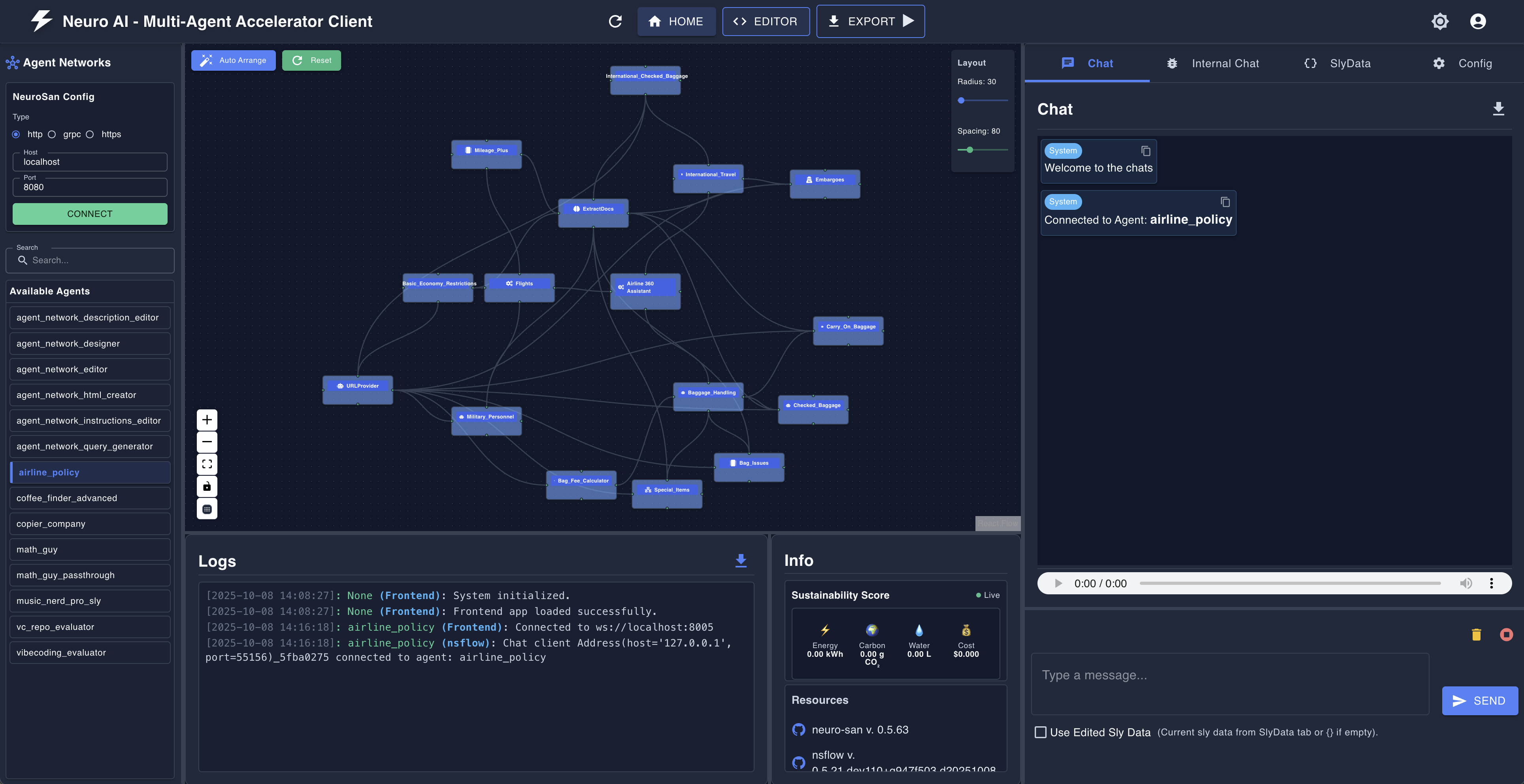
Neuro SAN Studio provides a user-friendly environment to interact with agent networks.
-
Start the server and client with a single command, from the project root directory:
python -m neuro_san_studio run
-
Navigate to http://localhost:4173/ to access the UI.
-
(Optional) Check the logs:
- For the server logs:
logs/server.log - For the client logs:
logs/nsflow.log - For the agents logs:
logs/thinking_dir/*
- For the server logs:
Use the --help option to see the various config options for the run command:
python -m neuro_san_studio run --help
Screenshot:
User guide
Ready to dive in? Check out the user guide for a detailed overview of the neuro-san library and its features.
Tutorial
For a detailed tutorial, refer to docs/tutorial.md.
Examples
For examples of agent networks, check out docs/examples.md.
Developer Guide
For the development guide, check out docs/dev_guide.md.
Community Projects
Applications
- Climate Change: a tool to answer questions about COP, the Paris Agreement or the Kyoto Protocol using UNFCCC documents.
- Enterprise Access Portal: an AI-powered multi-agent system for managing enterprise application access requests and IT operations.
- F1 fans eval: an app that evaluates F1 fan submissions about why they are the biggest F1 fans.
- PDF Knowledge Assistant: a Flask web app that queries PDFs using RAG with topic-based long-term memory synthesis across documents.
- Loopy Agents: run Neuro SAN agents continuously or on triggers through a separate service, with asynchronous messaging.
- Annual Report Reader: analyzes a LinkedIn profile and delivers a personalized summary of Cognizant's 2024 Annual Report, surfacing content most relevant to the user's industry and seniority level.
Utilities
- Neuro SAN Web Client: a basic Flask web client interface for Neuro SAN.
- Neuro SAN Slack app a Slack integration that lets you interact with Neuro SAN directly from your workspace.
Links
- Website: Cognizant AI Lab
- YouTube: Decision AI
- X: @cognizantailab
- LinkedIn: Cognizant AI Lab
More details
For more information, check out the Cognizant AI Lab Neuro SAN landing page.
Project details
Verified details
These details have been verified by PyPIProject links
GitHub Statistics
Maintainers
Release history Release notifications | RSS feed


Download files
Download the file for your platform. If you're not sure which to choose, learn more about installing packages.
Source Distribution
Built Distribution
Filter files by name, interpreter, ABI, and platform.
If you're not sure about the file name format, learn more about wheel file names.
Copy a direct link to the current filters
File details
Details for the file neuro_san_studio-0.3.0.tar.gz.
File metadata
- Download URL: neuro_san_studio-0.3.0.tar.gz
- Upload date:
- Size: 8.8 MB
- Tags: Source
- Uploaded using Trusted Publishing? Yes
- Uploaded via: twine/6.1.0 CPython/3.13.13
File hashes
| Algorithm | Hash digest | |
|---|---|---|
| SHA256 |
5425d5571eb72f1fb884abd01f2a85c1797319fbc693288d9da70f189ea05b3d
|
|
| MD5 |
8a60ec8ff6e389192b68df55f5f5bacb
|
|
| BLAKE2b-256 |
c89cacaa02f2635a34d8bf8b2a062e5e0d85517fc8e11a7af7d9d6e0f87cbc56
|
Provenance
The following attestation bundles were made for neuro_san_studio-0.3.0.tar.gz:
Publisher:
publish.yml on cognizant-ai-lab/neuro-san-studio
-
Statement:
-
Statement type:
https://in-toto.io/Statement/v1 -
Predicate type:
https://docs.pypi.org/attestations/publish/v1 -
Subject name:
neuro_san_studio-0.3.0.tar.gz -
Subject digest:
5425d5571eb72f1fb884abd01f2a85c1797319fbc693288d9da70f189ea05b3d - Sigstore transparency entry: 1657727207
- Sigstore integration time:
-
Permalink:
cognizant-ai-lab/neuro-san-studio@0c42f01d2731c352af76c58c6d8639822c09d780 -
Branch / Tag:
refs/tags/0.3.0 - Owner: https://github.com/cognizant-ai-lab
-
Access:
public
-
Token Issuer:
https://token.actions.githubusercontent.com -
Runner Environment:
github-hosted -
Publication workflow:
publish.yml@0c42f01d2731c352af76c58c6d8639822c09d780 -
Trigger Event:
release
-
Statement type:
File details
Details for the file neuro_san_studio-0.3.0-py3-none-any.whl.
File metadata
- Download URL: neuro_san_studio-0.3.0-py3-none-any.whl
- Upload date:
- Size: 801.8 kB
- Tags: Python 3
- Uploaded using Trusted Publishing? Yes
- Uploaded via: twine/6.1.0 CPython/3.13.13
File hashes
| Algorithm | Hash digest | |
|---|---|---|
| SHA256 |
a7af0c7c6104bc01ab92fb1559fa4c5905edcf10e5c05959328549ab4961a948
|
|
| MD5 |
4ac624b10e7d95cbcab182efd87acc40
|
|
| BLAKE2b-256 |
e08de864f631c9a3cce294111f4f81239c517d5a5cdcea9adaa231f8c970fd9c
|
Provenance
The following attestation bundles were made for neuro_san_studio-0.3.0-py3-none-any.whl:
Publisher:
publish.yml on cognizant-ai-lab/neuro-san-studio
-
Statement:
-
Statement type:
https://in-toto.io/Statement/v1 -
Predicate type:
https://docs.pypi.org/attestations/publish/v1 -
Subject name:
neuro_san_studio-0.3.0-py3-none-any.whl -
Subject digest:
a7af0c7c6104bc01ab92fb1559fa4c5905edcf10e5c05959328549ab4961a948 - Sigstore transparency entry: 1657727315
- Sigstore integration time:
-
Permalink:
cognizant-ai-lab/neuro-san-studio@0c42f01d2731c352af76c58c6d8639822c09d780 -
Branch / Tag:
refs/tags/0.3.0 - Owner: https://github.com/cognizant-ai-lab
-
Access:
public
-
Token Issuer:
https://token.actions.githubusercontent.com -
Runner Environment:
github-hosted -
Publication workflow:
publish.yml@0c42f01d2731c352af76c58c6d8639822c09d780 -
Trigger Event:
release
-
Statement type:






