
neuropipeline
neuropipeline is a lightweight wrapper around MNE-Python and MNE-NIRS that provides a simple, chainable API for fNIRS preprocessing and visualization.
Installation
pip install neuropipeline
Requires mne and mne-nirs:
pip install mne mne-nirs
Quick Start
from neuropipeline import fNIRS
from neuropipeline.fnirs import visualizer

f = fNIRS("path/to/data.snirf")

# Standard preprocessing pipeline (chainable)
f.to_optical_density().tddr().to_hemoglobin().bandpass(0.01, 0.1)

# Export processed data
f.to_snirf("path/to/processed.snirf")

# Visualize
visualizer.open(f)
Preprocessing
All methods return self and can be chained:
| Method | Description |
|---|---|
to_optical_density() |
Raw intensity → optical density |
tddr() |
TDDR motion correction |
to_hemoglobin(ppf=6.0) |
Optical density → HbO/HbR (Beer-Lambert) |
bandpass(low, high) |
Bandpass filter (default 0.01–0.1 Hz) |
short_channel_regression() |
Systemic artifact removal via short channels |
resample(sfreq) |
Resample to new sampling frequency |
crop(tmin, tmax) |
Crop recording to time window |
pick_long_channels() |
Keep only long-separation channels |
pick_short_channels() |
Keep only short-separation channels |
Preprocessor Pipeline
For a configurable, reusable pipeline use fNIRSPreprocessor:
from neuropipeline import fNIRS
from neuropipeline.fnirs.preprocessor import fNIRSPreprocessor

f = fNIRS("path/to/data.snirf")

pp = fNIRSPreprocessor(
    optical_density=True,
    motion_correction=True,
    short_channel_regression=False,
    hemoglobin=True,
    bandpass=True,
    bandpass_low=0.01,
    bandpass_high=0.1,
    ppf=6.0,
)
pp.print()       # inspect settings
f.preprocess(pp) # apply pipeline
Or with the builder interface:
pp = (fNIRSPreprocessor()
      .set_bandpass(0.01, 0.2)
      .set_short_channel_regression(True)
      .set_motion_correction(False))
f.preprocess(pp)
Export
# SNIRF (v1.1) — works at any processing stage
f.to_snirf("output/processed.snirf")

# With AtlasViewer-compatible montage landmarks
f.to_snirf("output/processed.snirf", add_montage=True)

# CSV — channel data + events
f.to_csv("output/", name="subject01")
Visualization
from neuropipeline.fnirs import visualizer

# Optional configuration (call before open)
visualizer.set_spectrum_mode("PSD")           # "FFT" or "PSD"
visualizer.set_spectrogram_method("Wavelet")  # "STFT", "Wavelet", or "CMT"
visualizer.set_spectrogram_limits(0.0, 0.2)  # frequency range (Hz)
visualizer.set_marker_dictionary({
    "1": "Rest",
    "2": "Task A",
    "3": "Task B",
})

visualizer.open(f)
The visualizer requires hemoglobin data — run to_optical_density().to_hemoglobin() first.
Keyboard shortcuts: ←/→ navigate channels, Space toggles FFT/PSD, Esc closes.
Advanced: Access MNE Directly
The underlying MNE Raw object is always available for advanced operations:
f = fNIRS("data.snirf")
f.to_optical_density().tddr().to_hemoglobin()

raw = f.raw  # mne.io.Raw

# Use any MNE function directly
epochs = f.epochs(tmin=-1.0, tmax=10.0)
events, event_id = f.events()

# Get numpy arrays
hbo, hbo_names = f.get_hbo()  # (channels, samples), [names]
hbr, hbr_names = f.get_hbr()
Example: Full Pipeline
from neuropipeline import fNIRS
from neuropipeline.fnirs import visualizer

f = fNIRS("raw.snirf")

(f.to_optical_density()
   .tddr()
   .to_hemoglobin()
   .bandpass(0.01, 0.1))

f.to_snirf("processed.snirf")

visualizer.set_spectrogram_method("STFT")
visualizer.open(f)
Analysis Example: Heel Stimulation
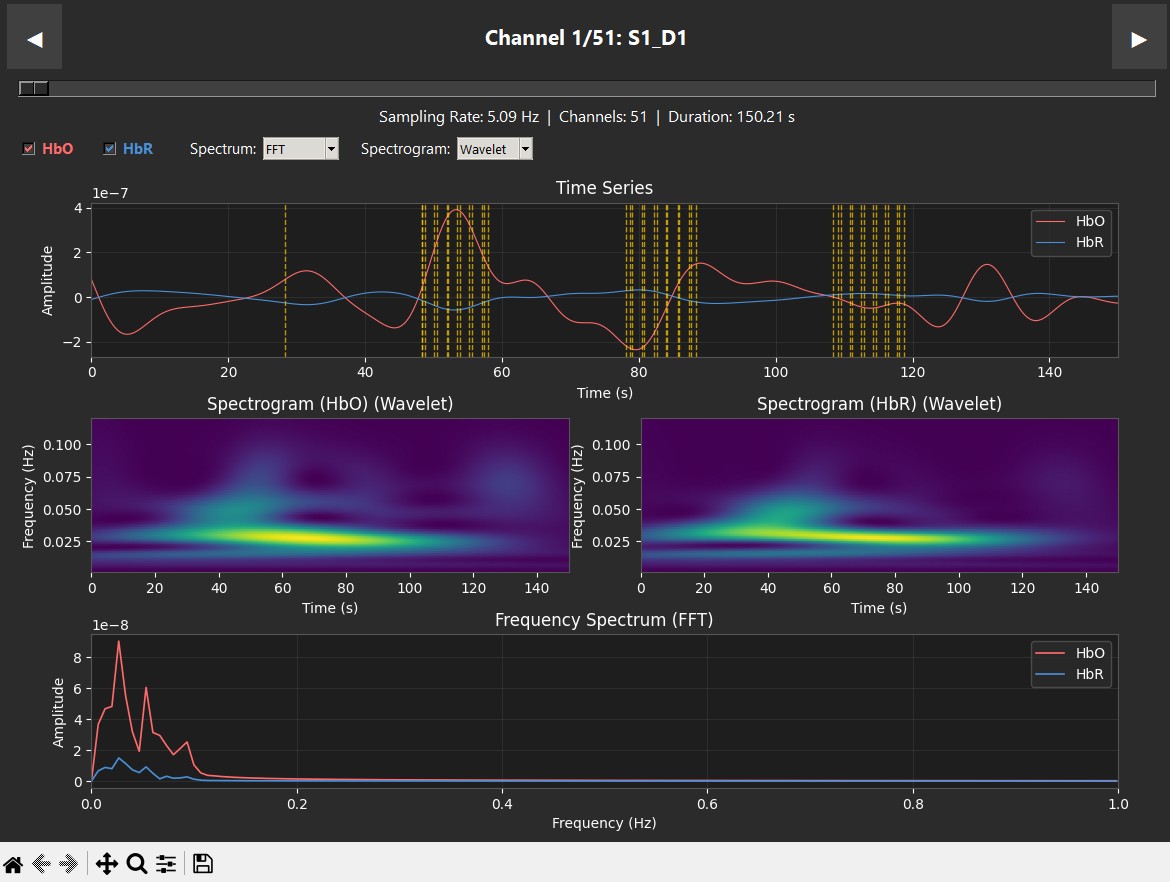
These plots display data from a single subject during a robotic heel-stimulation experiment, showing the Time Series, Spectrogram, and Frequency (PSD/FFT) for two different scenarios. The vertical dashed lines indicate markers showing when stimulation occurred.
 |
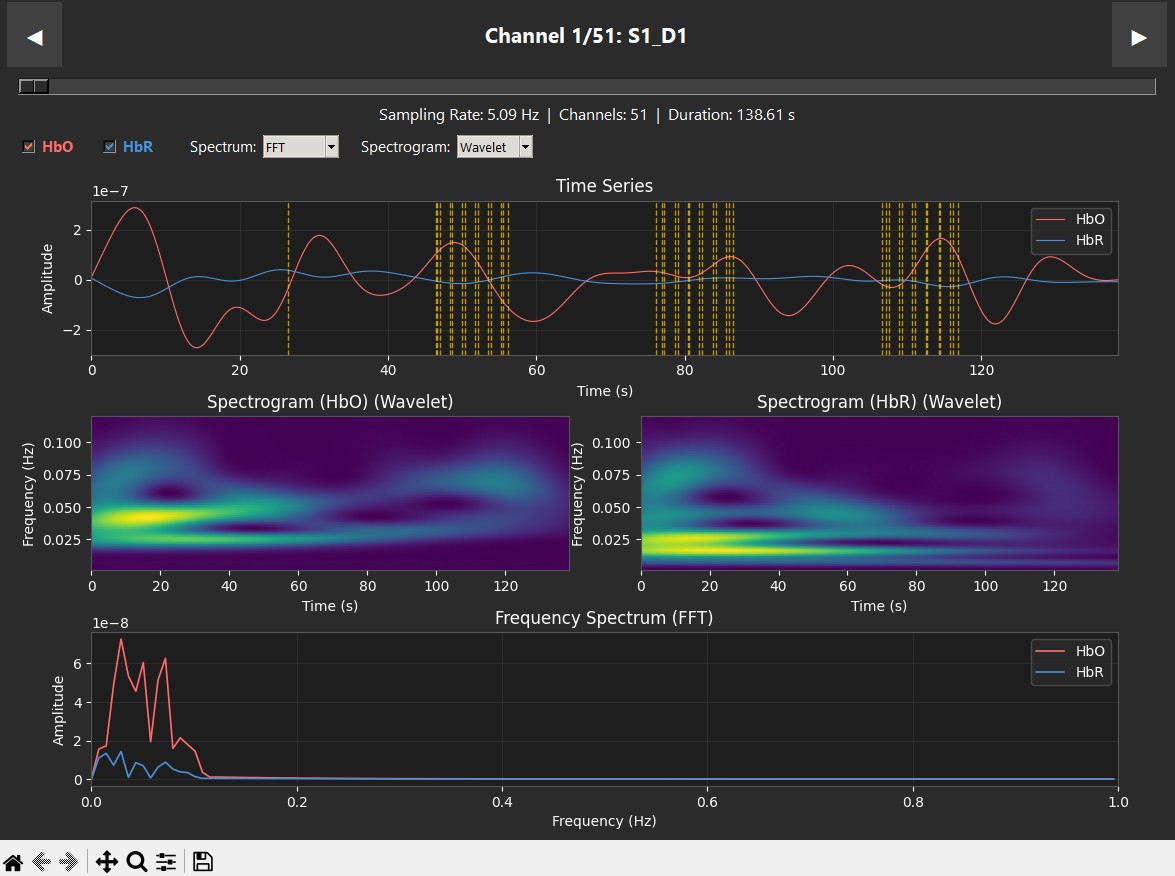 |
| Supination — clear HbO response | Pronation — low activity |
1 maintainer

Metadata
1 maintainer
Release files for neuropipeline 0.3.0
For a detailed explanation of source distributions (sdists) and built distributions (wheels), please see the package formats documentation.
Source distribution (sdist)
| File | Size | Uploaded | |
|---|---|---|---|
| neuropipeline-0.3.0.tar.gz | 37.1 kB | Details |
Built distribution (wheel)
| File | Interpreter | ABI | Platform | Reset |
|---|---|---|---|---|
| neuropipeline-0.3.0-py3-none-any.whl | Python 3 | none | any | Details |
Total release size: 77.4 kB
Release files / neuropipeline-0.3.0.tar.gz
| Download URL | neuropipeline-0.3.0.tar.gz |
|---|---|
| Size | 37.1 kB |
| Tags | Source |
|
SHA-256 checksum How to use checksums |
054a5c2bc29fde047336374cd813a05e3cbb430a52bdd32d6112211916229e1c
|
|
BLAKE2b-256 checksum How to use checksums |
c0f6ff24c6eb5b604f5d2bce33356753812a6e0c86d29fbdaab1744541ab5ed8
|
| Upload date | |
|
Uploaded using Trusted Publishing? What is trusted publishing? |
No |
| Uploaded via |
twine/6.2.0 CPython/3.12.0
|
Release files / neuropipeline-0.3.0-py3-none-any.whl
| Download URL | neuropipeline-0.3.0-py3-none-any.whl |
|---|---|
| Size | 40.2 kB |
| Tags | Python 3 |
|
SHA-256 checksum How to use checksums |
44b9e6f4c58bead8576facea51e832d463c894f949181ad78c930da6a7fe2f97
|
|
BLAKE2b-256 checksum How to use checksums |
e0528a20c7a9c4de4cb249503e711c12cf0c72adf2c08ef37cf3f6ec54f8bcce
|
| Upload date | |
|
Uploaded using Trusted Publishing? What is trusted publishing? |
No |
| Uploaded via |
twine/6.2.0 CPython/3.12.0
|














