
The open-source framework for building AI agents — and the Architect that builds them for you.














Quick start · The Architect · Graph & workflows · RAG · Tools & MCP · Gateway · Observability · Tutorials
Neurosurfer is a Python framework for building AI agents — models that don't only answer questions, but do things: call tools, read and write files, search the web, look something up in your own documents, and work through a task in several steps instead of one. You can wire those steps together yourself as a graph, or describe what you want in plain English and let the Architect build it for you — it works out which tools the job needs, runs what it made to check it actually works, and tells you plainly when something can't be built rather than handing back a workflow that quietly invents its results. The same code runs against Anthropic, OpenAI, Gemini, Bedrock or a model on your own machine, and anything you build can be served behind an OpenAI-compatible API.
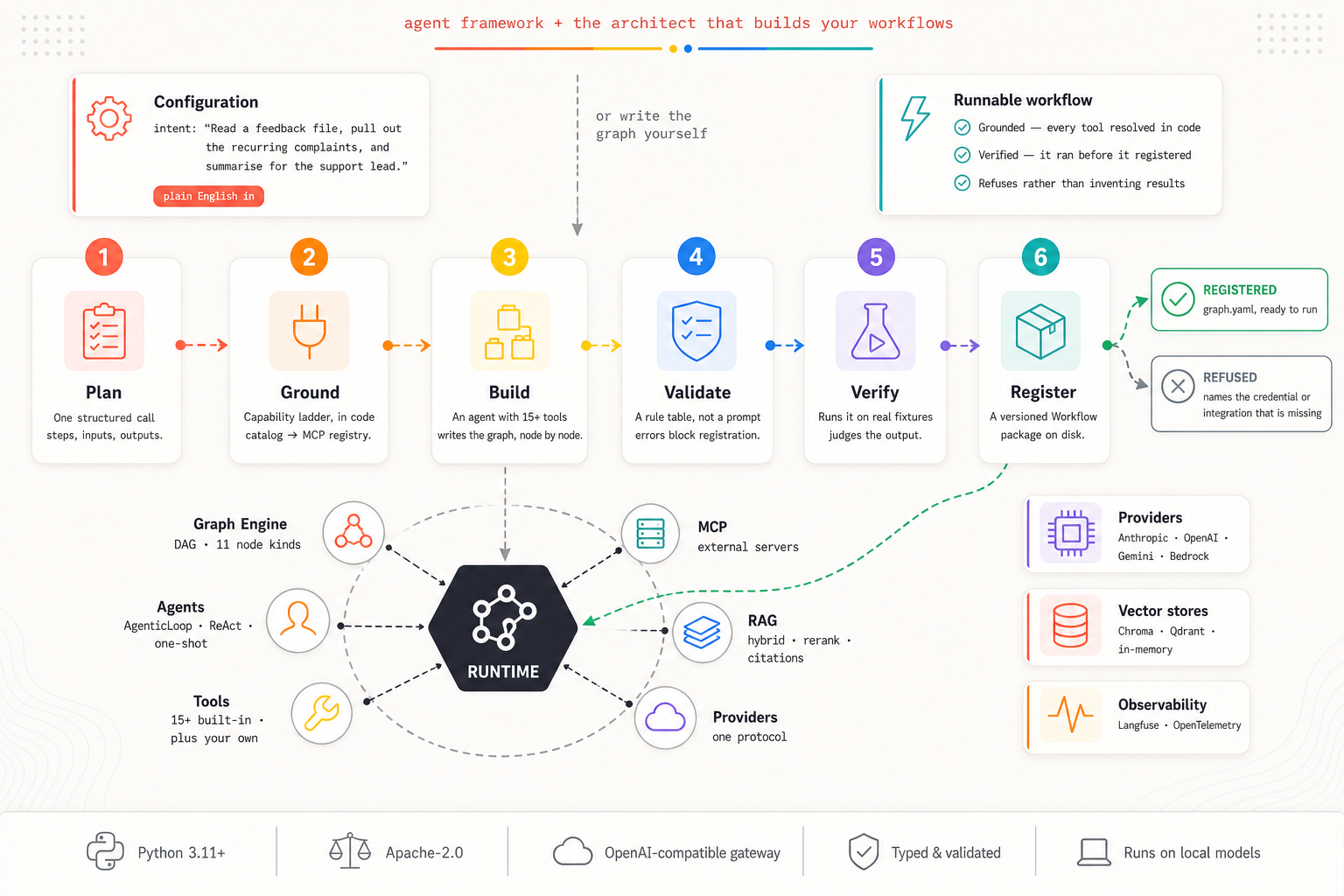
The Architect turns a plain-English request into a workflow, one step at a time.
📰 What's new
-
The Architect (latest): describe a workflow in plain English and it builds one — planning the steps, finding the tool each one needs, writing the graph, running it to check it works, and registering it. If it can't be built, it says so and names what is missing instead of guessing. See the Architect, or watch a build end to end in tutorial 06.
-
Retrieval you can measure: hybrid dense + BM25 fused by reciprocal rank, cross-encoder reranking, MMR diversity and citations with character spans. Qdrant joins Chroma and in-memory behind one vector-store contract with a conformance suite — "implements
BaseVectorDB" now means "passes the suite". Embeddings became a plugin point: sentence-transformers, OpenAI, or any/v1/embeddingsserver. Plus contextual retrieval, parent-document, multi-query/HyDE, sentence-window and semantic chunking, and an ingest manifest so one edited file costs one file's embeddings. See RAG. -
Google Gemini and Claude on Amazon Bedrock: Gemini natively over
httpxwith no new dependency; Bedrock as a thin subclass of the Anthropic provider. Four provider families, oneProviderprotocol. -
Observability: pluggable trace exporters: ship every agent run to a real backend with no code changes — Langfuse and OpenTelemetry (GenAI-semconv over OTLP → Phoenix / Grafana / Datadog). Runs → traces, LLM turns → generations, tool calls → spans; sub-agents and workflow nodes nest automatically.
Full history in the Changelog. Coming from 1.0.0, a few APIs moved — the upgrade notes cover them.
📦 What's in the box
- 🤖 Agent family:
AgenticLoop(native multi-step tool-use),ReactAgent(text-parsing ReAct for models without a native tool API), andAgent(one-shot, optionally with structured output). - 🧠 LLM providers: Anthropic Claude (direct or on Amazon Bedrock), OpenAI, Google Gemini, and any OpenAI-compatible server (Ollama, LM Studio, vLLM, llama.cpp) behind one
Providerprotocol — with canonical types, so swapping provider changes one line. - 🔧 Rich tool ecosystem: 19 built-in tools: web search (DuckDuckGo/SerpAPI), sandboxed Python execution, file ops, HTTP, headless browser, SQL, and sub-agents, plus a simple framework for your own.
- 📚 RAG pipeline: ingest → chunk → embed → retrieve → token-aware context injection, with hybrid (dense + BM25) retrieval, reranking, and citations. Chroma, Qdrant or in-memory behind one vector-store contract; embeddings from sentence-transformers, OpenAI, or any
/v1/embeddingsserver. - 📊 Token accounting: input, output and cache tokens on every agent run and every graph node, carried into traces for Langfuse/OTel to attribute.
- 🕸️ Graph & Workflows: a standalone DAG engine — 11 node kinds including
router,loop,mapandsubgraph— with a rules-based validator and persisted, runnable Workflow packages. - 🏗️ Architect: describe a workflow in plain English; it plans, sources the tools, builds the graph, runs it, judges the result, and registers it — or refuses and says what is missing.
- 🔌 MCP client: connect external Model Context Protocol servers and expose their tools to agents.
- ⚙️ OpenAI-compatible gateway:
/v1/models+/v1/chat/completionswith SSE streaming; proxy upstream backends or route to your own agents; request/response hooks. - 🔭 Observability: pluggable trace exporters (Langfuse, OpenTelemetry) with zero-overhead-when-off tracing.
- 🧪 Interactive CLI: a
neurosurferREPL for chat andneurosurfer servefor the gateway.
🎓 Tutorials
Hands-on notebooks: open any of them directly in Google Colab.
| # | Tutorial | What you'll build |
|---|---|---|
| 0 | Installation | Install Neurosurfer and its optional extras; verify your setup. |
| 1 | Providers & Agents | Connect cloud and local providers, then run AgenticLoop, ReactAgent, and one-shot Agent. |
| 2 | Custom Tools | Write your own tools and give agents new capabilities. |
| 3 | Graph Agents | Compose multi-step workflows with the graph engine and Workflow packages. |
| 4 | MCP Servers | Connect external Model Context Protocol servers and expose their tools to agents. |
| 5 | Capstone: Insight Engine | Put it all together: a database-backed insight engine over MCP. |
| 6 | The Architect | Hand an agent an intent and watch it design, build, test and register the workflow itself. |
⚡ Quick start
Install:
pip install -U neurosurfer
# with web search + gateway:
pip install -U "neurosurfer[search,serve]"
Run the interactive CLI:
neurosurfer
Run the OpenAI-compatible gateway:
neurosurfer serve --host 0.0.0.0 --port 8000
# proxy an upstream backend:
neurosurfer serve --upstream-url http://localhost:1234
Multi-step agent (Anthropic):
import asyncio, os
from pathlib import Path
from neurosurfer.llm.providers.anthropic import AnthropicProvider
from neurosurfer.agents import AgenticLoop, Guardrails
from neurosurfer.tools import default_pool

provider = AnthropicProvider(api_key=os.environ["ANTHROPIC_API_KEY"], model="claude-opus-4-8")

class AutoIO:  # auto-approving IOHandler for scripts (see the Agents guide)
    async def ask(self, question, options=None): return (options or ["yes"])[0]
    async def request_plan_approval(self, plan): return True, ""
    async def request_shell_approval(self, command, reason): return True
    async def request_write_approval(self, path, summary): return "once"
    def notify(self, message): pass

async def main():
    agent = AgenticLoop(
        provider=provider, tools=default_pool(),
        system_prompt="Use tools to answer, then finish.",
        guardrails=Guardrails(), io=AutoIO(), cwd=Path.cwd(),
    )
    async for event in agent.run("Search the web for the latest news on AI agents."):
        if hasattr(event, "text"):
            print(event.text, end="", flush=True)

asyncio.run(main())
One-shot with structured output:
import asyncio
from pathlib import Path
from pydantic import BaseModel
from neurosurfer.agents import Agent, Guardrails
from neurosurfer.tools import default_pool

class Summary(BaseModel):
    title: str
    points: list[str]

agent = Agent(
    provider=provider, tools=default_pool(),
    system_prompt="Answer concisely.",
    guardrails=Guardrails(), io=AutoIO(), cwd=Path.cwd(),
    output_schema=Summary,
)
result = asyncio.run(agent.complete("Summarise the Neurosurfer framework in 3 bullet points."))
print(result.title, result.points)  # `result` is a validated Summary instance
Register an agent as an OpenAI-compatible model:
from neurosurfer.app.server import NeurosurferServer
from neurosurfer.agents import AgenticLoop

server = NeurosurferServer()
server.register_agent(AgenticLoop(provider=provider), model_id="my-agent")
server.run()  # → http://localhost:8000/v1/chat/completions
🏗️ Two ways to build a workflow
Most frameworks give you the first. Neurosurfer gives you both, over the same engine.
Write it — a typed DAG with 11 node kinds, control flow, and a validator that refuses a graph that cannot run before it spends a model call:
from neurosurfer.graph import Graph, BaseNode

graph = Graph(
    name="summarise_and_title",
    inputs=[{"name": "article", "type": "string"}],
    nodes=[
        BaseNode(id="summary", goal="Summarise {article} in three sentences."),
        BaseNode(id="title", goal="Write a catchy title for the summary.",
                 depends_on=["summary"]),
    ],
    outputs=["title"],
)
Or describe it — and the Architect does the rest:
from neurosurfer.architect import ArchitectAgent

path = await ArchitectAgent(provider).build(
    "Read a text file of customer feedback, pull out the recurring complaints, "
    "and write a short summary for the support lead."
)
An LLM step cannot read a file however well you word it. The Architect checks that before it designs a node, runs what it built to see whether it works, and refuses rather than shipping a workflow that invents its results. More in the Architect docs.
🔭 Observability
See and debug what your agents actually do in a real dashboard: the LLM turns, tool calls, token usage, and cost. Tracing is a cross-cutting, side-channel layer: it observes the event stream every agent already emits, never consumes it, so nothing about how you call agent.run(...) changes.
- Zero code changes: auto-on from the environment. Set a backend's connection vars and it activates on the next run.
- Two backends in the box: Langfuse (batteries-included LLM observability) and OpenTelemetry (vendor-neutral GenAI-semconv spans over OTLP → Honeycomb, Phoenix, Grafana Tempo, Datadog…). Or write your own
TraceExporter. - Automatic nesting: a run is a trace; each LLM turn a generation (with token cost); each tool call a span; spawned sub-agents and workflow nodes nest under the parent (
workflow → node → agent → tool). - Safe by design: zero overhead when off, and a misbehaving or unreachable exporter never breaks a run.
pip install "neurosurfer[observability]"

# Langfuse: auto-detected from the environment
export LANGFUSE_PUBLIC_KEY=pk-...  LANGFUSE_SECRET_KEY=sk-...
# …or any OTel backend:
export OTEL_EXPORTER_OTLP_ENDPOINT=http://localhost:4318
That's it. Run any agent and the traces show up. Full guide: Observability docs.
🧩 Install options
| Extra | What you get |
|---|---|
| (base) | Agents, LLM providers, tools, RAG, server, CLI |
search |
Web search tool (DuckDuckGo, BM25 ranking, HTML extraction) |
browser |
Headless browser tool via Playwright |
local |
tiktoken for accurate token counting with local models |
rag |
ChromaDB, sentence-transformers, PDF/DOCX/PPTX readers |
qdrant |
Qdrant vector store client |
bedrock |
Claude on Amazon Bedrock (boto3) |
serve |
FastAPI + uvicorn for the OpenAI-compatible gateway |
mcp |
Model Context Protocol client SDK |
observability |
Langfuse + OpenTelemetry trace exporters |
dev |
pytest, ruff, mypy, build tools |
pip install "neurosurfer[search,serve,rag,observability]"
📄 License
Licensed under the Apache-2.0 License. See LICENSE.
💬 Support
- Star the project on GitHub
- Ask & share in Discussions
- File Issues
- Security: report privately to naumanhsa965@gmail.com
📚 Citation
@software{neurosurfer,
  author  = {Neurosurfer Team},
  title   = {Neurosurfer: A Production-Ready AI Agent Framework},
  year    = {2026},
  url     = {https://github.com/NaumanHSA/neurosurfer},
  license = {Apache-2.0}
}
1 maintainer

Metadata
1 maintainer
Release files for neurosurfer 2.0.0
For a detailed explanation of source distributions (sdists) and built distributions (wheels), please see the package formats documentation.
Source distribution (sdist)
| File | Size | Uploaded | Provenance | Actions |
|---|---|---|---|---|
| neurosurfer-2.0.0.tar.gz | 8.6 MB | With provenance | Details for neurosurfer-2.0.0.tar.gz |
Built distribution (wheel)
| File | Interpreter | ABI | Platform | Actions Reset |
|---|---|---|---|---|
| neurosurfer-2.0.0-py3-none-any.whl | Python 3 | none | any | Details for neurosurfer-2.0.0-py3-none-any.whl |
Total release size: 9.4 MB
Release files / neurosurfer-2.0.0.tar.gz
| Download URL | neurosurfer-2.0.0.tar.gz |
|---|---|
| Size | 8.6 MB |
| Tags | Source |
|
SHA-256 checksum How to use checksums |
6e578a98142474861631e879cc8968504e9155e7bb0ff7f1b33bc9feb2d8805d
|
|
BLAKE2b-256 checksum How to use checksums |
efb0fcd5be9c29f2df41edcefb945931d2a8c6f22a6361fb95cb20bb24e48a94
|
| Upload date | |
|
Uploaded using Trusted Publishing? What is trusted publishing? |
Yes |
| Uploaded via |
twine/7.0.0 CPython/3.13.14
|
Provenance
Provenance describes where a file came from. On PyPI, provenance is shared via attestations, which provide a verifiable record of the build or publishing details. View details, limitations and caveats.


PyPI Publish Attestation
PyPI verified that this artifact, at this checksum, originated from the publisher listed below.
Signed by GitHub Actions, verified by PyPI on Aug 17, 2026.
Transparency logRelease files / neurosurfer-2.0.0-py3-none-any.whl
| Download URL | neurosurfer-2.0.0-py3-none-any.whl |
|---|---|
| Size | 838.5 kB |
| Tags | Python 3 |
|
SHA-256 checksum How to use checksums |
dff82b10cec96b5b5d5cf834856977e3027ca0d6ba3b323984f304ab80c2e437
|
|
BLAKE2b-256 checksum How to use checksums |
25409e98a8c3f8bbb476713c98c625f0301b372fbc5346f6c81dc6aa9c4c9db5
|
| Upload date | |
|
Uploaded using Trusted Publishing? What is trusted publishing? |
Yes |
| Uploaded via |
twine/7.0.0 CPython/3.13.14
|
Provenance
Provenance describes where a file came from. On PyPI, provenance is shared via attestations, which provide a verifiable record of the build or publishing details. View details, limitations and caveats.
PyPI Publish Attestation
PyPI verified that this artifact, at this checksum, originated from the publisher listed below.
Signed by GitHub Actions, verified by PyPI on Aug 17, 2026.
Transparency logSecurity for neurosurfer 2.0.0
Provenance
Provenance describes where a file came from. On PyPI, provenance is shared via attestations, which provide a verifiable record of the build or publishing details. View details, limitations and caveats.
Full provenance
All 2 files in this release have been uploaded with provenance metadata.
Attestation for neurosurfer-2.0.0.tar.gz
PyPI Publish Attestation
PyPI verified that this artifact, at this checksum, originated from the publisher listed below.
Signed by GitHub Actions, verified by PyPI on Aug 17, 2026.
Transparency logA note on package security
PyPI is a repository for distributing packages, not a service for auditing them. While third-party security researchers and our staff do their best to detect and remove malicious packages, PyPI cannot guarantee the quality, security or suitability of any given package.
To learn more about protecting yourself from malicious actors, visit our package security documentation.














