
Nexify is a web framework for building APIs with AWS Lambda Python runetime based on standard Python type hints.

Project description
Nexify


Documentation: https://nexify.junah.dev
Source Code: https://github.com/junah201/nexify
Nexify is a lightweight web framework for building APIs on AWS Lambda's Python runtime based on standard Python type hints.
The key features are:
- 🚀 Automatic Parsing: Automatically parses AWS Lambda's Event and Context objects.
- 🔍 Data Validation: Validate user's request and response using Pydantic.
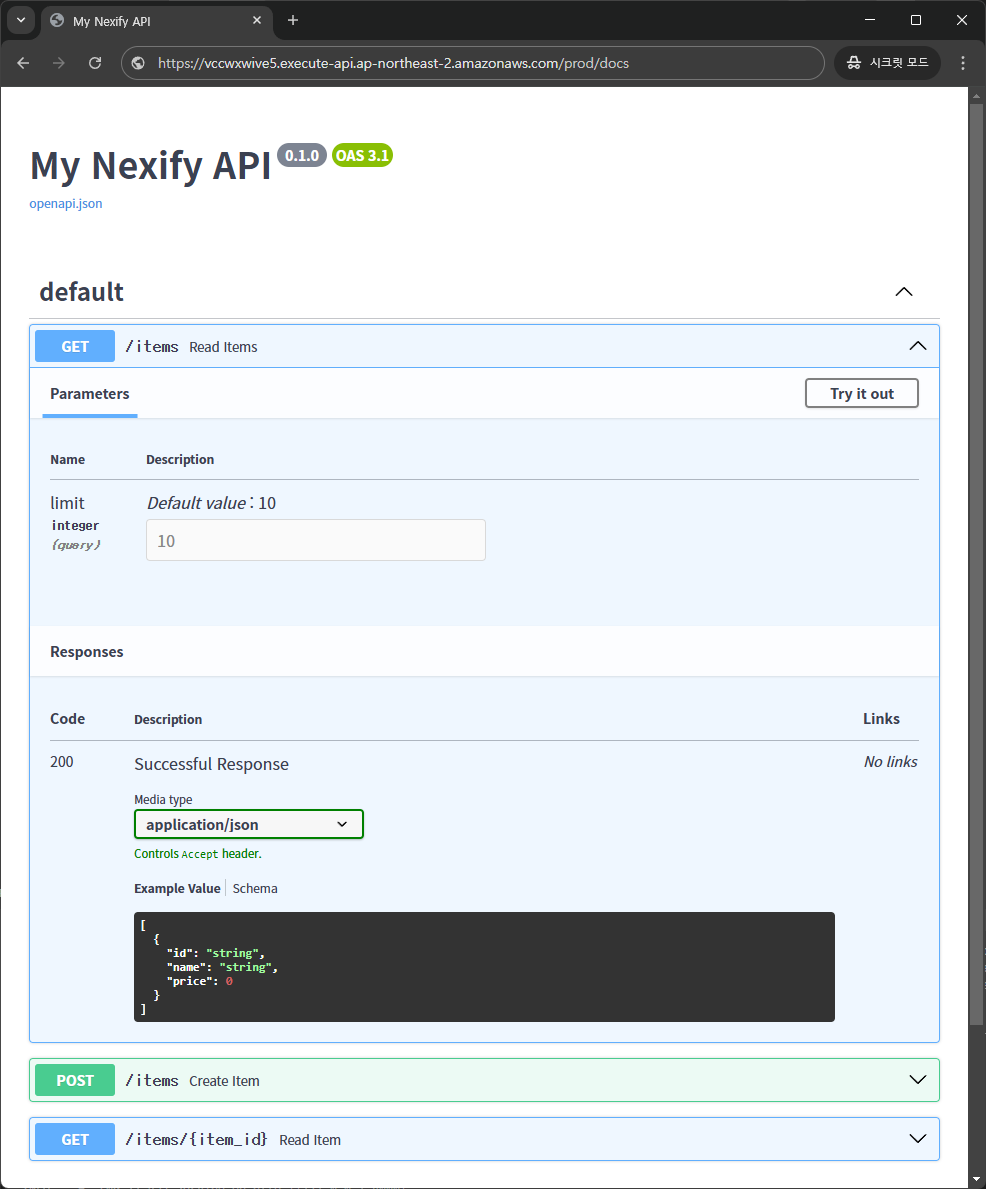
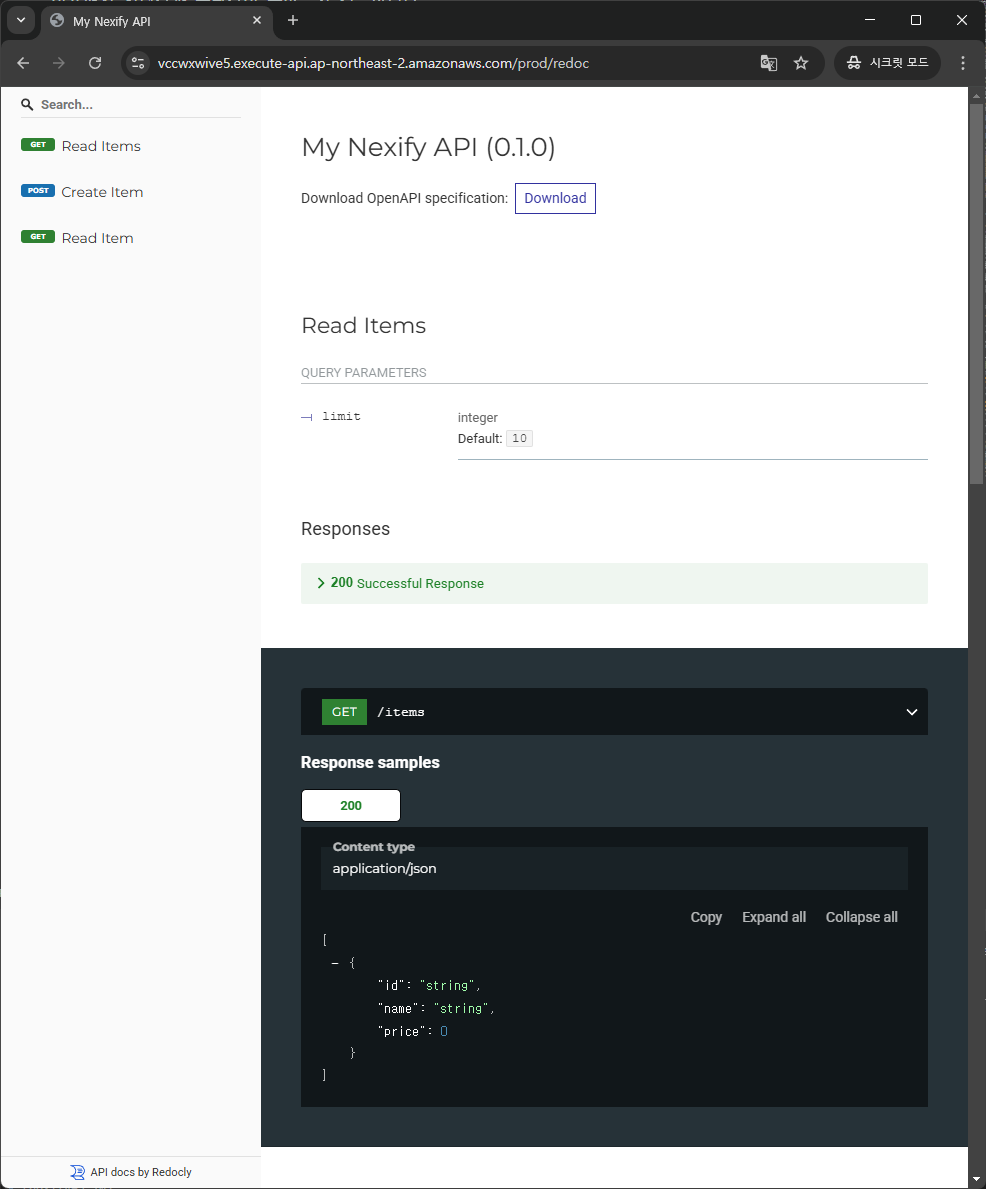
- 📜 OpenAPI Documentation: Generates API documentation with Swagger UI and ReDoc.
- ☁️ Deployment Automation: Deploy AWS Lambda and related infrastructure with a simple command.
Requirements
Nexify requires the following libraries:
- Pydantic for data validation and OpenAPI documentation.
- Boto3 for AWS deployment. (Only required in local development, not in production.)
Installation
First, set up a virtual environment, then install Nexify:
$ pip install "nexify[cli]"

---> 100%
Note: Some terminal environments require quoting "nexify[cli]" for correct installation.
Usage
Creating a Project
$ nexify init
Enter the project name: myapp
🎉 Project myapp created at 'C:\Users\junah\Desktop\myapp'
$ cd myapp
Running nexify init command generates a main.py file, a nexify.json configuration file, and etc.
- Example
main.py:
from typing import Annotated

from nexify import Body, Nexify, Path, Query, status
from pydantic import BaseModel, Field

app = Nexify(title="My Nexify API", version="0.1.0")


class Item(BaseModel):
    id: str
    name: str
    price: Annotated[int, Field(ge=0)]


@app.get("/items")
def read_items(limit: Annotated[int, Query(default=10)]) -> list[Item]:
    return [Item(id=f"{i + 1}", name=f"Item {i}", price=i * 10) for i in range(limit)]


@app.post("/items", status_code=status.HTTP_204_NO_CONTENT)
def create_item(item: Annotated[Item, Body()]): ...


@app.get("/items/{item_id}")
def read_item(item_id: Annotated[str, Path(min_length=2, max_length=8)]) -> Item:
    return Item(id=item_id, name="Foo", price=42)
- Example
nexify.json:
{
  "service": "myapp",
  "provider": {
    "name": "aws",
    "runtime": "python3.10",
    "region": "ap-northeast-2",
    "profile": "default",
    "logRetentionInDays": 14,
    "architecture": "x86_64",
    "memorySize": 128,
    "timeout": 10,
    "stage": "prod",
    "environment": { "YOUR_CUSTOM_ENV": "${env:YOUR_CUSTOM_ENV}" },
    "iamRoleStatements": [
      { "Effect": "Allow", "Action": ["s3:*"], "Resource": "*" }
    ]
  },
  "package": {
    "include": ["main.py"],
    "exclude": [".venv/**", ".git/**", ".gitignore"],
    "pipCmdExtraArgs": [""]
  },
  "resources": {
    "Resources": {
      "APIGatewayRestAPI": {
        "Type": "AWS::ApiGateway::RestApi",
        "Properties": {
          "Name": "myapp-API",
          "EndpointConfiguration": { "Types": ["EDGE"] },
          "Policy": "",
          "Description": "API for myapp"
        }
      }
    }
  }
}
Deploying
$ nexify deploy
✔ App imported successfully!
✔ Config loaded successfully!
✔ App analyzed successfully!
✔ Requirements installed successfully!
✔ Lambda functions packaged successfully!
✔ Basic stack created successfully!
✔ Template created successfully!
✔ Stack updated successfully!

🎉 Deployment successful!

Endpoints:
    - GET   https://apigatewayid.execute-api.ap-northeast-2.amazonaws.com/prod/items
    - POST  https://apigatewayid.execute-api.ap-northeast-2.amazonaws.com/prod/items
    - GET   https://apigatewayid.execute-api.ap-northeast-2.amazonaws.com/prod/items/{item_id}


Functions:
    - read_items
    - create_item
    - read_item
Once deployment is complete, API endpoints are generated.
Checking the API
Open the following URL in a browser to check the API response:
https://apigatewayid.execute-api.ap-northeast-2.amazonaws.com/prod/items/12
Note: Use the URL displayed after executing nexify deploy command.
Response example:
{"id":"12","name":"Foo","price":42}
Congratulations 🎉 You have already created an API.
- The
/itemsand/items/{item_id}endpoints can now receive HTTP requests. - The
/itemsendpoint handlesGETandPOSTrequests, while/items/{item_id}handlesGETrequests. - The
/itemsendpoint has aintquery parameterlimitwith a default value of10. - The
/items/{item_id}endpoint has astrpath parameteritem_idwith a length constraint between2and8characters.
Nexify uses Pydantic internally to validate the input and output data.
Swagger UI
Now go to https://apigatewayid.execute-api.ap-northeast-2.amazonaws.com/prod/docs.
Note: Please use the output URL after running the nexify deploy command.
You will see the automatic interactive API documentation (provided by Swagger UI):
ReDoc
And now, go to https://apigatewayid.execute-api.ap-northeast-2.amazonaws.com/prod/redoc.
Note: Please use the output URL after running the nexify deploy command.
You will see the automatic interactive API documentation (provided by ReDoc):
Summary
With Nexify, you can easily develop APIs on AWS Lambda using standard Python type hints.
- 🔍 Data Validation: Uses Pydantic for input and response validation.
- Automatically generates clear errors for invalid data.
- Supports validation for nested JSON objects.
- 📦 Automatic Parsing: Extracts body, pathParameters, queryStringParameters, and more from the Event object.
- 🔄 Response Conversion: Supports conversion of standard Python types (str, int, float, bool, list) as well as datetime, UUID, dataclass, and more.
- 📜 OpenAPI Documentation: Supports Swagger UI and ReDoc.
- ☁️ Deployment Automation: Deploy AWS Lambda with a single nexify deploy command.
License
This project is licensed under the terms of the MIT license.
Release history Release notifications | RSS feed


Download files
Download the file for your platform. If you're not sure which to choose, learn more about installing packages.
Source Distribution
Built Distribution
Filter files by name, interpreter, ABI, and platform.
If you're not sure about the file name format, learn more about wheel file names.
Copy a direct link to the current filters
File details
Details for the file nexify-0.7.1.tar.gz.
File metadata
- Download URL: nexify-0.7.1.tar.gz
- Upload date:
- Size: 61.5 kB
- Tags: Source
- Uploaded using Trusted Publishing? No
- Uploaded via: pdm/2.22.3 CPython/3.10.16 Linux/6.8.0-1020-azure
File hashes
| Algorithm | Hash digest | |
|---|---|---|
| SHA256 |
ab5dcf18a6c9d94935f01ab4418bdae8e86e7be6c398b42882da2a7dd706d3dd
|
|
| MD5 |
326377c92078463dfe19f274c2d44ece
|
|
| BLAKE2b-256 |
c4446538f9518571e02cddcec8e6fa1951fd242f8e8552ea778a9ff432d084b8
|
File details
Details for the file nexify-0.7.1-py3-none-any.whl.
File metadata
- Download URL: nexify-0.7.1-py3-none-any.whl
- Upload date:
- Size: 51.8 kB
- Tags: Python 3
- Uploaded using Trusted Publishing? No
- Uploaded via: pdm/2.22.3 CPython/3.10.16 Linux/6.8.0-1020-azure
File hashes
| Algorithm | Hash digest | |
|---|---|---|
| SHA256 |
b1c020a9b4784888b52b12720e95ede4f5a2c88a8016a7b7f163605037ed98d9
|
|
| MD5 |
a280232c9b48a411b33d9073eb3475f6
|
|
| BLAKE2b-256 |
043c9d97746daa4b55582fbe02f33c146d68e0c2bd7cc0e54cf8b6d2b111904a
|






