
A TUI orchestrator to manage your installed terminal tools: access everything through a single command

Project description
Nexus
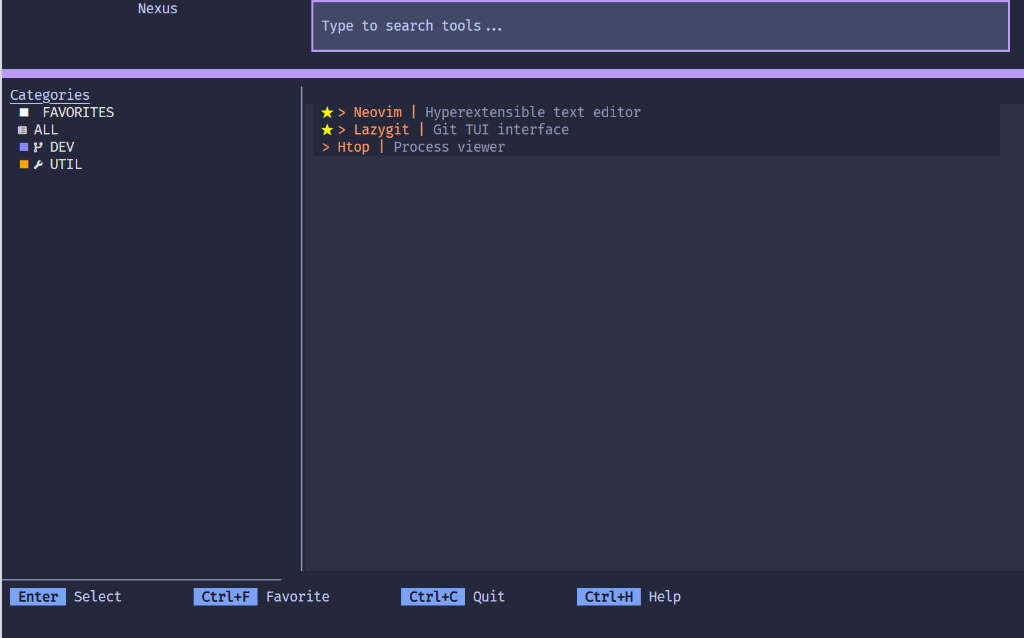
Nexus is a terminal dashboard that lets you launch your favorite CLI and TUI tools (like Neovim, Git UIs, or custom scripts) from a single interactive menu. No memorizing commands or directories required.
Think of Nexus as a launcher for terminal tools, similar to how Raycast or Alfred launch GUI apps.
Source Code: https://github.com/jdluu/Nexus | Changelog: https://github.com/jdluu/Nexus/blob/main/CHANGELOG.md
Prerequisites
- Python 3.12 or newer.
- The
uvpackage manager. - Recommended: A modern terminal emulator with TrueColor support (e.g., Windows Terminal, ghostty, Kitty, or WezTerm).
- Recommended: A Nerd Font for optimal icon rendering.
Installation
It is recommended to use uv, a fast Python package and tool manager (similar to pipx), for a clean, isolated global installation.
# Install globally so you can run 'nexus' from anywhere
uv tool install nexus-tui
Alternative (Standard pip):
You can also install via pip, though it is recommended uv or pipx to keep dependencies isolated.
pip install nexus-tui
Upgrade
To update to the latest version:
uv tool upgrade nexus-tui
Features
- Smart Search: Instantly find tools with fuzzy matching and a built-in Command Palette (
Ctrl+P). - Dynamic Flags: Pass custom arguments (e.g.,
--verbose,--dry-run) to your tools at launch time. - Advanced Project Browser: Browse your entire filesystem or scan defined roots to find project context. Supports selecting both folders and individual files.
- Responsive Design System: Fully themeable interface with support for Tokyo Night (Dark, Storm, Light) and automatic system preference detection.
- Secure Secrets: Seamless integration with Infisical for environment variable management.
- Persistence: Nexus remembers your recently accessed projects for quick re-launching.
Configuration
Nexus utilizes a tools.toml file for configuration.
Minimal Starter Config
# Define where your code projects live
project_root = "~/Projects"

# Add a tool with placeholder support
[[tool]]
label = "Edit"
category = "DEV"
description = "Open project in Neovim"
command = "nvim {project}"
requires_project = true
supports_flags = true
Command Placeholders
You can use the following placeholders in your command strings:
{project}: Replaced by the absolute path of the selected project or file.{flags}: Replaced by any custom arguments you enter at launch.
Controls
- Arrow Keys: Navigate through lists.
- Enter: Confirm selection or launch tool.
- Ctrl+P: Open the global Command Palette.
- Ctrl+B: Open the Advanced Project Browser (when in project picker).
- Ctrl+T: Open the Theme Picker.
- TypeAnywhere: Instantly filter tools by typing.
- Esc: Go back or return to the previous view.
- Ctrl+Q: Exit the application (with confirmation).
- F1: Show Help / Controls.
FAQ & Troubleshooting
Does Nexus discover tools automatically?
No. You must define your tools in tools.toml so you have full control over what appears in your dashboard.
Is this a replacement for my shell?
No. Nexus is a dashboard. When you launch a tool, it temporarily suspends itself to let the tool take over your terminal. When the tool exits, Nexus returns.
My icons look broken (rectangles or question marks).
Ensure you are using a Nerd Font and that your terminal emulator is configured to use it.
Development (For Contributors)
To configure the development environment:
-
Synchronize dependencies:
uv sync -
Run the application locally:
uv run nexus
-
Execute the comprehensive test suite:
uv run pytest --cov=nexus
-
Perform static analysis and type checking:
uv run ruff check .
uv run mypy .
Release history Release notifications | RSS feed


Download files
Download the file for your platform. If you're not sure which to choose, learn more about installing packages.
Source Distribution
Built Distribution
Filter files by name, interpreter, ABI, and platform.
If you're not sure about the file name format, learn more about wheel file names.
Copy a direct link to the current filters
File details
Details for the file nexus_tui-0.2.1.tar.gz.
File metadata
- Download URL: nexus_tui-0.2.1.tar.gz
- Upload date:
- Size: 22.0 kB
- Tags: Source
- Uploaded using Trusted Publishing? No
- Uploaded via: uv/0.10.9 {"installer":{"name":"uv","version":"0.10.9","subcommand":["publish"]},"python":null,"implementation":{"name":null,"version":null},"distro":{"name":"Ubuntu","version":"24.04","id":"noble","libc":null},"system":{"name":null,"release":null},"cpu":null,"openssl_version":null,"setuptools_version":null,"rustc_version":null,"ci":true}
File hashes
| Algorithm | Hash digest | |
|---|---|---|
| SHA256 |
ef274a17a2aee1258225f3b0d9834b791a3819bb8f02b217e61d92f2d34f6a20
|
|
| MD5 |
e678e5093817aafb8e7ce8c495e35c6a
|
|
| BLAKE2b-256 |
a9e695edcd0970c2d6b5fa8b31cad4a9748176031fce3f0c0f40995f22fca1f4
|
File details
Details for the file nexus_tui-0.2.1-py3-none-any.whl.
File metadata
- Download URL: nexus_tui-0.2.1-py3-none-any.whl
- Upload date:
- Size: 32.4 kB
- Tags: Python 3
- Uploaded using Trusted Publishing? No
- Uploaded via: uv/0.10.9 {"installer":{"name":"uv","version":"0.10.9","subcommand":["publish"]},"python":null,"implementation":{"name":null,"version":null},"distro":{"name":"Ubuntu","version":"24.04","id":"noble","libc":null},"system":{"name":null,"release":null},"cpu":null,"openssl_version":null,"setuptools_version":null,"rustc_version":null,"ci":true}
File hashes
| Algorithm | Hash digest | |
|---|---|---|
| SHA256 |
74cd3b5262e0c3bca36e5f4ace6db86a8d9bba2312913cc7585da280c0452ec9
|
|
| MD5 |
438e35af26235eeeb95fc6adb3a5ffdc
|
|
| BLAKE2b-256 |
39fb38e1833198ed970633b53cbadf66279968ccca4ecc38de480e3e97a1e8da
|






