
Generate metro-map-style SVG diagrams from Mermaid graph definitions

Project description
Documentation | Playground | Gallery
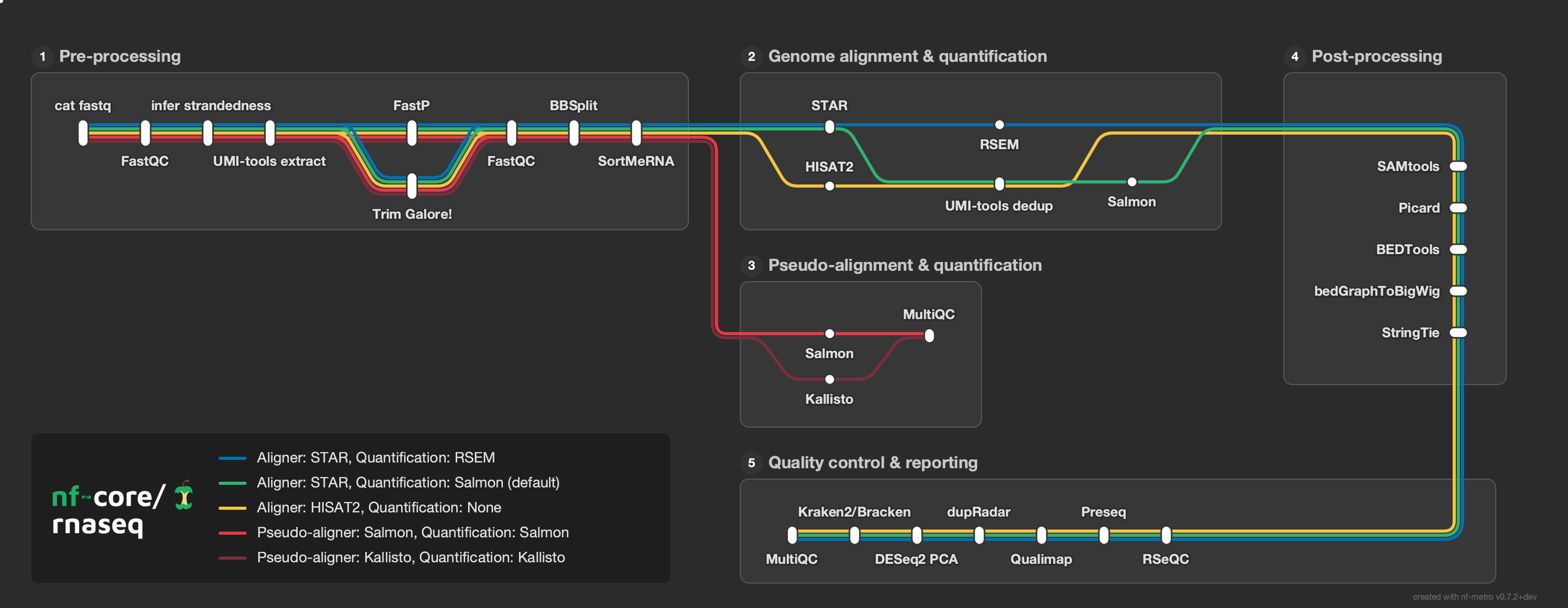
Generate metro-map-style SVG diagrams from Mermaid graph definitions with %%metro directives. Designed for visualizing bioinformatics pipeline workflows (e.g., nf-core pipelines) as transit-style maps where each analysis route is a colored "metro line."
Try it without installing: the nf-metro playground runs the full layout engine in your browser. Edit a .mmd file, preview the result live, import a Nextflow -with-dag diagram directly, and tweak layout options - no Python, no CLI needed.
What nf-metro does
- Static SVG - a self-contained diagram you can commit, embed in a README, or drop into docs.
- Interactive HTML - pan, zoom, hover for station details, click a line in the legend to isolate it and zoom to its extent.
- Live progress overlay - light up stations in real time as a Nextflow pipeline runs, using
nf-metro servewith Nextflow's-with-weblog. - Dashboard mode -
nf-metro serve-multihosts many pipelines or runs side by side on one page. - Nextflow DAG import - convert a
-with-dagMermaid export into a metro map withnf-metro convert(or--from-nextflowonrender). - Embedded data manifest - every SVG carries a machine-readable JSON manifest so overlays and downstream tools can address stations without re-running the layout engine.
Installation
pip (PyPI)
pip install nf-metro
Conda (Bioconda)
conda install bioconda::nf-metro
Container (Seqera Containers)
A pre-built container is available via Seqera Containers:
docker pull community.wave.seqera.io/library/pip_nf-metro:611b1ba39c6007f1
Development
pip install -e ".[dev]"
Requires Python 3.10+.
Quick start
Render a metro map from a .mmd file:
nf-metro render examples/simple_pipeline.mmd -o pipeline.svg
Validate your input without rendering:
nf-metro validate examples/simple_pipeline.mmd
Inspect structure (sections, lines, stations):
nf-metro info examples/simple_pipeline.mmd
See the Guide for a step-by-step walkthrough of writing .mmd files.
CLI reference
nf-metro render
Render a Mermaid metro map definition to SVG or interactive HTML.
nf-metro render [OPTIONS] INPUT_FILE
Every layout/render option below also has a %%metro directive equivalent in the .mmd file; an explicitly-passed flag overrides the directive.
| Option | Default | Description |
|---|---|---|
-o, --output PATH |
<input>.<format> |
Output file path |
--format [svg|html] |
svg |
Output format: svg or interactive html |
--theme [nfcore|light|seqera] |
from style:, else nfcore |
Visual theme |
--legend TEXT |
auto | Legend+logo position (keyword, keyword | canvas, keyword | dx,dy, or x,y) |
--line-spread [bundle|centered|rails] |
bundle |
How lines sharing a station relate vertically |
--width INTEGER |
auto | SVG width in pixels |
--height INTEGER |
auto | SVG height in pixels |
--x-spacing FLOAT |
auto | Horizontal spacing between layers |
--y-spacing FLOAT |
auto | Vertical spacing between tracks |
--fold-threshold INTEGER |
15 |
Max station-columns a section row may reach before wrapping to the next row |
--animate / --no-animate |
off | Add animated balls traveling along lines |
--directional / --no-directional |
off | Draw static chevrons along each route pointing in the flow direction |
--strict / --no-strict |
off | Treat a layout-invariant violation as an error instead of a warning |
--debug / --no-debug |
off | Show debug overlay (ports, hidden stations, edge waypoints) |
--logo PATH |
none | Logo image path (overrides %%metro logo: directive) |
--line-order [definition|span] |
definition |
Line ordering strategy: definition preserves .mmd order, span sorts by section span |
--diamond-style [straight|symmetric] |
straight |
Fork-join layout: straight keeps the top branch on the main track; symmetric fans evenly |
--center-ports / --no-center-ports |
off | Centre inter-section ports on the shorter of the two connected sections |
--compact-offsets / --no-compact-offsets |
off | Size each station only for the lines actually passing through it |
--section-x-gap FLOAT |
50 |
Horizontal gap between sections |
--section-y-gap FLOAT |
50 |
Vertical gap between sections |
--label-angle FLOAT |
theme default | Station-label angle in degrees |
--font-scale FLOAT |
1.0 |
Scale text and the label metrics that drive layout spacing |
--logo-scale FLOAT |
1.0 |
Scale the logo within the legend |
--legend-min-height FLOAT |
0 |
Minimum legend content height in pixels |
--legend-logo-gap FLOAT |
auto | Gap between the logo and the legend entries |
--validate |
off | Run the render-geometry oracle over the drawn SVG and report violations |
--from-nextflow |
off | Convert Nextflow -with-dag mermaid input before rendering |
--title TEXT |
none | Pipeline title (overrides the %%metro title: directive) |
Embedding options
Flags for producing an SVG to embed in another page or application. See the embedding guide for when to use each.
| Option | Default | Description |
|---|---|---|
--responsive / --no-responsive |
off | Emit viewBox only (no fixed width/height) so the host can scale with CSS |
--embed-font / --no-embed-font |
off | Inline Inter as a base64 @font-face so the SVG renders identically on any host |
--text-to-paths / --no-text-to-paths |
off | Convert text to vector paths (no font dependency; loses selectable text; needs fonttools[woff]) |
--bare / --no-bare |
off | Omit the title and outer padding so the canvas hugs the content (keeps the watermark) |
--svg-class-prefix TEXT |
none | Prefix every SVG presentation class so multiple maps on one page don't collide |
--no-dark-mode-css |
off | Suppress the prefers-color-scheme: dark block when the host manages its own theme |
--no-chrome-css |
off | Bake concrete chrome colors instead of --nfm-* var() (needed for raster export, e.g. cairosvg) |
The --logo flag lets you use the same .mmd file with different logos per theme:
nf-metro render pipeline.mmd -o pipeline_dark.svg --theme nfcore --logo logo_dark.png
nf-metro render pipeline.mmd -o pipeline_light.svg --theme light --logo logo_light.png
Interactive HTML output
--format html produces a self-contained .html file with the SVG inlined plus a small JS/CSS layer (no external dependencies, no network):
nf-metro render pipeline.mmd --format html -o pipeline.html
The page provides:
- Drag to pan, scroll to zoom (Cmd/Ctrl+scroll in embedded mode).
- Hover a station to see its label, section, and the lines passing through it.
- Click a line in the legend to isolate it. Stations and sections not carrying that line disappear and the view zooms to the bounding box of what remains. Click again, hit
Esc, or use the Reset button to restore. - Embed... opens a copy-snippet panel with three options:
- Inline HTML - a self-contained
<div>you paste into any HTML host (MkDocs, Confluence, Notion, blog templates). Keeps full interactivity, no iframe. - iframe - a one-liner pointing at the hosted
.htmlfile. - Static SVG - the raw
<svg>markup for contexts that strip scripts.
- Inline HTML - a self-contained
GitHub READMEs strip <script> tags, so embed there as a static SVG (or link out to a hosted version). Most static-site generators and internal wikis run the inline-HTML snippet as-is.
Embedded data manifest
Every rendered SVG carries a machine-readable manifest so the committed file is a self-contained artifact - a downstream tool can position overlays, restyle nodes, or look up which processes a node represents without re-running the layout engine. The data is carried as a JSON block in a <metadata id="diagram-manifest"> element and as data-node-* attributes on each station's <g> element.
Set %%metro manifest: false (or --no-manifest) to emit the drawn map without a manifest. See the Data manifest docs for the full schema and how to consume it.
nf-metro validate
Check a .mmd file for errors without producing output.
nf-metro validate [OPTIONS] INPUT_FILE
| Option | Default | Description |
|---|---|---|
--with-layout |
off | Also run the layout engine with its full invariant suite |
--strict |
off | Treat warnings as errors |
nf-metro validate-svg
Run geometry checks on an already-rendered SVG (without re-running the layout engine).
nf-metro validate-svg [OPTIONS] SVG_FILE
| Option | Default | Description |
|---|---|---|
--geometry |
off | Check that routes don't pass through station labels or markers, and that distinct lines don't collapse onto one stroke |
nf-metro info
Print a summary of the parsed map: sections, lines, stations, and edges.
nf-metro info INPUT_FILE
nf-metro convert
Convert a Nextflow -with-dag mermaid file to nf-metro .mmd format. The output can be rendered directly or hand-tuned first.
nf-metro convert [OPTIONS] INPUT_FILE
| Option | Default | Description |
|---|---|---|
-o, --output PATH |
stdout | Output .mmd file path |
--title TEXT |
auto | Pipeline title for the converted output |
To convert and render in one step, use the --from-nextflow flag on render instead. See Importing from Nextflow for details.
nf-metro serve
Host a metro map and light up stations in real time as a Nextflow pipeline runs. Point Nextflow's -with-weblog at the server; stations transition from pending to running to done as tasks complete. No Seqera Platform, no plugin required.
nf-metro serve path/to/map.mmd --port 8080
# then in another shell:
nextflow run my/pipeline -with-weblog http://localhost:8080/events
| Option | Default | Description |
|---|---|---|
--port |
8080 |
Port to listen on |
--host |
127.0.0.1 |
Interface to bind (0.0.0.0 to accept remote connections) |
--theme |
nfcore |
Visual theme (nfcore, light, seqera) |
--overlay |
ring |
Status overlay style: ring, pulse, dot, led |
--token |
none | Require ?token= or X-Metro-Token header on /events |
Stations must be mapped to Nextflow process names with %%metro process: directives (see the directive reference and the live progress guide).
nf-metro serve-multi
Long-lived dashboard mode: each pipeline or run registers its own map and gets a stable /r/<id>/ URL. Useful for running many pipelines side by side or keeping a history of runs.
nf-metro serve-multi --port 8080

# register a map (returns JSON with "id" and "events")
curl -s --data-binary @map.mmd "http://localhost:8080/maps?name=myrun"
# point Nextflow at the per-run events endpoint
nextflow run my/pipeline -with-weblog "http://localhost:8080/r/<id>/events"
See the live progress guide for the full dashboard workflow and the optional Nextflow plugin that handles registration automatically.
nf-metro check-mapping
Audit a .mmd file's %%metro process: directives against a real Nextflow process graph and report drift: processes with no station (invisible), stale patterns that match nothing, and processes matching more than one station (duplicated progress). Exits non-zero when it finds problems, so it can gate CI.
nextflow run my/pipeline -with-dag dag.mmd -preview
nf-metro check-mapping path/to/map.mmd --dag dag.mmd
| Option | Default | Description |
|---|---|---|
--dag <file> |
- | Nextflow -with-dag Mermaid export |
--processes <file> |
- | Newline-delimited list of process names (alternative to --dag) |
--ignore <regex> |
- | Processes deliberately left unmapped (e.g. .*:DUMPSOFTWAREVERSIONS). Repeatable. |
Examples
The examples/ directory contains ready-to-render .mmd files:
| Example | Description |
|---|---|
simple_pipeline.mmd |
Minimal two-line pipeline with no sections |
rnaseq_auto.mmd |
nf-core/rnaseq with fully auto-inferred layout |
rnaseq_sections.mmd |
nf-core/rnaseq with manual grid overrides |
Topology gallery
The examples/topologies/ directory has 38 examples covering a range of layout patterns. See the topology README for descriptions and rendered previews, or browse the online gallery.
A few highlights:
| Wide Fan-Out | Section Diamond | Variant Calling |
 |
 |
 |
| Fold Serpentine | Multi-Line Bundle | RNA-seq Lite |
 |
 |
 |
Input format
Input files use a subset of Mermaid graph LR syntax extended with %%metro directives. The format has three layers: global directives that configure the overall map, section directives inside subgraph blocks that control section layout, and edges that define connections between stations.
The Guide walks through the format step by step, from a minimal flat pipeline to a multi-section map with custom grid layout. The walkthrough below covers the key ideas.
Walkthrough: nf-core/rnaseq
The full example is at examples/rnaseq_sections.mmd.
Global directives
%%metro title: nf-core/rnaseq
%%metro logo: examples/nf-core-rnaseq_logo_dark.png
%%metro style: dark
title:sets the map title (shown top-left unless a logo is provided)logo:embeds a PNG image in place of the text titlestyle:selects a theme (darkorlight)
Lines (routes)
Each metro line represents a distinct path through the pipeline:
%%metro line: star_rsem | Aligner: STAR, Quantification: RSEM | #0570b0
%%metro line: star_salmon | Aligner: STAR, Quantification: Salmon (default) | #2db572
%%metro line: hisat2 | Aligner: HISAT2, Quantification: None | #f5c542
%%metro line: pseudo_salmon | Pseudo-aligner: Salmon, Quantification: Salmon | #e63946
%%metro line: pseudo_kallisto | Pseudo-aligner: Kallisto, Quantification: Kallisto | #7b2d3b
An optional fourth field sets the stroke style: solid (default), dashed, or dotted.
Grid placement
Sections are placed automatically via topological sort, but explicit positions can be set:
%%metro grid: postprocessing | 2,0,2
%%metro grid: qc_report | 1,2,1,2
The format is section_id | col,row[,rowspan[,colspan]].
Sections
Sections are Mermaid subgraph blocks. Entry and exit hints control which side the port appears on:
graph LR
    subgraph preprocessing [Pre-processing]
        %%metro exit: right | star_salmon, star_rsem, hisat2
        %%metro exit: bottom | pseudo_salmon, pseudo_kallisto
        cat_fastq[cat fastq]
        fastqc_raw[FastQC]
        ...
    end
%%metro entry: <side> | <line_ids>- which lines enter and from which side (left,right,top,bottom)%%metro exit: <side> | <line_ids>- which lines exit and to which side%%metro direction: <dir>- section flow direction:LR(default),RL(right-to-left), orTB(top-to-bottom)
Stations and edges
Stations use Mermaid node syntax. Edges carry comma-separated line IDs:
        cat_fastq -->|star_salmon,star_rsem,hisat2,pseudo_salmon,pseudo_kallisto| fastqc_raw
        star -->|star_rsem| rsem
        star -->|star_salmon| umi_tools_dedup
Inter-section edges
Edges between stations in different sections go outside all subgraph/end blocks. They are automatically rewritten into port-to-port connections with junction stations at fan-out points:
    sortmerna -->|star_salmon,star_rsem| star
    sortmerna -->|hisat2| hisat2_align
    sortmerna -->|pseudo_salmon| salmon_pseudo
    sortmerna -->|pseudo_kallisto| kallisto
Directive reference
| Directive | Scope | Description |
|---|---|---|
%%metro title: <text> |
Global | Map title |
%%metro logo: <path> |
Global | Logo image (replaces title text) |
%%metro logo_scale: <factor> |
Global | Scale the logo within the legend block |
%%metro style: <name> |
Global | Theme: dark, light |
%%metro line: <id> | <name> | <color> [| <style>] |
Global | Define a metro line. Optional style: solid (default), dashed, dotted |
%%metro grid: <section> | <col>,<row>[,<rowspan>[,<colspan>]] |
Global | Pin section to grid position |
%%metro legend: <position> |
Global | Legend position: tl, tr, bl, br, bottom, right, none (append | canvas, | <dx>,<dy>, or use <x>,<y> - see the guide) |
%%metro line_order: <strategy> |
Global | Line ordering: definition (default) or span |
%%metro file: <station> | <label> [| <name>] [| banner] |
Global | Mark a station as a file terminus with a document icon |
%%metro files: <station> | <label> [| <name>] [| banner] |
Global | Mark a station with a stacked-documents icon (e.g. paired files) |
%%metro dir: <station> | <label> [| <name>] |
Global | Mark a station with a folder icon |
%%metro off_track: <station>[, <station>...] |
Global | Lift listed stations above the main track, anchored to their producer/consumer |
%%metro process: <station> | <regex> |
Global | Map a station to a Nextflow process name regex for live progress; repeatable |
%%metro compact_offsets: true |
Global | Use compact per-station offsets instead of global line-priority slots |
%%metro center_ports: true |
Global | Centre inter-section ports on the shorter of the two connected sections |
%%metro line_spread: <mode>[ | <section>...] |
Global / Section | How lines sharing a station relate vertically: bundle (default), centered, rails |
%%metro animate: true |
Global | Add animated balls traveling along lines (same as --animate) |
%%metro directional: true |
Global | Draw static flow-direction chevrons (same as --directional) |
%%metro manifest: false |
Global | Omit the embedded data manifest from the rendered SVG |
%%metro legend_min_height: <pixels> |
Global | Minimum legend content height in pixels |
%%metro entry: <side> | <lines> |
Section | Entry port hint |
%%metro exit: <side> | <lines> |
Section | Exit port hint |
%%metro direction: <dir> |
Section | Flow direction: LR, RL, TB |
Live progress
nf-metro can light up a metro map in real time as a Nextflow pipeline runs. Map stations to Nextflow processes with %%metro process: directives, then start the server:
nf-metro serve path/to/map.mmd
nextflow run my/pipeline -with-weblog http://localhost:8080/events
Stations transition from pending to running to done as tasks are submitted and complete. The layout is computed once; the overlay is drawn on top, so the map never re-flows during a run.
For multi-pipeline dashboards, persistent history, and the optional Nextflow plugin that handles wiring automatically, see the live progress guide.
Python API
nf-metro is a command-line tool. Its Python modules are importable, but the internal
API (parser, layout engine, renderer) is not part of the public, semver-stable surface
and may change between releases without notice. Drive nf-metro through the nf-metro
CLI (or python -m nf_metro) for stable behaviour.
Contributing
See the Contributing guide for setup, testing, how to add topology fixtures, working with layout invariants, and the visual review process.
License
Release history Release notifications | RSS feed


Download files
Download the file for your platform. If you're not sure which to choose, learn more about installing packages.
Source Distribution
Built Distribution
Filter files by name, interpreter, ABI, and platform.
If you're not sure about the file name format, learn more about wheel file names.
Copy a direct link to the current filters
File details
Details for the file nf_metro-1.0.0.tar.gz.
File metadata
- Download URL: nf_metro-1.0.0.tar.gz
- Upload date:
- Size: 4.5 MB
- Tags: Source
- Uploaded using Trusted Publishing? Yes
- Uploaded via: twine/6.1.0 CPython/3.13.13
File hashes
| Algorithm | Hash digest | |
|---|---|---|
| SHA256 |
72a054d08cf51d838c6b43261883ce8c330052c2b80ea4bd8a5e559d2dc291fe
|
|
| MD5 |
757c18bc2a3f8461b8a1e8e282e553b4
|
|
| BLAKE2b-256 |
a60b2f25115c9e3e84ef7a4342d36913494fced2d79cc8611be29e0d4dd75527
|
Provenance
The following attestation bundles were made for nf_metro-1.0.0.tar.gz:
Publisher:
publish.yml on seqeralabs/nf-metro
-
Statement:
-
Statement type:
https://in-toto.io/Statement/v1 -
Predicate type:
https://docs.pypi.org/attestations/publish/v1 -
Subject name:
nf_metro-1.0.0.tar.gz -
Subject digest:
72a054d08cf51d838c6b43261883ce8c330052c2b80ea4bd8a5e559d2dc291fe - Sigstore transparency entry: 2021064258
- Sigstore integration time:
-
Permalink:
seqeralabs/nf-metro@3744a2195549d34cd29b1fcb1fa4d7dc8f056f2a -
Branch / Tag:
refs/tags/1.0.0 - Owner: https://github.com/seqeralabs
-
Access:
public
-
Token Issuer:
https://token.actions.githubusercontent.com -
Runner Environment:
github-hosted -
Publication workflow:
publish.yml@3744a2195549d34cd29b1fcb1fa4d7dc8f056f2a -
Trigger Event:
release
-
Statement type:
File details
Details for the file nf_metro-1.0.0-py3-none-any.whl.
File metadata
- Download URL: nf_metro-1.0.0-py3-none-any.whl
- Upload date:
- Size: 745.7 kB
- Tags: Python 3
- Uploaded using Trusted Publishing? Yes
- Uploaded via: twine/6.1.0 CPython/3.13.13
File hashes
| Algorithm | Hash digest | |
|---|---|---|
| SHA256 |
2d96a5a628040e53af2d46aa9df349fa56236f4570a104072d5c8acea85a3c7d
|
|
| MD5 |
e0f77364f6e9e063c6f98048599e9385
|
|
| BLAKE2b-256 |
0278b7e72eb25c11da96e79f5be3305fdf4d57bee402d76f3651c01378bb030c
|
Provenance
The following attestation bundles were made for nf_metro-1.0.0-py3-none-any.whl:
Publisher:
publish.yml on seqeralabs/nf-metro
-
Statement:
-
Statement type:
https://in-toto.io/Statement/v1 -
Predicate type:
https://docs.pypi.org/attestations/publish/v1 -
Subject name:
nf_metro-1.0.0-py3-none-any.whl -
Subject digest:
2d96a5a628040e53af2d46aa9df349fa56236f4570a104072d5c8acea85a3c7d - Sigstore transparency entry: 2021064336
- Sigstore integration time:
-
Permalink:
seqeralabs/nf-metro@3744a2195549d34cd29b1fcb1fa4d7dc8f056f2a -
Branch / Tag:
refs/tags/1.0.0 - Owner: https://github.com/seqeralabs
-
Access:
public
-
Token Issuer:
https://token.actions.githubusercontent.com -
Runner Environment:
github-hosted -
Publication workflow:
publish.yml@3744a2195549d34cd29b1fcb1fa4d7dc8f056f2a -
Trigger Event:
release
-
Statement type:






