
Desktop studio and CLI for ecological data: import biodiversity records, compute statistics and maps, publish a static portal.
Verified details
These details have been verified by PyPIProject links
GitHub Statistics
Maintainers

Project description

Niamoto
Turn ecological data into a biodiversity portal from a native desktop app or a Python CLI.





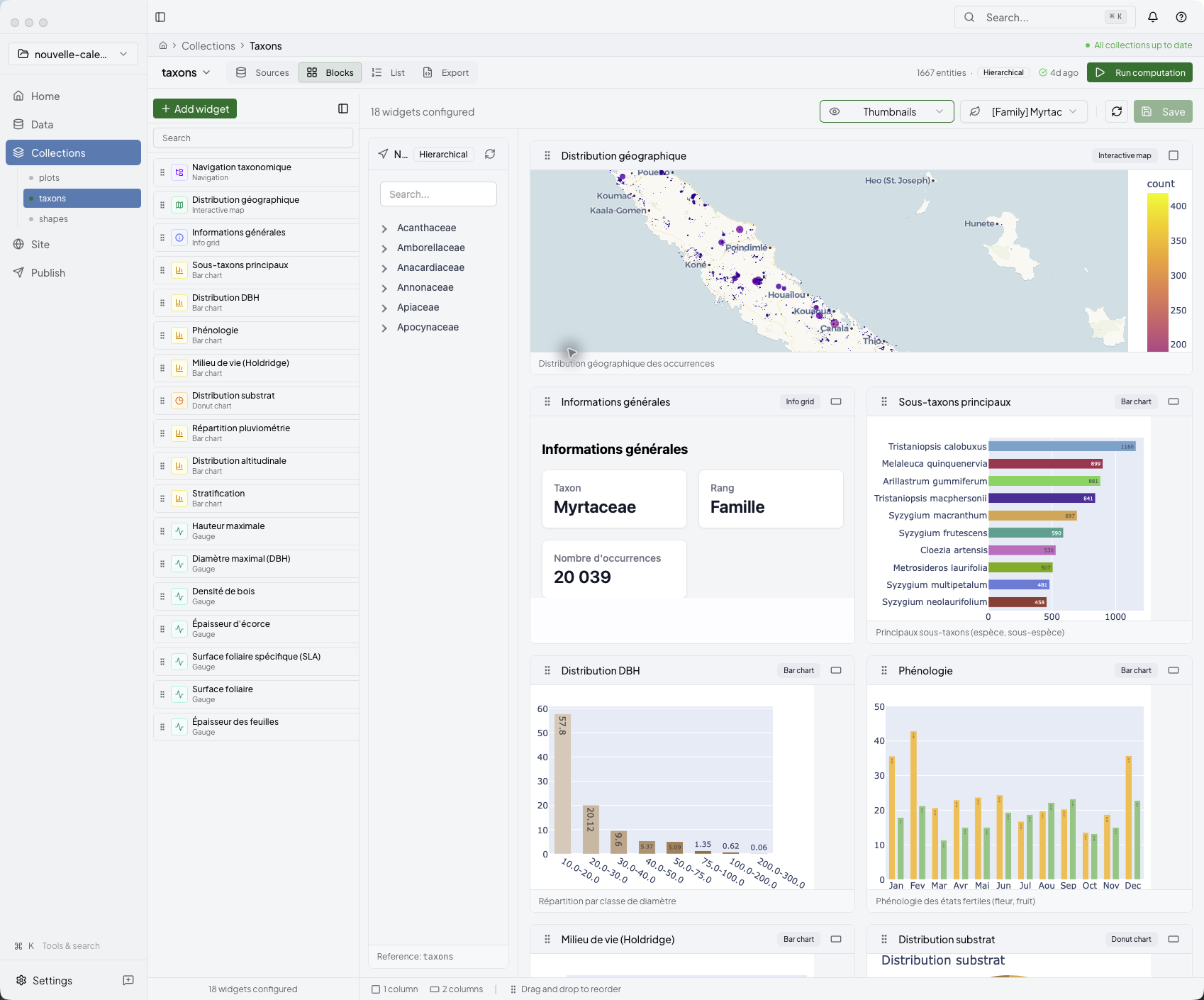
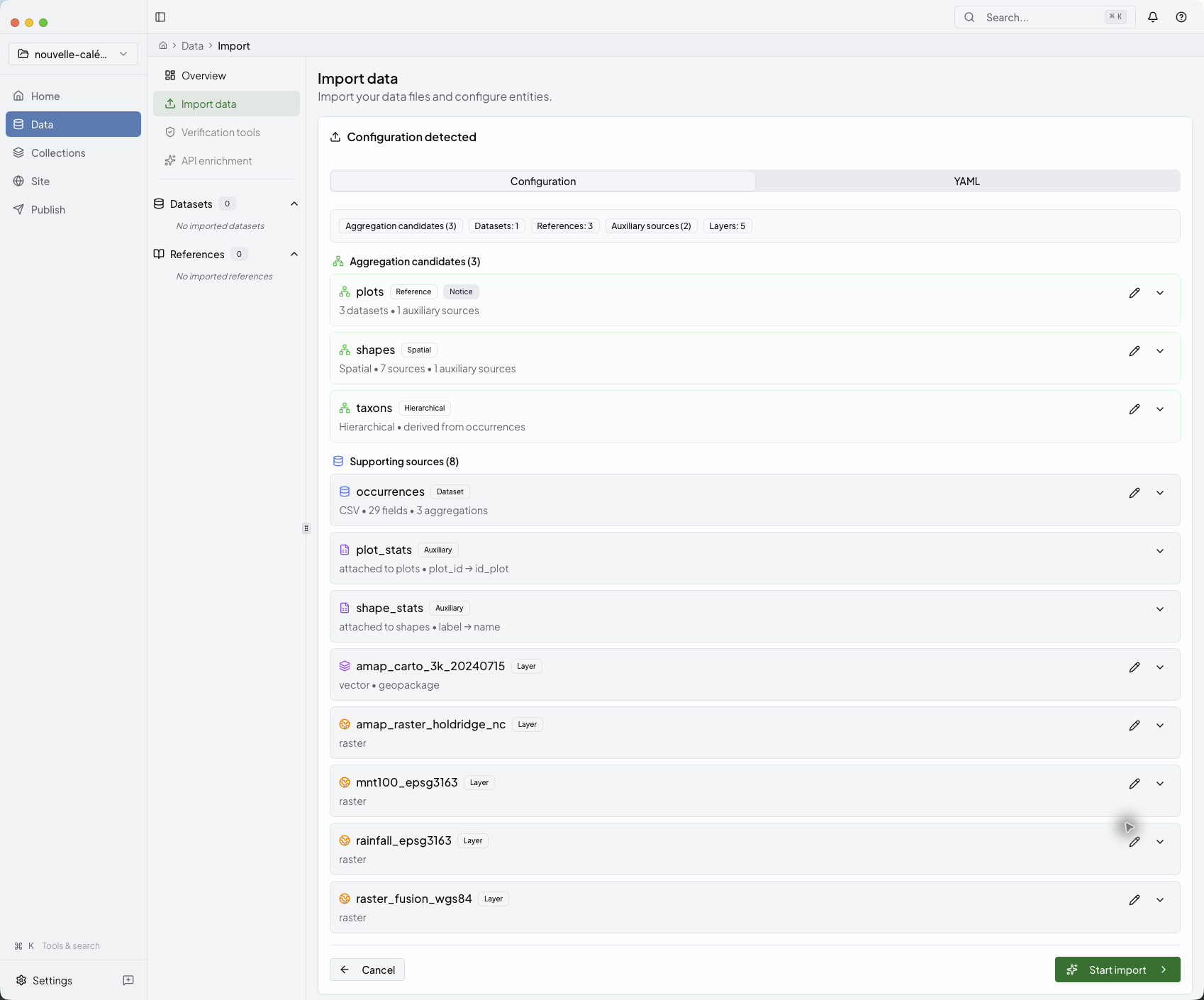
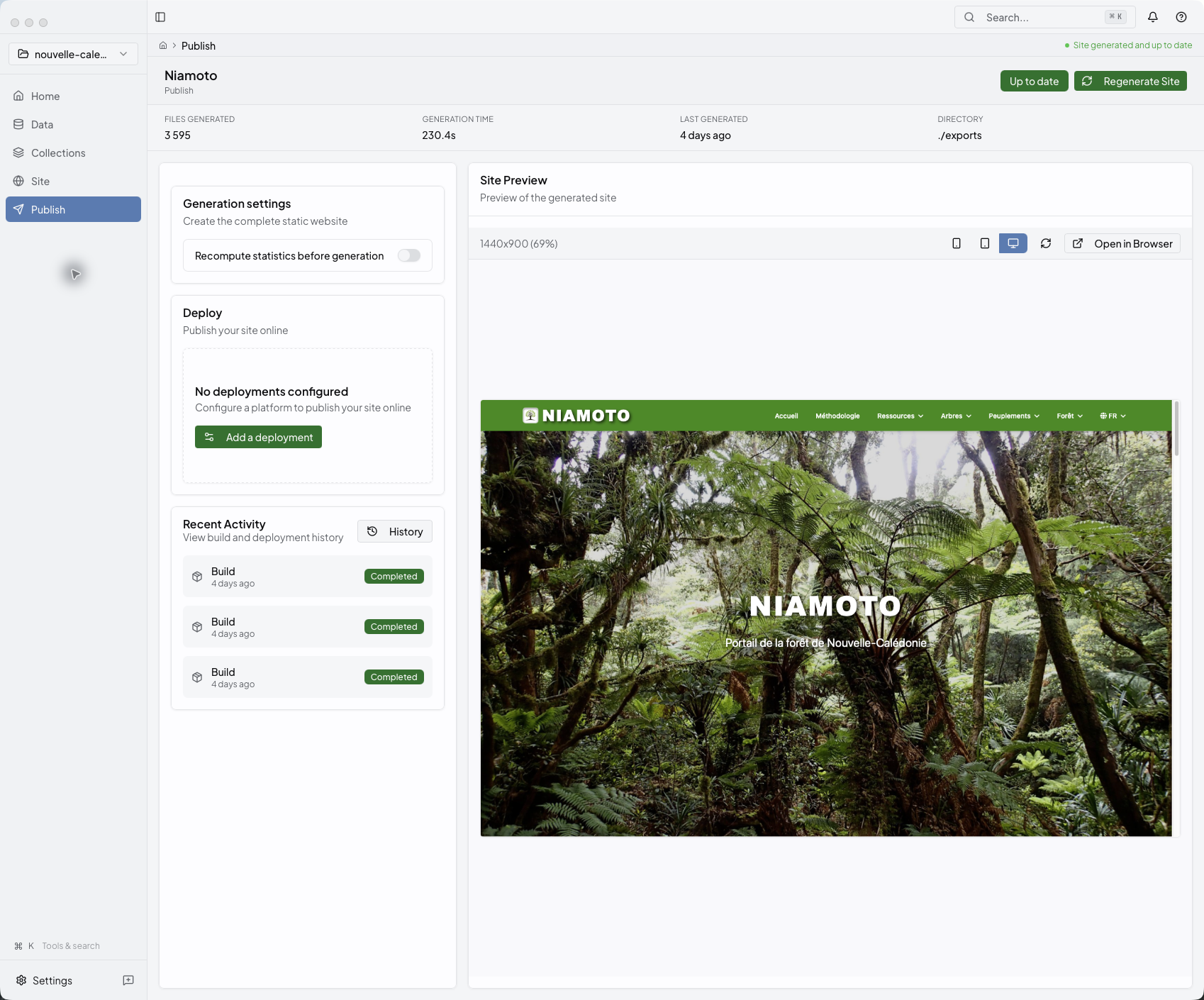
Build collections and publish a biodiversity portal from one desktop app.
|
|
What Niamoto does
- Import ecological tables, layers, and rasters into one project.
- Suggest file and column roles, so you can start from a working configuration.
- Build collections, widgets, statistics, and maps from that data.
- Publish a static biodiversity portal to GitHub Pages, Cloudflare Workers, Netlify, Vercel, Render, or your own server over SSH.
The desktop app is the main interface. The Python CLI handles automation, CI, and repeatable runs.
Pick your path
| You are… | Start here |
|---|---|
| A researcher | Desktop onboarding |
| A project lead | User guide |
| A developer | Plugin development guide |
Install
Desktop (recommended)
Signed builds for macOS, Windows, and Linux live on the releases page.
Command line (automation, CI)
pip install niamoto
niamoto --help
Requires Python 3.12 or newer. See CLI & automation docs for scripting recipes.
Quick start
Desktop path
- Download the latest desktop build from the releases page.
- Grab a sample dataset from niamoto-example-data or open your own CSVs, layers, and rasters.
- Continue with Desktop onboarding and then the Desktop App Tour.
CLI path
- Install the package with
pip install niamoto. - Run
niamoto --help. - Follow the CLI & automation docs for project init, scripted runs, and CI.
Inside the desktop studio
The desktop app takes you from source review to collections, widgets, and publication in one place. The full walk-through lives in the Desktop App Tour. If you want to see the generated result first, the live demo shows what the published portal looks like.
Resources
- Documentation — niamoto.github.io/niamoto
- Live demo — New Caledonia forests portal
- Discussions — GitHub Discussions
- Issues — GitHub Issues
- Roadmap — ROADMAP.md · vision, current priorities, and the GBIF Challenge 2026 milestone
- Changelog — CHANGELOG.md
- Contributing — CONTRIBUTING.md · STYLE_GUIDE.md
About Niamoto
Niamoto is developed by a small interdisciplinary team and supported by institutional partners committed to biodiversity conservation.
Niamoteam
Open-source collaborative project for biodiversity conservation.
- Philippe Birnbaum — CIRAD · UMR AMAP
- Dimitri Justeau-Allaire — IRD · UMR AMAP
- Gilles Dauby — IRD · UMR AMAP
- Julien Barbe — Developer
Partners & funders
Niamoto was developed within the ADMIRE research project ("Partnership for the Analysis of Reforestation Dynamics and Forest Resilience"), established by Province Nord, IAC, and Cirad. The project develops software that supports decision-making for the management of natural areas in Province Nord, New Caledonia.









Province Nord · Province Sud · Endemia · UMR AMAP · Herbarium · IAC · IRD · Cirad · OFB
License
niamoto is distributed under
GPL-3.0-or-later.
Project details
Verified details
These details have been verified by PyPIProject links
GitHub Statistics
Maintainers
Release history Release notifications | RSS feed


Download files
Download the file for your platform. If you're not sure which to choose, learn more about installing packages.
Source Distribution
Built Distribution
Filter files by name, interpreter, ABI, and platform.
If you're not sure about the file name format, learn more about wheel file names.
Copy a direct link to the current filters
File details
Details for the file niamoto-0.19.1.tar.gz.
File metadata
- Download URL: niamoto-0.19.1.tar.gz
- Upload date:
- Size: 68.4 MB
- Tags: Source
- Uploaded using Trusted Publishing? Yes
- Uploaded via: twine/6.1.0 CPython/3.13.12
File hashes
| Algorithm | Hash digest | |
|---|---|---|
| SHA256 |
046b1083f5602d80594f5fe4657b65f5596fc6d77fdfaeaac9fb1d76fe668a6b
|
|
| MD5 |
8f039e343e1ef8035589b1eeb06c090f
|
|
| BLAKE2b-256 |
68a4b97adf0b24396076bf9045a14cb6ccbdb774def5d9ee4136d740ffbb96f4
|
Provenance
The following attestation bundles were made for niamoto-0.19.1.tar.gz:
Publisher:
publish-pypi.yml on niamoto/niamoto
-
Statement:
-
Statement type:
https://in-toto.io/Statement/v1 -
Predicate type:
https://docs.pypi.org/attestations/publish/v1 -
Subject name:
niamoto-0.19.1.tar.gz -
Subject digest:
046b1083f5602d80594f5fe4657b65f5596fc6d77fdfaeaac9fb1d76fe668a6b - Sigstore transparency entry: 1602094079
- Sigstore integration time:
-
Permalink:
niamoto/niamoto@19c55bb705006a7f534dea996c916a57653b38fc -
Branch / Tag:
refs/tags/v0.19.1 - Owner: https://github.com/niamoto
-
Access:
public
-
Token Issuer:
https://token.actions.githubusercontent.com -
Runner Environment:
github-hosted -
Publication workflow:
publish-pypi.yml@19c55bb705006a7f534dea996c916a57653b38fc -
Trigger Event:
release
-
Statement type:
File details
Details for the file niamoto-0.19.1-py3-none-any.whl.
File metadata
- Download URL: niamoto-0.19.1-py3-none-any.whl
- Upload date:
- Size: 38.1 MB
- Tags: Python 3
- Uploaded using Trusted Publishing? Yes
- Uploaded via: twine/6.1.0 CPython/3.13.12
File hashes
| Algorithm | Hash digest | |
|---|---|---|
| SHA256 |
48bee2352061c3768ab102d61039962b57188a5ba0ea65fccda36a59f1da1be9
|
|
| MD5 |
ddb818603847733b5153dcfcda536a5a
|
|
| BLAKE2b-256 |
007d4f0236d28a32fc1bd4b0b1b8c74e20d966cb4afd70f405181f9ada96c9a8
|
Provenance
The following attestation bundles were made for niamoto-0.19.1-py3-none-any.whl:
Publisher:
publish-pypi.yml on niamoto/niamoto
-
Statement:
-
Statement type:
https://in-toto.io/Statement/v1 -
Predicate type:
https://docs.pypi.org/attestations/publish/v1 -
Subject name:
niamoto-0.19.1-py3-none-any.whl -
Subject digest:
48bee2352061c3768ab102d61039962b57188a5ba0ea65fccda36a59f1da1be9 - Sigstore transparency entry: 1602094119
- Sigstore integration time:
-
Permalink:
niamoto/niamoto@19c55bb705006a7f534dea996c916a57653b38fc -
Branch / Tag:
refs/tags/v0.19.1 - Owner: https://github.com/niamoto
-
Access:
public
-
Token Issuer:
https://token.actions.githubusercontent.com -
Runner Environment:
github-hosted -
Publication workflow:
publish-pypi.yml@19c55bb705006a7f534dea996c916a57653b38fc -
Trigger Event:
release
-
Statement type:






